IR-J - Guitar effect pedal Friedman - Free user manual and instructions
Find the device manual for free IR-J Friedman in PDF.


| Product type | Tube guitar preamplifier (effects pedal) |
| Brand | Friedman |
| Model | IR-J |
| Category | Guitar effects pedal |
| Preamplification technology | High-voltage all-tube preamplifier |
| Tubes | 2 x 12AX7 |
| Channels | Two independent channels |
| Boost per channel | TS-style (Tube Screamer) boost per channel |
| Controls | Gain, Bass, Middle, Treble, Volume, Bright, Boost V. per channel |
| Speaker simulator | Low-latency cabinet impulse response (IR) simulation, bypassable |
| Built-in IRs | 18 Friedman IRs included, option to load your own IRs |
| Effects loop | Ultra-transparent series effects loop, bypassable |
| Outputs | TRS balanced jack output and headphone output |
| MIDI | Standard 5-pin MIDI connector and USB MIDI |
| Programmability | USB programmability for Presence, Thump, low-pass filter, IR selection and more |
| MIDI features | Channel selection, boost, IR, loop activation, boost lock |
| Power amp simulation | Power amp simulation with Presence, Thump and Low-Pass Filter per channel (adjustable via software) |
| Footswitches | Three multifunction footswitches (Channel, Boost, Store) |
| Power supply | External mains adapter (not included), refer to the device label |
| Maintenance and cleaning | Clean with a dry lint-free cloth, avoid solvents and abrasive products |
| Safety | Do not expose to water or moisture, unplug if not used for extended periods |
| Spare parts and repairability | Tube replacement and repairs by a qualified technician with original parts |
| General information | Designed by Dave Friedman, based on the JEL-100 and JEL-20 amps, FCC Class B compliant |
Frequently Asked Questions - IR-J Friedman
User questions about IR-J Friedman
0 question about this device. Answer the ones you know or ask your own.
Ask a new question about this device
Download the instructions for your Guitar effect pedal in PDF format for free! Find your manual IR-J - Friedman and take your electronic device back in hand. On this page are published all the documents necessary for the use of your device. IR-J by Friedman.
USER MANUAL IR-J Friedman
IR-J
DUAL TUBE PREAMP
INSTRUCTION
MANUAL

FRIEDMAN
AMPLIFICATION


INSTRUCTION MANUAL
Please keep this instruction manual for future reference and for the duration of owning this Friedman Pre-Amp. Please carefully read and understand the instructions inside this user's manual before attempting to operate your new amp. This instruction manual includes essential safety information regarding the use and maintenance of the Pre-Amp. Take special care to heed all warning symbols and signs inside this manual and those printed on the Pre-Amp itself.

WARNING!
TO PREVENT FIRE OR SHOCK HAZARD, DO NOT EXPOSE THE PRE-AMP TO WATER OR MOISTURE. DO NOT OPERATE NEAR ANY WATER SOURCE.

WHAT'S THE MEANING OF THIS?
The lightning flash with an arrow triangular symbol is intended to alert the user to the presence of non-insulated “dangerous voltage” within the products enclosure, and may be of sufficient magnitude to constitute a risk of electric shock

WHAT'S THE MEANING OF THIS?
The exclamation point triangular symbol is intended to alert the user to the presence of important operating and maintenance (servicing) instructions in the user manual accompanying this Pre-Amp!
- Read Instructions
- All the safety and operating instructions should be read before this product is operated.
- Retain Instructions
-
The safety and operating instructions should be retained for future reference.
-
Heed Warnings
- All warnings on the Pre-Amp and in the operating instructions should be adhered to.
- Follow Instructions
- All operating and use instructions should be followed.
- Water and Moisture
- The Pre-Amp should not be used near water
- For example, a bathtub, washbowl, kitchen sink, laundry tub, wet basement, or near a swimming pool, and the like.
- Heat
- Pre-Amp should be situated away from heat sources such as radiators, heat registers, stoves or other Pre-Amp (including Pre-Amps) that produce heat.
- Power Sources
- This product should be operated only from the type of power source indicated on the rating label.
- Power - Cord Protection
- Power-supply cords should be routed so that they are not likely to be walked on or pinched by items placed upon or against them, paying particular attention to the cord in correspondence of plugs, convenience receptacles, and the point where they exit from the Pre-Amp.
- Non-use Periods
- The power cord of the Pre-Amp should be unplugged from the outlet when left unused for a long period of time.
- Object and Liquid Entry
- Care should be taken so that objects do not fall, and liquids are not spilled into the enclosure through openings.
- Damage Requiring Service
- The Pre-Amp should be serviced by qualified service personnel when:
A. The power-supply cord or the plug has been damaged; or
B. Objects have fallen, or liquid has been spilled into the Pre-Amp; or
C. The Pre-Amp has been exposed to rain; or
D. The Pre-Amp does not appear to operate normally or exhibits a marked change in performance; or
E. The Pre-Amp has been dropped, or the enclosure damaged.
F. The Pre-Amp needs tube replacement
- Servicing
- The user should not attempt any service to the Pre-Amp beyond that described in the operating instructions. All other servicing should be referred to qualified service personnel.
- Ventilation
- Slots and openings in the cabinet are provided for ventilation and to ensure reliable operation of the product and to protect it from overheating, and these openings must not be blocked or covered.
- Replacement Parts
- When replacement parts are required, be sure the service technician has used replacement parts specified by the manufacturer or have the same characteristics as the original part. Unauthorized substitutions may result in fire, electric shock, or other hazards.
- Safety Check
- Upon completion of any service or repairs to this product, ask the service technician to perform safety checks to determine that the product is in proper operating condition.
NOTE: This equipment has been tested and found to comply with the limits for a Class B digital device, pursuant to part 15 of the FCC Rules. These limits are designed to provide reasonable protection against harmful interference in a residential installation. This equipment generates, uses and can radiate radio frequency energy and, if not installed and used in accordance with the instructions, may cause harmful interference to radio communications. However, there is no guarantee that interference will not occur in a particular installation. If this equipment does cause harmful interference to radio or television reception, which can be determined by turning the equipment off and on, the user is encouraged to try to correct the interference by one or more of the following measures:
- Reorient or relocate the receiving antenna.
- Increase the separation between the equipment and receiver.
- Connect the equipment into an outlet on a circuit different from that to which the receiver is connected.
- Consult the dealer or an experienced radio/ TV technician for help.
Changes or modifications not expressly approved by the party responsible for compliance could void the user's authority to operate the equipment.
This device complies with part 15 of the FCC Rules. Operation is subject to the following two conditions: (1) This device may not cause harmful interference, and (2) this device must accept any interference received, including interference that may cause undesired operation.
IR-J DUAL TUBE PREAMP
Congratulations on purchasing this incredible new guitar tube Pre-Amp designed by one of the most well-known amp designers in the LA Music scene for the past 20 years, Dave Friedman. The Friedman IR-J is a dual-tube, high-voltage, multi-channel and multi-function preamp, designed to be used in a multitude of ways including:
1) As a stand-alone cab-less amplifier replacement, both live, and for studio recording sessions.
2) The IR-J can also be used as a full featured guitar preamp by connecting it into the effects loop return of an amplifier head or combo, or into a stand-alone power amp and speaker cab.
- Jake E Lee Signature
- All-tube HIGH-VOLTAGE preamp - DI
- 2 x 12AX7 preamp tubes
- Two independent channels + TS style boost per channel
- Based on Friedman's legendary JEL-100 and JEL-20 designs
• MIDI programmable features: - Channel select / Boost
- IR select
- Thump, Presence and Low-Pass Filter three-way switch (per channel)
- Effects loop ON/OFF
- Boost Lock
- Power amp simulation with software editable Presence, Thump and Low-Pass Filter (per channel)
- Low latency Impulse Response cabinet simulation (bypassable)
- Three position CAB/IR select switch per channel (programmable via software)
• 18 free Friedman IRs or load your own
- Boost Volume (top) - Vol. (gain amount) and Tone controls (per channel) on side panel
• Volume and Gain controls (per channel)
• Full EQ consisting of Bass, Middle, Treble (per channel)
• 3-way Bright switch (per channel)
• 2-way Gain switch (Channel 2)
- Three multi-function foot switches
- Ultra-transparent series FX loop (bypassable)
- TRS balanced output
- Headphone output
- MIDI 5 pin standard connector and USB MIDI
- USB software editor - powered by SYNERGY
• Limited 3-year Warranty
• Universal 12V Power Supply Included
PLUGGING IN
We recommend starting the preamp with the Bass on 5, the Mids at around 5 and the Treble at 5. Set the gain around 6, then bring the Master to taste on both channels. Set Boost levels located on the side to about 5. Up = more gain when in boost mode. After plugging in, you will notice instantly, the tight bottom end and rich harmonically detailed chords and single notes, that's the Friedman sound. The IR-J cleans up remarkably well with the guitar's volume control even with the amp on higher gain settings.
The IR-J was primarily designed as a direct recording and live solution, with that Friedman tone you have become accustomed to. The IR-J will thrill you with all the different tones available. If you need a great direct solution and more, the IR-J tube preamp is the unit for you.
PEDAL BOARD AMP - DIRECT OUT
Use the IR-J as a portable pedalboard amp replacement, or with headphones at home for practicing. You can also use the integrated DI balanced out to directly connect the IR-J to your RECORDING interface, monitors or PA system.

EXTERNAL AMP PREAMP
When you feel the need to hear a nice 4x12 cabinet-shaking response, connect the IR-J SEND to your favorite guitar amplifier's effects loop return and feel the IR-J's fire breathing capabilities. The IR-J can go from blues to classic rock and heavy rock to metal by simply adjusting the gain controls.
You will still be able to use the internal power amp and IR cabinet simulation for direct recording at the same time using the IR-J balanced out to your interface, monitors or PA system input!
If you want to use external effects on both the IR-J and an external amp, simply connect the IR-J SEND to the input of the first pedal, then connect the output of the last pedal to both the IR-J RETURN and the external power amp return/input using a passive signal splitter.
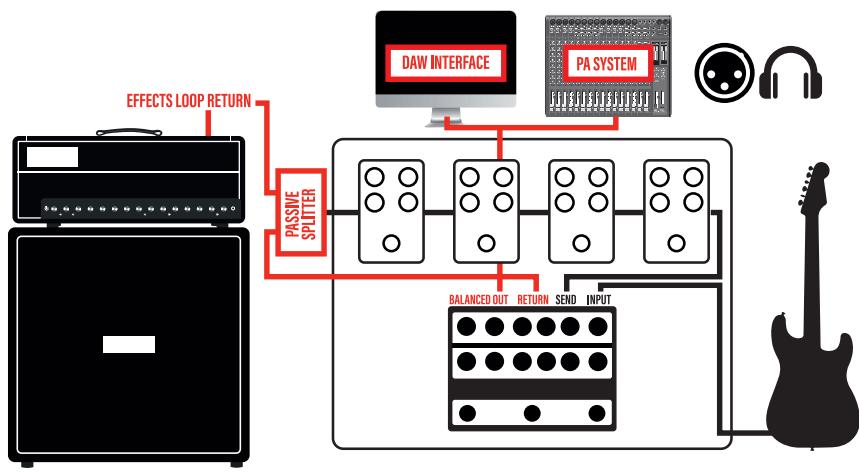
POWER AMP AND IR CABINET SIMULATOR
You can also use the IR-J as an IR Cabinet and Amp Simulator – simply connect any PREAMP into the RETURN of the IR-J.

FLEXIBLE RIG INTEGRATION
Easily and effectively integrate IR-J with everything from the most straightforward setups to the most complex digitally controlled rigs.
Now send all that tone directly to the board with the stunning-sounding benefits of IR technology.

FRONT PANEL CONTROLS AND CONNECTIONS

- BOOST V.: This is the IR-J MASTER VOLUME when BOOST is engaged. The more you turn it up the louder it gets.
• CAB-IR (PER CHANNEL): 3-Way Cabinet/IR Preset Selector. - TREBLE CONTROL (PER CHANNEL): This adds or takes away treble. Start at 5 and adjust to taste.
-
MIDDLE CONTROL (PER CHANNEL): Adds or takes away midrange. Start at 5, lower settings will scoop the mids, higher levels will allow your audience to actually hear the guitar in the mix.
-
BASS CONTROL (PER CHANNEL): This adds or takes away bass or bottom end. As the amp gets louder you may want to back this off a bit. Start at 5 and adjust to taste.
- VOLUME (PER CHANNEL): This is the IR-J MASTER VOLUME when boost is NOT engaged. The more you turn it up the louder it gets.
- BRIGHT SWITCH (PER CHANNEL): 2-way Bright/ Tight switch, set to the up position - tighter with high midrange boost. Down is a fuller and fatter sound, especially great for single coils.
- GAIN SWITCH (CHANNEL 2): 2-way gain switch - down medium gain, up, highest gain.
- GAIN CONTROL (PER CHANNEL): This adds gain/distortion to the desired channel. Adjust to taste. Don't be afraid.
- CHANNEL 1 FOOTSWITCH: Short press: Activates CHANNEL 1, Long press: BYPASS IR output.
- CHANNEL 2 FOOTSWITCH: Short press: Activates CHANNEL 2, Long press: BYPASS FX LOOP.
- BOOST FOOTSWITCH: Short press - Activates BOOST. Long press - STORE current preset on active MIDI preset number, including CHANNEL, BOOST, LOOP BYPASS, IR/CAB and power amp simulation. PRESENCE and THUMP are available via IR-J editor software only.
REAR PANEL CONTROLS AND CONNECTIONS
- INPUT: Just like it says. This is the IR-J Guitar Input Jack. Plug your guitar or the output of your pedal board here.
- SEND JACK: IR-J DRY Preamp only output. This is where you plug the INPUT of your Effect(s) or the output of the IR-J to be used as an additional preamp to your Guitar amp. Use a high-quality shielded guitar cable.
- RETURN JACK: This is where you plug the OUT of your Effect(s) or OUT of your external preamp (when using IR-J as external CAB/Power Amp SIM). Use a high-quality shielded guitar cable.
- BALANCED OUT: IR-J IR and Poweramp SIM output. This is a TRS Balanced output that can be used with TRS enabled input or readily available XLR converter.
- GND LIFT: This switch enables or disables the ground connection on the BALANCED OUT to eliminate possible ground loops.
- HEADPHONES: Headphones connector. Always make sure to lower master volume before wearing the headphones and slowly increase the volume to the desired level to avoid too much SPL (Sound Pressure Level) on your ear.
NOTE: When using the IR-J with just guitar and headphones using a regular non-earthed power supply like the one supplied, there will be no connection to your house earth and your guitar will likely pickup more noise (HUM) depending on your environment.
For a noise free experience please connect SEND or RETURN or BALANCED OUT or USB to an earthed device (AMP, Audio Interface, Monitor). Consider using an earthed power supply if this will be your primary use case.
- MIDI IN: Midi connector to control IR-J with an external midi device (Default channel is OMNI).
- USB: USB Connector for software update and IR-J remote programming.
- DC INPUT: DC Input power connector, use 9V adapter with >= 800mA min current or 12V adapter with >= 500mA min current available.
NOTE: IR-J uses space saving female jack adapters, so it's normal if the plug does not fully plug in.

SIDE PANEL CONTROLS AND CONNECTIONS

BOOST GAIN: Dual independent TS style boost. This adds additional gain/distortion to the desired channel when BOOST is active. Each boost has a dedicated tone and volume for maximum control. This famous Green machine is well known in the world of '800 style amps and will complement the tone nicely. This essentially gives you four channels.
PRESETS
The Friedman IR-J is MIDI programmable unlocking up to 128 user-customizable presets. Each preset can store CHANNEL, BOOST status (ON or OFF), FX LOOP status (ACTIVE or BYPASS), per CHANNEL IR/CAB simulation (1, 2, 3 or BYPASS) and per CHANNEL PRESENCE and THUMP (only accessible via software).
To store a preset, send the corresponding MIDI PROGRAM CHANGE using your preferred MIDI controller, adjust the setting on the IR-J and long press the BOOST foot switch to store it to the selected MIDI PC.
To recall a preset, simply send the corresponding MIDI PROGRAM CHANGE.
Preset programming and recall is also accessible using IR-J Editor Software. Please refer to IR-J EDITOR SOFTWARE section for more details.
For detailed step by step video tutorials please visit www.FriedmanAmplification.com
IR-J EDITOR SOFTWARE
Please visit www.FriedmanAmplification.com to download the IR-J software.
IMPORTANT
If you have previously installed the Friedman Editor, you need to download the latest available version from the Friedman website in order for the IR-J to be recognized.

The Friedman IR-J features easy-to-use software that allows you to upload your own IR's, program all MIDI presets and MIDI functionalities, including selecting THUMP and PRESENCE per channel.
INCLUDED IRs
The Friedman IR-J is pre-loaded with three of Dave's favorite IR's.
-
OH BE-412 M6402 - 16-ohm, 6402 cone Celestion G12M-75's from 1989 captured in a Friedman BE-412 cabinet by Kevin Rowe of Own-Hammer using Shure SM57 and Sennheiser MD421 microphones through mid-late 1970's API 312 preamps.
-
OH BE-412 M75BB 16-ohm, 1777 cone Celestion "Black Back" G12M-75's from 1975 captured in a Friedman BE-412 cabinet by Kevin Rowe of OwnHammer using Shure SM57 and Sennheiser MD421 microphones through mid-late 1970's API 312 preamps.
- OH BE-412 EV12L 8-ohm Electro Voice EVM-12L's from 1989 captured in a Friedman BE-412 cabinet by Kevin Rowe of OwnHammer using Shure SM57, Sennheiser MD421, and Royer 121 microphones through mid-late 1970's API 312 preamps.
FIRMWARE UPDATES
IR-J Software will automatically checks for device firmware update using internet connection.

DO NOT DISCONNECT OR POWER DOWN IR-J DURING A FIRMWARE UPDATE TO AVOID ANY DAMAGE.
TOP PANEL CONTROLS (SOFTWARE)

- CONNECTED status indicates the connection status of the IR-J IR.
- PROGRAM CHANGE selector lets you navigate through all the 128 storable MIDI PROGRAM CHANGES available (0-127) and it's relative settings. This will actively interact with the connected IR-J and switch presets on the device as well.
-
BOOST LOCK button will let you select the BOOST behavior when foot switching between channels: when BOOST LOCK is not active the BOOST status will be deactivated when switching to a different channel. When BOOST LOCK is active the BOOST status remains unchanged. Programmed MIDI boost will not be affected.
-
MIDI CHANNEL selector will program the MIDI INPUT channel the IR-J will use. Default is OMNI mode (IR-J will listen to all channels).
- CHANNEL toggle selector toggles between CHANNEL 1 and CHANNEL 2.
- BOOST toggle selector activates or deactivates BOOST.
- FX LOOP toggle selector toggles between active and bypass FX LOOP status.
- IR BYPASS toggle selector toggles IR Cabinet simulation to enable using external simulations.


SIDE PANEL CONTROLS (SOFTWARE)
- STORE button will store all the changes made to all presets inside the unit. MAKE SURE TO STORE ANY CHANGE before powering down IR-J.
- PRESENCE (PER CHANNEL) is a 3-way toggle selector to program the amount of presence for the power amp simulation in the DI output.
- THUMP (PER CHANNEL) is a 3-way toggle selector for programming the amount of thump resonance to the power amp simulation in the DI output.
- LOW PASS FILTER 3-way toggle select tailor how much low-frequency signals pass through while blocking high-frequency signals also known as a high-cut filter.
- IR SELECTOR (PER CHANNEL) lets you select one of 3 pre-loaded IRs for the selected channel.
- IR LOADING (PER SLOT) The Folder icon lets you load your preferred IR by simply navigating to your IR file location and selecting it. Supported formats are WAV 44.1K to 96K.
- ADDITIONAL INCLUDED IR SELECTION (PER SLOT) The Plus (+) icon will open the IR selector window. Scroll through the additional IRs 19848 V30 GB (MAIN) preloaded within the software by clicking the arrows before or after the IR name. Pressing the Plus (+) icon opens the IR selector window. Press the SELECT button to use the current IR, or press AUDITION to automatically load while scrolling the list.
Press the plus (+) icon to exit/close the IR selector window once you've made your selection. Repeat these steps per available IR slot.
FRIEDMAN 3-YEAR WARRANTY
Thank you for choosing Friedman. Friedman manufactures some of the world's most reliable and innovative guitar products. Friedman takes great pride in an extremely thorough testing procedure, which is implemented on each product prior to shipment. In the unlikely event that you have a problem with your Pre-Amp, please refer to warranty below. Friedman stands behind our products like no other and we're here to help you!
PRE-AMP: Friedman offers a limited 3 (three) year warranty to the original purchaser that this Friedman Pre-Amp will be free from defects in material and workmanship. A dated sales receipt will establish coverage under this warranty, PLEASE KEEP YOUR PROOF OF PURCHASE TO USE YOUR WARRANTY. This warranty does not cover service or parts to repair damage caused by accident, neglect, abuse, normal & wear, disaster, misuse, abuse, over-powering, negligence, inadequate packing or shipping procedures and service, repair or any modifications to the product which have not been authorized or approved by Friedman in writing.
ANY MODIFICATION TO THE PRE-AMP WILL VOID YOUR WARRANTY. If this product is defective in materials or workmanship as warranted above, your sole remedy shall be repair or replacement by Friedman as provided below.
CAUTION: Do NOT attempt to repair, modify or service your Pre-Amp by yourself!!! Please read the instruction manual for all safety notifications, warnings and instructions.
This Friedman Pre-Amp has extremely high voltages that can cause serious injury or death. Do not remove the chassis from the Pre-Amp. All repair and service work must be performed by Friedman or an authorized service center of Friedman. ANY UNAUTHORIZED REPAIRS WILL VOID YOUR WARRANTY.
TUBES: Friedman warrants the original purchaser that the specific tubes used in Friedman will be free from defects in material and workmanship for a period of 90 days from the original date of purchase. A dated sales receipt will establish coverage under this warranty. This tube warranty will automatically terminate 90 days after the original retail sales date. This tube warranty is in lieu of all other expressed warranties. If tubes fail within the 90-day warranty period, your sole remedy shall be replacement of tubes as provided below.
RETURN PROCEDURES: In the unlikely event that a defect occurs please email us at friedmanamps@gmail.com. In most cases we can help you diagnose the problem over the phone. If a product must be sent to us, please follow the procedure outlined below.
- Defective products must be shipped, together with proof of purchase, freight prepaid and insured to the Authorized Friedman Service Center or directly to Friedman.
-
If a product must be returned to Friedman for warranty replacement/repair, a Return Authorization Number must be obtained from our Customer Service Department prior to shipping the product.
-
Please contact Friedman Customer Service Department for the Authorized Friedman Service Center nearest you.
- Products must be shipped in their original packaging or its equivalent; in any case, the risk of loss or damage in transit is to be borne by the purchaser.
- The Return Authorization Number must appear in large print directly below the shipping address.
- Always include a brief description of the defect, along with your correct return address and telephone number.
- When calling to inquire about a returned product, always refer to the Return Authorization Number.
If Friedman determines that the unit was defective in materials or workmanship at any time during the warranty period, Friedman has the option of repairing or replacing the product at no additional charge, except as set forth below.
- All replaced parts become a property of Friedman. Products replaced or repaired under this warranty will be returned via ground shipping within the United States or Canada - freight prepaid.
- Friedman is not responsible for costs associated with expedited shipping, either to Friedman or the return of the product to the customer.
All warranty repairs outside the United States and Canada must be directed to the dealer or distributor from which you purchased the product.
INCIDENTAL OR CONSEQUENTIAL DAMAGE: In no event will Friedman be liable for any incidental or consequential damages arising out of the use or inability to use of any Friedman product, even if a Friedman dealer has been advised of the possibility of such damages, or any other claim by any other party. Some states do not allow the exclusion or limitation of consequential damages, so the above limitation and exclusion may not apply to you. This warranty gives you specific legal rights and you may also have other rights which may vary from state to state.
FOR YOUR PROTECTION: Please complete and send in the completed warranty registration card to: Friedman Amplification, care of Boutique Amps Distribution, 5300 Harbor Street, Commerce, CA 90040. Please send within (10) ten days of the date of purchase so that we may contact you directly in the event a safety notification issued in accordance with the 1972 Consumer Product Safety Act.
CUSTOMER SUPPORT: Our dedicated and friendly staff is ready to help you with any warranty or product questions you may have. Please email us at friedmanamps@gmail.com
Thank you again for choosing Friedman and we look forward to a long relationship.
FRIEDMAN
AMPLIFICATION


- IR-J
- INSTRUCTION MANUAL
- WARNING
- WHAT'S THE MEANING OF THIS
- IR-J DUAL TUBE PREAMP
- PLUGGING IN
- PEDAL BOARD AMP - DIRECT OUT
- EXTERNAL AMP PREAMP
- POWER AMP AND IR CABINET SIMULATOR
- FLEXIBLE RIG INTEGRATION
- FRONT PANEL CONTROLS AND CONNECTIONS
- REAR PANEL CONTROLS AND CONNECTIONS
- SIDE PANEL CONTROLS AND CONNECTIONS
- PRESETS
- IR-J EDITOR SOFTWARE
- IMPORTANT
- INCLUDED IRS
- FIRMWARE UPDATES
- SIDE PANEL CONTROLS (SOFTWARE)
- FRIEDMAN 3-YEAR WARRANTY
- FRIEDMAN
- AMPLIFICATION
Brand : Friedman
Model : IR-J
Category : Guitar effect pedal