GATEKEEPER - Guitar effect pedal Pigtronix - Free user manual and instructions
Find the device manual for free GATEKEEPER Pigtronix in PDF.
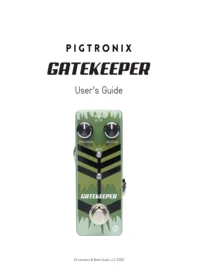


| Product type | Guitar effects pedal (noise gate) |
| Brand | Pigtronix |
| Model | GKM2 |
| Category | Guitar effects pedal |
| Power supply | 9V DC, negative tip |
| Power consumption | Less than 20 mA |
| Main function | Background noise reduction (gate) |
| Processing circuit | Ultra-fast J-FET |
| Signal attenuation | Up to 100% |
| Threshold adjustment | Wide range with rotary knob |
| Release adjustment | Rotary knob (instant to progressive closure) |
| LED indicator | Mute indicator (lights up when the gate is closed) |
| Dimensions (estimated) | Approximately 9.5 × 5.1 × 6.4 cm |
| Weight (estimated) | Approximately 250 g |
| Maintenance | Clean with a dry, non-abrasive cloth |
| Safety | Use only a 9V DC power supply, negative tip |
| Warranty | 1 year (parts and labor) |
| Spare parts | Not available to the user |
| Repairability | Repair by a qualified technician recommended |
| Customer service | support@pigtronix.com |
Frequently Asked Questions - GATEKEEPER Pigtronix
User questions about GATEKEEPER Pigtronix
0 question about this device. Answer the ones you know or ask your own.
Ask a new question about this device
Download the instructions for your Guitar effect pedal in PDF format for free! Find your manual GATEKEEPER - Pigtronix and take your electronic device back in hand. On this page are published all the documents necessary for the use of your device. GATEKEEPER by Pigtronix.
USER MANUAL GATEKEEPER Pigtronix
PIGTRONIX
GATEKEEPER
User's Guide

CONTENTS
03
Introduction
04
Explanation of Controls
05
Warranty
06
Contact Information
HEAR THAT? NOTHING.
Gatekeeper is a lightning fast, studio-quality noise gate that locks out unwanted noise from any rig. Featuring Threshold and Release knobs, Gatekeeper provides 100% attenuation with unprecedented response time and utilizes ultra high-speed J-FET circuitry to completely eliminate hum, hiss, buzz and any other intrusive non-musical sounds from your signal path. Its wide range Threshold control combines with exceptional headroom to deliver smooth transient response previously available only in rackmount, studio-oriented noise gate processors. The addition of the Release knob allows the user to control how long it takes gate to slam closed.

EXPLANATION OF CONTROLS


Threshold is the most important control on the Gatekeeper pedal. This knob controls how much signal is needed in order to open the gate. The hotter the signal you put into the Gatekeeper, the lower the Threshold knob should be set.
The best way to set the Threshold knob on the Gatekeeper is to start with the knob turned all the way counter-clockwise and then slowly move it in the clockwise direction until the gate remains closed when you are not playing, but opens up immediately when you play a note. The Threshold knob should be set somewhere in the region where the noise in your system is below the level needed to open the gate and the sound of your instrument is above the level needed to open the gate. If the Threshold knob is set completely counterclockwise, the gate will not open and your sound will remain muted.

The Release knob controls how long it will take the gate to close once your signal drops below the level determined by the Threshold knob. The Release control changes the overall “feel” of the way the Gatekeeper responds to your playing style. For most applications, the fully counter-clockwise setting of the Release control is most desirable. This position provides the fastest overall performance, closing the gate instantly when you stop playing. As you turn the Release knob clockwise, the time it takes the gate to close increases. This setting gives players a looser feel that extends the window of opportunity to keep the gate open between notes as well as a smoother, more gradual gating effect.

The Mute LED turns on when the signal has fallen below the threshold needed to keep the gate open. When the Release knob is at maximum, the pedal will mute shortly after this light comes on. When the Release knob is at minimum, the pedal will mute immediately when the light comes on.
The Gatekeeper Micro requires a negative tip, 9VDC power supply. The Gatekeeper Micro does not take batteries. The current consumption is under 20mA.
WARRANTY
Your Pigtronix effect pedal comes with a 1-year limited warranty on parts and workmanship. During the warranty period we will repair or replace, at our option, defective parts or pedals free of charge, and return them to the owner. Warranty service does not include damaged, modified, or misused pedals and such pedals will be subject to a standard repair charge.
Register your product at: pigtronix.com/product-registration
Contact us for warranty service at: support@pigtronix.com
CONTACT INFORMATION
Address
Bond Audio LLC
141 W 28th St, Floor 4
New York, NY, 10001
Phone
631-331-7447
info@pigtronix.com
Warranty Service Email
support@pigtronix.com
Warranty Contact Form
pigtronix.com/warranty
Website
pigtronix.com
YouTube
youtube.com/pigtronix

Product manuals are offered digitally in an attempt to be mindful of our environment.
We ask that you consider the same before printing at home. Thank you!

Brand : Pigtronix
Model : GATEKEEPER
Category : Guitar effect pedal