
AquaGo (detartrage) - Water heater TRUMA - Free user manual and instructions
Find the device manual for free AquaGo (detartrage) TRUMA in PDF.


| Brand | TRUMA |
| Model | AquaGo |
| Product Type | Tankless water heater for recreational vehicles |
| Application | Provides hot water in RVs and caravans |
| Heating Type | Gas-fired with electronic ignition |
| Control System | Analog dial or CP plus digital controller |
| Power Supply | 12V DC for electronic controls |
| Water Connection | City water inlet required for decalcification |
| Maintenance | Decalcify regularly using approved tablets |
| Cleaner Quantity | 6 tablets per cleaning cycle |
| Cleaning Duration | Approximately 2 to 3 hours |
| Rinse Volume | Approximately 8 gallons (30 liters) of water |
| Indicators | Amber light on dial, red LED fault codes |
| Fault Code 31 | Decalcification complete (3 short, 5 long blinks) |
| Safety Features | Depressurization before service, automatic air purge |
| Included Manual | Free user manual in PDF format (EN) |
Frequently Asked Questions - AquaGo (detartrage) TRUMA
User questions about AquaGo (detartrage) TRUMA
0 question about this device. Answer the ones you know or ask your own.
Ask a new question about this device
Download the instructions for your Water heater in PDF format for free! Find your manual AquaGo (detartrage) - TRUMA and take your electronic device back in hand. On this page are published all the documents necessary for the use of your device. AquaGo (detartrage) by TRUMA.
USER MANUAL AquaGo (detartrage) TRUMA
Truma AquaGo Decalcification Instructions
Please use city water for the cleaning process to ensure you have enough water to complete cleaning process. To start the decalcification process please follow these steps:
- Turn off city water and allow the system to cool off.
- Turn off Truma AquaGo at the toggle switch on the outside of the RV.
- Go inside the RV and open hot water faucet to allow system to depressurize and water to drain. Wait until water stops flowing out of faucet and then close the faucet.
- After system is depressurized, go back outside to the Truma AquaGo. Stand off to the side and slowly pull the yellow "Easy Drain Lever" down and remove the filter.
- Open the decalcification tablet pack and insert all 6 tablets into the filter screen.
- Place the filter loaded with the decalcification tablets back into the water heater, close the yellow lever, and snap in place.
- Turn on city water.
- On the outside of the RV, turn the AquaGo toggle switch to the "on" position.
- Choose a faucet with the highest pressure and a removable screen/aerator for this process. Remove the screen so debris being flushed during the rinse cycle will not clog the faucet screen and the flow sensor can read the gallons per minute accurately.
- Go inside and turn on a hot water faucet. Allow the air to be purged from the lines. The water coming out of the faucet may be pink in color, this is normal. Turn faucet off.
During the cleaning cycle, the circulation pump will turn on intermittently, this is normal. The decalcification process will take roughly 2 to 3 hours. There is no way to speed up this process or cancel after it has started.
From here, the decalcification process will depend on which control module your Truma AquaGo uses. Please refer to the instructions for your control module below.
Analog Dial
To the right is a picture of the analog dial with an amber backlight.
After depressurizing the water system, turn the analog dial to "Clean" mode. During the cleaning process, the amber light will blink slowly. When the analog dial is turned to "Clean" mode, you have 30 seconds to cancel the cleaning process. After 30 seconds the circulation pump will turn on and the decalcification process will begin, even if there are no decalcification tablets in the filter.
After the cleaning process is complete, the amber light will blink rapidly.

-
Once light blinks rapidly this means that the unit is ready to flush. You will use the hot water faucet with the highest pressure and a removable screen/aerator for this process. Turn the faucet on and flush approximately 8 gallons of water through the system. Once enough water has flushed through, the light will stop blinking rapidly and blink two times with a pause. There will be a blinking red LED light below the toggle switch on the outside of the AquaGo. Red LED light will blink 8 times in the sequence of S,S,S,L,L,L,L,L. This is fault code 31 "Decalcification Complete".
-
Turn the analog dial to "Off." On outside of the RV, turn the AquaGo toggle switch to the "off" position. Wait 1 minute.
-
Turn the AquaGo toggle switch to the "on" position and then go inside and turn the analog dial on.
-
Slowly turn the analog dial from "Off," to "Comfort," to "Eco," back to "Off" and then to "Eco" again. You may have to do this a few times to "wake the dial up." You will get a solid amber light when this is successful.
CP plus Controller
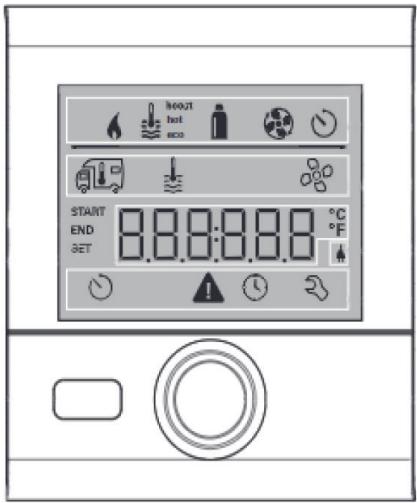
To the right is a picture of the CP plus controller. After depressurizing the system, follow the instructions below to initiate the AquaGo cleaning mode.
- Turn dial until the wrench icon is selected and push the center button, turn dial to select AquaGo and push the center button, turn the dial until you see "Clean," and push the button to activate cleaning mode.
- The screen will say "clean" while decalcification is in progress.
- The screen will say "rinse" when the cleaning process is complete.
- You will use the hot water faucet with the highest pressure and a removable screen/aerator for this process. Turn the faucet on and flush approximately 8 gallons of water through the system.
- Once the rinse cycle has completed, an "E31" code will appear to indicate decalcification is complete. Turn off the water.
- Push the center button twice to revert to the main screen and resume normal operation.
- On outside of the RV, turn the AquaGo toggle switch to the "off" position. Wait 1 minute. Turn back on.
Resetting the CP plus
If there are multiple Truma appliances connected to the CP plus you will need to reset the CP plus to get the other device(s) to back online.
- Turn dial until the wrench icon is selected and push the center button.
- Turn the dial until "Reset" is selected and push the center button.
- The screen will say "PR SET," push the center button again.
- The screen will say "INIT," this means the system is initializing. When complete, the screen will return to a digital clock.
AquaGo stuck in clean mode
- The Truma AquaGo must have power from the main panel.
- The outside toggle switch on the AquaGo needs to be in the "On" position.
- Turn the analog dial to "Clean" mode (this is the bottom position on the dial)
- Wait until you hear the circulation pump cycle on and off. You may need to "wake the dial up" by turning it on and off a couple of times until you hear the circulation pump cycling.
- Open a hot water faucet, let the water run until the amber light on the analog dial stops flashing. This could take 15 minutes or more. During this time, you will hear the circulation pump turning off and on intermittently. This is normal and the burner will not ignite.
- Once the flush cycle is complete, the green LED above the toggle switch on the outside of the AquaGo, will go off. You will see a red LED light fault code below the toggle switch. This is fault code 31 (S,S,S,L,L,L,L,L) "Decalcification Complete".
- Turn the toggle switch on the AquaGo to the "off" position.
- Go inside and turn the analog dial to the "off" position and wait 30 seconds.
- Turn the toggle switch on the AquaGo back on- solid green light should be present
- Turn the analog dial to the "ECO" or "Comfort" mode. You may need to "wake the dial up" by slowly turning it on and off a couple times. The unit should work normally at this time.


Brand : TRUMA
Model : AquaGo (detartrage)
Category : Water heater