
PR400 Sig - CD Player Atoll - Free user manual and instructions
Find the device manual for free PR400 Sig Atoll in PDF.


User questions about PR400 Sig Atoll
0 question about this device. Answer the ones you know or ask your own.
Ask a new question about this device
Download the instructions for your CD Player in PDF format for free! Find your manual PR400 Sig - Atoll and take your electronic device back in hand. On this page are published all the documents necessary for the use of your device. PR400 Sig by Atoll.
USER MANUAL PR400 Sig Atoll

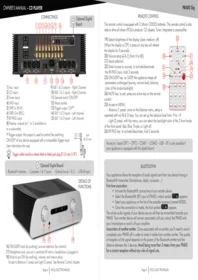
1) Aux. input.
2) CD input.
3) Tuner input.
4) DVD input.
5) TAPE In (PLAY).
6) TAPE Out (REC).
7) BY-PASS input.
8) Preamp. outputs (to 1 or 2 amplifiers or to a subwoofer).
(1) Trigger output: this output is used to control the switching ON/OFF of any device equipped with a compatible Trigger input (see instructions for use).
9) XLR 1 & 2 outputs – Right Channel.
10) XLR 1 & 2 inputs – Right Channel.
11) General switch ON/OFF.
12) Mains socket.
13) Trigger output 12V(1).
14) XLR 1 & 2 Inputs – Left channel.
15) XLR 1 & 2 Inputs – Left channel.
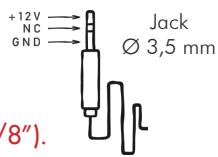

Trigger cable must be a stereo Male to Male jack plug ∅ 3,5 mm (1/8").
a Optional Digital Board
- Bluetooth® antenna - Coaxiales 1 & 2 Inputs - Optical Inputs 1 & 2 - USB-B Input

16) ON/SLEEP knob (by pushing); sources selection (by rotation).
17) Headphone jack: pre-out is switched off when a headphone is plugged in.
18) Knob to put ON (by pushing), volume, and menus setup.
Access to Balance (1 press) and Light (2 press). See Remote Control chapter.
REMOTE CONTROL
The remote control is equipped with 2 Lithium CR2025 batteries. This remote control is also able to drive all others ATOLL's products: CD players; Tuner; Integrated or preamplifier.
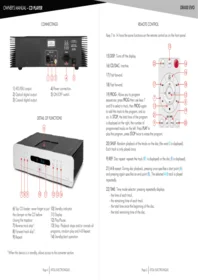
19) Selects brightness of the display (clear, medium, off). (When the display is OFF, a press on any key will refresh the display for 3 seconds).
20) Volume setup ⊖ & ⊕ (from 0 to 80).
21) Inputs selection.
22) Direct access to sources; to activate/deactivate the BY-PASS Input, hold 3 seconds.
23) ON/SLEEP key: on SLEEP, the appliance keeps all parameters unchanged (source, volume level, balance, color of the knobs backlight).
24) MUTE key: to exit, press any active key on the remote control.
25) Access to MENU:
- Balance (1 press): once on the Balance menu, setup is operated with vol & keys. You can set up the balance level from -9 to +9.
– Light (2 press): with this menu, you can select the backlight color of the 2 front knobs of the front panel: Red, Blue, Purple, or Light off.
26) BY-PASS key: to activate/deactivate, hold 3 seconds.
Access to inputs OPT1 – OPT2 – COAX1 – COAX2 – USB – BT is only possible if your appliance is equipped with the digital board.

BLUETOOTH®
Your appliance allows the reception of audio signals sent from any device having a Bluetooth® transmitter (Smartphone, tablet, computer...).
First time association:
- Activate the Bluetooth® connectivity of your emitter device.
- Select the Bluetooth® (BT) input of PR400: unlock symbol BT appears.
- Select your appliance on the list of the possible receivers (named IN200).
- Once the connection is made, the lock symbol BT appears.
The whole audio signals of your device source will then be transmitted towards your PR400. Your emitter device will remain associated until you unlock the PR400 with your Smartphone or switch off your amplifier.
Association of another emitter: Once associated with an emitter, you'll need to switch completely your PR400 off in order to make it visible from another emitter. The quality of reception of the signal depends on the power of the Bluetooth emitter and the distance between the 2 devices. Avoid being more than 5 meters from your PR400 for a correct reception without any risks of signal cuts.
USING THE BY-PASS INPUT
Warning: reduce the volume of the source connected to BY-PASS before any use of the BY-PASS Input. The BY-PASS Input offer you the capacity to use your Integrated as a Power amplifier (plugged to an A/V processor for example). This Input can be selected from the front panel (knob 15) or with the BY-PASS key of the remote control (hold 3 seconds). Once selected, "BY-PASS" appears on the display. Then, no other functions are available from the front panel or the remote control. Turn knob 15 or hold the BY-PASS button to get back from BY-PASS.
USB INPUT
Your appliance is equipped with a High-Res. asynchronous USB Input (B type). It will be possible to use it only when you'll have downloaded the appropriate driver on your computer. This driver can be freely downloaded on our website at the page:

https://www.atoll-electronique.com/en/xmos-specific-driver-usb/
To avoid any troubles in the transfer of High Resolution files (24 bits/192kHz), it is recommended to use a USB interconnect with ferrite.
ACCEPTED FORMATS
- Accepted format on optical and coaxial inputs: 16-24 bits (44,1 kHz, 48 kHz, 88,2 kHz, 96 kHz, 176,4 kHz and 192 kHz).
- Accepted format on USB Input:
- DSD: DSD64, DSD128, DSD256 and DSD512.
- PCM: 16-32 bits (44,1 kHz, 48 kHz, 88,2 kHz, 96 kHz, 176,4 kHz, 192 kHz, 352,8 kHz, 384 kHz, 705,6 kHz and 768 kHz).

TECHNICAL DATA
Analog power supplies: 2x10 VA
Digital power supplies: 10 VA
Total of capacitors: 112 000 µ F
Number of inputs: 5 LINES
2 XLR
Input impedance: 357 kΩ
Sensibility: 4 V
Signal/noise ratio: 100 dB
Distortion at 1kHz: 0,004%
Bandwidth: 0,5 Hz - 780 kHz
Rising time: 0,4 μs
Dimensions: 440 × 370 × 130 mm
Weight: 15 Kg


CAUTIONS
- Do not make any connections when your device is powered on.
- Put your device in a dry and well ventilated place, far from a source of heat.
- Do not put something on your preamplifier.
- Do not make any plug in when the preamplifier is on.
- Strictly respect the left and right connections.
- Avoid any short-cut.

ADVISES
- To optimize the performance of your device, you should switch it on at least half an hour before any listening, the time for the power stage to reach its ideal working temperature. Your device will give you optimal listening quality after this time-lapse. Between two uses, it is, therefore, preferable to let the device in the SLEEP position so that it remains at its optimum temperature. At night or when you leave your home, it is best to use the main switch to turn off the device.
- To optimize the sound quality of your system, we recommend that you choose good-quality connection cords. Do not hesitate to ask your specialist dealer for advice.
You have just bought a preamplifier with exceptional audiophile performance. We really thank you for your confidence in our products. To get the best part of your preamplifier, please read carefully this manual.
CONCERNING THIS OWNER'S MANUAL
Paragraphs with grey and blue frames concerns only appliance getting the optional digital board installed.

YOU WILL FIND ENCLOSED
- A Preamplifier.
– A remote control (with 2 Lithium batteries CR2032). - One power lead.
- This manual with the certificate of guarantee.
Latest update: 10th June 2024
ATOLL ELECTRONIQUE®
is a French Company that designs, manufactures, and commercializes all its products.

E.C. MARKING
E.C. marking certified the conformity with low tension directive 73/23/CEE, directive CEM 89/336/CEE and national transpositions.
WARRANTY CONDITIONS
The guarantee is two years period from date of purchase. We recommend you to ask your dealer to fill the guarantee and to conserve it. The guarantee is only available for appliance which have been use correctly.
MAINTENANCE
Before any cleaning, switch off your amplifier. Use a soft and dry rag to clean up the appliance. Never use acetone, white-spirit, ammoniac, or any kind of product containing abrasive agent. Never try to clean up inside the appliance.

WARRANTY FORM \~ PR400 Sig
To present to your dealer with the invoice when returning back the appliance:
ATOLL ELECTRONIQUE®
Bd des Merisiers
50370 BRECEY
FRANCE
Date of purchase:
Place of purchase:
Buyer signature:
Dealer Stamp
OWNER'S MANUAL
PR400 SIGNATURE
PREAMPLIFIER

ELECTRONIQUE
www.atoll-electronique.com


Brand : Atoll
Model : PR400 Sig
Category : CD Player