
DR100 Sig - DR200 Sig - CD Player Atoll - Free user manual and instructions
Find the device manual for free DR100 Sig - DR200 Sig Atoll in PDF.


Pick your language and provide your email: we'll send you a specifically translated version.
| Type of product | CD Player (DR100 Sig) / CD Transport (DR200 Sig) |
| Brand | Atoll |
| Model | DR100 Signature, DR200 Signature |
| Disc compatibility | CD, CD-R, CD-RW |
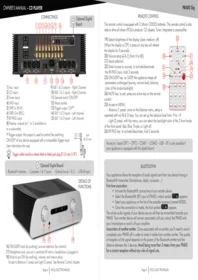
| Audio outputs (DR100 Sig) | RCA and XLR analog outputs, optical and coaxial digital outputs |
| Audio outputs (DR200 Sig) | Optical and coaxial digital outputs |
| DAC (DR100 Sig) | High-resolution 24-bit/192kHz DAC with asynchronous USB input |
| DAC (DR200 Sig) | None (pure CD transport) |
| Power supply | 230V AC, 50Hz (also available for 120V regions) |
| Dimensions (W x H x D) | 430 x 90 x 320 mm |
| Weight | 6.5 kg (DR100 Sig), 5.8 kg (DR200 Sig) |
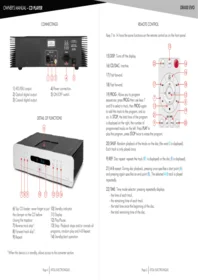
| Remote control | Infrared remote control included |
| Display | Fluorescent dot-matrix display with dimming function |
| Transport mechanism | Precision CD transport with low-jitter design and anti-vibration damping |
| Playback functions | Play, pause, stop, next/previous track, repeat (all/one), shuffle, intro scan |
| Operations | Front panel buttons and full remote control |
| Maintenance and cleaning | Clean the lens with a soft brush or air blower; wipe exterior with a dry, soft cloth |
| Safety | Class I laser product; do not open the chassis; keep away from moisture and heat sources |
| Spare parts and repairability | Atoll supports long-term availability of spare parts; authorized service centers worldwide |
| General information | High-end French engineering, rigid chassis, shielded internal sections, premium connectors |
Frequently Asked Questions - DR100 Sig - DR200 Sig Atoll
What is the difference between the DR100 Sig and DR200 Sig?
The DR100 Sig is a full CD player with built-in DAC and analog outputs, while the DR200 Sig is a pure CD transport that provides only digital outputs. You would need an external DAC to use the DR200 Sig.
Can I play MP3 or FLAC files on this CD player?
No, these players are designed for standard audio CDs (CD-DA). They do not support data discs with MP3 or FLAC files.
How do I connect the DR100 Sig to my amplifier?
You can use the RCA (unbalanced) or XLR (balanced) analog outputs. Simply connect them to the corresponding inputs on your amplifier using high-quality interconnect cables.
Does the DR200 Sig require an external DAC?
Yes, the DR200 Sig is a CD transport, so it needs an external DAC to convert its digital output to analog audio. You can connect it via optical or coaxial cable.
How should I clean the CD lens?
To clean the lens, use a soft brush or a rubber air blower to remove dust. Avoid touching the lens directly and never use solvents or cleaning discs that could damage the mechanism.
Does the player come with a remote control?
Yes, each model is supplied with an infrared remote control that lets you operate all playback functions from your listening position.
Can I use the DR100 Sig as a USB DAC?
Yes, the DR100 Sig has a USB input that accepts up to 24-bit/192kHz audio from your computer, making it also function as a high-quality external sound card.
What kind of power cable is provided?
A standard IEC C13 power cord is included. You can replace it with an audiophile-grade cable if desired, using the same connection.
Is the DR200 Sig compatible with all DACs?
It outputs standard SPDIF (coaxial and optical) signals, which are universally compatible with any DAC that has matching inputs.
What is the warranty period?
Atoll provides a standard warranty of 2 years from the original purchase date. Warranty terms may vary depending on your local dealer, so please keep your receipt.
User questions about DR100 Sig - DR200 Sig Atoll
0 question about this device. Answer the ones you know or ask your own.
Ask a new question about this device
No questions yet. Be the first to ask one.
Download the instructions for your CD Player in PDF format for free! Find your manual DR100 Sig - DR200 Sig - Atoll and take your electronic device back in hand. On this page are published all the documents necessary for the use of your device. DR100 Sig - DR200 Sig by Atoll.
USER MANUAL DR100 Sig - DR200 Sig Atoll


Manual assistant
Powered by Anthropic
Waiting for your message
Product information
Brand : Atoll
Model : DR100 Sig - DR200 Sig
Category : CD Player