
VFM1530-11 - Digital screen VIEWSONIC - Free user manual and instructions
Find the device manual for free VFM1530-11 VIEWSONIC in PDF.


| Product type | Digital photo frame |
| Brand | ViewSonic |
| Model | VFM1530-11 |
| Screen size | 15 inches (38.1 cm) |
| Display resolution | 1024 x 768 pixels (4:3 aspect ratio) |
| Brightness | 250 cd/m² |
| Contrast ratio | 500:1 |
| Viewing angle | 170° horizontal / 170° vertical |
| Supported file formats | JPEG, BMP, PNG for photos; MPEG-1/2/4, MJPEG for videos; MP3, WMA for audio |
| Internal memory | 512 MB (expandable via SD/MMC/MS card) |
| Connectivity | USB 2.0 port, memory card reader (SD/MMC/MS), audio/video input |
| Special features | Photo viewer, video/audio player, calendar, clock, sleep timer |
| Remote control | Included (infrared) |
| Wall mounting | VESA 75x75 mm compatible (bracket included) |
| Dimensions (W x H x D, without stand) | 40.2 x 29.8 x 4.5 cm |
| Weight (without accessories) | 1.8 kg |
| Power supply | AC adapter 100-240V, 50/60 Hz, output 12V 2A |
| Power consumption | 12 W (max), 0.5 W standby |
| Care and cleaning | Wipe the screen with a soft, dry cloth. Do not use any chemicals or liquids. |
| Safety precautions | Do not expose to moisture or extreme temperatures. Use only the supplied adapter. |
| Spare parts and repairability | Adapter, remote control and stand available. The device is not designed for user repair. |
| General information | Standard ICES-003 (Canada); class B. |
Frequently Asked Questions - VFM1530-11 VIEWSONIC
User questions about VFM1530-11 VIEWSONIC
0 question about this device. Answer the ones you know or ask your own.
Ask a new question about this device
Download the instructions for your Digital screen in PDF format for free! Find your manual VFM1530-11 - VIEWSONIC and take your electronic device back in hand. On this page are published all the documents necessary for the use of your device. VFM1530-11 by VIEWSONIC.
USER MANUAL VFM1530-11 VIEWSONIC
IMPORTANT: Please read this User Guide to obtain important information on installing and using your product in a safe manner, as well as registering your product for future service. Warranty information contained in this User Guide will describe your limited coverage from ViewSonic Corporation, which is also found on our web site at http://www.viewsonic.com in English, or in specific languages using the Regional selection box in the upper right corner of our website.
This device complies with part 15 of FCC Rules. Operation is subject to the following two conditions: (1) this device may not cause harmful interference, and (2) this device must accept any interference received, including interference that may cause undesired operation.
This equipment has been tested and found to comply with the limits for a Class B digital device, pursuant to part 15 of the FCC Rules. These limits are designed to provide reasonable protection against harmful interference in a residential installation. This equipment generates, uses, and can radiate radio frequency energy, and if not installed and used in accordance with the instructions, may cause harmful interference to radio communications. However, there is no guarantee that interference will not occur in a particular installation. If this equipment does cause harmful interference to radio or television reception, which can be determined by turning the equipment off and on, the user is encouraged to try to correct the interference by one or more of the following measures:
Reorient or relocate the receiving antenna.
- Increase the separation between the equipment and receiver.
- Connect the equipment into an outlet on a circuit different from that to which the receiver is connected.
- Consult the dealer or an experienced radio/TV technician for help.
Warning: You are cautioned that changes or modifications not expressly approved by the party responsible for compliance could void your authority to operate the equipment.
For Canada
CE Conformity for European Countries
The device complies with the EMC Directive 2004/108/EC and Low Voltage Directive 2006/95/EC.
Following information is only for EU-member states:
The mark is in compliance with the Waste Electrical and Electronic Equipment Directive 2002/96/EC (WEEE).
The mark indicates the requirement NOT to dispose the equipment including any spent or discarded batteries or accumulators as unsorted municipal waste, but use the return and collection systems available.
If the batteries, accumulators and button cells included with this equipment, display the chemical symbol Hg , Cd, or Pb, then it means that the battery has a heavy metal content of more than 0.0005% Mercury or more than, 0.002% Cadmium, or more than 0.004% Lead.


Important Safety Instructions
- Do not use the equipment near water.
- Wipe the machine with a soft and dry cloth.
- Do not block any vent holes. Please install the product in accordance with the manufacturer's instructions.
- Do not use the product on your legs for a long time because it gets hot and you may be burned.
- Please avoid installing the product in a place where the temperature is above 35^ or lower than 5^ , or in a place that is moist or wet.
- Protect the power cord plug, outlet, and connections to other equipment from damage by trapping and squeezing.
- Please only use devices and accessories specified by the manufacturer.
- The unit is hot pluggable. However it is recommended that the power be turned off before the memory card is inserted or removed.
- Do not remove the memory card during data access. The data may be lost and the product could be damaged.
- Disconnect the power cord if the product will not be used for an extended period.
- Do not repair, disassemble, or modify the product. Only qualified ViewSonic personnel can check and repair any damage to the machine.
- The unauthorized playing of certain audio or image files may infringe the related copyright laws under certain circumstances.
- When you use the internal speakers, do not adjust the volume to a high level, or the sounds may distort and become unpleasant.
- When you view pictures for an extended period of time your eyes may become strained.
- Do not touch the screen because it is difficult to remove finger marks.
- Avoid exposing the digital photo frame to direct sunlight. Adjust the angle to reduce glare.
- Careful attention should always be paid when moving the digital photo frame.
- Make sure the place where the digital photo frame is placed is clean and dry.
- If there is smoke, a strange smell or an abnormal noise, immediately turn off the digital photo frame and contact your dealer or ViewSonic.
- Do not rub or apply pressure to the LCD panel. This may cause irreparable damage to the screen.
Declaration of RoHS Compliance
This product has been designed and manufactured in compliance with Directive 2002/95/EC of the European Parliament and the Council on restriction of the use of certain hazardous substances in electrical and electronic equipment (RoHS Directive) and is deemed to comply with the maximum concentration values issued by the European Technical Adaptation Committee (TAC) as shown below:
| Substance | Proposed Maximum Concentration | Actual Concentration |
| Lead (Pb) | 0.1% | < 0.1% |
| Mercury (Hg) | 0.1% | < 0.1% |
| Cadmium (Cd) | 0.01% | < 0.01% |
| Hexavalent Chromium (Cr6+) | 0.1% | < 0.1% |
| Polybrominated biphenyls (PBB) | 0.1% | < 0.1% |
| Polybrominated diphenyl ethers (PBDE) | 0.1% | < 0.1% |
Certain components of products as stated above are exempted under the Annex of the RoHS Directives as noted below:
Examples of exempted components are:
- Mercury in compact fluorescent lamps not exceeding 5mg per lamp and in other lamps not specifically mentioned in the Annex of RoHS Directive.
- Lead in glass of cathode ray tubes, electronic components, fluorescent tubes, and electronic ceramic parts (e.g. piezoelectronic devices).
- Lead in high temperature type solders (i.e. lead-based alloys containing 85% by weight or more lead).
- Lead as an allotting element in steel containing up to 0.35% lead by weight, aluminium containing up to 0.4% lead by weight and as a cooper alloy containing up to 4% lead by weight.
Copyright Information
Copyright © ViewSonic Corporation, 2009. All rights reserved.
ViewSonic, the three birds logo, OnView, ViewMatch, and ViewMeter are registered trademarks of ViewSonic Corporation.
Disclaimer: ViewSonic Corporation shall not be liable for technical or editorial errors or omissions contained herein; nor for incidental or consequential damages resulting from furnishing this material, or the performance or use of this product.
In the interest of continuing product improvement, ViewSonic Corporation reserves the right to change product specifications without notice. Information in this document may change without notice.
No part of this document may be copied, reproduced, or transmitted by any means, for any purpose without prior written permission from ViewSonic Corporation.
For Your Records
Product Name:
VFM1530-11
ViewSonic Digital Photo Frame
Model Number:
VS12982
Document Number:
VFM1530-11_UG_ENG Rev. 1B 11-26-09
Serial Number:
Purchase Date:
Product disposal at end of product life
ViewSonic is concerned about the preservation of our environment. Please dispose of this product properly at the end of its useful life. Your local waste disposal company may provide information about proper disposal.
The lamp in this product contains mercury. Please dispose of properly in accordance with environmental laws of your location.
Product features:
High definition 15" LCD display;
Support picture view;
Support music play;
Support video play;
Support background music play;
Support SD/MMC/MS memory card
Connect external USB device, such as U disk and digital camera, through USB extension line;
Built-in 256M memory;
Connect computer through USB line and copy files, such as pictures, to the built-in memory.
Product List:
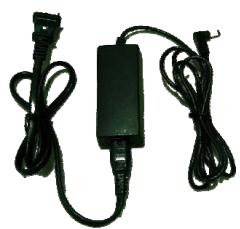
- Digital photo frame 1 set
- Stand 1 piece
- Power adapter (DC 12V 3A) 1 piece
- Remote control 1 piece
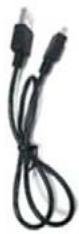
- USB cable 1 piece
- User guide 1 Copy

Functions of remote control:
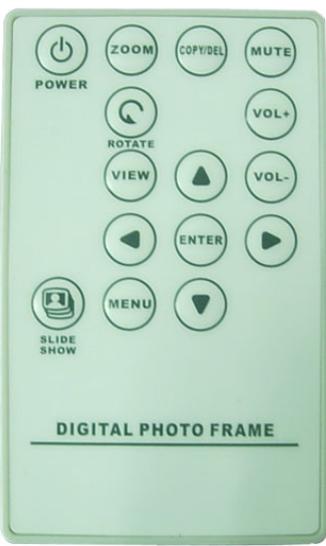
| Keypad Name | Function |
| POWER | Remote control power on/off |
| ZOOM | Picture zooming |
| COPY/DEL | Copy/delete files, such as picture under list folder |
| MUTE | Mute |
| ROTATE | Picture rotate |
| VOL+ | Volume up |
| VOL- | Volume down |
| VIEW | Picture view |
| MENU | Enter into the main menu or back to the last menu |
| SLIDE SHOW | View picture and play music simultaneously |
| ENTER | Confirm or enter the chosen function item |
| UP,DOWN,LEFT,RIGHT | Up, down, left and right option keys, option key for menu icon or list |
Basic Connection:
The following picture shows the product's basic installation and interface's basic connection and functions.
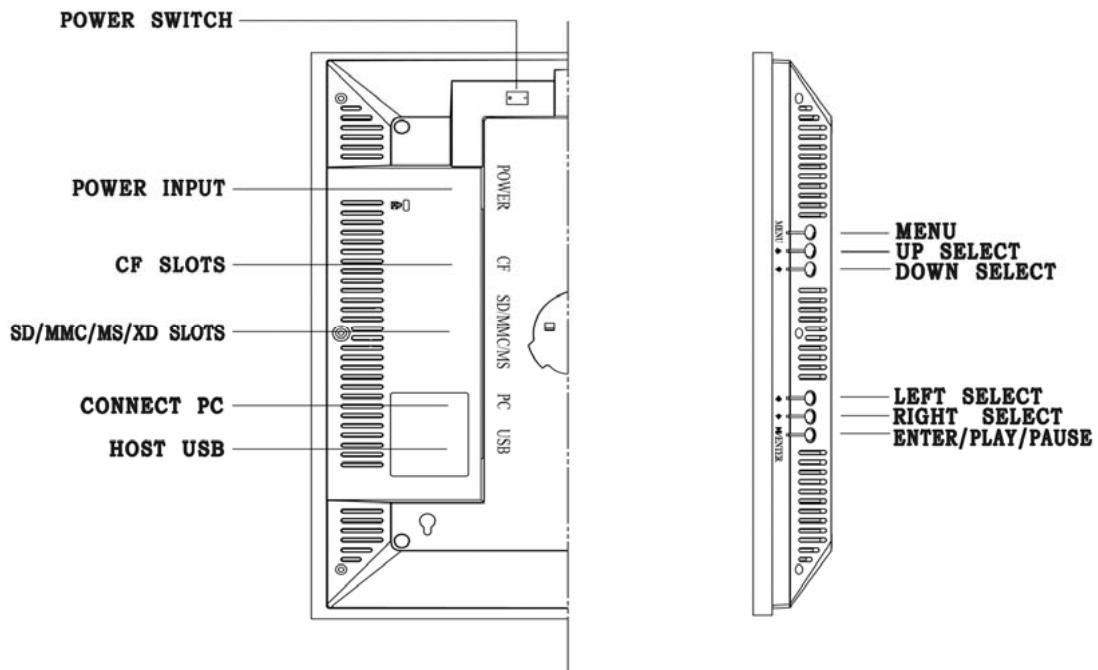
Insert one end of the power adapter into electrical outlet of the product and insert another end into AC electrical outlet up to standard.
Insert proper memory card with content into corresponding slot of the product (the product has copied part content while leaving factory, and the step can be omitted if there is no proper memory card or the card is not inserted temporarily);
Turn on power switch of the product;
After several seconds, start viewing pictures (the product has been set in automatic viewing picture state while leaving factory).
If the product has not been set in automatic playing state or it has no playing content, main menu displays after starting and then gradually operate by remote control or keying. (Refer to the following functional operation steps for the details)
View picture, play music and film:
Insert USB device suitable for the product, such as memory card or U disk (including picture, music or film file), then the name of the inserted storage device will be displayed under main menu interface (if you insert several memory devices, choose the storage device that you want to play by "Left/Right" key). Press "Enter" for next interface- Function Selection Interface.
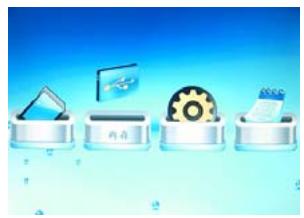
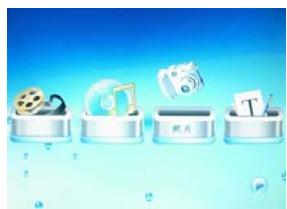
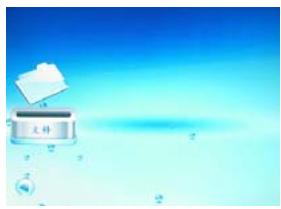
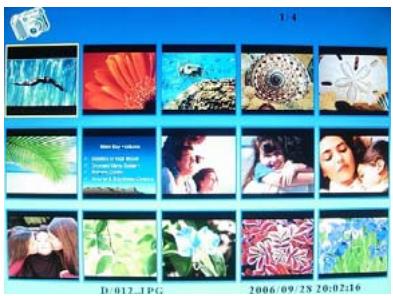
Photo view
Under the function selection interface, choose "photo" icon by "Left/Right" key, press "Enter" to confirm picture preview interface, choose the picture file that you want to play by "Up/Down" key and then press "Enter" to confirm picture view.
Music Play
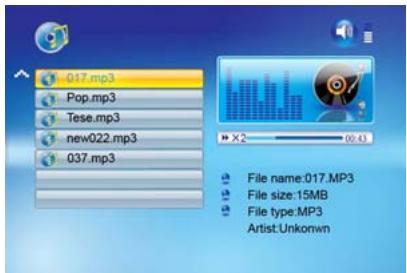
Under the function selection interface, choose "Music" icon by "Left/Right" key, press "Enter" to confirm music play interface, choose the music file that you want to play by "Up/Down" key and then press "Enter" to confirm music play.
Movie play
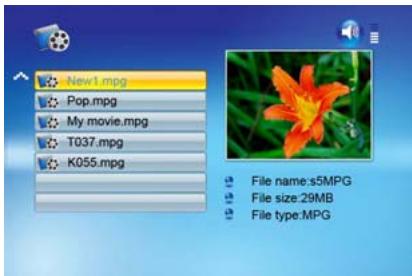
Under the function selection interface, choose "Movie" icon by "Left/Right" key, press "Enter" to confirm film preview interface, choose the film file that you want to play by "Up/Down" key and then press "Enter" to confirm film play.
Other functions:
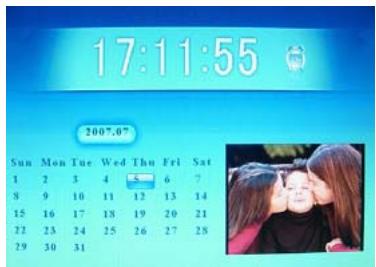
Calendar, clock and alarm clock function:
Under the main menu interface, choose "Calendar" icon by "Left/Right" key, press "Enter" for calendar display interface and show calendar, clock, alarm clock (if start) and small picture view. (Local date and time should be set at corresponding selection of the menu)
E-book
Insert USB device suitable for the product, such as memory card or U disk (including text file), then the name of the inserted storage device will be displayed under main menu interface (if you insert several memory devices, choose the storage device that you want to play by "Left/Right" key). Press "Enter" for next interface- function selection interface.
Under the function selection interface, choose "E-book" icon by "Left/Right" key, press "Enter" to confirm E-book file interface, choose the text file that you want to play by "Up/Down" key and then press "Enter" to enter text file reading.
Files Copying or Deleting:
Insert USB device suitable for the product, such as memory card or U disk, then the name of the inserted storage device will be displayed under main menu interface (if you insert several memory devices, choose the storage device that you want to play by "Left/Right" key), and press "Enter" for next interface- function selection interface.
Under the function selection interface, choose "File" icon by "Left/Right" key, press "Enter" to confirm folder interface, choose the file you want to copy or delete by "Up/Down" key and then press "Right" to confirm selection (repeat if several files are required to be copied or deleted); press "Copy/Del" for copy/delete interface, choose Copy by "Up/Down" key and press "Enter" to choose the copied target folder; choose target disk by "Up/Down" key and press "Right" to confirm selection, and then press "Enter" to confirm copying till completion, press "Enter" to quit; choose Delete by "Up/Down" key, press "Enter" for delete interface, choose " ” or “X” by "Up/Down" key, choose " ” and press "Enter" to confirm deleting till completion, press "Enter" to quit.
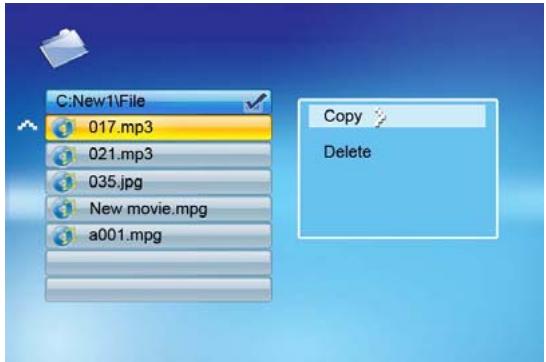
Menu Setting:
| Set Item | Set Value | Function |
| LANGUAGE | English /French/ Spanish | According to users’ local language or requirement |
| SLIDESHOW TIME | 3s/5s/15s/1m/15m/1h | Set picture view switch speed according to users’ desire |
| TRANSITION Effect | Random / Sequential Bottom_To_TOP Top_To_Bottom Left_To_Right Right_To_Left Door_Close / Door_Open Hori_Cross / Verti_Cross Fading Vexpand_Top Vexpand_Bottom Vexpand.Middle Hexpand_Left Hexpand Right Hexpand.Middle FC_Ken_Burn / Off | Set picture view switch speed according to users’ desire |
| MUSIC REPEAT MODE | Repeat all/repeat one/repeat off | Set whether repeat file according to users’ requirement |
| MOVIE REPEAT MODE | Repeat all/repeat one/repeat off | Set whether repeat file according to users’ requirement |
| TIME | Set according to local time, choose by Left/Right key and set by Up/Down key | Set date and time according to users’ local date and time |
| ALARM | Set according to local time, choose by Left/Right key and set by Up/Down key | Set alarm clock time according to users’ requirement |
| AUTO PLAY | Photo/Music/Movie/Slideshow/Calendar/Off | Set automatic playing content after starting according to users’ fond |
| DEFAULT | Press “Enter” to confirm ex-factory setting | Recover ex-factory setting |
Product specifications:
| Item | Specification |
| Externality Size | 426(W) x360(H) x 65(D) mm |
| LCD | 15" |
| Resolution | 1024×768 |
| Adapter AC power input | 110-240VAC, 50/60Hz |
| Adapter AC power output | 12VDC@3A |
| Built-in speaker | Stereo |
| Support picture format | JPEG BMP |
| Support music format | MP3 |
| Support video format | MPEG1, MPEG4(DIVX、XVID) |
| Support memory card | CF/MMC/SD/MS |
| Connect computer | Support |
| Support external USB device | Support |
| Built-in memory | 256M |
| Remote control | Support |
Customer Support
For technical support or product service, see the table below or contact your reseller.
Note: You will need the product serial number.
| Country/Region | Web Site | Telephone |
| United States | www.viewsonic.com | T (Toll-Free)= 1-800-688-6688 T (Toll)= 1-424-233-2530 F= 1-909-468-1202 |
| Canada | www.viewsonic.com | T (Toll-Free)= 1-866-463-4775 T (Toll)= 1-424-233-2533 F= 1-909-468-1202 |
| Renta y Datos, 29 SUR 721, COL. LA PAZ, 72160 PUEBLA, PUE. Tel: 01.222.891.55.77 CON 10 LINEAS Electroser, Av Reforma No. 403Gx39 y 41, 97000 Mérida, Yucatán. Tel: 01.999.925.19.16 Other places please refer to http://www.viewsonic.com/la/soporte/index.htm#Mexico | ||
Limited Warranty VIEWSONIC Digital Photo Frame
What the warranty covers:
ViewSonic warrants its products to be free from defects in material and workmanship, under normal use, during the warranty period. If a product proves to be defective in material or workmanship during the warranty period, ViewSonic will, at its sole option, repair or replace the product with a like product. Replacement product or parts may include remanufactured or refurbished parts or components.
How long the warranty is effective:
ViewSonic Digital Photo Frame are warranted for 1 year for labor from the date of the first customer purchase.
Who the warranty protects:
This warranty is valid only for the first consumer purchaser.
What the warranty does not cover:
-
Any product on which the serial number has been defaced, modified or removed.
-
Damage, deterioration or malfunction resulting from:
a. Accident, misuse, neglect, fire, water, lightning, or other acts of nature, unauthorized product modification, or failure to follow instructions supplied with the product.
b. Repair or attempted repair by anyone not authorized by ViewSonic.
c. Causes external to the product, such as electric power fluctuations or failure.
d. Use of supplies or parts not meeting ViewSonic's specifications.
e. Normal wear and tear.
f. Any other cause which does not relate to a product defect.
- Any product exhibiting a condition commonly known as "image burn-in" which results when a static image is displayed on the product for an extended period of time.
How to get service:
- For information about receiving service under warranty, contact ViewSonic Customer Support (please refer to Customer Support page). You will need to provide your product's serial number.
- To obtain warranted service, you will be required to provide (a) the original dated sales slip, (b) your name, (c) your address, (d) a description of the problem, and (e) the serial number of the product.
- Take or ship the product freight prepaid in the original container to an authorized ViewSonic service center or ViewSonic.
- For additional information or the name of the nearest ViewSonic service center, contact ViewSonic.
Limitation of implied warranties:
There are no warranties, express or implied, which extend beyond the description contained herein including the implied warranty of merchantability and fitness for a particular purpose.
Exclusion of damages:
ViewSonic's liability is limited to the cost of repair or replacement of the product. ViewSonic shall not be liable for:
- Damage to other property caused by any defects in the product, damages based upon inconvenience, loss of use of the product, loss of time, loss of profits, loss of business opportunity, loss of goodwill, interference with business relationships, or other commercial loss, even if advised of the possibility of such damages.
- Any other damages, whether incidental, consequential or otherwise.
- Any claim against the customer by any other party.
4.3: ViewSonic LCD TV Warranty
DPF_LW01 Rev. 1A 06-20-08
Mexico Limited Warranty VIEWSONIC Digital Photo Frame
What the warranty covers:
ViewSonic warrants its products to be free from defects in material and workmanship, under normal use, during the warranty period. If a product proves to be defective in material or workmanship during the warranty period, ViewSonic will, at its sole option, repair or replace the product with a like product. Replacement product or parts may include remanufactured or refurbished parts or components & accessories.
How long the warranty is effective:
ViewSonic LCD TVs are warranted for 1 year for all parts excluding the light source and 1 year for labor from the date of the first customer purchase.
Who the warranty protects:
This warranty is valid only for the first consumer purchaser.
What the warranty does not cover:
- Any product on which the serial number has been defaced, modified or removed.
- Damage, deterioration or malfunction resulting from:
a. Accident, misuse, neglect, fire, water, lightning, or other acts of nature, unauthorized product modification, unauthorized attempted repair, or failure to follow instructions supplied with the product.
b. Any damage of the product due to shipment.
c. Causes external to the product, such as electrical power fluctuations or failure.
d. Use of supplies or parts not meeting ViewSonic's specifications.
e. Normal wear and tear.
f. Any other cause which does not relate to a product defect.
- Any product exhibiting a condition commonly known as "image burn-in" which results when a static image is displayed on the product for an extended period of time.
- Removal, installation, insurance, and set-up service charges.
How to get service:
For information about receiving service under warranty, contact ViewSonic Customer Support (Please refer to the attached Customer Support page). You will need to provide your product's serial number, so please record the product information in the space provided below on your purchase for your future use. Please retain your receipt of proof of purchase to support your warranty claim.
For Your Records
Product Name:
Document Number:
Purchase Date:
Model Number:
Serial Number:
Extended Warranty Purchase? (Y/N)
If so, what date does warranty expire?
- To obtain warranty service, you will be required to provide (a) the original dated sales slip, (b) your name, (c) your address, (d) a description of the problem, and (e) the serial number of the product.
- Take or ship the product in the original container packaging to an authorized ViewSonic service center.
- Round trip transportation costs for in-warranty products will be paid by ViewSonic.
Limitation of implied warranties:
There are no warranties, express or implied, which extend beyond the description contained herein including the implied warranty of merchantability and fitness for a particular purpose.
Exclusion of damages:
ViewSonic's liability is limited to the cost of repair or replacement of the product. ViewSonic shall not be liable for:
- Damage to other property caused by any defects in the product, damages based upon inconvenience, loss of use of the product, loss of time, loss of profits, loss of business opportunity, loss of goodwill, interference with business relationships, or other commercial loss, even if advised of the possibility of such damages.
- Any other damages, whether incidental, consequential or otherwise.
- Any claim against the customer by any other party.
- Repair or attempted repair by anyone not authorized by ViewSonic.
| Contact Information for Sales & Authorized Service (Centro Autorizzato de Servizio) within Mexico: | |
| Name, address, of manufacturer and importers: México, Av. de la Palma #8 Piso 2 Despacho 203, Corporativo Interpalmas, Col. San Fernando Huixquilucan, Estado de México Tel: (55) 3605-1099 http://www.viewsonic.com/la/soporte/index.htm | |
| NUMERO Gratis DE ASISTENCIA TÉCNICA PARATodo MÉXICO: 001.866.823.2004 | |
| Hermosillo: Distribuciones y Servicios Computaciones SA de CV. Calle Juarez 284 local 2 Col. Bugambillas C.P. 83140 Tel: 01-66-22-14-9005 E-Mail: disc2@hmo.megared.net.mx | Villahermosa: Compumantenimietnos Garantizados, S.A. de C.V. AV. GREGORIO MENDEZ #1504 COL, FLORIDA C.P. 86040 Tel: 01 (993) 3 52 00 47 / 3522074 / 3 52 20 09 E-Mail: compumantenimientos@prodigy.net.mx |
| Puebla, Pue. (Matriz): RENTA Y DATOS, S.A. DE C.V. Domicilio: 29 SUR 721 COL. LA PAZ 72160 PUEBLA, PUE. Tel: 01(52).222.891.55.77 CON 10 LINEAS E-Mail: datos@puebla.megared.net.mx | Veracruz, Ver.: CONEXION Y DESARROLLO, S.A DE C.V. Av. Americas # 419 ENTRE PINZON Y ALVARADO Fracc. Reforma C.P. 91919 Tel: 01-22-91-00-31-67 E-Mail: gacosta@qplus.com.mx |
| Chihuahua | Cuernavaca |
| Solutiones Globales en Computación C. Magisterio # 3321 Col. Magisterial Chihuahua, Chih. Tel: 4136954 E-Mail: Cefevo@soluglobales.com | Compusupport de Cuernavaca SA de CV Francisco Leyva # 178 Col. Miguel Hidalgo C.P. 62040, Cuernavaca Morelos Tel: 01 777 3180579 / 01 777 3124014 E-Mail: aquevedo@compusupportcva.com |
| Distrito Federal: QPLUS, S.A. de C.V. Av. Coyoacán 931 Col. Del Valle 03100, México, D.F. Tel: 01(52)55-50-00-27-35 E-Mail: gacosta@qplus.com.mx | Guadalajara, Jal.: SERVICRECE, S.A. de C.V. Av. Niños Héroes # 2281 Col. Arcos Sur, Sector Juárez 44170, Guadalajara, Jalisco Tel: 01(52)33-36-15-15-43 E-Mail: mmiranda@servicrece.com |
| Guerrero Acapulco | Monterrey: Global Product Services Mar Caribe # 1987, Esquina con Golfo Pésico Fracc. Bernardo Reyes, CP 64280 Monterrey N.L. México Tel: 8129-5103 E-Mail: aydeem@gps1.com.mx |
| GS Computación (Grupo Sesicomp) Progreso #6-A, Colo Centro 39300 Acapulco, Guerrero Tel: 744-48-32627 | Monterrey: Global Product Services Mar Caribe # 1987, Esquina con Golfo Pésico Fracc. Bernardo Reyes, CP 64280 Monterrey N.L. México Tel: 8129-5103 E-Mail: aydeem@gps1.com.mx |
| MERIDA: ELECTROSER Av Reforma No. 403Gx39 y 41 Mérida, Yucatán, México CP97000 Tel: (52) 999-925-1916 E-Mail: rrrb@sureste.com | Oaxaca, Oax.: CENTRO DE DISTRIBUTION Y SERVICIO, S.A. de C.V. Murguía # 708 P.A., Col. Centro, 68000, Oaxaca Tel: 01(52)95-15-15-22-22 Fax: 01(52)95-15-13-67-00 E-Mail: gpotai2001@hotmail.com |
| Tijuana: STD Av Ferrocarril Sonora #3780 L-C Col 20 de Noviembre Tijuana, Mexico | FOR USA SUPPORT: ViewSonic Corporation 381 Brea Canyon Road, Walnut, CA. 91789 USA Tel: 800-688-6688 (English); 866-323-8056 (Spanish); Fax: 1-800-685-7276 E-Mail: http://www.viewsonic.com |
- For Canada
- CE Conformity for European Countries
- Following information is only for EU-member states:
- Important Safety Instructions
- Declaration of RoHS Compliance
- Copyright Information
- For Your Records
- Product disposal at end of product life
- Product features:
- Product List:
- Functions of remote control:
- Basic Connection:
- View picture, play music and film:
- Photo view
- Music Play
- Movie play
- Other functions:
- Calendar, clock and alarm clock function:
- E-book
- Files Copying or Deleting:
- Menu Setting:
- Product specifications:
- Customer Support
- Limited Warranty VIEWSONIC Digital Photo Frame
- What the warranty covers:
- How long the warranty is effective:
- Who the warranty protects:
- What the warranty does not cover:
- How to get service:
- Limitation of implied warranties:
- Exclusion of damages:
- Mexico Limited Warranty VIEWSONIC Digital Photo Frame
Brand : VIEWSONIC
Model : VFM1530-11
Category : Digital screen