
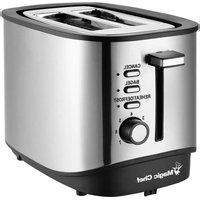
MCL2STRT - Toaster Magic Chef - Free user manual and instructions
Find the device manual for free MCL2STRT Magic Chef in PDF.


Pick your language and provide your email: we'll send you a specifically translated version.
| Product type | Toaster |
| Brand | Magic Chef |
| Model | MCL2STRT |
| Dimensions (W x H x D) | Approximately 25 x 20 x 18 cm |
| Weight | Approximately 1.5 kg |
| Power | 900 W |
| Power supply | 220-240 V, 50/60 Hz |
| Cable length | Approximately 0.8 m |
| Number of slots | 2 wide slots |
| Browning control | Rotary control with 6 levels |
| Functions | Toasting, defrosting, reheating |
| Automatic shut-off | Yes, with automatic ejection |
| Overheat protection | Yes |
| Material | Stainless steel and ABS plastic body |
| Crumb tray | Removable tray for easy cleaning |
| Cleaning | Removable crumb tray, exterior surface wipeable with a damp cloth |
| Non-slip feet | Yes |
| Cord storage | Yes, wraps under the base |
| Spare parts | Replacement crumb tray available |
| Intended use | Household use only |
| Color | Black/Stainless steel (typical) |
| Warranty | 2 years (standard) |
Frequently Asked Questions - MCL2STRT Magic Chef
How do I adjust the browning level?
Use the browning dial on the side of the appliance. Choose a level from 1 (light) to 6 (dark) according to your preference.
What should I do if the toaster does not switch on?
Check that the plug is properly connected and that the socket works. Make sure the lever is pressed down firmly. If the problem persists, contact customer service.
Can large slices of bread be toasted?
The wide slots accommodate most standard bread slices, including slightly thick rustic bread. Never insert overly thick slices that could jam the appliance.
How do I clean the crumb tray?
Unplug the appliance, wait for it to cool down, then remove the crumb tray located at the base. Empty the crumbs and wash it with warm soapy water. Dry it before putting it back.
Can I use the defrost function?
Yes, place frozen bread slices, then press the Defrost button. The toaster automatically adjusts the toasting time to defrost and brown the bread.
Does the toaster have automatic shut-off?
Yes, once the toasting cycle is complete, the lever rises automatically and the power is cut off. Additionally, overheating protection activates in case of prolonged use.
What does the indicator light mean?
The indicator shows that the toaster is operating. It turns off automatically when the bread is ejected and the appliance returns to the rest position.
Can pastries be reheated?
Yes, use the Reheat function to warm croissants or brioches without browning them further. Press the button after lowering the lever.
How do I prevent the bread from burning?
Start with a low browning level (1-2) and adjust according to the result. Watch the bread during the first uses to find the ideal setting.
Is it dangerous to immerse the toaster in water?
Absolutely forbidden. Never immerse the appliance in water or any other liquid. For cleaning, use only a damp cloth and the removable crumb tray.
User questions about MCL2STRT Magic Chef
0 question about this device. Answer the ones you know or ask your own.
Ask a new question about this device
No questions yet. Be the first to ask one.
Download the instructions for your Toaster in PDF format for free! Find your manual MCL2STRT - Magic Chef and take your electronic device back in hand. On this page are published all the documents necessary for the use of your device. MCL2STRT by Magic Chef.
USER MANUAL MCL2STRT Magic Chef
Manual assistant
Powered by Anthropic
Waiting for your message
Product information
Brand : Magic Chef
Model : MCL2STRT
Category : Toaster