
CE602 - Audio/video extension ATEN - Free user manual and instructions
Find the device manual for free CE602 ATEN in PDF.


Pick your language and provide your email: we'll send you a specifically translated version.
| Product Type | DVI HDBaseT Extender |
| Interface | DVI-D, RJ-45 (HDBaseT) |
| Maximum Resolution | 3840 x 2160 @ 60Hz (4K UHD) |
| Transmission Distance | Up to 100m (1080p), up to 70m (4K) |
| Audio Support | Digital audio pass-through |
| IR Support | Bidirectional IR pass-through |
| RS-232 Support | Bidirectional RS-232 control |
| Power Supply | DC 12V 1A |
| Power Consumption | 5W max |
| Dimensions (W x D x H) | 125 x 80 x 25 mm |
| Weight | 350 g |
| Material | Metal chassis |
| Operating Temperature | 0°C to 50°C |
| Storage Temperature | -20°C to 60°C |
| Certifications | CE, FCC |
| Installation | Plug-and-play, no software required |
| Maintenance | Wipe with a dry cloth; do not use liquid cleaners |
| Safety | Keep away from water and excessive heat |
| Spare Parts and Repairability | No user-serviceable parts; contact qualified service |
| Package Contents | Transmitter, receiver, power adapter, user manual |
Frequently Asked Questions - CE602 ATEN
What is the maximum transmission distance of the CE602?
The CE602 can transmit video signals up to 100 meters at 1080p resolution and up to 70 meters at 4K resolution over a single Cat5e/Cat6 cable.
Does the CE602 support 4K resolution?
Yes, the CE602 supports 4K UHD (3840 x 2160) resolution at 60Hz, providing high-quality video for professional AV applications.
Can I control devices via IR and RS-232?
Absolutely. The CE602 features bidirectional IR pass-through and bidirectional RS-232 control, allowing you to manage source and display devices from either end.
What power supply does the CE602 require?
The CE602 requires a DC 12V power adapter with a current rating of at least 1A. It typically draws a maximum of 5W.
Is the CE602 plug-and-play?
Yes, the CE602 is plug-and-play. No software drivers or configuration are needed. Simply connect the transmitter and receiver with a network cable and power them on.
Can the CE602 extend audio as well as video?
Yes, the CE602 supports digital audio pass-through, ensuring that audio signals are transmitted alongside video over the same HDBaseT connection.
What cables are required for installation?
You will need a DVI cable for the source and display, and a Cat5e or Cat6 network cable (STP recommended) to connect the transmitter and receiver. For IR and RS-232, use the appropriate cables.
How do I clean and maintain the CE602?
Clean the device with a soft, dry cloth. Avoid using liquid cleaners, aerosol sprays, or abrasive materials that might damage the metal chassis.
Is the CE602 compatible with all DVI/HDMI devices?
The CE602 is designed to work with standard DVI-D sources and displays. For HDMI devices, a simple DVI-to-HDMI adapter can be used, but HDCP protection may limit some content.
What should I do if the CE602 does not work?
First, check that all cables are firmly connected and that the power supply is plugged in. Verify the network cable is Cat5e or better and not longer than the maximum distance. If problems persist, contact ATEN technical support.
User questions about CE602 ATEN
0 question about this device. Answer the ones you know or ask your own.
Ask a new question about this device
No questions yet. Be the first to ask one.
Download the instructions for your Audio/video extension in PDF format for free! Find your manual CE602 - ATEN and take your electronic device back in hand. On this page are published all the documents necessary for the use of your device. CE602 by ATEN.
USER MANUAL CE602 ATEN
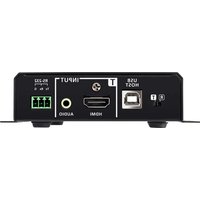


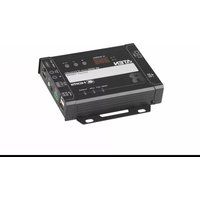
Manual assistant
Powered by Anthropic
Waiting for your message
Product information
Brand : ATEN
Model : CE602
Category : Audio/video extension