
Vaio VGC-RB34G - Desktop computer SONY - Free user manual and instructions
Find the device manual for free Vaio VGC-RB34G SONY in PDF.


Pick your language and provide your email: we'll send you a specifically translated version.
| Product Type | Desktop Computer |
| Brand | Sony |
| Model | Vaio VGC-RB34G |
| Category | Desktop Computer |
| Operating System | Windows XP Media Center Edition |
| Processor | Intel Pentium 4 (3.0 GHz) with Hyper-Threading |
| Memory | 512 MB DDR (expandable) |
| Hard Drive | 160 GB SATA |
| Optical Drive | DVD±R/RW and CD-R/RW |
| Graphics | Intel Graphics Media Accelerator 900 |
| TV Tuner | Built-in TV tuner for broadcast reception |
| Audio | High Definition Audio with built-in speakers |
| Network Connectivity | Ethernet (10/100/1000) and 56K modem |
| Ports | USB 2.0, FireWire (IEEE 1394), audio jacks |
| Dimensions (W x D x H) | 18.5 x 40.5 x 45.5 cm (7.3 x 15.9 x 17.9 in) |
| Weight | Approximately 12.5 kg (27.5 lbs) |
| Power Supply | 250 W AC adapter |
| Power Consumption | 150 W (typical) |
| Main Functions | Multi-media desktop computing, TV viewing, recording, and home productivity |
| Maintenance & Cleaning | Use a soft, dry cloth; never spray liquid directly on the system |
| Safety Features | Built-in overheat protection, approved electrical safety, and secure cover lock |
| Spare Parts & Repairability | Spare parts available via authorized Sony service centers; user-replaceable memory and drives |
| General Information | Includes media center software, user manual, and remote control for TV functions |
Frequently Asked Questions - Vaio VGC-RB34G SONY
How do I set up my Vaio VGC-RB34G for the first time?
Connect the power cable, keyboard, mouse, and monitor to the designated ports. Press the power button and follow the on-screen instructions in the Windows XP Media Center Edition setup wizard. You can also refer to the Quick Start Guide included in the manual.
How can I connect to the internet?
Use the built-in Ethernet port to plug into a router or modem. Alternatively, connect a phone line to the 56K modem and set up a dial-up connection. Configure the network settings in Control Panel > Network Connections.
How do I use the TV tuner on this desktop?
Connect an antenna or cable to the TV input on the back panel. Open the Media Center application and go to TV. Select 'Set up TV signal' and follow the steps to scan for channels. The TV tuner lets you watch and pause live television.
Can I record TV programs with the Vaio VGC-RB34G?
Yes, using the Media Center software. When watching TV, press the Record button on the remote or in the interface. You can schedule recordings by selecting Program Guide and clicking 'Record' on a future program. The shows are stored on the hard drive.
What are the steps to upgrade the RAM?
First, shut down the computer and unplug the power cable. Remove the side panel and locate the memory slots. Insert a new DDR module at a 45-degree angle until it clicks, then press down. Replace the panel and restart the system. Increase your RAM for better multi-tasking.
How do I clean the Vaio desktop safely?
Use a soft, dry cloth to wipe the outer casing. Do not use volatile liquids. For the keyboard, gently shake out debris. For the interior, use compressed air to remove dust from fans and vents. Always disconnect the power before cleaning internal components.
Are there any safety precautions I should know?
Place the computer on a stable, ventilated surface. Do not cover the vents. Use a surge protector. Avoid exposure to rain or moisture. Unplug during lightning storms. Do not attempt to open the power supply; it contains high voltage.
How do I create recovery discs for my system?
Use the VAIO Recovery Center software. Go to Start > All Programs > VAIO Recovery Center, and choose 'Create Recovery Discs'. You will need blank DVD media. Follow the prompts and store the discs in a safe place.
What should I do if the system runs slowly?
Close unused programs, run Disk Cleanup and Defragmentation. Check for malware using Windows Defender or an external tool. Increase RAM or remove unnecessary startup items via MSCONFIG. Also, check that the hard drive has at least 15% free space.
How can I connect external devices like a camera or printer?
The system has USB 2.0 ports on the front and back, plus FireWire (IEEE 1394) for video cameras. Plug in the device and Windows will automatically detect it. Install drivers if prompted. You can also connect a monitor or TV via the VGA output.
User questions about Vaio VGC-RB34G SONY
0 question about this device. Answer the ones you know or ask your own.
Ask a new question about this device
No questions yet. Be the first to ask one.
Download the instructions for your Desktop computer in PDF format for free! Find your manual Vaio VGC-RB34G - SONY and take your electronic device back in hand. On this page are published all the documents necessary for the use of your device. Vaio VGC-RB34G by SONY.
USER MANUAL Vaio VGC-RB34G SONY
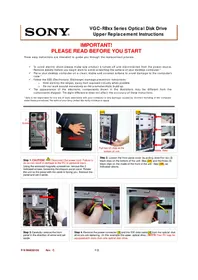
Manual assistant
Powered by Anthropic
Waiting for your message
Product information
Brand : SONY
Model : Vaio VGC-RB34G
Category : Desktop computer