
EV-122B-4 - Security Camera Enforcer - Free user manual and instructions
Find the device manual for free EV-122B-4 Enforcer in PDF.


Pick your language and provide your email: we'll send you a specifically translated version.
| Product Type | Security Camera |
| Brand | Enforcer |
| Model | EV-122B-4 |
| Mounting Type | Wall mount with adjustable bracket |
| Video Resolution | 1080p Full HD |
| Night Vision | IR LEDs for black and white image in low light |
| Motion Detection | Built-in motion sensor with alert notification |
| Field of View | 80 degree viewing angle |
| Connectivity | Wired video output for CCTV system |
| Power Supply | 12V DC adapter included |
| Weatherproof Rating | IP66 protection against rain and dust |
| Housing Material | Durable metal housing |
| Operating Temperature | -20C to 50C |
| Dimensions | Approximately 18 x 6 x 6 cm |
| Weight | Approximately 0.5 kg |
| Storage | Compatible with DVR recording systems |
| Mounting Accessories | Screws and mounting template included |
| Cleaning | Wipe the lens and housing with a soft, dry cloth |
| Safety | Disconnect power before cleaning or maintenance |
| Repairability | Spare parts available through Enforcer support |
Frequently Asked Questions - EV-122B-4 Enforcer
What is the resolution of the Enforcer EV-122B-4 security camera?
The EV-122B-4 delivers 1080p Full HD video quality for clear monitoring.
How do I install the camera outdoors?
Use the included mounting bracket, secure it with the screws, then adjust the camera to the desired angle. Make sure the connections are protected from water.
Does the camera support night vision?
Yes, it has built-in IR LEDs that provide black and white images in low light conditions.
What power adapter is needed?
The camera requires a 12V DC power adapter, which is included with the device.
Is the camera weatherproof?
The housing is rated IP66, meaning it is protected against heavy rain and dust.
How do I connect the camera to a monitor or recorder?
Use a standard video cable to connect the camera to a CCTV monitor, DVR, or capture card.
What should I do if there is no image on the screen?
Check the power connection, verify the video cable is secure, and make sure the camera is not in standby mode.
Can the camera record video?
The camera is designed to be used with a DVR recorder; it does not have built-in storage.
How do I clean and maintain the camera?
Disconnect power, then use a soft dry cloth to gently clean the lens and housing. Avoid using harsh chemicals.
Where can I find the full user manual?
The user manual is available for free download on notice-facile.com in PDF format.
User questions about EV-122B-4 Enforcer
0 question about this device. Answer the ones you know or ask your own.
Ask a new question about this device
No questions yet. Be the first to ask one.
Download the instructions for your Security Camera in PDF format for free! Find your manual EV-122B-4 - Enforcer and take your electronic device back in hand. On this page are published all the documents necessary for the use of your device. EV-122B-4 by Enforcer.
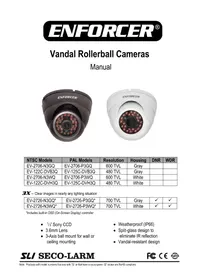
USER MANUAL EV-122B-4 Enforcer


Manual assistant
Powered by Anthropic
Waiting for your message
Product information
Brand : Enforcer
Model : EV-122B-4
Category : Security Camera