
2132 - Telephone RCA - Free user manual and instructions
Find the device manual for free 2132 RCA in PDF.


Pick your language and provide your email: we'll send you a specifically translated version.
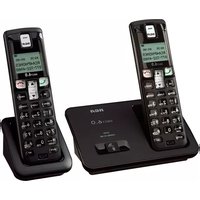
| Product Type | 2-Handset DECT 6.0 Cordless Landline Phone with Digital Answering System |
| Brand | RCA |
| Model | 2132 |
| Handsets Included | 2 handsets with charging bases |
| Expandable Handsets | Up to 5 handsets (additional units sold separately) |
| Frequency Band | DECT 6.0 (1921.536 to 1928.448 MHz) |
| Wireless Range | Up to 300 m outdoors and 50 m indoors |
| Caller ID | Caller ID and Call Waiting with 30-number call log |
| Phonebook | Up to 50 names and numbers per handset |
| Answering System | Digital answering machine with up to 20 minutes of recording time |
| Remote Message Retrieval | Access messages from any touch-tone phone using the remote access code |
| Display | Backlit LCD with clock, call timer and caller ID display |
| Speakerphone | Hands-free speakerphone on each handset |
| Ringer Tones | 10 ringer tones: 5 standard and 5 polyphonic |
| Audio Controls | Adjustable earpiece, ringer and speaker volume; mute and pause keys |
| Redial | Last 10-number redial with line access pause |
| Call Block | Block up to 20 unwanted numbers |
| Battery | 2 x AAA NiMH rechargeable batteries per handset |
| Power Adapter | Base uses 6V DC 600mA AC adapter; backup battery retains time and settings |
| Wall Mountable | Yes, base and chargers include keyhole slots for wall mounting |
| Dimensions | Handset: 7.4 x 1.8 x 1.2 in (188 x 46 x 31 mm); Base/charger: 4.4 x 7.8 x 2.3 in (112 x 198 x 58 mm) |
| Weight | Handset approx. 4.6 oz (130 g); Base/charger approx. 10.2 oz (290 g) |
| Maintenance | Clean with a soft, dry cloth; keep charging contacts free of dust |
| Safety & Certifications | FCC Part 15 compliant; Hearing Aid Compatible (HAC) |
| Spare Parts & Repairability | Replacement handsets, batteries and chargers available; no internal user-serviceable parts |
Frequently Asked Questions - 2132 RCA
How do I pair the additional handset with the base?
Place the handset on the base for 15 seconds, then press and hold the SEARCH key on the base. The handset will be registered automatically. If it does not pair, remove the battery, reinstall it, and repeat the process.
How can I set the date and time?
Press MENU, select Set Date/Time, then use the keypad to enter the hour, minutes, month, day and year. Press SAVE to confirm. The date and time will appear on the idle display.
Why does the handset show 'No line' or have no dial tone?
Check the phone line cord connections from the base to the wall jack and place the handset on the base for 10 seconds. If the problem continues, connect the base directly to the wall socket and make sure you are using the supplied line cord.
How do I access my answering machine messages remotely?
Call the phone number from a touch-tone phone, wait for the outgoing announcement, then enter the remote access code within 10 seconds. Press 1 to play new messages, 2 for all messages, and 0 to turn off the answering system.
Can I block unwanted calls?
Yes. Press MENU, choose Call Block and enter the number you want to block. You can store up to 20 numbers. Calls from blocked numbers are rejected before they ring.
How should I clean and maintain the telephone?
Unplug the power adapter and line cord, then wipe the surfaces with a soft, dry lint-free cloth. Do not use liquid cleaners, sprays or abrasive pads, and never immerse the handset or base in water.
What type of batteries does the handset need?
Each handset uses two AAA NiMH rechargeable batteries. New handsets are shipped with the battery pack installed. Replacement packs are available from RCA accessories or authorized retailers.
Why is the handset not charging?
Verify that the power adapter is connected to the charger and wall outlet, then place the handset with the display facing forward. Clean the charging contacts with a dry cloth and check that the battery contacts are correctly aligned.
Can I use the phone during a power failure?
No, this cordless phone requires AC power at the base. For emergency calls during an outage, keep a corded phone connected to the same line or use a battery backup power supply for the base.
How do I set a different ringer volume or melody?
Press MENU, choose Settings, then Ringer. Select a volume level or melody from the list and press SAVE to apply the choice to the active handset.
User questions about 2132 RCA
0 question about this device. Answer the ones you know or ask your own.
Ask a new question about this device
No questions yet. Be the first to ask one.
Download the instructions for your Telephone in PDF format for free! Find your manual 2132 - RCA and take your electronic device back in hand. On this page are published all the documents necessary for the use of your device. 2132 by RCA.
USER MANUAL 2132 RCA


Manual assistant
Powered by Anthropic
Waiting for your message
Product information
Brand : RCA
Model : 2132
Category : Telephone