
TC25424RE1 - Telephone RCA - Free user manual and instructions
Find the device manual for free TC25424RE1 RCA in PDF.


Pick your language and provide your email: we'll send you a specifically translated version.
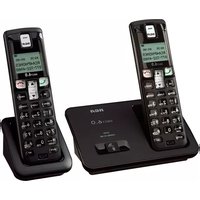
| Product Type | Corded Landline Telephone |
| Brand | RCA |
| Model | TC25424RE1 |
| Display | Caller ID LCD display |
| Dialing System | Dual-Tone Multi-Frequency (DTMF) with pulse dialing support |
| Phonebook Capacity | Up to 50 name and number entries |
| Call History/Caller ID | Stores up to 60 incoming calls |
| Redial Function | Last number redial key |
| Ringer Tone Options | Multiple selectable ringer tones |
| Volume Control | Adjustable handset and speaker volume |
| Flash/Call Waiting | Flash key for call waiting |
| Mounting Options | Desktop or wall mountable |
| Handset Cord | Standard coiled handset cord (approx. 1.5 m) |
| Power Source | Powered by the telephone line (no extra battery needed) |
| Dimensions (H x W x D) | Approx. 8.5 x 7.0 x 2.3 in (21.6 x 17.8 x 5.8 cm) |
| Weight | Approx. 1.3 lb (0.59 kg) |
| Color | Black |
| Maintenance | Wipe with a soft, dry cloth; do not use liquid or aerosol cleaners |
| Cleaning | Unplug from wall before cleaning; keep away from water and moisture |
| Safety Certifications | FCC compliant |
| Spare Parts and Repair | Contact RCA support for original replacement handsets and cords |
| General Information | Designed for home and small office use |
Frequently Asked Questions - TC25424RE1 RCA
Can the RCA TC25424RE1 be used with any telephone line?
Yes, this corded phone works with any standard RJ11 telephone jack and requires no AC power. Simply connect the included line cord and lift the handset.
How do I program speed dial numbers?
Use the phonebook function. Press the Directory key, then select an empty slot and enter the name and number. Follow the prompts on the LCD display.
How do I adjust the ringer volume?
Use the ringer switch on the base or the volume up/down buttons while the phone is idle. Choose between low, medium, high, or off.
Why is my phone not showing caller ID?
Make sure you subscribe to Caller ID from your phone company. Additionally, verify that the incoming call display is enabled and that the line cord is securely connected to the wall jack.
Can I use this phone with a VoIP adapter?
Yes, the phone is tone dialing compliant and can be used with most VoIP adapters. Switch the dialing mode to Tone before use.
How can I cancel the last missed call notification?
Press the Delete key twice or wait a few seconds after viewing the missed call list to clear the notification screen.
Does the phone have a battery backup?
No, the RCA TC25424RE1 is line powered. It continues to operate during power outages because it draws power from the phone line. However, features like LCD backlight may be unavailable.
How do I perform a factory reset?
Unplug the base unit from the wall, wait 10 seconds, then plug it back in. This clears temporary settings while preserving stored numbers in memory.
What is the maximum handset extension distance?
Since it's a corded telephone, the handset is connected by a coiled cord. The standard cord length allows a comfortable range of 1.5 meters. You can replace it with a longer RJ11 cable if needed.
Where can I find a replacement handset cord?
Replacement coiled handset cords are available from RCA customer service or most electronics retailers. Use a standard RJ9 or RJ11 4P4C connector depending on the handset jack.
User questions about TC25424RE1 RCA
0 question about this device. Answer the ones you know or ask your own.
Ask a new question about this device
No questions yet. Be the first to ask one.
Download the instructions for your Telephone in PDF format for free! Find your manual TC25424RE1 - RCA and take your electronic device back in hand. On this page are published all the documents necessary for the use of your device. TC25424RE1 by RCA.
USER MANUAL TC25424RE1 RCA


Manual assistant
Powered by Anthropic
Waiting for your message
Product information
Brand : RCA
Model : TC25424RE1
Category : Telephone