
18816 - Headphones TRUST - Free user manual and instructions
Find the device manual for free 18816 TRUST in PDF.


Pick your language and provide your email: we'll send you a specifically translated version.
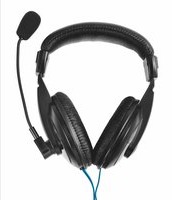
| Product Type | Over-Ear Headphones |
| Brand | TRUST |
| Model | 18816 |
| Connectivity | Wired 3.5 mm audio jack |
| Driver Size | 40 mm |
| Impedance | 32 Ohm |
| Frequency Response | 20 Hz - 20 kHz |
| Microphone | Built-in, with in-line remote |
| Cable Length | 1.2 m |
| Weight | 200 g |
| Dimensions | 18 x 16 x 8 cm (foldable) |
| Compatibility | Devices with 3.5 mm jack: smartphones, tablets, PCs, consoles |
| Adjustable Headband | Yes |
| Foldable Design | Yes, for easy storage and portability |
| Ear Cushions | Soft, padded for comfort |
| Maintenance | Clean with a soft dry cloth; avoid moisture |
| Safety Warning | Use moderate volume to prevent hearing damage |
| Spare Parts | Replacement ear cushions and cable available via manufacturer support |
| Repairability | Cable and ear pads are user-replaceable |
| General Information | TRUST model 18816 is designed for everyday use with excellent sound quality |
Frequently Asked Questions - 18816 TRUST
How do I connect the TRUST 18816 headphones to my device?
Connect the 3.5 mm audio jack to your device's headphone port. Make sure the connection is secure for optimal sound.
How do I adjust the volume on the headphones?
Use the in-line remote controls (if available) or adjust the volume on your connected device. Some models have volume buttons on the ear cup.
Why is there no sound coming from the headphones?
Check if the audio jack is fully inserted, verify the device volume is not muted, and confirm the device output is set to headphones. If the problem persists, test with another device.
How do I clean the TRUST 18816 headphones?
Use a soft, dry cloth to wipe the surfaces. Do not use water or cleaning agents, as they may damage the electronics.
Are the ear cushions replaceable?
Yes, the ear cushions are detachable and can be replaced with new ones. Contact TRUST customer support or look for compatible cushions online.
Can I use the headphones with my gaming console?
The headphones are compatible with devices that have a 3.5 mm audio jack, which includes most gaming consoles, PCs, and mobile devices.
How can I prevent hearing damage while using the headphones?
Listen at moderate volumes and take regular breaks. Prolonged exposure to high volume can cause permanent hearing damage.
What is the cable length of the headphones?
The cable is 1.2 meters long, giving you a comfortable range for most devices.
Does the headphones have a microphone?
Yes, the built-in microphone allows you to make calls or chat online. The in-line remote includes a mic and control buttons.
How should I store the headphones when not in use?
Fold the headphones into their compact size and store them in the provided pouch or a protective case to avoid damage.
User questions about 18816 TRUST
0 question about this device. Answer the ones you know or ask your own.
Ask a new question about this device
No questions yet. Be the first to ask one.
Download the instructions for your Headphones in PDF format for free! Find your manual 18816 - TRUST and take your electronic device back in hand. On this page are published all the documents necessary for the use of your device. 18816 by TRUST.
USER MANUAL 18816 TRUST


Manual assistant
Powered by Anthropic
Waiting for your message
Product information
Brand : TRUST
Model : 18816
Category : Headphones