
Roha II - Headphones TRUST - Free user manual and instructions
Find the device manual for free Roha II TRUST in PDF.


Pick your language and provide your email: we'll send you a specifically translated version.
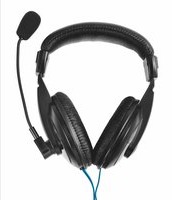
| Product Type | Wired Over-Ear Headphones |
| Brand | TRUST |
| Model | Roha II |
| Color | Black |
| Connectivity | 3.5 mm TRRS jack |
| Cable Length | 2 m |
| Driver Size | 40 mm |
| Frequency Response | 20 Hz - 20 kHz |
| Impedance | 32 Ω |
| Sensitivity | 105 dB |
| Microphone | Yes, omnidirectional |
| Microphone Frequency | 100 Hz - 10 kHz |
| Controls | Inline volume wheel |
| Compatibility | PC, Mac, PS4, PS5, Xbox One/Series X|S (controller), Nintendo Switch, smartphones, tablets |
| Ear Cushions | Soft padded, noise-isolating |
| Headband | Adjustable, lightweight |
| Weight | 190 g |
| Dimensions (W x H x D) | 190 x 175 x 75 mm |
| Power Source | None (wired via audio jack) |
| Main Features | Built-in microphone, inline volume control, noise isolation |
| Cleaning & Maintenance | Wipe with a soft dry cloth; avoid liquids |
| Safety Warnings | Do not listen at high volumes for extended periods; keep away from liquids and heat |
| Spare Parts & Repairability | Contact TRUST official support for replacement parts; no user-serviceable parts |
| General Information | TRUST Roha II headset delivers clear audio and a comfortable fit for calls and multimedia. |
Frequently Asked Questions - Roha II TRUST
How do I connect the TRUST Roha II to my computer?
Plug the 3.5 mm jack into the headphone/microphone combo port on your computer. If your computer has separate ports, use a Y-splitter (not included).
Can I use the Roha II with my mobile phone?
Yes, the headset works with any device equipped with a standard 3.5 mm audio jack, including smartphones and tablets.
How do I adjust the volume on the headset?
The Roha II features an inline volume wheel on the cable. Rotate it to increase or decrease the volume output.
How do I use the built-in microphone?
The microphone is always active when connected. Ensure it is not accidentally muted and position it close to your mouth for optimal voice pickup. It is an omnidirectional mic.
Do the headphones require batteries?
No, the TRUST Roha II is a wired headset powered directly through the audio jack, so no batteries or charging are needed.
How should I clean the headset?
Clean the ear cushions and headband with a soft, dry cloth. Do not use liquids, sprays, or abrasive cleaners, as they may damage the materials.
What should I do if there is no sound?
Check that the 3.5 mm plug is fully inserted, ensure the device volume is turned up, and confirm the correct audio output is selected. Also test on another device to isolate the issue.
Are replacement ear cushions available?
Replacement parts for the TRUST Roha II are not included in the package. Contact TRUST official support for availability and ordering options.
Does the Rohta II have active noise cancellation?
No, the headset does not feature active noise cancellation. However, the over-ear design provides passive noise isolation by physically covering the ears.
Is the TRUST Roha II compatible with Xbox consoles?
Yes, it works with Xbox One and Xbox Series X/S when plugged into the 3.5 mm jack on the controller. For older controllers without a jack, a compatible adapter is required.
User questions about Roha II TRUST
0 question about this device. Answer the ones you know or ask your own.
Ask a new question about this device
No questions yet. Be the first to ask one.
Download the instructions for your Headphones in PDF format for free! Find your manual Roha II - TRUST and take your electronic device back in hand. On this page are published all the documents necessary for the use of your device. Roha II by TRUST.
USER MANUAL Roha II TRUST


Manual assistant
Powered by Anthropic
Waiting for your message
Product information
Brand : TRUST
Model : Roha II
Category : Headphones