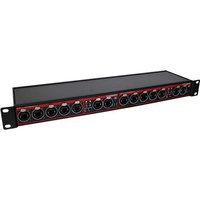
XES-8G - Switch Swisson - Free user manual and instructions
Find the device manual for free XES-8G Swisson in PDF.


Pick your language and provide your email: we'll send you a specifically translated version.
| Product Type | 8-Port Gigabit Ethernet Switch |
| Number of Ports | 8 RJ45 ports |
| Port Speeds | 10/100/1000 Mbps (10/100/1000Base-T) |
| Network Standards | IEEE 802.3, 802.3u, 802.3ab, 802.3x |
| Switching Capacity | 16 Gbps (full-duplex) |
| MAC Address Table | 8K entries |
| LED Indicators | Power, Link/Activity per port |
| Housing Material | Metal |
| Mounting | Desktop / wall-mountable |
| Power Supply | External DC adapter, 5V/1A |
| Power Consumption | < 5W |
| Dimensions (W x D x H) | 140 x 70 x 26 mm (approx.) |
| Weight | 0.4 kg (approx.) |
| Operating Temperature | 0°C to 40°C (32°F to 104°F) |
| Operating Humidity | 10% to 90% non-condensing |
| Certifications | CE, FCC, RoHS |
| Package Contents | XES-8G switch, power adapter, user manual |
| Compatibility | Plug and play with any Ethernet-enabled device |
| Cooling | Fanless, silent operation |
| Maintenance and Cleaning | Wipe with a soft dry cloth; no regular maintenance required |
| Safety | Keep away from water and heat; ensure proper ventilation |
| Spare Parts and Repairability | No user-serviceable parts; contact Swisson support for repair |
Frequently Asked Questions - XES-8G Swisson
How do I set up the Swisson XES-8G switch?
Simply connect your devices (computers, printers, routers) to the RJ45 ports using Ethernet cables. Then plug in the included power adapter. The switch will automatically start working with plug and play operation, requiring no extra configuration.
Does the XES-8G support Power over Ethernet (PoE)?
No, this model is a standard Gigabit switch and does not support PoE. You will need to power connected devices like IP cameras or access points separately.
Can I connect the XES-8G to my router to expand the number of available ports?
Yes, just use an Ethernet cable to connect one of the switch's ports to an available LAN port on your router. The switch will add 8 additional ports for your wired devices.
What types of Ethernet cables are compatible with this switch?
The XES-8G supports 10/100/1000Base-T connections, so you should use Cat5e or Cat6 cables to achieve Gigabit speeds. Category 5 cables may work at lower speeds but are not recommended.
How can I verify that each port is working correctly?
Each port has a Link/Activity LED. When a device is connected and communicating, the LED will be lit or blink. A solid green light usually indicates a stable Gigabit link, while an amber light may indicate a 10/100 Mbps connection.
Is the XES-8G a managed or unmanaged switch?
It is an unmanaged switch, which means it operates automatically with no configuration interface or settings to adjust. This makes it ideal for simple home or small office networks.
What is the maximum data transfer speed on this switch?
Each port can achieve 1000 Mbps (1 Gbps) in full-duplex mode. The total switching capacity is 16 Gbps, allowing all 8 ports to run at full Gigabit speed simultaneously without congestion.
Does this switch support VLAN or QoS features?
Since the XES-8G is an unmanaged switch, it does not support VLAN, QoS, or other advanced management features. All ports are in the same broadcast domain and treat traffic equally.
How do I reset the switch if I have issues?
An unmanaged switch typically does not need a reset. If problems occur, simply power cycle the switch by unplugging the power adapter, waiting a few seconds, and plugging it back in. Check all cable connections to ensure a secure fit.
What power adapter specifications do I need for this switch?
The switch requires an external DC power adapter delivering 5V/1A. Always use the included adapter or an equivalent with matching specs and correct polarity to avoid damage.
User questions about XES-8G Swisson
0 question about this device. Answer the ones you know or ask your own.
Ask a new question about this device
No questions yet. Be the first to ask one.
Download the instructions for your Switch in PDF format for free! Find your manual XES-8G - Swisson and take your electronic device back in hand. On this page are published all the documents necessary for the use of your device. XES-8G by Swisson.
USER MANUAL XES-8G Swisson


Manual assistant
Powered by Anthropic
Waiting for your message
Product information
Brand : Swisson
Model : XES-8G
Category : Switch