
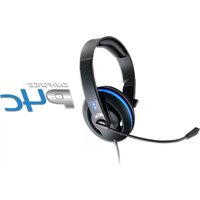
Ear Force XC1 - Headphones TURTLE BEACH - Free user manual and instructions
Find the device manual for free Ear Force XC1 TURTLE BEACH in PDF.


Pick your language and provide your email: we'll send you a specifically translated version.
| Product Type | Gaming Headset |
| Brand | Turtle Beach |
| Model | Ear Force XC1 |
| Compatibility | Xbox One, PS4, PC, Mac, Nintendo Switch, Mobile Devices |
| Connection Type | Wired 3.5mm Audio Jack |
| Design | Over-Ear, Closed-Back |
| Driver Size | 40mm |
| Frequency Response | 20Hz - 20kHz |
| Impedance | 32 Ohms |
| Sensitivity | 100 dB / mW |
| Microphone Type | Noise-Cancelling Boom Microphone |
| Microphone Frequency Response | 50Hz - 15kHz |
| Cable Length | 1.2m (4 ft) |
| In-Line Controls | Volume Wheel and Mic Mute |
| Weight | 250g (8.8 oz) |
| Ear Cushion Material | Memory Foam with Leatherette |
| Headband | Padded, Adjustable |
| Noise Isolation | Passive Noise Isolation |
| Power Source | Passive, no batteries required |
| Foldable | Yes |
| Maintenance | Wipe clean with dry soft cloth; avoid moisture |
| Safety | Do not use at high volumes for extended periods |
| Spare Parts | Ear cushions and cable may be available via manufacturer support |
Frequently Asked Questions - Ear Force XC1 TURTLE BEACH
Is the Turtle Beach Ear Force XC1 compatible with Xbox One?
Yes, the Ear Force XC1 is compatible with Xbox One via the 3.5mm headset jack on the controller. For older controllers without a 3.5mm jack, you will need the Microsoft Stereo Headset Adapter.
Can I use the headset with my PC or mobile phone?
Absolutely. Since it uses a standard 3.5mm audio interface, the XC1 works with PCs, Macs, tablets, and most smartphones with a headphone jack.
How do I set up the headset for my console?
Simply plug the 3.5mm cable into your controller or device. For Xbox One, you may need to adjust audio settings in the console’s guide. Ensure the microphone is fully inserted into the port.
Why isn't my microphone working?
Check that the mute switch is off, the mic boom is fully inserted, and the connection to your controller is secure. The mic may also be positioned too far from your mouth; adjust it for better pickup.
How can I adjust the volume and mute the microphone?
Use the in-line controls on the cable: rotate the wheel for volume, and slide the toggle to mute the mic. The mute switch typically shows a red indicator when active.
Does the headset require batteries or charging?
No, the Ear Force XC1 is a passive headset powered entirely by your device. It contains no rechargeable battery and never needs charging.
How do I clean and maintain the headset?
Wipe the ear cushions and headband with a soft dry cloth. Do not use water or harsh chemicals. Keep the headset away from moisture and extreme heat.
Can I replace the ear cushions?
Yes, the leatherette ear cushions are removable and replaceable. Contact Turtle Beach support to purchase spare cushions if replacements are needed.
What does the in-line remote control do?
The remote provides a volume control wheel and a microphone mute switch. It does not include bass boost or chat/game mix features found on premium headsets.
How can I improve comfort during long gaming sessions?
The padded headband and memory foam ear cushions offer comfort. Take regular breaks and adjust the headband size for a secure but gentle fit. The lightweight design reduces pressure on your head.
User questions about Ear Force XC1 TURTLE BEACH
0 question about this device. Answer the ones you know or ask your own.
Ask a new question about this device
No questions yet. Be the first to ask one.
Download the instructions for your Headphones in PDF format for free! Find your manual Ear Force XC1 - TURTLE BEACH and take your electronic device back in hand. On this page are published all the documents necessary for the use of your device. Ear Force XC1 by TURTLE BEACH.
USER MANUAL Ear Force XC1 TURTLE BEACH


Manual assistant
Powered by Anthropic
Waiting for your message
Product information
Brand : TURTLE BEACH
Model : Ear Force XC1
Category : Headphones