
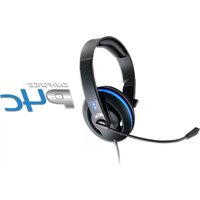
Ear Force P12 - Headphones TURTLE BEACH - Free user manual and instructions
Find the device manual for free Ear Force P12 TURTLE BEACH in PDF.


Pick your language and provide your email: we'll send you a specifically translated version.
| Product Type | Amplified stereo gaming headset |
| Brand | Turtle Beach |
| Model | Ear Force P12 |
| Compatible With | PlayStation 4/3, Xbox One/360, PC, Mac and mobile devices |
| Driver Size | 50 mm over-ear speakers |
| Audio Connection | Wired 3.5 mm plus USB or optical audio cable |
| Chat Cable | Detachable 2.5 mm chat cable for console controllers |
| Microphone | Noise-cancelling flip-to-mute boom microphone |
| Amplifier | In-line Ear Force Audio Controller with bass boost and mic monitoring |
| Controls | Master volume, mic mute, bass boost |
| Frequency Response | 20 Hz - 20 kHz |
| Impedance | 32 ohms |
| Headband Cushion | Padded headband for extended comfort |
| Ear Cushions | Soft over-ear cushions with foam padding |
| Weight | Approximately 300 g |
| Dimensions | Approximately 19 x 17 x 9 cm |
| Power Supply | 2 x AAA batteries for amplifier |
| Battery Type | 2 x AAA alkaline batteries |
| Battery Life | Up to 40 hours of use |
| Maintenance | Wipe ear cushions with a soft dry cloth; disconnect cables before cleaning |
| Safety Warning | Keep volume at safe levels to prevent hearing damage |
| Detachable Parts | Microphone, chat cable and ear cushions can be replaced |
| Repairability | Replaceable cable and ear cushions; avoid opening the ear cup housings |
| Package Contents | Headset, Ear Force Audio Controller, chat cable, USB cable and manual |
Frequently Asked Questions - Ear Force P12 TURTLE BEACH
How do I set up the Turtle Beach Ear Force P12 on PlayStation 4?
Connect the USB cable to the console for amplifier power and the 3.5 mm audio cable to the controller or TV. Attach the chat cable to your controller for in-game chat. Use the Ear Force Audio Controller to adjust volume.
Why is the microphone not working on my Ear Force P12?
Check that the chat cable is firmly connected to the controller and that the mic is not muted. The inline mute switch is on the cable; also verify the console chat settings.
How do I activate bass boost?
Locate the Ear Force Audio Controller on the headset cable and press the Bass Boost button. The LED will indicate when bass boost is active.
Does the Ear Force P12 work with Xbox One?
Yes, the Ear Force P12 works with Xbox One and Xbox 360 when connected through the 3.5 mm audio jack or the appropriate console adapter. Ensure the audio controller has fresh batteries.
Can I use this headset on PC or Mac?
Yes, connect the 3.5 mm cable to your computer's headphone jack or use the USB cable for digital audio and power.
How do I clean the headset safely?
Turn off and disconnect all cables. Wipe the ear cushions and headband with a soft, dry cloth. Do not immerse the headset in water or use harsh cleaning agents.
How long do the AAA batteries last?
With two fresh AAA alkaline batteries, the amplifier can last up to 40 hours depending on volume and bass boost usage.
Can I replace the ear cushions?
Yes, the ear cushions are detachable. Gently pull the old cushion away from the ear cup and press a new replacement cushion into place until it snaps firmly.
How do I enable mic monitoring?
Use the Mic Monitor control on the inline Ear Force Audio Controller. Turn the dial to increase the level of your own voice in the headphones for better voice control.
What should I do if there is no sound?
Check that the audio cables are fully inserted, confirm the headset is not muted, and make sure the batteries are inserted correctly. Also verify that the connected console/PC output volume is not set to zero.
User questions about Ear Force P12 TURTLE BEACH
0 question about this device. Answer the ones you know or ask your own.
Ask a new question about this device
No questions yet. Be the first to ask one.
Download the instructions for your Headphones in PDF format for free! Find your manual Ear Force P12 - TURTLE BEACH and take your electronic device back in hand. On this page are published all the documents necessary for the use of your device. Ear Force P12 by TURTLE BEACH.
USER MANUAL Ear Force P12 TURTLE BEACH


Manual assistant
Powered by Anthropic
Waiting for your message
Product information
Brand : TURTLE BEACH
Model : Ear Force P12
Category : Headphones