
Lockerstor 4RD - Server Asustor - Free user manual and instructions
Find the device manual for free Lockerstor 4RD Asustor in PDF.


Pick your language and provide your email: we'll send you a specifically translated version.
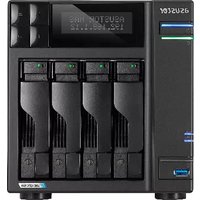
| Product Type | Network Attached Storage (NAS) Server |
| Brand | Asustor |
| Model | Lockerstor 4RD |
| Drive Bays | 4 x 3.5"/2.5" SATA HDD/SSD |
| Processor | Intel Atom C3558 Quad-Core 2.2 GHz |
| Memory | 4GB DDR4 SO-DIMM (expandable to 64GB) |
| Maximum Storage | Up to 64TB (4 x 16TB drives) |
| Network Ports | 2 x 10GbE RJ-45 + 2 x 2.5GbE RJ-45 |
| USB Ports | 2 x USB 3.2 Gen 1 (front and rear) |
| Expansion Slot | 1 x PCIe 2.0 x2 (for 10GbE or NVMe adapter) |
| HDMI Output | 1 x HDMI 1.4b |
| Power Supply | 120W external adapter |
| Dimensions (HxWxD) | 170mm x 170mm x 230mm |
| Weight | 3.5 kg (with drives installed) |
| Cooling | 2 x 70mm quiet fans |
| RAID Support | RAID 0, 1, 5, 6, 10, JBOD |
| File System | Btrfs, EXT4, SMB, NFS, AFP |
| Maintenance | Disconnect power before cleaning; use dry anti-static cloth. |
| Security | User authentication, AES-256 encryption, firewall, secure login |
| Repairability | User-replaceable fans, RAM modules, and drive trays. |
| Included Accessories | Power adapter, 2 x network cables, screw kit, quick start guide |
Frequently Asked Questions - Lockerstor 4RD Asustor
How do I install drives in the Lockerstor 4RD?
Open the drive tray handle, insert a 3.5" or 2.5" SATA drive into the tray, then slide the tray back into the bay until it clicks. Secure the tray with the lock and power on the NAS.
What RAID configurations are supported?
The Lockerstor 4RD supports RAID 0, 1, 5, 6, 10, and JBOD. Choose RAID 5 or 6 for a balance of capacity and data protection in a 4-bay setup.
How do I access the NAS from the internet?
Enable EZ-Connect or DDNS in the ADM software, then set up port forwarding on your router. You can also use Asustor's Cloud Connect service for secure remote access.
Can I expand the memory beyond 4GB?
Yes, the Lockerstor 4RD has a SO-DIMM slot that supports up to 64GB DDR4 memory. Open the case, replace the existing module or add a second one, and tighten the screws.
How do I reset the administrator password?
Press and hold the RESET button on the rear panel for 3 seconds. This will reset the admin password to 'admin' while preserving your data. For a full factory reset, hold for 10 seconds.
What are the benefits of the 10GbE ports?
The dual 10GbE ports provide ultra-fast network transfers, ideal for video editing, virtualization, and large backup jobs. Ensure your switch and cables support 10GbE to achieve full speed.
Which file systems can I use?
The NAS supports Btrfs and EXT4 for volumes, as well as network protocols like SMB, NFS, and AFP. Btrfs offers snapshots, data checksums, and advanced data protection.
Can I run Plex Media Server on this NAS?
Yes, install Plex Media Server from the ADM app store. With the Intel Atom processor and hardware transcoding capable, it can handle multiple 1080p streams, but 4K transcoding may require direct play.
How do I back up data from my PC?
Use Asustor Backup Plan for Windows, Time Machine for Mac, or set up a Rsync job for Linux. You can also schedule snapshots via Btrfs for point-in-time recovery.
Is hot-swapping supported?
Yes, the drive trays are hot-swappable. In a RAID 5 or 6 array, you can replace a failed drive without powering down the NAS. The system will automatically rebuild the array.
User questions about Lockerstor 4RD Asustor
0 question about this device. Answer the ones you know or ask your own.
Ask a new question about this device
No questions yet. Be the first to ask one.
Download the instructions for your Server in PDF format for free! Find your manual Lockerstor 4RD - Asustor and take your electronic device back in hand. On this page are published all the documents necessary for the use of your device. Lockerstor 4RD by Asustor.
USER MANUAL Lockerstor 4RD Asustor


Manual assistant
Powered by Anthropic
Waiting for your message
Product information
Brand : Asustor
Model : Lockerstor 4RD
Category : Server