
V-VMS601 - Action Camera Valore - Free user manual and instructions
Find the device manual for free V-VMS601 Valore in PDF.


Pick your language and provide your email: we'll send you a specifically translated version.
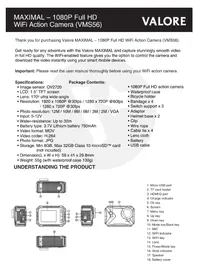
| Product type | Action camera |
| Brand | Valore |
| Model | V-VMS601 |
| Color | Black |
| Dimensions | Approximately 60 x 25 x 40 mm |
| Weight | Approximately 80 g |
| Power supply | Built-in rechargeable lithium-ion battery |
| Battery capacity | 900 mAh |
| Charging interface | Micro USB port |
| Video resolution | Up to 1080p Full HD at 30 fps |
| Photo resolution | 12 megapixels |
| Lens angle | 170-degree wide angle |
| Waterproof housing | Included, rated up to 30 m depth |
| Storage media | microSD card up to 32 GB |
| Display | Built-in LCD screen |
| Main functions | Video recording, photo capture, loop recording, time-lapse |
| Mounting | Multiple brackets and adhesive mounts included |
| Cleaning and care | Wipe with a soft dry cloth; keep the lens clean |
| Safety warnings | Do not submerge without waterproof housing; avoid high temperatures |
| Spare parts and repairability | Battery and housing are replaceable; contact Valore support for parts |
Frequently Asked Questions - V-VMS601 Valore
How do I turn on the Valore V-VMS601 action camera?
Press and hold the power/mode button for about 3 seconds until the indicator light turns on. The screen will activate and you can begin using the camera.
How do I start recording a video?
Make sure the camera is in video mode by pressing the mode button. Then press the shutter button to start recording. Press the shutter button again to stop and save the video file.
How do I charge the built-in battery?
Connect the included Micro USB cable to the camera and plug it into a USB power adapter or computer. The indicator light shows charging status. A full charge typically takes about 2 hours.
Is the V-VMS601 waterproof without a case?
No, the camera body is not waterproof. You must use the included waterproof housing when shooting underwater or in wet conditions. The housing protects the camera up to a depth of 30 meters.
Which memory card should I use?
Use a microSD card with a capacity up to 32 GB and a speed class of Class 10 or higher for smooth recording. Insert the card into the slot with the contacts facing down.
How can I transfer files to my computer?
You can connect the camera to your computer using the Micro USB cable and select 'Mass Storage' mode. Alternatively, remove the microSD card and use a card reader for faster transfer.
How do I enable loop recording?
Go to the camera's settings menu and select the loop recording option. Choose the desired clip length, such as 1, 3, or 5 minutes. Loop recording overwrites old footage when the card is full.
What should I do if the camera freezes or stops responding?
Perform a reset by pressing the reset button with a sharp object, such as a paper clip. If that doesn't work, remove the battery (if possible) and reconnect it after a few seconds.
How do I clean the lens?
Use a microfiber cloth to gently wipe the lens in a circular motion. Avoid using harsh chemicals or abrasive materials, as they may scratch the lens surface.
Can I use the camera while charging?
Yes, the V-VMS601 supports pass-through charging, allowing you to record or take photos while connected to a power source. This is useful for long recording sessions.
User questions about V-VMS601 Valore
0 question about this device. Answer the ones you know or ask your own.
Ask a new question about this device
No questions yet. Be the first to ask one.
Download the instructions for your Action Camera in PDF format for free! Find your manual V-VMS601 - Valore and take your electronic device back in hand. On this page are published all the documents necessary for the use of your device. V-VMS601 by Valore.
USER MANUAL V-VMS601 Valore
Manual assistant
Powered by Anthropic
Waiting for your message
Product information
Brand : Valore
Model : V-VMS601
Category : Action Camera