
VMS506 - Action Camera Valore - Free user manual and instructions
Find the device manual for free VMS506 Valore in PDF.


Pick your language and provide your email: we'll send you a specifically translated version.
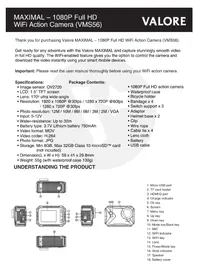
| Product type | Action camera |
| Brand | Valore |
| Model | VMS506 |
| Video resolution | Up to 1080p Full HD |
| Photo resolution | 12 megapixels (interpolated) |
| Lens angle | 170° wide angle |
| Display | 1.5-inch LCD screen for playback and settings |
| Waterproof | With included waterproof case up to 30 meters |
| Connectivity | WiFi and HDMI |
| Storage | MicroSD card slot (supports up to 32GB, not included) |
| Battery | Rechargeable lithium-ion 900 mAh |
| Charging | USB cable included |
| Mounting | Standard tripod screw and multiple mounting accessories |
| Dimensions | Approximately 60 x 40 x 25 mm |
| Weight | Approximately 100 g (including battery) |
| Power source | Built-in rechargeable battery |
| Main functions | Video recording, photo capture, time-lapse, loop recording, motion detection |
| Cleaning and maintenance | Wipe the exterior with a dry, soft cloth; keep the lens free of dust and fingerprints |
| Safety | Do not expose to high temperatures or water (without case); use the original charger |
| Spare parts and repairability | Replacement parts available through Valore support; dispose of battery according to local regulations |
| General information | Compatible with Windows and macOS; supports multiple languages in the menu |
Frequently Asked Questions - VMS506 Valore
How do I turn on the camera?
Press and hold the power button for about 3 seconds until the indicator light turns on. The camera will be in standby mode ready to record.
How do I charge the camera?
Connect the supplied USB cable to the camera and a power adapter or computer. The battery indicator will show charging status. A full charge takes approximately 2 hours.
What memory card should I use?
Use a MicroSD card with at least Class 10 speed, up to 32GB. A high-speed card is essential for smooth 1080p video recording.
How do I start recording video?
After turning on the camera, press the shutter button (or REC button) once to start recording. Press it again to stop and save the file.
Is the camera waterproof without the case?
No, the camera itself is not waterproof. You must use the included waterproof housing to dive underwater up to 30 meters. Always ensure the case is closed securely.
How do I connect the camera to WiFi?
Activate WiFi from the camera menu, then go to your phone's WiFi settings and select the camera's network (name like VMS506_XXXX). The default password is usually 12345678. Then open the companion app.
Why is my video blurry?
Make sure the lens is clean and the focus distance is appropriate for your subject. Also check that the waterproof case lens cover is free from water droplets or scratches. For stationary shots, use the tripod mount.
How do I reset the camera?
If the camera freezes, press the reset button (pinhole) with a paperclip or hold the power button for 10 seconds. Alternatively, remove and reinsert the battery if accessible.
Can I use the camera as a webcam?
Yes, if your model supports PC camera mode. Connect via USB and select 'Webcam' mode in the settings, then it will appear as a standard video device on your computer.
What is the maximum recording time per file?
The maximum file size per video is typically 4GB, which is about 15-30 minutes of 1080p footage. After that, it will automatically create a new file to continue recording.
User questions about VMS506 Valore
0 question about this device. Answer the ones you know or ask your own.
Ask a new question about this device
No questions yet. Be the first to ask one.
Download the instructions for your Action Camera in PDF format for free! Find your manual VMS506 - Valore and take your electronic device back in hand. On this page are published all the documents necessary for the use of your device. VMS506 by Valore.
USER MANUAL VMS506 Valore
Manual assistant
Powered by Anthropic
Waiting for your message
Product information
Brand : Valore
Model : VMS506
Category : Action Camera