
308A-146 - Weather Station LA CROSSE TECHNOLOGY - Free user manual and instructions
Find the device manual for free 308A-146 LA CROSSE TECHNOLOGY in PDF.


Pick your language and provide your email: we'll send you a specifically translated version.
| Product Type | Wireless Weather Station |
| Model Number | 308A-146 |
| Brand | LA CROSSE TECHNOLOGY |
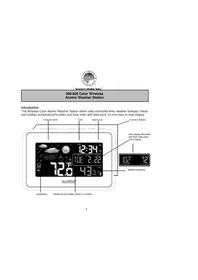
| Display Type | Large LCD with backlight |
| Indoor Temperature Range | 32°F to 122°F (0°C to 50°C) |
| Outdoor Temperature Range | -40°F to 140°F (-40°C to 60°C) |
| Indoor Humidity Range | 1% to 99% RH |
| Outdoor Humidity Range | 1% to 99% RH |
| Wireless Range | Up to 100 ft (30 m) open air |
| Signal Frequency | 433 MHz |
| Time Display | Atomic time with 12/24-hour format |
| Alarm Function | Daily alarm with snooze |
| Backlight | Blue backlight with adjustable intensity |
| Power Source (Display) | 2 AA batteries (not included) |
| Power Source (Remote Sensor) | 2 AA batteries (not included) |
| Mounting Options | Desk stand or wall mount |
| Dimensions (Display) | 8.3" x 0.6" x 5.1" (211 x 15 x 130 mm) |
| Weight (Display) | 8.1 oz (230 g) |
| Operating Temperature | 32°F to 122°F (0°C to 50°C) |
| Warranty | 1-year limited warranty |
| What's in the Box | Weather station display, remote sensor, manual |
Frequently Asked Questions - 308A-146 LA CROSSE TECHNOLOGY
How do I set the time on the La Crosse 308A-146 weather station?
Press and hold the TIME SET button for 2 seconds. Use the + or - buttons to adjust the hour, minute, year, month, and day. Press TIME SET again to confirm and move to the next field.
How do I pair the remote sensor with the display?
First, install batteries in the remote sensor. Then, place the display in PAIRING MODE by pressing and holding the CHANNEL button for 2 seconds. The display will search for the sensor and connect automatically within 3 minutes.
What does the moon phase icon on the display mean?
The moon phase icon shows the current lunar phase based on your time and date settings. It cycles through 8 phases, from new moon to full moon and back, reflecting the actual moon state.
How can I change the temperature unit from Celsius to Fahrenheit?
Press and hold the SET button to enter the settings menu. When the temperature value flashes, press the + or - button to toggle between °C and °F. Confirm with SET.
Why is the outdoor sensor signal lost and how do I fix it?
Signal loss can occur if the sensor is out of range or batteries are low. Ensure the sensor is within 100 ft (30 m) of the display. Check and replace batteries in the sensor. Press the CHANNEL button to rescan the sensor.
How do I reset the weather station to factory defaults?
Remove batteries from both the display and remote sensor. Press any button on the display for 5 seconds to discharge remaining power. Reinsert batteries and wait for the display to reboot. Then re-pair the sensor.
How to turn on/off the daily alarm?
Press the ALARM button once to view the alarm time. While viewing, press the + or - button to enable or disable the alarm. An alarm icon will appear on the display when active.
Can I mount the weather station on a wall?
Yes, the 308A-146 has a wall-mount hole on the back. Use a screw (not included) to hang it on a wall. Position it away from direct sunlight and moisture for optimal performance.
How do I clean the weather station and remote sensor?
Use a soft, dry cloth to gently wipe the exterior. Do not use water, chemical solvents, or abrasives as they may damage the plastic and display. Ensure both units are powered off before cleaning.
Does the display have a backlight and can I adjust it?
Yes, it has a blue backlight. Press the LIGHT button to cycle through brightness levels: high, medium, low, and off. The backlight defaults to a steady-on mode when powered by AC, but with batteries it may auto-off.
User questions about 308A-146 LA CROSSE TECHNOLOGY
0 question about this device. Answer the ones you know or ask your own.
Ask a new question about this device
No questions yet. Be the first to ask one.
Download the instructions for your Weather Station in PDF format for free! Find your manual 308A-146 - LA CROSSE TECHNOLOGY and take your electronic device back in hand. On this page are published all the documents necessary for the use of your device. 308A-146 by LA CROSSE TECHNOLOGY.
USER MANUAL 308A-146 LA CROSSE TECHNOLOGY

Manual assistant
Powered by Anthropic
Waiting for your message
Product information
Brand : LA CROSSE TECHNOLOGY
Model : 308A-146
Category : Weather Station