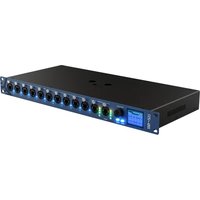
MagicQ Rack - Remote control ChamSys - Free user manual and instructions
Find the device manual for free MagicQ Rack ChamSys in PDF.


Pick your language and provide your email: we'll send you a specifically translated version.
| Brand | ChamSys |
| Model | MagicQ Rack |
| Product Type | Rack-mountable remote control for professional lighting systems |
| Dimensions | 483 × 266 × 88 mm (19" rack, 2U) |
| Weight | Approximately 4.5 kg |
| Power Supply | 100-240V AC, 50/60Hz |
| Power Consumption | 50W maximum |
| Connectivity | DMX, Ethernet, Art-Net, sACN |
| Display | Integrated LCD with multi-language support |
| Control Protocol | MagicQ software over TCP/IP |
| Main Functions | Programming, playback, and remote management of lighting cues |
| Mounting | 19-inch rack mountable, 2U height |
| Cooling | Integrated fan, front-to-rear airflow |
| Operating Temperature | 5°C to 40°C |
| Maintenance | Clean with a soft, dry cloth; avoid solvents |
| Safety | Disconnect power before cleaning or servicing |
| Spare Parts | Replacement power supply, fans, and fuses available |
| Repairability | Modular construction for easy replacement of internal components |
| Documentation | Included user manual (631 pages, PDF) |
Frequently Asked Questions - MagicQ Rack ChamSys
How do I connect the MagicQ Rack to my lighting fixtures?
Use DMX cables from the DMX output ports to your fixtures, or connect via Ethernet for Art-Net/sACN.
Can I control the MagicQ Rack remotely from a computer?
Yes, the rack can be accessed remotely via MagicQ software over a TCP/IP network.
What power cord does it need?
It uses a standard IEC C13 power cable and accepts 100-240V AC, 50/60Hz.
How do I perform a factory reset?
Hold the reset button on the rear panel for 10 seconds until the display shows confirmation.
Is the MagicQ Rack compatible with MagicQ PC software?
Yes, it integrates seamlessly with the MagicQ ecosystem, allowing shared show files and networked control.
How many DMX universes does it support?
It supports up to 4 independent DMX universes as standard, expandable via Ethernet nodes.
What maintenance does it require?
Regularly clean dust from the fan and vents, and check network and DMX connections to ensure reliable operation.
Can I mount it in a standard 19-inch rack?
Yes, it is 2U high and comes with rack ears for quick installation in a standard 19-inch rack.
How do I update the firmware?
Connect the rack to your network, open MagicQ software, and use the update option in the settings menu.
What should I do if the device doesn't power on?
Check the power cable, internal fuse, and ensure the rear power switch is on. If it still fails, consult the service section.
User questions about MagicQ Rack ChamSys
0 question about this device. Answer the ones you know or ask your own.
Ask a new question about this device
No questions yet. Be the first to ask one.
Download the instructions for your Remote control in PDF format for free! Find your manual MagicQ Rack - ChamSys and take your electronic device back in hand. On this page are published all the documents necessary for the use of your device. MagicQ Rack by ChamSys.
USER MANUAL MagicQ Rack ChamSys



Manual assistant
Powered by Anthropic
Waiting for your message
Product information
Brand : ChamSys
Model : MagicQ Rack
Category : Remote control