POMDDP50DEN1 - Dehumidifier Point - Free user manual and instructions
Find the device manual for free POMDDP50DEN1 Point in PDF.


Pick your language and provide your email: we'll send you a specifically translated version.
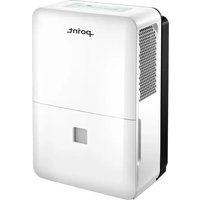
| Product Type | Dehumidifier |
| Brand | Point |
| Model | POMDDP50DEN1 |
| Dehumidification Capacity | 50 pints/day (23.7 L/day) |
| Water Tank Capacity | 5.5 L |
| Power Supply | 220-240 V ~ 50 Hz |
| Power Consumption | 500 W |
| Humidity Control | 30-80% RH adjustable |
| Display | LED with current humidity and digital setpoint |
| Operating Modes | Continuous drying, laundry mode, and smart auto mode |
| Drainage Options | Removable 5.5 L tank or continuous drain hose connection |
| Defrost Function | Automatic defrost in low-temperature conditions |
| Noise Level | 45 dB(A) |
| Dimensions (W x H x D) | 385 x 590 x 280 mm |
| Weight | 16.5 kg |
| Refrigerant | R290 |
| Air Filter | Washable, reusable filtration mesh |
| Safety Features | Automatic shut-off when tank is full, overheat protection, and auto restart |
| Spare Parts and Repair | Filter, tank, drain hose, and casters available from Point service centers |
| Included Manual | Free PDF download, 76 pages, available in EN, DA, FI, NO, SV |
Frequently Asked Questions - POMDDP50DEN1 Point
How often should I empty the water tank?
The frequency depends on the humidity level. When the water tank is full, the unit stops automatically and the tank-full indicator lights up. In a highly humid room, it can fill the 5.5 L tank in 24 hours. For continuous operation, use the drain hose.
Can I use a drain hose for continuous drainage?
Yes. Remove the tank from the bottom, connect a standard garden hose to the drain outlet, and place the other end in a floor drain. Make sure the hose is not kinked. Then select continuous mode on the display.
What is the recommended humidity setpoint?
For living rooms, set the hygrostat between 50% and 55% RH. For basements or garages, 60% RH is sufficient. Avoid setting below 40% to prevent excessive energy consumption.
How do I clean the air filter?
Turn off the unit, remove the filter frame, and rinse the washable filter in lukewarm water. Let it air dry completely before reinstalling. Clean it every two weeks to maintain airflow and efficiency.
Why does the dehumidifier exhaust warm air?
The dehumidifier draws humid air over cold coils, condenses the moisture, and passes the dry air over the warm condenser. The exhausted air is therefore slightly warmer than the room, which is normal.
Can I run it in cold rooms?
The recommended operating range is 5°C to 35°C. Below 5°C, ice can form on the coils. The automatic defrost function activates periodically to prevent damage, but the efficiency drops at very low temperatures.
How do I use the laundry drying mode?
Place the unit close to the wet clothes, select laundry mode on the control panel, and set the humidity to its highest setting. Continuous airflow will speed up drying. Leave enough space around the machine.
Is the refrigerant dangerous for my health?
The unit uses R290 refrigerant, which is flammable but safe in normal use. Do not puncture or damage the cooling circuit. Any repair that involves the refrigerant must be performed by a certified technician.
What happens after a power cut?
The dehumidifier has an auto-restart function. When the power returns, it restarts automatically with the previous settings, so you do not need to reprogram it.
Where can I obtain spare parts?
Contact the Point service center or an authorized dealer. Commonly requested parts include the water tank, air filter, drain hose, and casters. You can also find the spare parts list in the manual.
User questions about POMDDP50DEN1 Point
0 question about this device. Answer the ones you know or ask your own.
Ask a new question about this device
No questions yet. Be the first to ask one.
Download the instructions for your Dehumidifier in PDF format for free! Find your manual POMDDP50DEN1 - Point and take your electronic device back in hand. On this page are published all the documents necessary for the use of your device. POMDDP50DEN1 by Point.
USER MANUAL POMDDP50DEN1 Point
Manual assistant
Powered by Anthropic
Waiting for your message
Product information
Brand : Point
Model : POMDDP50DEN1
Category : Dehumidifier