
W200 - Lighting COLBOR - Free user manual and instructions
Find the device manual for free W200 COLBOR in PDF.


Pick your language and provide your email: we'll send you a specifically translated version.
| Product Type | LED Video Light |
| Brand | COLBOR |
| Model | W200 |
| Power Output | 200W |
| Color Temperature Range | 2700K - 6500K |
| CRI Rating | ≥96 |
| TLCI Rating | ≥97 |
| Dimming Range | 0% - 100% |
| Control Methods | On-board, Wireless Remote, Mobile App |
| Cooling System | Active cooling with silent fans |
| Mounting | Standard light stand adapter with U-mount bracket |
| Input Power | AC 100-240V, 50/60Hz |
| Dimensions (approx.) | 350 x 220 x 150 mm |
| Weight (approx.) | 2.5 kg |
| Display | LED status display |
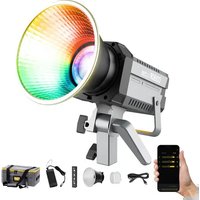
| Included Accessories | Reflector, stand adapter, power cord |
| Maintenance | Clean with a soft dry cloth; avoid touching the lens |
| Safety Precautions | Ensure proper ventilation; avoid humidity and heat sources |
| Spare Parts & Repairability | LED modules, power supplies, and controllers are available |
| General Information | Designed for professional video and photography applications |
Frequently Asked Questions - W200 COLBOR
How can I control the COLBOR W200 remotely?
You can control the W200 using the wireless remote or the mobile app. The app allows adjustment of brightness, color temperature, and other settings from a distance.
Can I use the W200 with a softbox?
Yes, the W200 is compatible with standard softboxes and other light modifiers. The included mount adapter ensures easy attachment.
What is the power consumption of the W200?
The W200 has a 200W power output. Its power consumption is approximately 220W at full brightness, depending on the AC input.
How do I clean the W200 light?
To clean the W200, use a soft, dry cloth to wipe the exterior. Avoid touching the lamp lens directly; use a lens brush if necessary. Do not use liquids.
What color temperature range does the W200 support?
The W200 supports a wide color temperature range from 2700K (warm) to 6500K (cool), allowing flexible white balance control.
Can the W200 be powered by a battery?
The W200 is primarily line-powered via AC 100-240V. For battery operation, you would need an external V-mount battery plate or a compatible power station.
Does the W200 have DMX support?
The W200 offers DMX control for integration into professional lighting setups. DMX allows centralized control alongside other fixtures.
How do I update the firmware on the W200?
Firmware updates are typically done via the mobile app over Bluetooth or through a USB port. Check the official COLBOR website for the latest firmware.
What are the safety precautions for using the W200?
Always ensure adequate ventilation around the light to prevent overheating. Keep it away from moisture and flammable materials. Do not cover the cooling fans during operation.
Does the W200 come with a carrying case?
The W200 typically includes a protective carrying bag for transport. Check the box contents; some bundles may include additional accessories.
User questions about W200 COLBOR
0 question about this device. Answer the ones you know or ask your own.
Ask a new question about this device
No questions yet. Be the first to ask one.
Download the instructions for your Lighting in PDF format for free! Find your manual W200 - COLBOR and take your electronic device back in hand. On this page are published all the documents necessary for the use of your device. W200 by COLBOR.
USER MANUAL W200 COLBOR


Manual assistant
Powered by Anthropic
Waiting for your message
Product information
Brand : COLBOR
Model : W200
Category : Lighting