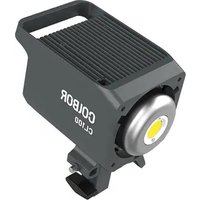
CL100 - Lighting COLBOR - Free user manual and instructions
Find the device manual for free CL100 COLBOR in PDF.


| Product Type | LED Video Light |
| Brand | COLBOR |
| Model | CL100 |
| Power Output | 100W |
| Color Temperature Range | 2700K - 6500K |
| Brightness Adjustment | 0-100% Continuous Dimming |
| CRI (Color Rendering Index) | ≥95 |
| TLCI (Television Lighting Consistency Index) | ≥95 |
| Power Supply | AC 100-240V, 50/60Hz or DC 14.4V Battery (V-Mount) |
| Dimensions (L x W x H) | 200 x 150 x 100 mm |
| Net Weight | 1.2 kg |
| Control Method | On-board Knobs and Buttons; Optional Remote Control |
| Cooling | Quiet Active Fan |
| Mounting | Standard 5/8" Stud with 1/4"-20 Adapter |
| Beam Angle (with Reflector) | 45° |
| Usage Environment | Indoor / Outdoor (with weather protection) |
| Maintenance | Wipe with dry soft cloth; avoid liquids and solvents |
| Safety Precautions | Do not cover during operation; ensure adequate ventilation |
| Spare Parts Availability | Contact COLBOR support or authorized dealers |
| Warranty | 1 year limited warranty |
Frequently Asked Questions - CL100 COLBOR
User questions about CL100 COLBOR
0 question about this device. Answer the ones you know or ask your own.
Ask a new question about this device
Download the instructions for your Lighting in PDF format for free! Find your manual CL100 - COLBOR and take your electronic device back in hand. On this page are published all the documents necessary for the use of your device. CL100 by COLBOR.
USER MANUAL CL100 COLBOR
Thank you for choosing COLBOR product. Please read this manual carefully before use and follow all instructions mentioned herein.
Caring For Your COLBOR Product
- Keep corrosive chemicals, liquids and heat source away from the product to prevent mechanical demand.
• The product is not waterproc
- Do not leave the product unattended while in use. Keep out of reach of
children,
- Must remove the COB protective cover before use.
- Do not handle with wet hands. Do not touch hot CUB surfaces. - Please do not break the ventilation and do not look at the light.
- Please do not block the ventilation and bottle, look at the light directly when it is on.
- Do not attempt to disassemble or modify the product. Doing so voids
warranty. Please have the product shelval or received by authorized technicians if you
- Please have the product malfunctions happened.
- Disconnect from the power supply when it is not in use.
- Malfunction may be caused by dropping, impact of external force.
- Failure to follow all the instructions may result in mechanics damage.
- Warranty does not apply to human errors
Product Instructions


| 1 Bowens Mount Release Latch | 8 Power Input |
| 2 LED Display Screen | 9 Umbrella Lock |
| 3 Settings Button | 10 Umbrella Input |
| 4 EFF Rate Option Button | 11 Light Base Lock |
| 5 Adjustment Dial | 12 Light Base |
| 6 EFF Mode Button | 13 Direction Adjusting Handle |
| 7 CCT Mode / Power Button |
The Ground Truth image displays a single, solid horizontal line. According to Rule 2 (UNDERSCORE & LINE RULES), this is a stylistic or background line, not a placeholder underscore. Therefore, the OCR result must ignore it and output nothing or only meaningful text. The provided OCR content is "____", which consists of four underscores. This is an incorrect interpretation of the line as a placeholder, violating the rule that stylistic lines must be ignored. The OCR has hallucinated underscores where none should exist based on the GT's visual context. Hence, the OCR result is inconsistent with the Ground Truth.
Operation Instructions
-
Connect the power and with the power adapters, give the controller of
-
Connect the power cord with the power adapter, plug the connector of adapter into the fixture's Power Input.
-
Plug it into an electricity supply
-
Long press the Power Button to turn on the light. Default Mode: CCT
-
Long press the Power Button to turn off the light.
- 2013, 45th and 19th Edition of Ann. 18th and 19th
Status Icon Description

© 19.2.2017
• (•) (•) After selecting wireless connection in Settings menu, the iron will be derived upon only.
The icon is always on to indicate successful pairing with
(1-3) The team is always on to indicate successful pairing with mobile APP.
The icon disappears to indicate mobile APP pairing
failure, or the product is unpaired.
⑦ Fan Status Icon
Smart Mode. The product will adjust the fan speed.
According to the internal detected temperature to ensure
that it is in optimal working condition.
Quiet Mode. The fan keeps running at low speed for
minimum noise, and overheating protection will be
activated if the product temperature is higher than the alarm value.
alarm v
Group Status Icon
None grouping status. The product defaults to the factory
status, and will not be affected by other groups.
A stands for Group A. There are six groups (A-F). T
stands
- 4 stands for Group 6. There are six groups (A > E).
A R stands for Rx
- Assets for Group 1. There are six groups (A, B, C)
A TR A stand stancha
Supervisory Status Index
napalatan Status Icon
If the icon is always on, it means that Repeater function
RP is turned on, and if the icon disappears, it means the function is turned off.
function & turnaround
Product Overheated
If the icon flashes, it means that the internal temperature
of the product is too high, and cooling measures need to be taken. If the lamp disasperam, it means that the
to be taken if the Ic operation is normal.
CCT Mode (Short press CCT Mode Button to enter)
Interface Introduction

BILK 1800
Brightness (0%-100%)
Color Temperature (2700K-6500K)
(No text)
Brightness / Color Temperature Control:
- Short press Adjustment Dial to switch between brightness and color
temperature control,





(No text)
- Roll the Dixi clockwise to increase value, and anticlockwise to decrease
E: Plan 103 (AP) basis to 70% (50/4850), and 20% (AP) basis to 100% (50/4850) value.






- Rolling the Deal will enlarge the current setting parameter value, and it will automatically return to the main screen after 1.5 seconds of no operation
EFF Mode (Short press EFF Mode Button to enter)
Interface Introduction
4.2 用 (SDD)
1.2.3.4
RATE L.V.
SET 270% Color Temperature
(2) 10.7.2020
Special Effect Switch: Short press EFF Mode Butte
| FF | RATE: Lv1 - Lv5DIM: 0%-100%CCT: 2700K-6500K | Fault, Bull | RATE: Lv1 - Lv5DIM: 0%-100%CCT: 2700K-6500K | |
| SCT Chase | RATE: Lv1 - Lv5DIM: 0%-100%CCT: LOCK | Walding | RATE: Lv1 - Lv5DIM: 0%-100%CCT: 2700K-6500K | |
| EFF | Pushing | RATE: Lv1 - Lv5DIM: 0%-100%CCT: 2700K-6500K | Stroke | RATE: Lv1 - Lv5DIM: 0%-100%CCT: 2700K-6500K |
| TV | RATE: Lv1 - Lv5DIM: 0%-100%CCT: LOCK | Lighting | RATE: Lv1 - Lv5DIM: 0%-100%CCT: 2700K-6500K | |
| Expansion | RATE: Lv1 - Lv5DIM: 0%-100%CCT: 2700K-6500K | SOB | RATE: LOCKDIM: 0%-100%CCT: 2700K-6500K |
广力云智慧零售收银系统
Brightness / Color Temperature Control: than 10 meters, it is recommended to use the Repeater (RP) function.
- Short press Adjustment Dial to switch between brightness or color
temperature control.

-
Short press Settings Button to control the following settings
-
Scroll down the list by rolling Adjustment Dial clockwise, or rolling
anticlockwise to scroll up.
- Short press the Dial to enter corresponding setting.
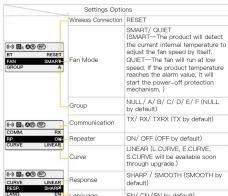
When Group function is on, if the product is operated after a period
of time, it takes time to connect between products, so there will be millisecond delay.
The effective clists
The effective distance of transmitter (TXR), receiver 0 dB, transmitter & receiver (TXRX) is 10 meters. If the product is used at a distance greater
★ Repeater (RP) function can effectively increase the control distance, but it
will affect the product response time.
It is recommended to set only one product within 10 meters diameter to
turn on the Repeater (RPI) function, the more you turn on, the slower the response during move control.
response during group control
≤slant 10m Dist > 10m

Place anywhere within
the range
The Ground Truth image displays a single, solid horizontal line. According to Rule 2 (UNDERSCORE & LINE RULES), this is a stylistic or background line, not a placeholder underscore. Therefore, the OCR result must ignore it. The provided OCR content is "____", which consists of four underscores. This is an incorrect interpretation of the line as a placeholder, violating the rule that stylistic lines must be ignored. The OCR has hallucinated text (underscores) where none should exist, violating the rule to ignore such lines. Hence, the OCR result is inconsistent with the Ground Truth.

RP function needs to be
turned on within this range
(1) 本说明仅供参考。
Specifications
Specifications
Color Rendering Index ≥ 0.7
Color Temperature Range 2700K-6500K
Beam Angle =∠ 120° (With Standard Reflector 55°)
Illumination 2998Lux (at 3.28ft / 1m 6500K, None Reflector);
10123Lux (at 3.28ft / 1m 6500K, With Standard Reflector)
Power 100W (Constant Power)
Light Working Voltage DC 15-24V 6.32A
Cooling Mode Active
Connector 68X16.3-Pin Connector
Body Material ABS
Light Dimension (mm) 202*116*117 (Light Base Not Included)
Light Weight 1.3kg/90cm
Light. Weight 100g twice Operating Temperature -10\~50°C
Package List
1 Package End
ODBOR
[NO TEXT]
π
↓
CL100 Video Light x1
Light
-
2017年
-
-
-
-
-
-
-
-
-
-
-
-
-
-
-
-
-
-
-
-
-
-
-
-
-
-
-
-
-
-
-
-
-
-
-
-
-
-
-
-
-
-
-
-
-
-
-
-
-
-
-
-
-
-
-
-
-
-
-
-
-
-
-
-
-
-
-
-
-
-
-
-
-
-
-
-
-
-
-
-
-
-
-
-
-
-
-
-
-
-
-
-
-
-
-
-
-
- 99.
-
-
-
-
-
-
-
-
-
-
-
-
-
-
-
-
-
-
-
-
-
-
-
-
-
-
-
-
-
-
-
-
-
-
-
-
-
-
-
-
-
-
-
-
-
-
-
-
-
-
-
-
-
-
-
-
-
-
-
-
-
-
-
-
-
-
-
-
-
-
-
-
-
-
-
-
-
-
-
-
-
-
-
-
-
-
-
-
-
-
-
-
-
-
-
-
COB Protective
Cover x1
[Non-Text]
WARRANTY
Warranty Period
Thank you for purchasing COLBOR products.
- Customers are entitled to free replacement
quality defect(s) found in the product under normal use within 30 days upon
receipt of the product.
- Original COLEOH products are entitled to 12-month limited warranty serv
The warranty period begins on the date of purchase of brand haw, leased products by the first end-user.
Within the warranty period, if product defect or failure is attributable to mate
defection or technological problem, the defective product or defective part
be repaired or replaced without charge (service and materials fee).
Warranty Exclusions and Limitations
- Faults resulted from inappropriate use of a product without following its
operation specification
-
Artificial damage, e.g. crash, squeeze, scratch, soaking, exposing to harm or dose
-
Modifications to a pt
consent of COLBOR, e.g. replacement of element or circuit, label alteration
- The code on product is inconsistent with that of warranty certificate, or th
code on the product or warranty certificate is altered or torn off
-
All consumable accessory attached to a product, like cable, cover
-
Faults as a result of force majeure, such as fire, flood, lightning, etc.
Warranty Claim Procedure
- If failure or any problem occurs to your product after purchase, please
contact a local agent for assistance, or you can always contact COLBOR's
customer service through email.
- Please submit your sales receipt and warranty certificate as proof of purchase. If any of these documents is missing, only sales return or chargeable.
service will be provided.
- If the COLBOR product is out of the warranty coverage, the service and the
parts cost will be charged.
| WARRANTY CERTIFICATE | |
| Please register your warranty. Meaningful, you are welcomed to contact us via Email. | |
| USER INFORMATION | Customer Name: |
| Phone Number: | |
| Email: | |
| Address: | |
| SALES INFORMATION | Search Dates: |
| Model: | |
| Product Code: | |
| Dealer: | |
| REPAIR RECORD | Service Date: |
| Technician: | |
| Issue: | |
RESULT
Solved Unsolved Returned(Replaced)
Guangzhou Zhiying Technology Co., Ltd
■ Rivalu 18th, Xin 202 Guam Jungun Fanti Liwua District Guangzhou, China: B35550
BLOCK 130CNO.269 Pangcon support@colborlight.com
www.colborlight.com
•
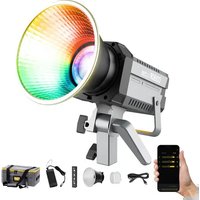
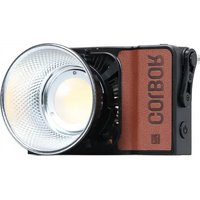

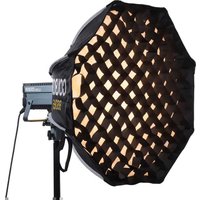
Brand : COLBOR
Model : CL100
Category : Lighting