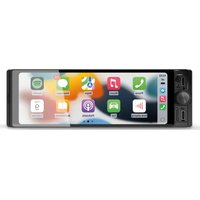
RD10 - Car radio Navitel - Free user manual and instructions
Find the device manual for free RD10 Navitel in PDF.


Pick your language and provide your email: we'll send you a specifically translated version.
| Product Type | Car Multimedia Receiver |
| Display Size | 7-inch LCD Touchscreen |
| Screen Resolution | 800 x 480 pixels |
| Number of Zones | Single |
| Radio Bands | FM/AM with RDS |
| Bluetooth | Yes, version 4.0 |
| USB Ports | 1 x USB 2.0 |
| SD Card Slot | MicroSD up to 32GB |
| Audio Line-in (AUX) | Yes, 3.5mm Jack |
| Built-in Navigation | Navitel GPS Navigation |
| GPS Support | Yes, with Antenna |
| Supported Formats | MP3, WMA, WAV, AVI, MP4 |
| Steering Wheel Controls | Compatible (via Adapter) |
| Dimensions (W x H x D) | 178 x 100 x 100 mm |
| Weight | 600 g |
| Power Supply | 12V DC (10-15V) |
| Power Output | 4 x 45W (Maximum) |
| Operating Temperature | -10°C to +60°C |
| Included Accessories | Power Cable, Mounting Trim, GPS Antenna |
| Repairability | Modular design, replaceable fuses and connectors |
| Maintenance | Gently clean the touchscreen with a microfiber cloth |
| Safety Features | Drive Safe Mode, Parking Brake Input |
Frequently Asked Questions - RD10 Navitel
How do I pair my smartphone via Bluetooth?
Activate Bluetooth on your phone and search for devices. Select 'Navitel RD10' and confirm the pairing. Use the BT MODE option on the unit to establish the connection.
How can I update the Navitel GPS maps?
Download the latest maps from the official Navitel website, copy them to a microSD card, and insert it into the device. Follow the on-screen instructions to update the navigation database.
The system is frozen. What should I do?
Perform a factory reset by pressing the reset button with a pin or using the 'Restore Defaults' option in the settings. If that fails, disconnect the car battery for a few minutes to fully reboot the unit.
Can I install a rear-view camera?
Yes, the RD10 supports an optional backup camera. Connect the camera's video cable to the AV-IN input and trigger the video feed via the reverse gear signal wire.
How do I adjust the bass and treble?
Go to the audio settings menu and select 'Equalizer'. You can adjust the low, mid, and high frequencies or choose a preset like Rock, Pop, or Classical.
Does the unit support steering wheel remote controls?
Yes, it can be wired to your vehicle's steering wheel buttons using an external adapter. Consult the manual wiring diagram to connect the Key 1 and Key 2 wires correctly.
Why is there no sound coming from the speakers?
Check that the speaker wiring is not shorted and the speaker impedance is correct. Verify the volume level and ensure the unit is not in MUTE or a source like FM with no stations. Test with another audio source.
How do I play video files from a USB drive?
Format the USB drive as FAT32, copy supported video files (AVI, MP4) to it, and insert it into the USB port. Select 'USB' mode and browse the files with the file explorer.
Can I set the clock automatically?
Use the GPS time setting in the system menu. The RD10 will sync the date and time from the GPS satellites automatically after a valid GPS fix is obtained.
Is a USB hub supported for more devices?
No, the USB port does not support hubs. Use the microSD slot for additional media or connect via AUX to expand playback options.
User questions about RD10 Navitel
0 question about this device. Answer the ones you know or ask your own.
Ask a new question about this device
No questions yet. Be the first to ask one.
Download the instructions for your Car radio in PDF format for free! Find your manual RD10 - Navitel and take your electronic device back in hand. On this page are published all the documents necessary for the use of your device. RD10 by Navitel.
USER MANUAL RD10 Navitel


Manual assistant
Powered by Anthropic
Waiting for your message
Product information
Brand : Navitel
Model : RD10
Category : Car radio