
FS 781864 N - Freezer GRAM - Free user manual and instructions
Find the device manual for free FS 781864 N GRAM in PDF.


Pick your language and provide your email: we'll send you a specifically translated version.
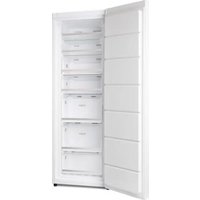
| Brand | GRAM |
| Model | FS 781864 N |
| Product type | Freezer (upright) |
| Installation type | Freestanding |
| Energy efficiency class | A++ |
| Freezer net capacity | 240 L |
| Annual energy consumption | 260 kWh |
| Noise level | 42 dB |
| Temperature range | -18 °C and below |
| Defrost type | No Frost (automatic) |
| Control type | Electronic |
| Interior light | LED |
| Number of drawers | 4 |
| Reversible door | Yes |
| Fast freeze function | Yes |
| Door opening alarm | Yes |
| Climate class | SN-T |
| Dimensions (H × W × D) | 180 × 60 × 60 cm |
| Weight | 70 kg |
| Power supply | 220–240 V, 50 Hz |
| Refrigerant | R600a |
Frequently Asked Questions - FS 781864 N GRAM
How to set the temperature on the GRAM FS 781864 N?
Use the electronic control panel to adjust the temperature. Press the temperature buttons repeatedly until the desired value is displayed. A typical setting for a freezer is -18 °C. The fast freeze function can lower the temperature quickly for freezing fresh food.
How do I defrost this freezer?
The GRAM FS 781864 N features No Frost technology, which prevents ice build-up, so manual defrosting is not required. Any excess frost is automatically removed, and the condensation is evaporated.
What does the door opening alarm indicate?
The door opening alarm activates when the freezer door has been left open for a certain time, usually 60 seconds. It helps prevent energy loss and food spoilage. Close the door to stop the sound.
How should I clean the freezer?
Unplug the freezer first. Remove the shelves and drawers, wash them with warm soapy water. Wipe the interior with a water and bicarbonate solution. Dry everything thoroughly before switching it back on.
How to transport the appliance safely?
Transport the freezer upright if possible. If it must be tilted, tilt it no more than 45 degrees. Leave the freezer standing for about 4 hours before plugging it in to allow the refrigerant to settle.
How can I save energy with this freezer?
Keep the freezer away from heat sources and direct sunlight. Do not set the temperature unnecessarily low. Use the fast freeze function only when needed. Make sure the door seals properly.
What should I do if the freezer is too cold?
If the temperature is lower than -18 °C, adjust the thermostat to a warmer setting. Check that the door is closed properly. If the issue persists, there might be a sensor fault.
How long does food stay frozen during a power outage?
A full freezer typically keeps food frozen for about 24 hours if the door is kept closed. Half-full freezers last about 12 hours. This appliance is designed with cold retention to maximize this time.
Can I remove the drawers for cleaning?
Yes, the drawers are removable. Just slide them out fully and lift slightly. Clean them with mild detergent and dry them before placing back onto the rails.
Where can I find spare parts for my freezer?
Spare parts such as shelves, drawers, door gaskets and electronic boards are available through your local GRAM dealer and official service centres. Use the model number FS 781864 N when ordering.
User questions about FS 781864 N GRAM
0 question about this device. Answer the ones you know or ask your own.
Ask a new question about this device
No questions yet. Be the first to ask one.
Download the instructions for your Freezer in PDF format for free! Find your manual FS 781864 N - GRAM and take your electronic device back in hand. On this page are published all the documents necessary for the use of your device. FS 781864 N by GRAM.
USER MANUAL FS 781864 N GRAM
Manual assistant
Powered by Anthropic
Waiting for your message
Product information
Brand : GRAM
Model : FS 781864 N
Category : Freezer