SA-15S2 - High-end CD player MARANTZ - Free user manual and instructions
Find the device manual for free SA-15S2 MARANTZ in PDF.


| Product Type | High-end stereo CD player |
| Brand | Marantz |
| Model | SA-15S2 |
| Dimensions (W x H x D) | 440 x 125 x 380 mm |
| Weight | 15.5 kg |
| Power supply | 230 V AC, 50 Hz |
| Power consumption | 35 W (operating), 0.5 W (standby) |
| Compatible formats | CD-Audio, CD-R/RW |
| Digital-to-analog converter | DAC 24-bit / 192 kHz |
| Audio outputs | Stereo analog (RCA), coaxial and optical digital |
| Signal-to-noise ratio | 120 dB |
| Total harmonic distortion | < 0.002% |
| Frequency response | 2 Hz – 20 kHz |
| Maintenance and cleaning | Clean with a soft, dry cloth. Do not use solvents. |
| Safety | Do not expose to moisture, splashes or excessive heat. Unplug before cleaning. |
| Spare parts and repairability | Spare parts not supplied. Contact authorized Marantz after-sales service. |
| Warranty | 2 years (parts and labor) |
| Supplied accessories | Power cord, remote control, user manual |
Frequently Asked Questions - SA-15S2 MARANTZ
User questions about SA-15S2 MARANTZ
0 question about this device. Answer the ones you know or ask your own.
Ask a new question about this device
Download the instructions for your High-end CD player in PDF format for free! Find your manual SA-15S2 - MARANTZ and take your electronic device back in hand. On this page are published all the documents necessary for the use of your device. SA-15S2 by MARANTZ.
USER MANUAL SA-15S2 MARANTZ
Super Audio CD player
CAUTION
RISK OF ELECTRIC SHOCK DO NOT OPEN
CAUTION: TO REDUCE THE RISK OF ELECTRIC SHOCK, DO NOT REMOVE COVER (OR BACK) NO USER-SERVICEABLE PARTS INSIDE REFER SERVICING TO QUALIFIED SERVICE PERSONNEL
The lightning flash with arrowhead symbol within an equilateral triangle is intended to alert the user to the presence of uninsulated "dangerous voltage" within the product's enclosure that may be of sufficient magnitude to constitute a risk of electric shock to persons.
The exclamation point within an equilateral triangle is intended to alert the user to the presence of important operating and maintenance (servicing) instructions in the literature accompanying the product.
WARNING
TO REDUCE THE RISK OF FIRE OR ELECTRIC SHOCK, DO NOT EXPOSE THIS APPLIANCE TO RAIN OR MOISTURE.
CAUTION: TO PREVENT ELECTRIC SHOCK, MATCH WIDE BLADE OF PLUG TO WIDE SLOT, FULLY INSERT.
ATTENTION: POUR EVITER LES CHOCSE ELECTRIQUES, INTRODUIRE LA LAME LA PLUS LARGE DE LA FICHE DANS LA BORNE CORRESPONDANTE DE LA PRESE ET POUSSER JUSQU'AU FOND.
LASER SAFETY
This unit employs a laser. Only a qualified service person should remove the cover or attempt to service this device, due to possible eye injury.
CAUTION: USE OF CONTROLS OR ADJUSTMENTS OR PERFORMANCE OF PROCEDURE OTHER THAN THOSE SPECIFIED HEREIN MAY RESULT IN HAZARDOUS RADIATION EXPOSURE.
NOTE:
This equipment has been tested and found to comply with the limits for a Class B digital device, pursuant to Part 15 of the FCC Rules. These limits are designed to provide reasonable protection against harmful interference in a residential installation. This equipment generates, uses and can radiate radio frequency energy and, if not installed and used in accordance with the instructions, may cause harmful interference to radio communications. However, there is no guarantee that interference will not occur in a particular installation. If this equipment does cause harmful interference to radio or television reception, which can be determined by turning the equipment off and on, the user is encouraged to try to correct the interference by one or more of the following measures:
- Reorient or relocate the receiving antenna.
- Increase the separation between the equipment and receiver.
- Connect the equipment into an outlet on a circuit different from that to which the receiver is connected.
- Consult the dealer or an experienced radio/TV technician for help.
NOTE:
Changes or modifications may cause this unit to fail to comply with Part 15 of the FCC Rules and may void the user's authority to operate the equipment.
IMPORTANT SAFETY INSTRUCTIONS
READ BEFORE OPERATING EQUIPMENT
This product was designed and manufactured to meet strict quality and safety standards.
There are, however, some installation and operation precautions which you should be particularly aware of.
- Read these instructions.
- Keep these instructions.
- Heed all warnings.
- Follow all instructions.
- Do not use this apparatus near water.
- Clean only with dry cloth.
- Do not block any ventilation openings. Install in accordance with the manufacture's instructions.
- Do not install near any heat sources such as radiators, heat registers, stoves, or other apparatus (including amplifiers) that produce heat.
- Do not defeat the safety purpose of the polarized or grounding-type plug. A polarized plug has two blades with one wider than the other. A grounding type plug has two blades and a third grounding prong. The wide blade or the third prong are provided for your safety. If the provided plug does not fit into your outlet, consult an electrician for replacement of the obsolete outlet.
- Protect the power cord from being walked on or pinched particularly at plugs, convenience receptacles, and the point where they exit from the apparatus.
- Only use attachments/accessories specified by the manufacturer.
- Use only with the cart, stand, tripod, bracket, or table specified by the manufacturer, or sold with the apparatus. When a cart is used, use caution when moving the cart/apparatus combination to avoid injury from tip-over.
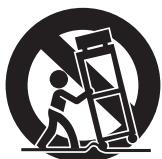
- Unplug this apparatus during lightning storms or when unused for long periods of time.
- Refer all servicing to qualified service personnel. Servicing is required when the apparatus has been damaged in any way, such as power-supply cord or plug is damaged, liquid has been spilled or objects have fallen into the apparatus, the apparatus has been exposed to rain or moisture, does not operate normally, or has been dropped.
Additional Safety Information!
- This product should not be placed in a built-in installation such as a bookcase or rack unless proper ventilation is provided or the manufacturer's instructions have been adhered to.
- Apparatus shall not be exposed to dripping or splashing and that no objects filled with liquids, such as vases, shall be placed on the apparatus.
- When the switch is in the OFF position, the apparatus isn't completely switched-off from the MAINS.
- The equipment shall be installed near the power supply so that the power supply is easily accessible.
- Do not expose the unit and batteries to excessive heat such as direct sunlight, fire or the like.
- Make a space of about 4 inches (0.1 m) around the unit.
ENGLISH
WARRANTY
For warranty information, contact your local Marantz distributor.
RETAIN YOUR PURCHASE RECEIPT
Your purchase receipt is your permanent record of a valuable purchase. It should be kept in a safe place to be referred to as necessary for insurance purposes or when corresponding with Marantz.
IMPORTANT
When seeking warranty service, it is the responsibility of the consumer to establish proof and date of purchase. Your purchase receipt or invoice is adequate for such proof.
FOR U.K. ONLY
This undertaking is in addition to a consumer's statutory rights and does not affect those rights in any way.
FRANCAIS
GARANTIE
English
The SA-15S2 is in conformity with the EMC directive and low-voltage directive.
C Frangois
- Do not expose the equipment to rain, moisture, dripping or splashing.
- Do not remove the cover from the equipment.
- Do not insert anything into the equipment through the ventilation holes.
- Do not handle the mains cord with wet hands.
- Do not cover the ventilation with any items such as tablecloths, newspapers, curtains, etc.
- No naked flame sources, such as lighted candles, should be placed on the equipment.
- When disposing of used batteries, please comply with governmental regulations or environmental public instruction's rules that apply in your country or area.
- Make a space of about 0.1 meter around the unit.
- No objects filled with liquids, such as vases, shall be placed on the equipment.
- When the switch is in the OFF position, the equipment is not completely switched off from MAINS.
- The equipment shall be installed near the power supply so that the power supply is easily accessible.
- Do not expose the unit and batteries to excessive heat such as direct sunlight, fire or the like.
Français
AVERTISSEMENTS
Information for Users on Collection and Disposal of Old Equipment and used Batteries
When discarding the unit, comply with local rules or regulations.
Batteries should never be thrown away or incinerated but disposed of in accordance with the local regulations concerning battery disposal.
Thank you for selecting the Marantz Super Audio CD Player for your Audio system. This Player incorporates a number of features designed to enhance the listening of your favorite audio sources.
Please read these operating instructions carefully. We recommend that you read the entire user guide before you attempt to connect or operate the player.
After you have reviewed the contents of this manual, we suggest that you make all system connections before you attempt to operate the unit.
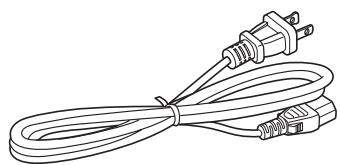
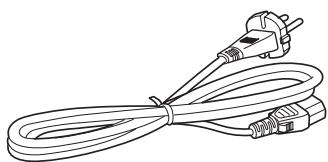
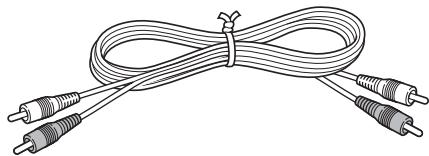
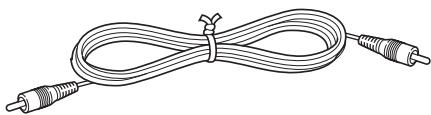
Checking the accessories
After opening the cover of the packing box, check that the following accessories are included.
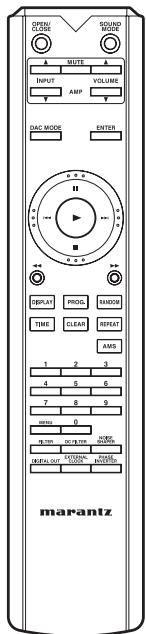
- Remote controller
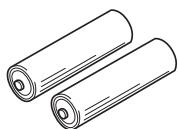
- Size "AAA" batteries x 2
- AC Power cord
(U.S.A.)
(Europe)
Audio connecting cord
- Remote control connecting cord
- User Guide
- Warranty card (U.S.A.)
(U.S.A. x 1, Canada x 1)
A NOTE ABOUT RECYCLING
This product's packaging materials are recyclable and can be reused. This product and the accessories packed together are the applicable product to the WEEE directive except batteries.
Please dispose of any materials in accordance with your local recycling regulations.
When discarding the unit, comply with your local rules or regulations.
Batteries should never be thrown away or incinerated but disposed of in accordance with your local regulations concerning chemical wastes.
CONTENTS
FEATURES 3
APPLICABLE DISCS TO THE UNIT 4
BEFORE USING 5
USAGE OF REMOTE CONTROLLER 6
NAMES AND FUNCTIONS
FRONT PANEL 7
REMOTE CONTROLLER 8
REAR PANEL 9
DISPLAY 10
BASIC CONNECTIONS 11
CONNECTING TO AN AMPLIFIER 11
CONNECTING THE POWER SUPPLY 11
BASIC OPERATION 12
NORMAL PLAYBACK 12
PLAYING YOUR FAVORITE TRACKS OF A DISC 13
PLAYING YOUR FAVORITE PARTS OF A DISC (SEARCH) 13
ADVANCED CONNECTIONS 14
CONNECTING TO A DIGITAL AUDIO COMPONENT 14
CONNECTING THE DIGITAL AUDIO INPUT TERMINAL 15
REMOTE CONTROL CONNECTION 15
TIMER PLAY 16
REPEATED DISC PLAY (REPEAT PLAY) 17
PLAYING TRACKS IN A RANDOM SEQUENCE (RANDOM PLAY) 18
PLAYING TRACKS IN A SPECIFIC SEQUENCE (PROGRAM PLAY) 18
TO CHECK THE PROGRAMMED TRACKS 19
SEARCHING YOUR FAVORITE TRACKS (AMS (AUTOMATIC MUSIC SCAN) PLAY) ....19
SWITCHING SOUND MODE (SUPER AUDIO CD) 20
SETTING THE DIGITAL OUTPUT 21
USING AS A D/A CONVERTER (DAC MODE) 21
FILTER SELECTION 22
TURNING OFF THE DISPLAY AND ILLUMINATION (DISPLAY OPERATION) 22
TROUBLESHOOTING 23
OTHERS 24
SPECIFICATIONS & DIMENSIONAL DRAWINGS 25
NOTES ABOUT THE DISCS 26
FEATURES
This unit can play back the outstanding sound performance of Super Audio CDs. This unit has the following major features.
- Low-noise low-distortion filter circuit and high-speed HDAMSA2-type output amplifier with the differential input type HDAM
- Playback of CD-R/CD-RW discs
- Playback of CD-R/CD-RW/CD-ROM discs containing WMA and MP3 files
- Toroidal transformer
The SA-15S2 features a toroidal transformer that produces less vibration and magnetic leakage flux compared to conventional power transformers. The materials and manufacturing process of the ring-shaped core are strictly controlled to reduce vibration, while the short-ring attached to the perimeter of the transformer reduce magnetic leakage flux.
- Equipped with highly-selected audio parts
The unit comes with the same custom power block capacitor used in the SA-7S1. The unit's power rectifier diode and regulator are also top-of-the-line.
- Headphone circuit component upgrade
The unit comes with a fully discrete headphone output circuit and we've upgraded the circuits and components from the highly acclaimed SA-15S1 for improved audio texture and expressiveness. - DAC Mode
By connecting devices with digital outputs, such as CD transports or MD recorders, to the unit's DIGITAL AUDIO IN terminal, the unit can be used as a D/A converter.
You can further enhance music tracks by playing them through the unit's high-performance, high-sound-quality circuits.
- Double-layered chassis
- High-grade machined analog audio output connectors
FEATURES
APPLICABLE DISCS TO THE UNIT
1. Super Audio CD
SUPER AUDIO CD
The Super Audio standard is based on Direct Stream Digital (DSD) technology. This new direct-stream digital format comprises a 1-bit system that has a digital sampling frequency that is 64 times higher than that of conventional audio CD. The results are spectacular: a frequency response of over 100kHz and a 120dB dynamic range over the entire audible spectrum. Mixed with as many of the original frequencies as possible, the audio information audible for human ears sounds much more natural.
All audible frequencies are, after all, embedded in the frequency range as emitted by the sound source. A better reproduction does not exist! For the first time your ears will relive reality.
There are three types of Super Audio CDs.
- Single-layer Disc
- Dual-layer Disc
- Hybrid-layer Disc
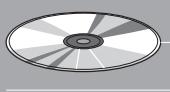
Disc Types Single-layer Disc
HD layer
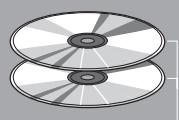
Dual-layer Disc
HD layer
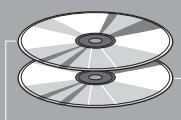
Hybrid-layer Disc
CD layer
HD layer
And each type may contain two areas of recorded information.
- High quality stereo area
- High quality multi-channel area**
- Single Layer Disc
It can contain both high quality stereo area and high quality multi-channel area** information.
- Dual Layer Disc
It can contain both high quality stereo area and high quality multichannel area** information. And a double amount of information can be stored on the disc thanks to the second layer.
- Hybrid Layer Disc
Not only does this disc contain both high sound quality stereo area and high sound quality multi-channel area** information, it also has a CD layer in the second layer, so it can be played on a CD player.
Hybrid Super Audio CD Disc

SUPERAUDIO CD
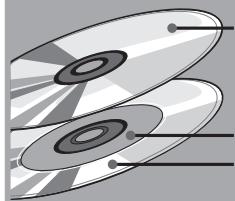
1 CD layer that plays on any of your existing CD players
High-Density layer containing:
2 - High sound quality stereo
3 - High sound quality multi-channel**
The number of tracks recorded may vary per layer.
**This unit is a stereo-only player, and so it cannot play high-quality multi-channel audio areas. (It does not recognize multi-channel areas.)
2. Audio CD (CDDA)
Audio CDs contain music tracks only.
3.CD-R / CD-RW
This unit can play back the CD-RW (ReWritable) discs as well as ordinary Audio CD and CD-R (Recordable) discs.
- The CD-R and CD-RW discs should contain properly-recorded TOC* information so that they can be played back. In CD recorders, the task of writing TOC information is referred to as finalizing the disc. Discs that are not finalized cannot be properly recognized as an Audio CD and played back by regular CD players and Super Audio CD players. For details, please read the instruction manual provided with a CD recorder.
- TOC stands for Table Of Contents and contains information such as the total number of tracks and total playing time of the disc.
- As the playback of a CD-RW disc necessitates partial change of the player setup, it may take longer time for reading the TOC information than when an Audio CD or CD-R disc is played.
BEFORE USING
This section must be read before any connection is made to the mains supply.
Equipment mains working setting
Your Marantz product complies with the household power and safety requirements in your area.
Power requirements (U.S.A.) AC 120V 60Hz
Power requirements (Europe)AC 230V 50/60Hz
Copyright
Recording and playback of any material may require consent.
For further information refer to the following:
Copyright Act 1956
— Dramatic and Musical Performers Act 1958
— Performers Protection Acts 1963 and 1972
— any subsequent statutory enactments and orders
Inappropriate places for installation
To keep your player in perfect working order for the longest possible time, avoid installing the player in the following locations.
- Wherever it will be exposed to direct sunlight
- Wherever it will be close to a heater or other heat-radiating appliance
- Wherever the humidity is high or ventilation is poor
- Wherever it is very dusty
- Wherever it will be subject to vibration
- On top of a rickety stand or in an unstable location which is tilted at an angle
- On top of an amplifier or other component which dissipates a great deal of heat
- In an audio rack with little space at the top and bottom or other location where the heat dissipation will be obstructed.
To ensure proper heat dissipation, install the player while leaving clearances between the player and wall or other components, as shown in the figure below.
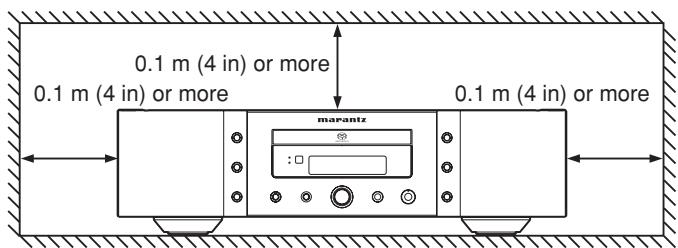
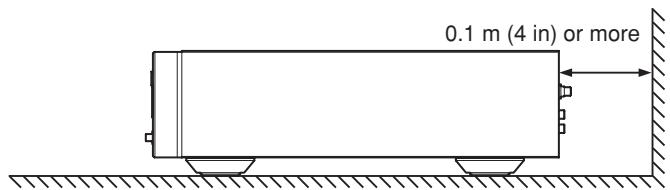
Do not place objects on top
- Refrain from placing any objects on top of the player.
Cautions on handling mains cord
- Do not touch the mains cord with wet hands.
- When disconnecting the mains cord, always make sure that you take hold of the plug. Yanking out or bending the cord can damage it and/or cause electric shocks or a fire.
- Get into the habit of disconnecting the power plug before leaving home.
■ Do not attempt repairs yourself
- Refrain from lubricating the player: doing so can cause malfunctioning.
- Only qualified engineers with specialized expertise are authorized to repair the pick-up and parts inside the player.
Precautions
-
In winter, droplets of water form on the insides of the windows of a heated room: this is called condensation. This CD player uses an optical lens, so the condensation may form in the following cases.
-
In a room immediately after the heating has been turned on
- In a room where the humidity level is high
- When the player has been suddenly brought from a cold location into a warm room
Since, in cases like this, the track numbers may not be read and the player is prevented from operating properly, wait about 30 minutes, and then operate the player.
- This player may cause interference on a tuner or TV set. If this is the case, place it further away from the tuner or TV set.
- Compact discs have much less noise than analog records and hardly any noise is heard before play starts. Bear in mind, therefore, that if the volume control on the amplifier is set too high, you will risk damaging other audio components.
- This audio player is for the exclusive playing of Audio CDs (Compact Discs) and MP3/WMA compressed data files.
It cannot play CD-ROMs used with personal computers, game CDs, video CDs, DVDs (video/audio) or DTS-CDs.
- We do not recommend the use of lens cleaners.
- When listening to a performance through headphones connected to the unit while the power for the amp, receiver, or stereo system connected to the unit are turned off, the sound of the performance may change depending on the type of model connected to the unit (for example: input shorted type models). There is nothing wrong with the unit.
BEFORE USING
Before using the remote controller for the first time, load the batteries in the remote controller. The batteries provided are used to verify the operations of the remote controller only.
- Remove the battery cover.
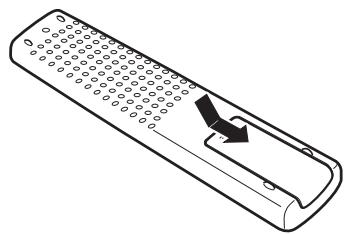
- Insert the batteries with correct / orientation.
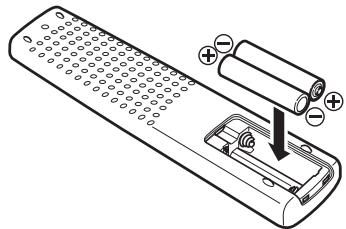
- Close the battery cover until it clicks shut.
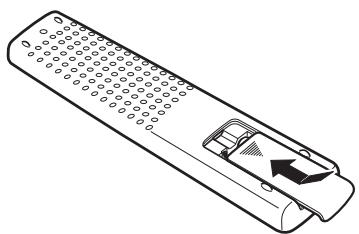
Cautions on handling batteries
Misuse of the batteries can result in electrolyte leakage, rupturing, corrosion, etc.
Bear in mind the following points when using batteries.
- Remove the batteries from the remote control unit if the unit is not going to be used for a prolonged period (a month or more).
- Do not use an old battery together with a new one.
- Insert the batteries while ensuring that their and poles are properly aligned with the corresponding markings on the remote control unit.
- Batteries with the same shape may have different voltages. Do not use different types of batteries together.
- If electrolyte has leaked, thoroughly wipe the inside of the battery compartment, and then insert new batteries.
- When batteries which are no longer required are to be discarded, follow the directions (regulations) laid down by the local authorities in the area concerned for their disposal.
Operational range
Operate the unit with the remote controller within the range of the illustration below.
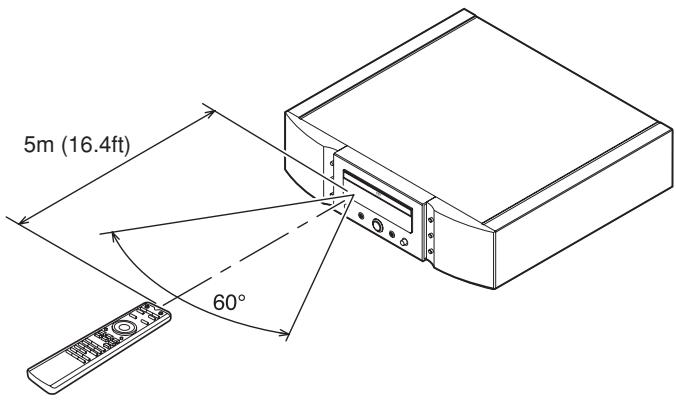
Precautions
- Do not allow direct sunlight, an inverter fluorescent light or other strong source of light to shine onto the player's infrared signal reception window (remote sensor). Otherwise, the operation of the remote control unit may be disabled.
- Bear in mind that operating the remote control unit may cause other devices operated by infrared rays to be operated by mistake.
- The remote control unit cannot be operated if the space between the controller and the player's remote sensor is obstructed.
- Do not place any objects on top of the remote control unit. Doing so may cause one or more buttons to be held down which will cause the batteries to run down.
NAMES AND FUNCTIONS
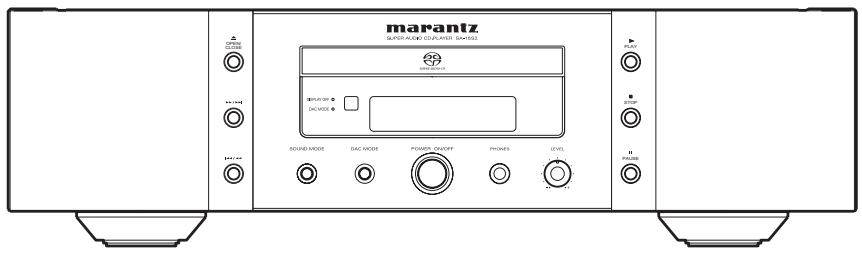
FRONT PANEL
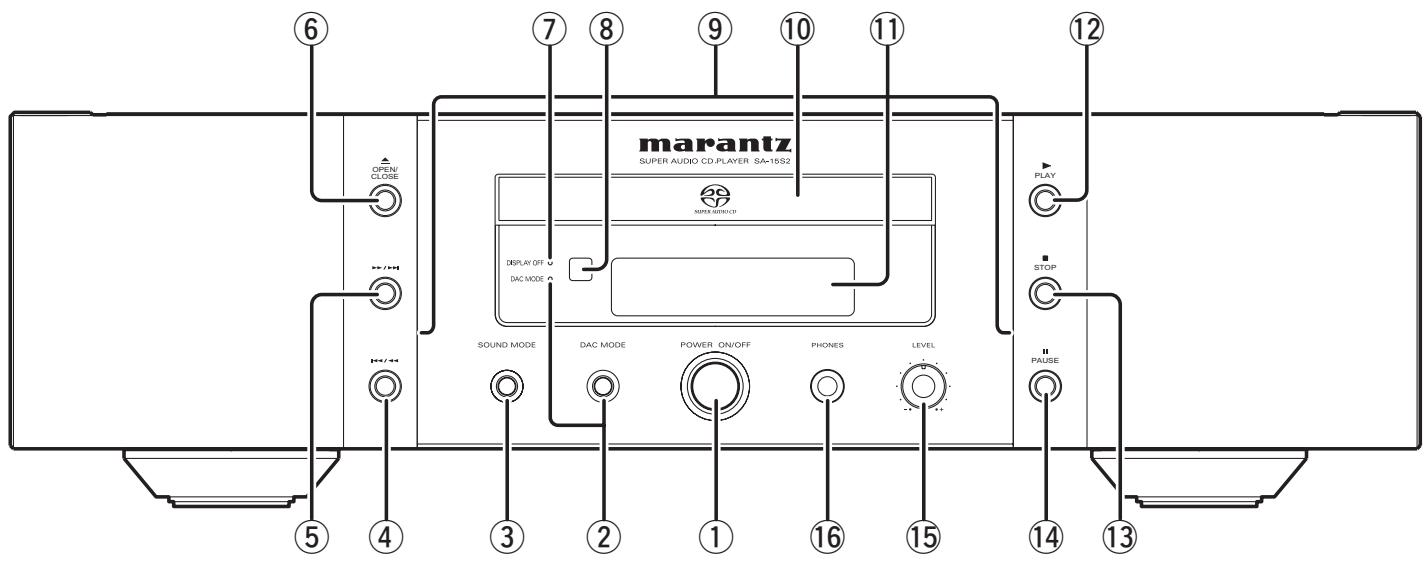
① POWER ON/OFF switch
This switch is used to turn the power ON and OFF.
When it is pressed, the display window lights up, and the power comes on. When it is pressed again, the display window is extinguished and the power goes off. (See page 12)
② DAC MODE button DAC MODE indicator
Use this button to use the unit as a D/A converter.
When the button is pressed and the unit enters DAC mode, the DAC MODE indicator lights up. (See page 21)
③ SOUND MODE button
Use this button to select the Super Audio CD disc sound mode.
(Track Skip/Search) button
(See page 13)
(5) / (Search/Track Skip) button
(See page 13)
(6) (Open/Close) button
(See page 12)
⑦ DISPLAY OFF indicator
(See page 22)
Remote sensor
This sensor senses the infrared control signals sent from the remote control unit.
⑨ Illumination lamp
This lamp lights up when the display window lights up.
The lamp can also be set so that it always remains off. (See page 22)
⑩ Disc tray
The disk to be played is placed on the tray. (See page 12)
⑪ LCD display
(See page 10)
(Play) button
(See page 12)
(Stop) button
(See page 12)
14 II (Pause) button
(See page 12)
LEVEL (headphones level) control
This is used to adjust the headphones volume level. The level increases when turned clockwise.
16 PHONES (headphones) jack
The headphones are connected to this jack. Use headphones that come with a standard plug.
NAMES AND FUNCTIONS
REMOTE CONTROLLER
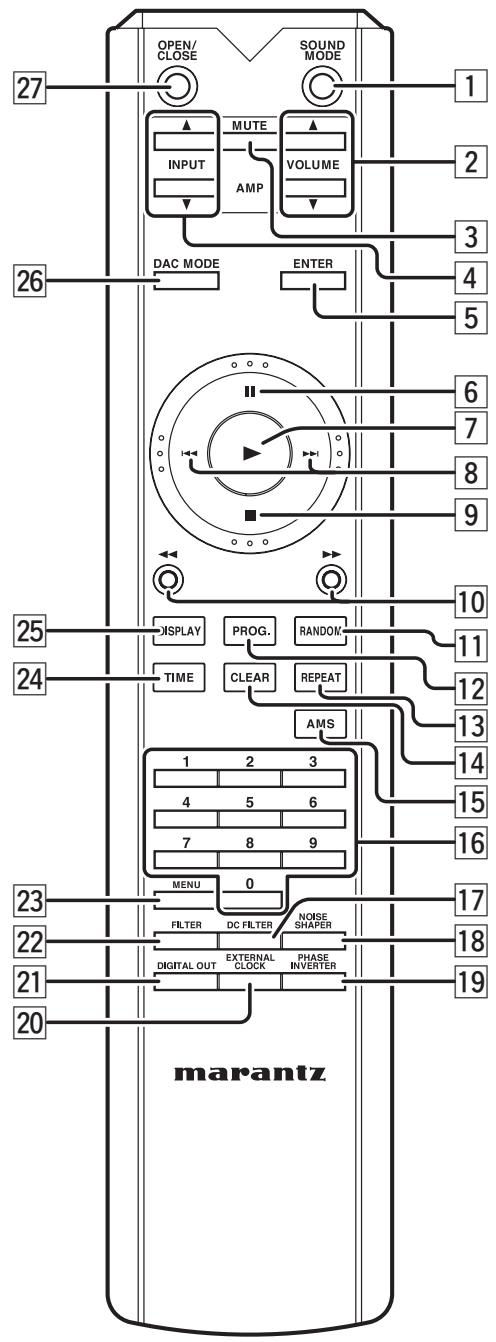
1 SOUND MODE button
(See page 20)
2 VOLUME / buttons
This button can be used to adjust the volume of devices compatible with Marantz amplifiers that come with a remote controller.
3 MUTE button
This button can activate the mute function of devices compatible with Marantz amplifiers that come with a remote controller.
4 INPUT / buttons
These buttons are used to switch the input when using one of the supported Marantz amplifiers. However, this function may not work with some of the older models.
5 ENTER button
This button is used to confirm menu settings.
6 II (pause) button
(See page 12)
7 (play) button
(See page 12)
8 | , , (track skip) buttons
(See page 13)
9 (stop) button
(See page 12)
10 , (search) buttons
(See page 13)
11 RANDOM button
(See page 18)
12 PROG. button
(See page 18)
13 REPEAT button
(See page 17)
14 CLEAR button
(See page 19)
15 AMS (Automatic Music Scan) button
(See page 19)
16 0-9 (numeric) buttons
(See page 12)
17 DC FILTER button
This button cannot be used on this unit.
18 NOISE SHAPER button
This button cannot be used on this unit.
19 PHASE INVERTER button
This button cannot be used on this unit.
NAMES AND FUNCTIONS
20 EXTERNAL CLOCK button
This button cannot be used on this unit.
21 DIGITAL OUT button
Press this button when switching the digital output of an audio CD signal on/off. (See page 21)
22 FILTER button
Press this button when setting the filter. (See page 22)
23 MENU (menu setting) button
Use this button to set the Timer Play and the Start Sound Mode function.
24 TIME button
Press this button when switching the main display area from text display to time display. (See page 17)
25 DISPLAY button
Press this button when switching the display ON and OFF. The last setting is retained even if the power is turned off.
26 DAC MODE button
Use this button to use the unit as a D/A converter. (See page 21)
27 OPEN/CLOSE button
(See page 12)
REAR PANEL
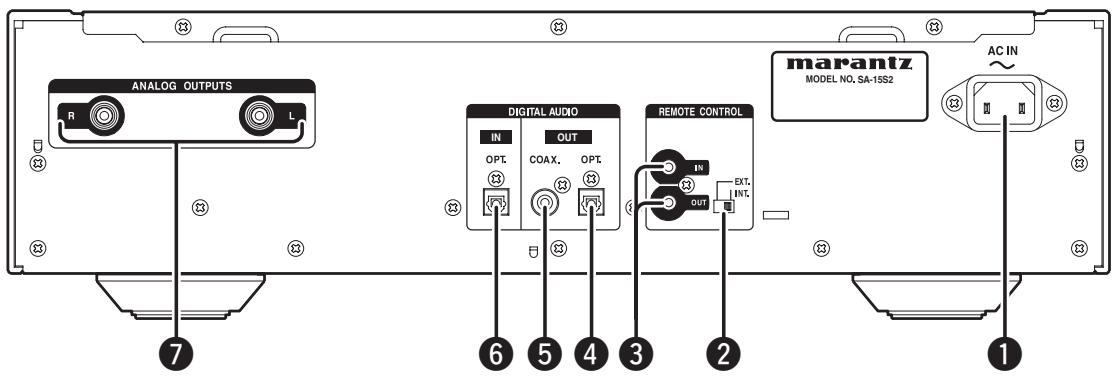
Power cord connector socket
Use the supplied power cord to connect the unit to a standard household power supply outlet.
Connect the player so that the power cord can be removed easily as a precaution against possible accidents.
EXTERNAL / INTERNAL (external/internal) switch
The switch is set to INTERNAL at factory shipping, enabling use of the player's built-in remote sensor. When connecting the remote control connector of this player to a Marantz unit using the supplied connecting cable, set this switch to EXTERNAL. (See page 15)
REMOTE CONTROL IN / OUT (remote control IN and OUT) connectors
These connectors are used to connect the player to a Marantz audio component equipped with remote control connectors using the supplied remote control connecting cable. (See page 15)
DIGITAL AUDIO OUT OPTICAL (optical digital output) connector
This optical output connector performs digital output of the music signal of the audio CD during playback. (See page 14)
⑤ DIGITAL AUDIO OUT COAXIAL (coaxial digital output) connector
This coaxial digital output connector performs digital output of the music CD of the audio CD during playback. (See page 14)
DIGITAL AUDIO IN OPTICAL (optical digital input) terminal
This optical input terminal is for digital input when using the unit as a D/A converter. (See page 15)
7 ANALOG OUT (analog output) connector
This connector outputs the music signal during playback. (See page 11)
NAMES AND FUNCTIONS
DISPLAY
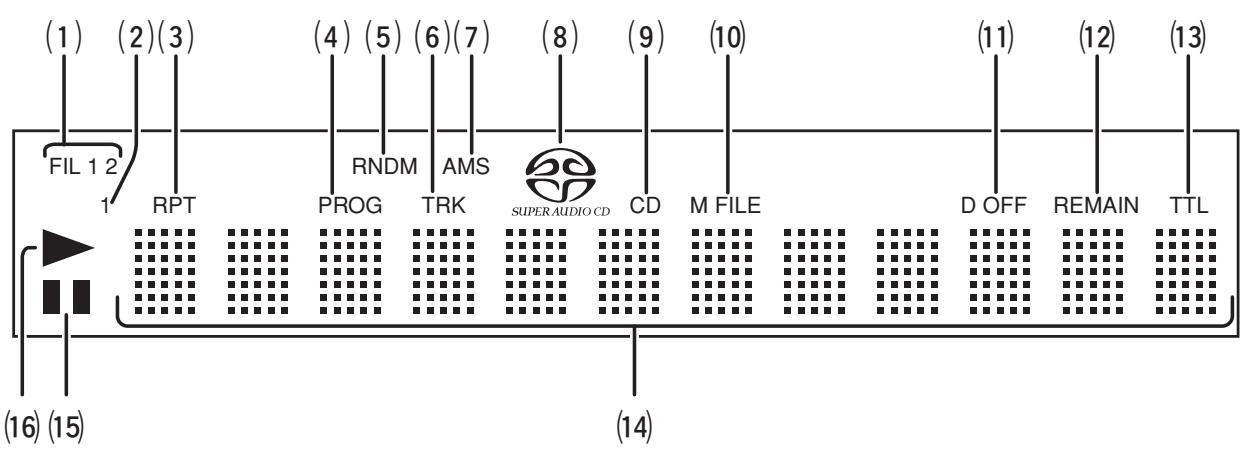
(1) FIL 1 2 (filter 1, filter 2) indicator
This indicates whether filter 1 or filter 2 is currently selected.
(2) 1 (repeat) indicator
This indicator lights up during repeat play of one track.
(3) RPT (repeat) indicator
This indicator lights up during repeat play.
(4) PROG (program) indicator
This indicator lights up during program play.
(5) RNDM (random) indicator
This indicator lights up during random play.
(6) TRK (track) indicator
This indicator lights up above the display of the track number currently being played.
(7) AMS (automatic music scan) indicator
This lights up during AMS playback.
(8) SUPER AUDIO CD indicator
This indicator indicates the type of disc on the disc tray (Super Audio CD).
(9) CD indicator
This indicator indicates the type of disc on the disc tray (CD).
(10) M FILE indicator
This indicator indicates the type of disc on the disc tray (WMA/MP3).
(11) D OFF (digital output OFF) indicator
This indicator lights up when the digital output setting of the audio CD signal is set to OFF. (See page 21)
(12) REMAIN (remaining time) indicator
This indicator lights up above the remaining playback time of a track, when it is displayed.
(13) TTL (total time) indicator
This indicator lights up above the total remaining time or the total program time, when it is displayed.
(14) Main display area
This area displays the time display and text information of the disc to be played, as well as the setting menu items, etc.
(15) II (pause) indicator
This indicator lights up when play is paused.
(16) (play) indicator
This indicator lights up during disc play.
BASIC CONNECTIONS
This CD player is connected to an amplifier, CD recorder and other components for use. To ensure that the components are connected properly, refer to the instruction manuals that come with the components to be connected.
Before connecting the components, be absolutely sure to turn off their power.
CONNECTING TO AN AMPLIFIER
Use the audio connecting cord to connect the player with a stereo amplifier or AV amplifier.
When making the connections, insert the plugs securely into the connectors. Failure to insert the plugs securely may result in noise.
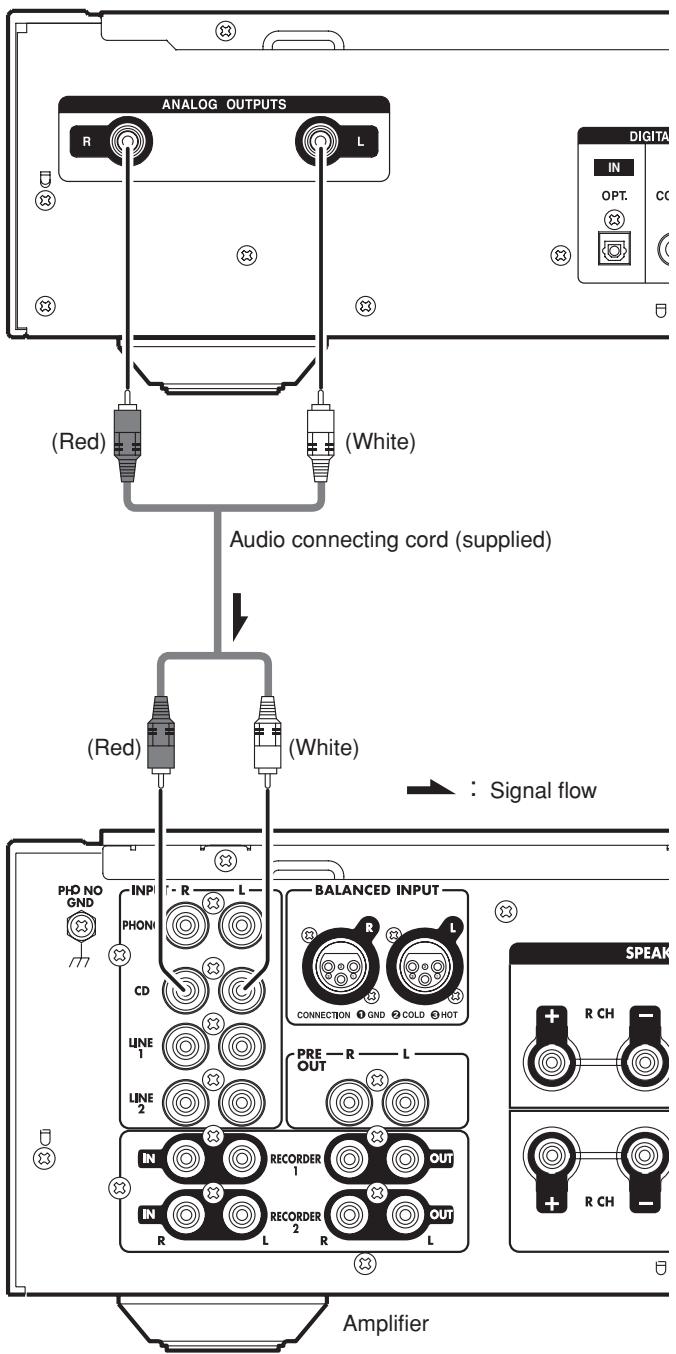
Caution:
Do not connect the player to the PHONO input connectors on the amplifier.
CONNECTING THE POWER SUPPLY
- Plug the power cable into AC IN jack on the back panel.
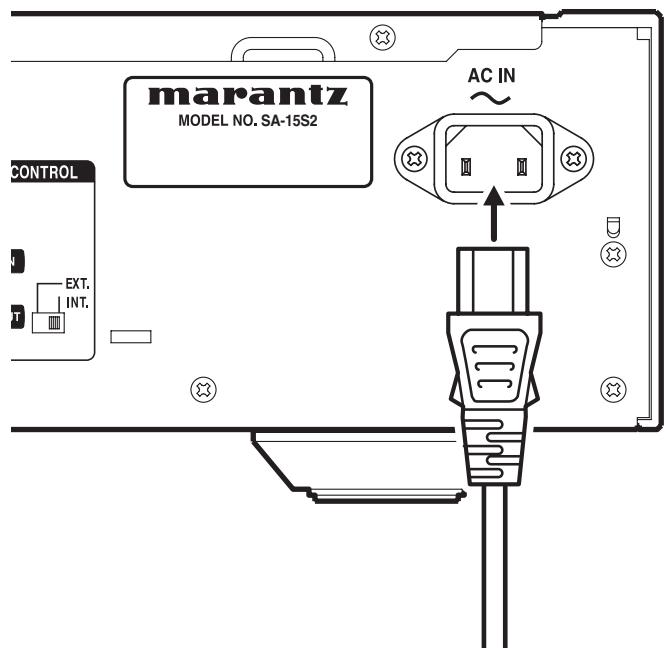
- Plug the power cable into an AC outlet.
- Turn on the power switch of the audio unit (amplifier, etc.) that is connected with this unit. Set the selector on the connected unit to this unit.
BASIC OPERATION
NORMAL PLAYBACK
Super Audio CD player playback
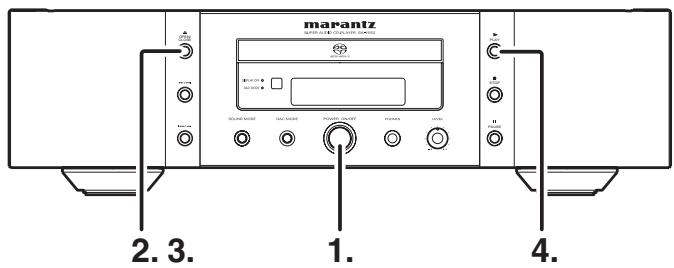
1. Press POWER switch to turn on.
Display
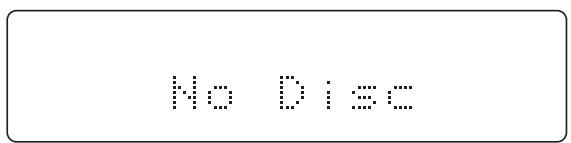
The display cycles from "Power On" "TOC Reading" "No Disc" (when no disc is loaded).
2. Press the button.
The disc tray comes out. Place the disc with label side up on the tray.
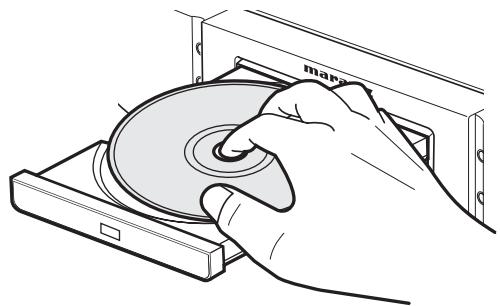
To play a single (8cm) CD, place the disc with the indentation at the center of the tray.
3. Press button.
Caution:
Do not close the disc tray by pressing it in with your hand, as this will damage it.
4. Press button.
Disc type is automatically detected and playback is started. Track number and track elapsed time (minute, second) appear on the display.
- For Super Audio CD/CD hybrid-layer discs (see page 4), the layer that is set in the start sound mode (see page 20) is played. To change the layer, use the SOUND MODE button (see page 20).
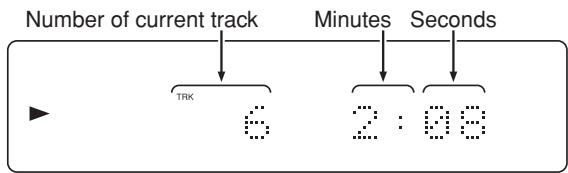
(Exp.:Track 6, Elapsed time 2 min 8 sec)
Playback automatically stops at the end of the final track.
- To stop playback
Press button.
To eject disc
Press button to open the disc tray and take the disc off. Press the button again to close the tray.
Disc tray must be closed when the unit is not be used.
To pause playback
Press button.
"PAUSE" indicator will light and playback is paused at the point that the button is pressed. To restart playback, press button again or press button.
BASIC OPERATION
PLAYING YOUR FAVORITE TRACKS OF A DISC
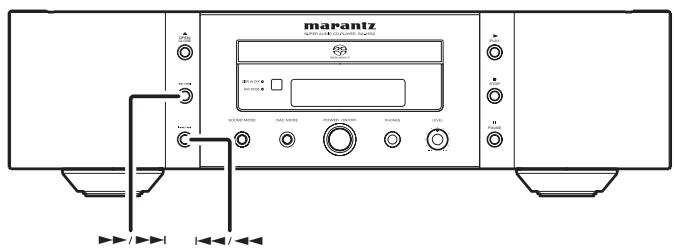
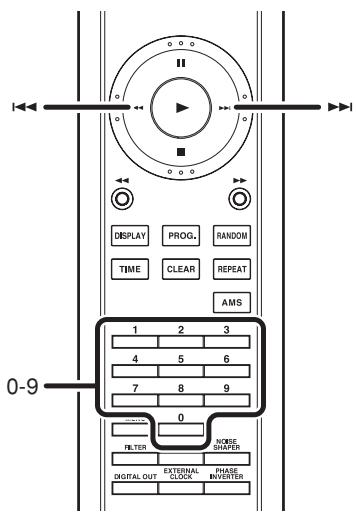
■ Specify track number to play (Direct Search)
Specify track number with numerical buttons (0-9) on the remote controller.
example)
3rd track : Press 3.
12th track : Press 1 and then press 2 (within approximately 1.5 seconds).
- If a wrong number is pressed
If you specify a track number that doesn't exist on the disc, the indicator returns to the display shown prior to this operation.
Please specify a correct track.
Press correct number again.
■ Skipping to the previous or next track (Track Skip)
- To listen to a track posterior to the current track
Press the button on the remote controller or the unit the same number of times as the number of tracks you want to advance.
- To listen to a track prior to the current track
If the button is pressed on the unit or the remote controller while playing a track, playback starts again from the start of the current track.
Continue to press the button for the same number of times as the number of tracks you want to return.
PLAYING YOUR FAVORITE PARTS OF A DISC (SEARCH)
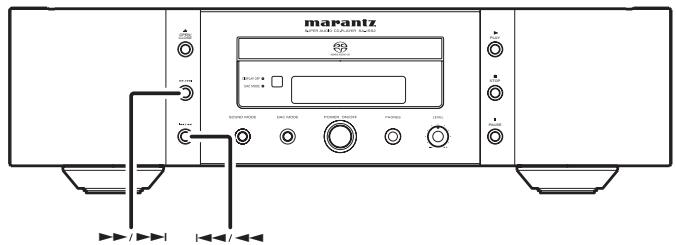
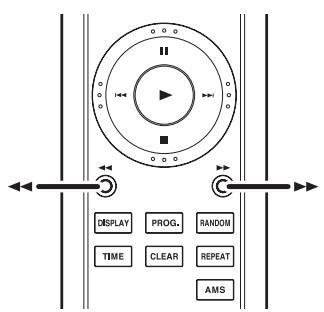
The search is started by holding down the , buttons on the player or the , buttons on the remote control unit during playback.
The search speed can be changed by pressing the , buttons on the player or the , buttons on the remote control unit.
The search speed changes in 4 steps: 1 2 3 4 1 . 4 is the fastest search speed.
When the specific part you wish to hear is near, press the button.
Note:
No sound is output during the search operation.
ADVANCED CONNECTIONS
CONNECTING TO A DIGITAL AUDIO COMPONENT
The player has one digital optical output connector and one digital coaxial output connector.
You can enjoy digital recording when the player is connected to a CD recorder or other digital recording component.
- After connecting, press the DIGITAL OUT button on the remote control while the CD is stopped and set the digital output for the audio CD signal from the DIGITAL AUDIO OUT terminal to ON.
Switch the digital output ON and OFF using the button on the remote control. When digital output is switched OFF, "D OFF" lights up on the LDC display.
To enjoy better sound quality, switch digital output to OFF when digital output is not in use.
Caution:
Signals are sent from the Digital Audio Output (Optical and Coaxial) terminals only when playing back audio CDs or the CD layer of Super Audio CDs. There are no signals when other media are being played back.
- Connecting the optical output connector
Use an optical digital connecting cable available on the market. Insert the plug firmly in until it clicks into place. Do not bend or bundle the optical digital connecting cable.
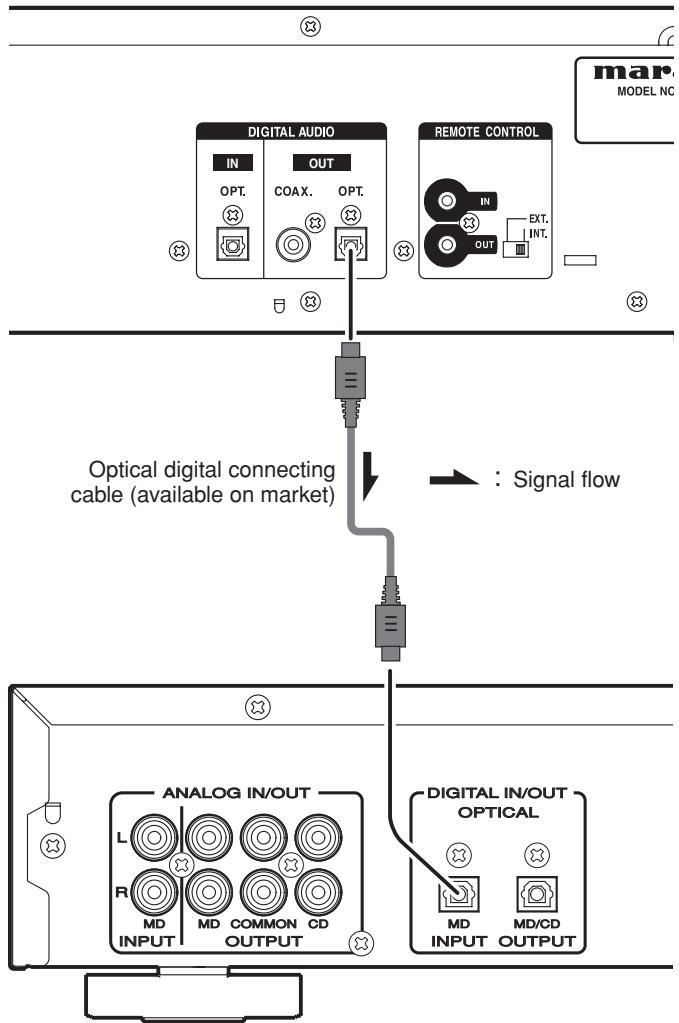
CD recorder, MD deck, AV amplifier, etc.
- Connecting the coaxial output connector
Use a coaxial digital connecting cable available on the market.
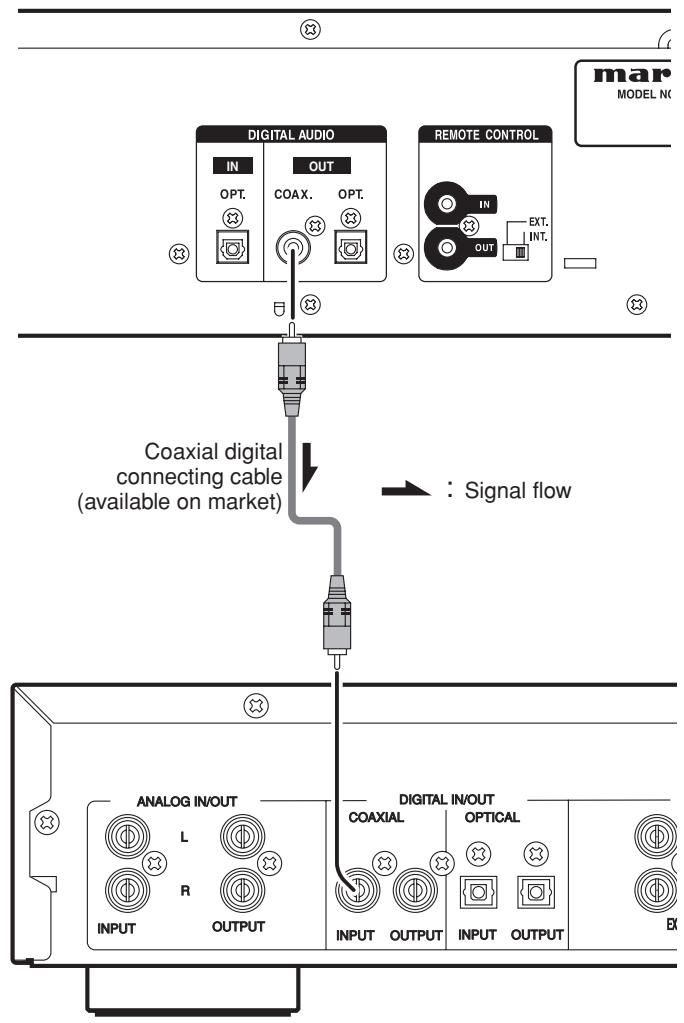
CD recorder, MD deck, AV amplifier, etc.
ADVANCED CONNECTIONS
CONNECTING THE DIGITAL AUDIO INPUT TERMINAL
When connected to devices equipped with digital outputs, such as CD transports or MD recorders, the unit can be used as a D/A converter.
Note:
This unit can input linear PCM signals with sampling frequencies of 32kHz , 44.1kHz , 48kHz , 64kHz , 88.2kHz , and 96kHz .
Please do not input signals other than linear PCM signals (such as CD-ROM, Dolby Digital, DTS, or AAC signals). Signals other than linear PCM may generate noise and damage the speakers.
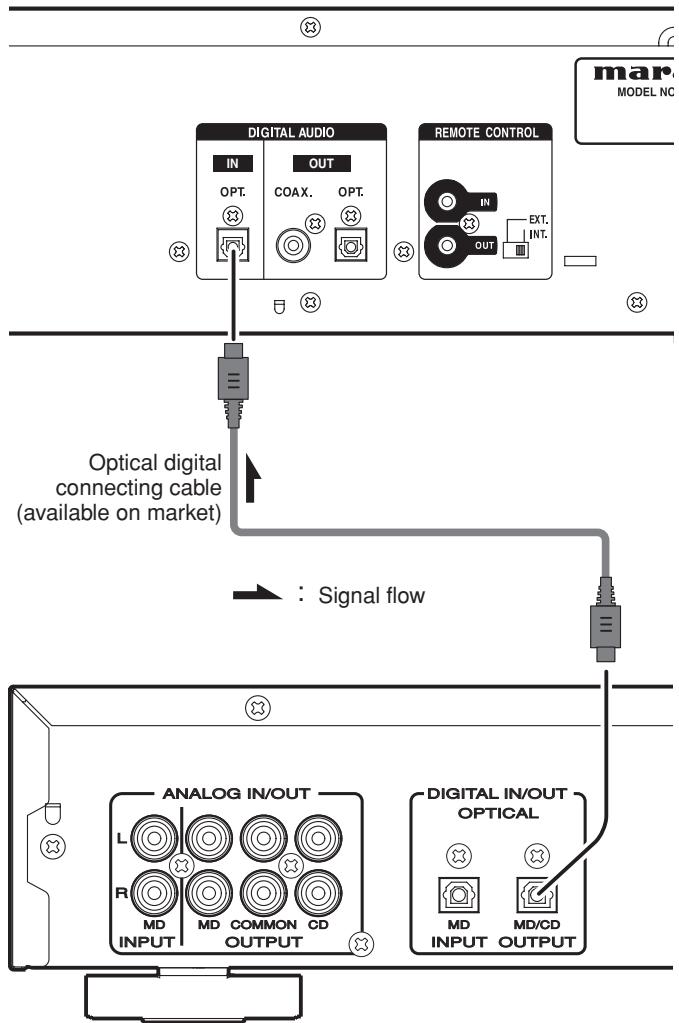
CD recorder, MD deck, AV amplifier, etc.
REMOTE CONTROL CONNECTION
Connecting this player to additional Marantz audio equipment using the supplied remote control cable enables remote control of the connected equipment as a single audio system.
- When connecting equipment incorporating a remote sensor, connect the "remote control out" connector of the equipment to the "remote control in" jack of the CD player.
When doing this, set this player's switch to "EXTERNAL." This will stop its remote control IR receiver from operating and the player can now be controlled via the remote control IR receiver of the attached equipment.
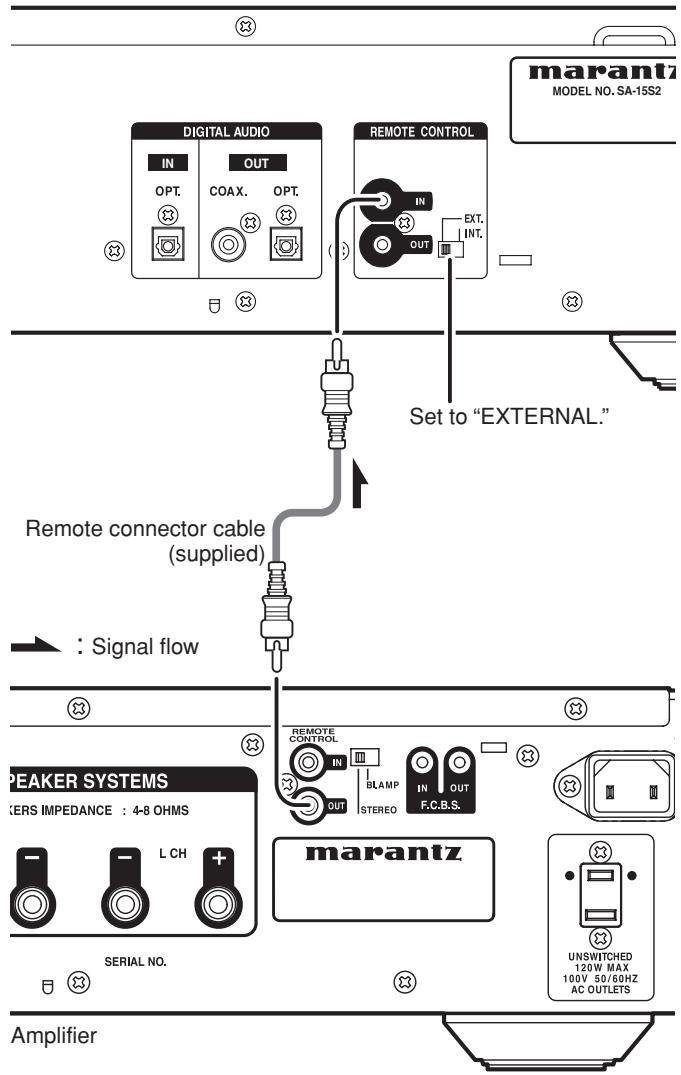
ADVANCED CONNECTIONS
TIMER PLAY
This unit can perform timer play by cooperating with your audio timer.
Connect this unit's power cord to the audio timer's power socket and the timer's power cord to power outlet.
- For connection to audio timer and it's operation, please refer to the instruction manual of your audio timer.
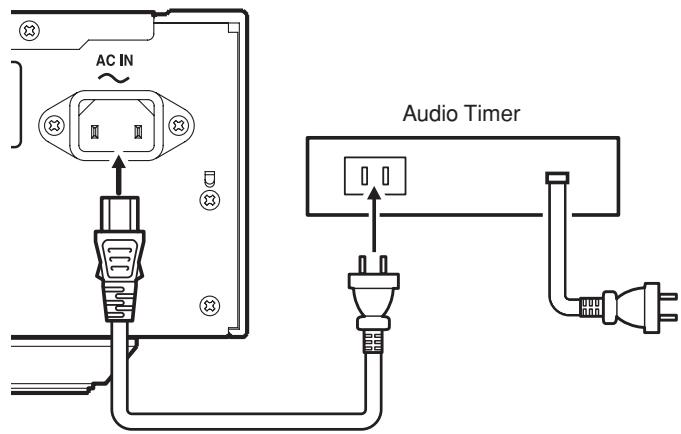
Timer play setting
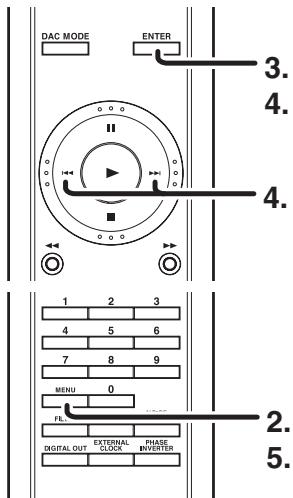
- Keep pressing the POWER Switch for about a second to turn on the system.
- Press the MENU button on the remote control unit.
- Display "TIMER PLAY = " in the display area and then press ENTER button on the remote control unit.
- Display "2 ON" with the , buttons, and then press ENTER button on the remote control unit.
- Press the MENU button on the remote control unit to complete the setting.
- Insert the disc to be played.
- Set the audio timer.
Note:
Menu settings cannot be adjusted when the unit is in Repeat Play or Random Play modes.
Press the TIME button on the remote control.
Each time TIME button is pressed, display will change in the following order.
Track elapsed time Track remaining time
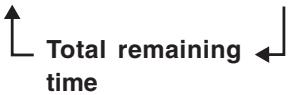
- Track remaining time
(The remaining playing time from the playing point to the end of the current track)
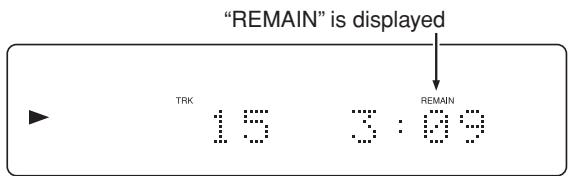
Total remaining time
(The remaining playing time from the playing point to the end of the last track)
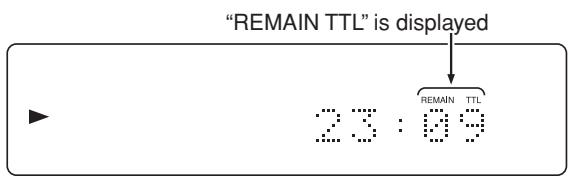
Track information does not appear when "Total remaining time" is displayed.
REPEATED DISC PLAY (REPEAT PLAY)
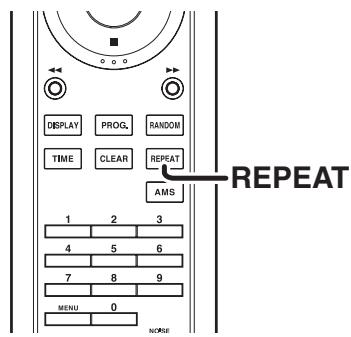
Each time the REPEAT button on the remote control is pressed, the repeat mode cycles in the following order.
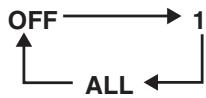
One Track Repeat
Press the REPEAT button on the remote control once.
"1", "RPT" indicators will light and the track will be played repeatedly.
To Return to Normal Play
Press the REPEAT button on the remote control twice. "1" "RPT" indicator will disappear, repeat mode will be off and it returns to normal play mode.
Pressing the button and stopping playback turns off repeat mode.
All track repeat
When "Repeat" mode is off, press the REPEAT button on the remote control twice. The "RPT" indicator will light up and all track repeat play begins.
To Return to Normal Play
Press the REPEAT button on the remote control once. "RPT" indicator will disappear, repeat mode will be off and it returns to normal play mode.
Pressing the button and stopping playback turns off repeat mode.
Note:
Random Play and AMS Play cannot be conducted when the unit is in Repeat Mode.
When the RANDOM button on the remote control is pressed in stop mode, and then the button is pressed, the unit shuffles the track order automatically and plays all tracks randomly in the shuffled order.
The display's "RNDM" (random) indicator will light-up.
Note:
Repeat Play and AMS Play cannot be conducted when the unit is in Random Mode.
- If the button on the main unit, or the button on the remote control are pressed during Random Play, the player jumps to the next track of the shuffled order.
- To search through the current track during random play, press and continue holding the / , buttons on the main unit or press the , buttons on the remote control.
- To Exit from Random Play and Return to Normal Play
Press the button, and then press the RANDOM button while playback is stopped.
The "RNDM" (random) indicator goes off, and random play is released.
PLAYING TRACKS IN A SPECIFIC SEQUENCE (PROGRAM PLAY)
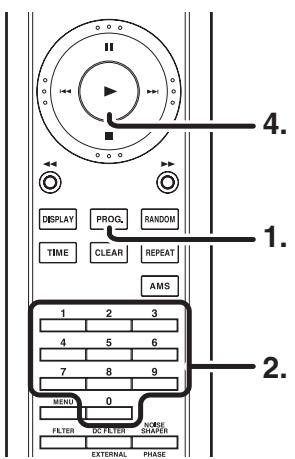
You can arrange and play tracks in a specific sequence. Up to 24 tracks to be played can be programmed.
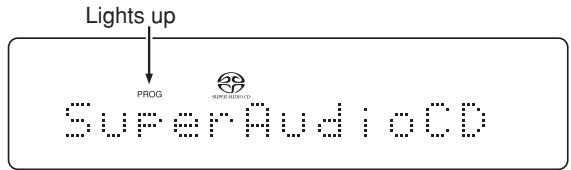
- Press PROG. button on the remote in stop mode. "PROG" indicator will blink and it goes to program mode.
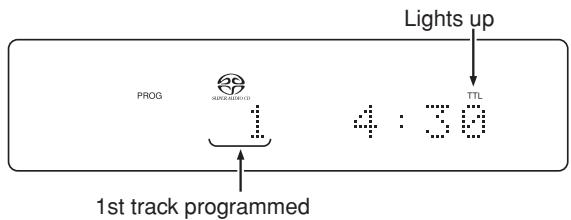
- Choose a track to be programmed with numeric buttons on the remote.
(Example: The 15th track is chosen and it's length is 4min30sec)
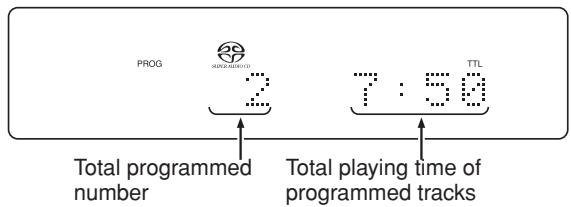
- With the sequence described in step 2 above, program another track. Repeat that sequence to program all the tracks you want. You can program up to 24 tracks.
(Example: The 7th track is chosen and total length of 7th and 15th is 7min50sec)
- Press button to starts playback in programmed order.
Note:
Repeat Play, Random Play, and AMS Play cannot be conducted while the unit is in PROGRAM mode (i.e. when the PROG indicator is lit).
TO CHECK THE PROGRAMMED TRACKS
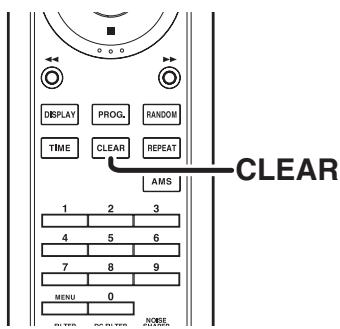
To Delete a Programmed Track
- Press CLEAR button in stop mode when program has been made (When "PROG" indicator is lighting up).
- Every time press CLEAR button, the programmed tracks are deleted in order from the last track programmed.
To Clear Whole Program
Press STOP button two times while in program play.
In the stop mode, press STOP button once.
Program can also be cleared by pressing OPEN/CLOSE button to open the disc tray.
To Add Tracks to Program
Tracks can be added to the end of program when program is remaining ("PROG" indicator is lighting up) and in stop mode.
- Please be careful about the following matters
- When programming 1st through 9th tracks in a disc that has over 10 tracks by using numeric buttons. For instance, programming the 3rd track after programming the 1st track, press 3 button more than approximately 1.5 seconds after 1 button is pressed. When a program is finalized, the time is updated.
- Likewise, when programming a track at 10th or after. For example, to program 13th track, press 3 button within approximately 1.5 seconds after 1 button is pressed.
- When programming a track in a disc that has less than 9 tracks. For instance, to program the 5th track after 4th track has been programmed, press 5 button more than approximately 0.5 second after 4 button is pressed.
SEARCHING YOUR FAVORITE TRACKS (AMS (AUTOMATIC MUSIC SCAN) PLAY)
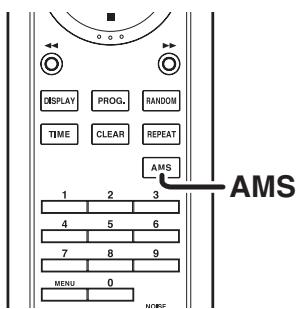
This feature is convenient for searching where your favorite track is.
If the AMS button is pressed while a track is stopped, the AMS indicator "AMS" lights up, and the first ten seconds of each track on the disc will be played starting from the first track.
Also, if the AMS button is pressed during playback, the AMS indicator "AMS" lights up, and the program jumps to the next track after approximately 10 seconds elapses on the display time.
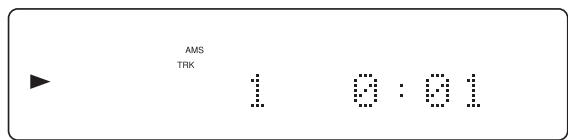
Once you find a song that you want to listen to, press the AMS button again or press the button. The AMS indicator "AMS" turns off, and normal playback resumes from the current track.
Note:
AMS Play cannot be conducted while the unit is in PROGRAM mode.
Switching "Start Sound Mode"
The Start Sound Mode can be switched over in the following hierarchical scheme.

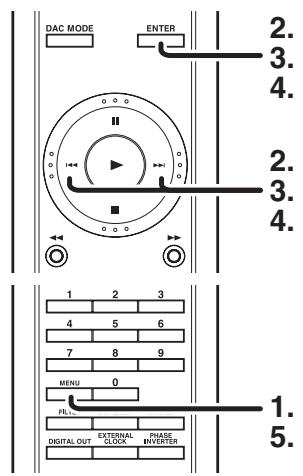
- Press the MENU button on the remote control in stop mode.
- Use the , buttons to display "SA-CD Mode=>" and press ENTER button on the remote control.
- To load the SA-CD layer, use the buttons to display "1 SA-CD" and press ENTER button on the remote control.
- To load the CD layer, use the , button to display "2 CD" and press ENTER button on the remote control.
- Press the MENU button on the remote control unit to complete the setting.
Note:
Menu settings cannot be adjusted when the unit is in Repeat Play or Random Play modes.
- When Start Sound Mode is switched to CD
- At this time, if a Super Audio CD hybrid layer disk is inserted, the CD layer is read.
- Sound Mode cannot be switched even if the SOUND MODE button on the remote control is pressed.
- If a disk with only a Super Audio CD area is inserted, the Super Audio CD layer is read.
- When Start Sound Mode is switched to SA-CD (default mode)
- At this time, if a Super Audio CD hybrid layer disk is inserted, the Super Audio CD layer is read.
- Switch to the CD layer by pressing the SOUND MODE button on the remote control.
- Switch back to the Super Audio CD layer by pressing the SOUND MODE button on the remote control once again.
Switching Layers on Hybrid Layer Discs
Please set Start Sound Mode to "SA-CD".
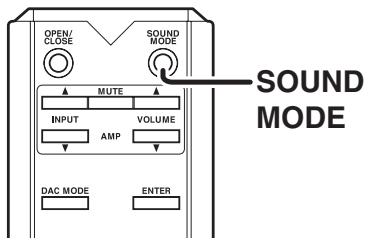
- Press SOUND MODE button in stop mode (not playing). The currently selected layer or area is shown on the display. (CD or Super Audio CD)
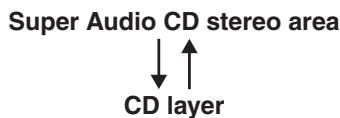
If the SOUND MODE button is pressed again, the layer or area will be switched to a new one.
- When layer or area is switched, TOC will be read again.
- The sound mode cannot be changed for Audio CDs, WMA/MP3 discs, or discs with only a Super Audio CD area.
- The sound mode on hybrid layer discs will be changed in the following order.
- Press the SOUND MODE button during playback.
The currently selected layer or area is shown on the display. (CD or Super Audio CD)
If SOUND MODE button is pressed again, the playback is stopped, and the layer or area will be switched to new one.
When you want to listen at that area, press button again. The playback will be started.
SETTING THE DIGITAL OUTPUT
The settings can be made using the remote control.
The settings are retained even if the power is turned off so that you can always hear tracks played the way you want.
Use the same procedures to change the settings again.
The settings can be changed when the track is stopped.
During the playback of the CD layer of an audio CD or Super Audio CD
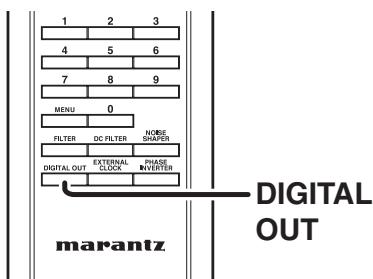
"Digital Output Off" operation
The digital output function is turned ON and OFF by pressing the "DIGITAL OUT" button while the track is stopped. When digital output is turned off, the "D OFF" indicator lights up on the display.
- When digital output is not used, turn off the digital output and enjoy better sound quality through analog output.
Note:
Digital signals are only output when playing Audio CDs or the CD layer of Super Audio CDs.
They are not output when playing other media.
The "digital output off" has a memory retention function where the settings remain stored and unchanged even when the disk is changed or the power is turned off.
USING AS A D/A CONVERTER (DAC MODE)
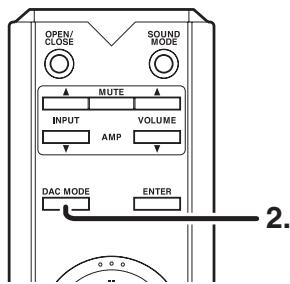
- Connect a device with a digital output, such as a CD transport or MD recorder, to the unit's DIGITAL AUDIO IN terminal located on the rear panel.
- Press the DAC MODE button on the main unit or remote control. The DAC MODE indicator on the front panel will light up in blue.
- The input signal's sampling frequency (32kHz, 44.1kHz, 48kHz, 64kHz, 88.2kHz, 96kHz) will be displayed on the LCD.

Note:
- When the unit is in DAC mode, audio output is analog only.
- This unit can input linear PCM signals with sampling frequencies of 32kHz , 44.1kHz , 48kHz , 64kHz , 88.2kHz , and 96kHz .
Please do not input signals other than linear PCM signals (such as CD-ROM, Dolby Digital, DTS, or AAC signals). Signals other than linear PCM may generate noise and damage the speakers.
- When the sampling frequency switches, such as when a satellite broadcast switches from A Mode to B Mode, there is a 1~2 second muting effect that may result in a brief audio drop out.
- If the data in the connected device has excessive jitter and playback is not possible, the LCD will display the following message.

- To exit DAC mode and return to disc playback mode, press the DAC MODE button on the main unit or remote control again. The DAC MODE indicator on the front panel will turn off.
Filter settings can be adjusted when the unit is in either DAC mode or disc playback mode.
Each time the FILTER button is pressed, the filter types cycle from FIL1 FIL2 FIL1.
The filter setting has a memory retention function so that the setting remains stored and unchanged even when the disc is changed or the power is turned off.
Filter settings can be made for either Audio CDs or Super Audio CDs.
When in DAC mode or playing back WMA/MP3 discs, set filters as you would for Audio CDs.
Filter Selection Table
Both Audio CDs and Super Audio CDs have 2 types of built-in filter characteristics, and the quality characteristics differ for each. Please switch them according to your personal preference.
| Filter type | Audio CD | Super Audio CD |
| FILTER 1 | Faithfully reproduces all audio information. Intimate sound image and positional relationship of audio source are clearly reproduced. (asymmetric slow roll-off filter) (* This is the factory default setting) | This is a direct mode that does not perform any filtering of DSD data (the Super Audio CD's recording signal). The original source data is reproduced without any alteration capturing the sound's natural texture and spatial dynamic. (* This is the factory default setting) |
| FILTER 2 | Faithfully reproduces all audio information with distinct audio contour. (asymmetric sharp roll-off filter) | Faithfully reproduces all audio information. Intimate sound image and positional relationship of audio source are clearly reproduced. |
Note:
The analog output level for each filter changes slightly when playing a Super Audio CD's high-sound-quality stereo area.
TURING OFF THE DISPLAY AND ILLUMINATION (DISPLAY OPERATION)
This function is used to turn the LCD and illumination lamps (blue) on and off.
(Two display statuses are available)
-
Mode where LCD and illumination lamp (blue) turn on. Each time the DISPLAY button is pressed during playback, the LCD and illumination lamp (blue) switch on and off. When Display Off is set, the Display Off indicator (red) lights up.
-
When any related button is pressed (such as when the OPEN/CLOSE button, STOP button, or button is used), the display is automatically turned on, but the Display Off indicator (red) remains lit. If a track is started in this state, the display is automatically turned off two seconds later.
-
The LCD and illumination lamps (blue) will not turn off even if the DISPLAY button is pressed if the track is stopped. If the Display Off indicator (red) is lit at this time, the display is set to OFF.
-
Setting for turning on only LCD (illumination lamp (blue) remains off).
In the default state, the illumination lamp (blue) is lit. In this state, the illumination lamp (blue) remains off regardless of whether the LCD is turned on or off.
- Changing procedure (Changes can be made when operation is stopped.)
- If playback is in progress, press the STOP button to stop playback. To make the setting, hold down the DISPLAY button for at least two seconds from the remote control.
-
If the illumination lamp (blue) is lit, it is turned off and is set off. To change the setting from off to on, hold down the same operation DISPLAY button for at least two seconds to turn on.
-
The illumination lamp (blue) off setting is retained even when the power is turned off, and this setting remains until the setting is changed to the on setting.
- The LCD and illumination lamp (blue) on/off settings are retained even when the power is turned off.
TROUBLESHOOTING
If you think that something is wrong with your player, first check the points listed below. Incorrect operations can sometimes be taken for trouble and malfunctions. If the trouble persists even after the following points have been checked, consult your dealer or nearest Marantz sales office or service center.
| Problem | Cause | Corrective action |
| The disc fails to rotate. | The power cord is pulled out of the socket. | Insert the power cord plug into the socket. (→ Page 11) |
| Power to this unit is not ON. | Turn the power to this unit ON. (→ Page 12) | |
| The disc is not placed in the correct position on the disc tray. | Place the disc in the disc tray correctly. (→ Page 12) | |
| The disc is placed in upside down. (The disc is placed in with the label facing down). | Place the disc in the disc tray correctly. (→ Page 12) | |
| The unit is set to DAC mode. | Switch the unit to disc mode. (→ Page 21) | |
| The disc stops rotating in mid-operation. | The disc is dirty. | Clean the disc's surface. (→ Page 26) |
| The disc is scratched. | The disc may be unable to be played if it has a lot of scratches. | |
| The disc is warped. | The disc may be unable to be played if it is badly warped. | |
| The disc is rotating but no sound is heard. | The amplifier and speakers are not connected correctly. | Connect the cables correctly. (See the instruction manual for the amplifier.) |
| The amplifier power is not ON. | Turn ON the power to the amplifier. (See the instruction manual for the amplifier.) | |
| The amplifier's function or selector switch is not set to "CD" or "AUX" or such (to whatever you have connected this unit to). | Switch the amplifier's function or selector switch to "CD" or "AUX" or such (to whatever you have connected this unit to). (See the instruction manual for the amplifier.) | |
| The amplifier's volume control is set at the minimum level. | Adjust the amplifier volume. (See the instruction manual for the amplifier.) | |
| Remote control operation is not possible. | The distance between this unit and the remote control is too great. | Move closer to this unit, and operate the remote control within the operating range. (→ Page 6) |
| There is an obstacle between this unit and the remote control. | Remove the obstacle. (→ Page 6) | |
| The remote control's batteries are dead. | Replace all batteries with new ones. (→ Page 6) | |
| A strong light is hitting the unit's sensor window. | Do not let strong light hit the sensor window. (→ page 6) | |
| The switch on the back of the REMOTE CONTROL is on EXTERNAL. | When using this unit independently, set the switch to INTERNAL. (→ Page 15) | |
| CD-R/CD-RW disc cannot be played. | The disc is placed in upside down. | Place the disc in the tray correctly. (→ Page 12) |
| The information recorded is not in an audio (CD-DA) format. Or the specified MP3/WMA file was not properly recorded. | Record correct information that is compatible with to this unit. (→ Page 24, 26) |
OTHERS
About WMA playback
- Windows Media is a trademark of the Microsoft Corporation in the US and other countries.
- WMA is an abbreviation for "Windows Media Audio" and is an audio compression technology developed by the Microsoft Corporation. WMA data may be encoded using Windows Media® Player Ver. 7, 7.1, Windows Media® Player for Windows® XP, or Windows Media® Player 9 Series.
- Use discs recorded conforming to the ISO 9660 Level 1/Level 2 CD-ROM file system and extended format (Joliet, Romeo).
- Multi-session recording is not supported.
- WMA files having DRM copy protection cannot be played.
- Encode WMA files using applications that have received Microsoft Corporation certification. If an uncertified application is used, it may not operate normally.
WMA Files
| Standard | Conforming to Microsoft Windows Media Audio 9.2 The following are unsupported • WMA9 Series Professional • WMA9 Series Voice • WMA9 Series Lossless • WMA with Video |
| Extension | .wma |
| Bit rate [kbps] | CBR: 48/64/80/96/128/160/192 |
| Sampling frequency [kHz] | 44.1 |
| Channels | 2ch (Stereo) |
About Windows Media DRM
Windows Media Digital Rights Management (DRM) (referred to below as WMDRM) is a platform to prevent playback on computers, digital audio players, network devices and the like in order to securely distribute digital content.
Content protected by WMDRM may be played back only when connected to a media server that has WMDRM functionality.
This system does no comply with any contents protected by WMDRM.
- About MP3 play back
- Use discs recorded conforming to the ISO 9660 Level 1/Level 2 CD-ROM file system and extended format (Joliet, Romeo).
- MPEG1 Audio Layer-3 files recorded at sampling frequencies of 44.1kHz are supported. For files recorded with a frequency other than this, "No File" will be displayed, and these files cannot be played.
- Variable Bit Rate is not supported (when playback is possible, the time display in the display window will speed up and slow down).
- Multi-session recording is not supported.
- For audio quality, a recording rate of 128 kbps or higher is recommended.
MP3 files
| Standard | MPEG-1 Audio Layer3 |
| Extension | .mp3 |
| Bit rate [kbps] | For MPEG-1 Audio Layer3, 32/40/48/56/64/80/96/112/128/160/192/224/256/320 |
| Sampling frequency [kHz] | For MPEG-1 Audio Layer3, 44.1 |
| Channels | 2 ch (Stereo) |
| Emphasis | OFF |
OTHERS
SPECIFICATIONS & DIMENSIONAL DRAWINGS
| Super Audio CD | Audio CD | |
| Audio Characteristics Analog output Channels Frequency range Frequency characteristics Dynamic range S/N Ratio (A-weighted) THD (1kHz) wow & flutter | 2 channels 2 Hz ~ 100 kHz 2 Hz ~ 50 kHz (-3dB) 112 dB 110 dB 0.0010 % | 2 channels 2 Hz ~ 20 kHz 2 Hz ~ 20 kHz (-0.15 dB) 100 dB 110 dB 0.0015 % |
| Precision of quartz | Precision of quartz | |
| Analog Output level Unbalanced Headphone output Digital output output level (cinch JACK) output level (optical) Digital input Rectangular optical connector (optical input) | 2.4 V RMS stereo 30 mW/32 ohms (Variable maximum) | 2.4 V RMS stereo 30 mW/32 ohms (Variable maximum) |
| — | 0.5 Vp-p (75 Ω) | |
| — | -19 dBm | |
| — | -17.5 dBm ~ -23 dBm | |
| Optical Readout System Laser Wave length | AlGaAs 650 nm | AlGaAs 780 nm |
| Signal format Sampling frequency | 1-bit DSD 2.8224 MHz | 16-bit linear PCM 44.1 kHz |
Power Supply
Power Supply
AC 120 V 60 Hz (U.S.A.)
AC 230 V 50/60 Hz (Europe)
Power Consumption 20 W
Cabinet, etc.
Dimensions (Width × Height × Depth)
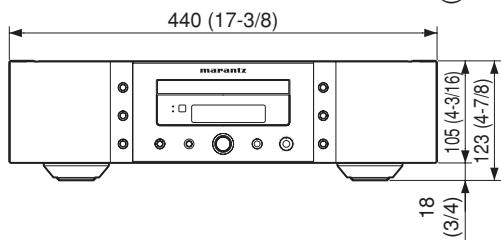
440 × 123 × 419 mm (17-3/8 × 4-7/8 × 16-1/2 in)
Net weight. 13.5 kg (29.8 lbs)
Operating temperatures. +5^ +35^
Operating humidity . 5 90% (without dew)
- Accessories
Remote control unit 1
Net weight 160 g (0.4 lbs)
- AAA (R03) Batteries 2
- AC Power cord 1
Audio cable. 1
Remote control connecting cord 1
- User's Guide. 1
Warranty card (U.S.A.) 1
Warranty card (Canada) 1
Specifications subject to change without prior notice.
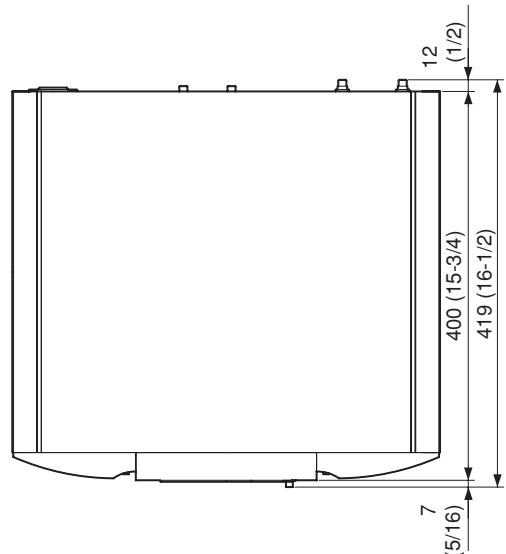
Dimensions (unit: mm (in))
CLASS 1 LASER PRODUCT
LUOKAN 1 LASERLAITE
KCLASS 1 LASERAPPARAT
OTHERS
NOTES ABOUT THE DISCS
- Handle the discs carefully so as not to scratch their surfaces.
- Keep the surfaces of the discs clean at all times.
When cleaning the surfaces of discs, always be sure to use the special cleaner and wipe the surfaces in the directions shown in the figure below.
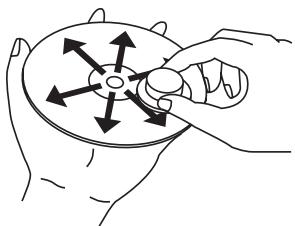
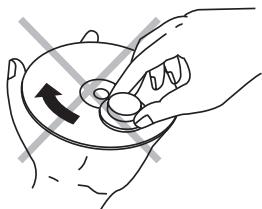
- Wipe the surface radially from the center.
-
Do not wipe the surface in the circumferential direction.
-
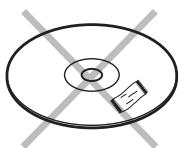
Do not attach pieces of paper or stickers to the label surfaces of the discs.
When a disc has a piece of plastic tape or rental CD label with paste protruding from the edge or when a disc still bears traces of sticky tape or adhesive labels, do not attempt to play it. If such a disc is played on the CD player, you may find that you cannot remove it or that some other kind of malfunctioning may occur.
- Do not use discs which come in special shapes.
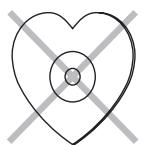
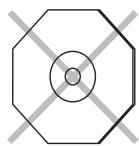
Do not attempt to play heart-shaped or octagonal discs or discs with any other special shapes. You may find that you cannot remove them or that some other kind of malfunctioning may occur in the player.
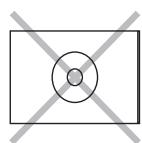
- Use discs which satisfy the CD standards such as those with the "CD logo", "ROMAS" or "DESIGN" mark on their disc label surfaces.
No guarantees are made for playback if discs which do not satisfy the appropriate CD standards are used.
Similarly, no guarantees are made for their sound quality even if it is possible to play such discs.
To protect your discs from damage, avoid placing them in the following locations.
- Where they will be exposed to direct sunlight or where they will be close to a heater or other heat-radiating appliance
- Where the humidity level is high or it is very dusty
- Near a window or other such location where they may be exposed to rain
Get into the habit of putting the discs back in their cases after use.
ABOUT PLAYING COPY-CONTROLLED CDS
Some copy-controlled CDs may not conform to official CD standards. They are special discs and may not play on the unit.
Playing CD-R/CD-RW discs
This unit can play back the CD-RW (ReWritable) discs as well as ordinary Audio CD and CD-R (Recordable) discs.
- The CD-R and CD-RW discs should contain properly-recorded TOC* information so that they can be played back. In CD recorders, the task of writing TOC information is referred to as finalizing the disc. Discs that are not finalized cannot be properly recognized as an Audio CD and played back by regular CD players and Super Audio CD players. For details, please read the instruction manual provided with a CD recorder.
- TOC stands for Table Of Contents and contains information such as the total number of tracks and total playing time of the disc.
- This unit can play CD format, and CD-R/CD-RW discs which contain WMA/MP3 music data. However, some discs may have problems such as unable to play, noise or sound distortion.
- This device is exclusively a playback device. It cannot record CD-R/CD-RW discs.
- As the playback of a CD-RW disc necessitates partial change of the player setup, it may take longer time for reading the TOC information than when an Audio CD or CD-R disc is played.
- Depending on the application settings and environment, discs recorded with a personal computer may not be able to be played. Please record with the correct format. (For details, please inquire at your application sales agent.)
- Discs recorded with the packet writing system cannot be played.
- Mixed mode CD/enhanced CD and DTS CD discs cannot be played.
- CD-G, video CD and DVD discs cannot be played.
About DualDisc playback
- "DualDisc" contains DVD-standard-compliant video and audio on one side and audio for playing on a CD player on the other side, respectively.
- Since the non-DVD audio side does not conform to common CD physical standards, it may not be able to be played.
- In regard to details such as "DualDisc" specifications and standards, please inquire at your selling agent or distributor.
OTHERS
■ Cleaning of equipment external surfaces
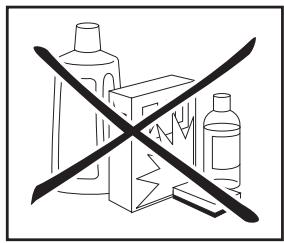
The exterior finish of your unit will last indefinitely with proper care and cleaning. Never use scouring pads, steel wool, scourging powders or harsh chemical agents (e.g., lye solution), alcohol, thinner, benzine, insecticide or other volatile substances as these wil mar the finish of the equipment. Likewise, never use cloths containing chemical substances. If the equipment get dirty, wipe the external surfaces with a soft, lint-free cloth.
If the equipment becomes heavily soiled:
- dilute some washing up liquid in water, in a ratio of one part detergent to six parts water.
- dip a soft, lint free in the solution and wring the it is damp.
- wipe the equipment with the damp cloth.
- dry the equipment by wiping it with a dry cloth.
Repairs
Only the most competent and qualified service technicians should be allowed to service the factory-trained warranty station personnel have the knowledge and special facilities needed for repair and calibration of this precision equipment.
After the warranty period has expired, repairs will be performed for a charge if the equipment can be returned to normal operation.
In the event of difficulty, refer to your dealer or write directly to the nearest location to you that is listed on the Marantz Authorized Service Station list. If writing, please include the model and serial number of the equipment together with a full description of what you think is abnormal about the equipment's behaviour.
Memo
www.marantz.com
You can find your nearest authorized distributor or dealer on our website.
marantz® is a registered trademark.

- CAUTION
- WARNING
- LASER SAFETY
- CAUTION: USE OF CONTROLS OR ADJUSTMENTS OR PERFORMANCE OF PROCEDURE OTHER THAN THOSE SPECIFIED HEREIN MAY RESULT IN HAZARDOUS RADIATION EXPOSURE.
- NOTE:
- IMPORTANT SAFETY INSTRUCTIONS
- READ BEFORE OPERATING EQUIPMENT
- Additional Safety Information!
- ENGLISH
- WARRANTY
- RETAIN YOUR PURCHASE RECEIPT
- IMPORTANT
- FOR U.K. ONLY
- FRANCAIS
- GARANTIE
- Français
- AVERTISSEMENTS
- Information for Users on Collection and Disposal of Old Equipment and used Batteries
- Checking the accessories
- A NOTE ABOUT RECYCLING
- CONTENTS
- FEATURES
- APPLICABLE DISCS TO THE UNIT
- Super Audio CD
- Audio CD (CDDA)
- 3.CD-R / CD-RW
- BEFORE USING
- Equipment mains working setting
- Copyright
- Inappropriate places for installation
- Do not place objects on top
- Cautions on handling mains cord
- ■ Do not attempt repairs yourself
- Precautions
- Cautions on handling batteries
- Operational range
- NAMES AND FUNCTIONS
- FRONT PANEL
- ① POWER ON/OFF switch
- ② DAC MODE button DAC MODE indicator
- ③ SOUND MODE button
- Remote sensor
- ⑨ Illumination lamp
- ⑩ Disc tray
- ⑪ LCD display
- LEVEL (headphones level) control
- PHONES (headphones) jack
- REMOTE CONTROLLER
- EXTERNAL CLOCK button
- DIGITAL OUT button
- FILTER button
- MENU (menu setting) button
- TIME button
- DISPLAY button
- DAC MODE button
- OPEN/CLOSE button
- REAR PANEL
- Power cord connector socket
- EXTERNAL / INTERNAL (external/internal) switch
- REMOTE CONTROL IN / OUT (remote control IN and OUT) connectors
- DIGITAL AUDIO OUT OPTICAL (optical digital output) connector
- ⑤ DIGITAL AUDIO OUT COAXIAL (coaxial digital output) connector
- DIGITAL AUDIO IN OPTICAL (optical digital input) terminal
- ANALOG OUT (analog output) connector
- DISPLAY
- FIL 1 2 (filter 1, filter 2) indicator
- 1 (repeat) indicator
- RPT (repeat) indicator
- PROG (program) indicator
- RNDM (random) indicator
- TRK (track) indicator
- AMS (automatic music scan) indicator
- SUPER AUDIO CD indicator
- CD indicator
- M FILE indicator
- D OFF (digital output OFF) indicator
- REMAIN (remaining time) indicator
- TTL (total time) indicator
- Main display area
- II (pause) indicator
- (play) indicator
- BASIC CONNECTIONS
- CONNECTING TO AN AMPLIFIER
- Caution:
- CONNECTING THE POWER SUPPLY
- BASIC OPERATION
- NORMAL PLAYBACK
- Super Audio CD player playback
- Press POWER switch to turn on.
- Press the button.
- Press button.
- Press button.
- - To stop playback
- To eject disc
- To pause playback
- PLAYING YOUR FAVORITE TRACKS OF A DISC
- ■ Specify track number to play (Direct Search)
- - If a wrong number is pressed
- ■ Skipping to the previous or next track (Track Skip)
- - To listen to a track posterior to the current track
- - To listen to a track prior to the current track
- PLAYING YOUR FAVORITE PARTS OF A DISC (SEARCH)
- ADVANCED CONNECTIONS
- CONNECTING TO A DIGITAL AUDIO COMPONENT
- - Connecting the optical output connector
- - Connecting the coaxial output connector
- CONNECTING THE DIGITAL AUDIO INPUT TERMINAL
- REMOTE CONTROL CONNECTION
- TIMER PLAY
- Timer play setting
- - Track remaining time
- Total remaining time
- REPEATED DISC PLAY (REPEAT PLAY)
- One Track Repeat
- To Return to Normal Play
- All track repeat
- - To Exit from Random Play and Return to Normal Play
- PLAYING TRACKS IN A SPECIFIC SEQUENCE (PROGRAM PLAY)
- TO CHECK THE PROGRAMMED TRACKS
- To Delete a Programmed Track
- To Clear Whole Program
- To Add Tracks to Program
- - Please be careful about the following matters
- SEARCHING YOUR FAVORITE TRACKS (AMS (AUTOMATIC MUSIC SCAN) PLAY)
- Switching "Start Sound Mode"
- - When Start Sound Mode is switched to CD
- - When Start Sound Mode is switched to SA-CD (default mode)
- Switching Layers on Hybrid Layer Discs
- SETTING THE DIGITAL OUTPUT
- During the playback of the CD layer of an audio CD or Super Audio CD
- "Digital Output Off" operation
- USING AS A D/A CONVERTER (DAC MODE)
- Filter Selection Table
- TURING OFF THE DISPLAY AND ILLUMINATION (DISPLAY OPERATION)
- - Changing procedure (Changes can be made when operation is stopped.)
- TROUBLESHOOTING
- OTHERS
- About WMA playback
- WMA Files
- About Windows Media DRM
- - About MP3 play back
- MP3 files
- Power Supply
- Cabinet, etc.
- - Accessories
- NOTES ABOUT THE DISCS
- ABOUT PLAYING COPY-CONTROLLED CDS
- Playing CD-R/CD-RW discs
- About DualDisc playback
- ■ Cleaning of equipment external surfaces
- Repairs
- Memo
Brand : MARANTZ
Model : SA-15S2
Category : High-end CD player