
DD7700, DD7710 - Vacuum Cleaners DIRT DEVIL - Free user manual and instructions
Find the device manual for free DD7700, DD7710 DIRT DEVIL in PDF.


| Device type | Vacuum cleaner with bag |
| Brand | DIRT DEVIL |
| Model | DD7700 / DD7710 (Rebel 70) |
| Supply voltage | 220-240 V ~, 50/60 Hz |
| Rated power | 1600 W |
| Maximum power | 1800 W |
| Dust bag volume | 2.0 liters |
| Power cord length | 6 m |
| Weight | 3.9 kg |
| Motor protection filter | Washable, clean every 3 months |
| Air outlet filter | Washable, replace if deformed |
| Mechanical power control | Yes |
| Automatic cord rewinder | Yes |
| Full bag indicator | Yes (indicator in the view port) |
| Overheat protection | Automatic safety shutdown |
| Accessories included | Combination brush, telescopic tube, 3-in-1 crevice tool |
| Spare parts available | Y50 bags, filters, brushes (parquet, turbo, mini turbo) |
| Usage | Dry floors, carpets, upholstered furniture (with accessory) |
| Filter cleaning | With clean water, dry 24 hours in air |
Frequently Asked Questions - DD7700, DD7710 DIRT DEVIL
User questions about DD7700, DD7710 DIRT DEVIL
0 question about this device. Answer the ones you know or ask your own.
Ask a new question about this device
Download the instructions for your Vacuum Cleaners in PDF format for free! Find your manual DD7700, DD7710 - DIRT DEVIL and take your electronic device back in hand. On this page are published all the documents necessary for the use of your device. DD7700, DD7710 by DIRT DEVIL.
USER MANUAL DD7700, DD7710 DIRT DEVIL
natural_image
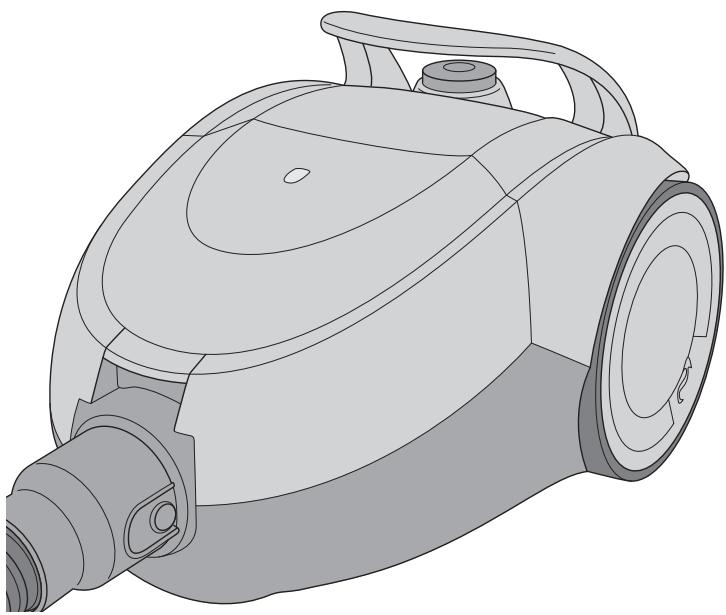
Technical line drawing of a vacuum cleaner (no text or symbols on the device itself)GB Operating Manual bagged vacuum cleaner
natural_image
Illustration of a hand using a handheld tool to clean or store digital displays (no text or symbols visible)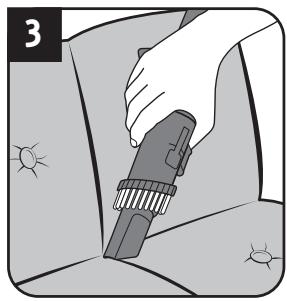
natural_image
Illustration of a hand using a power tool to clean or store items (no text or symbols visible)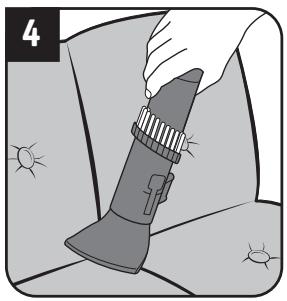
natural_image
Illustration of a hand holding a flashlight with sun-like patterns on the ground (no text or symbols)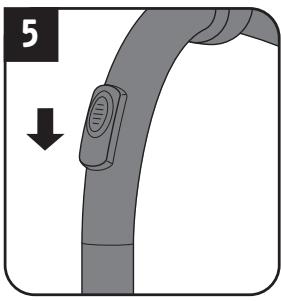
natural_image
Illustration of a hand holding a device with a downward arrow indicating motion (no text or symbols)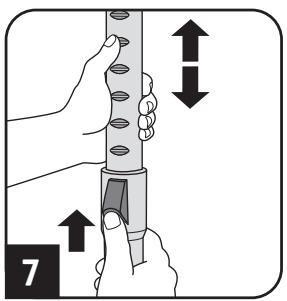
natural_image
Illustration of a hand using a pipette to press or install a component on a base, with an arrow indicating the process (no text or symbols present)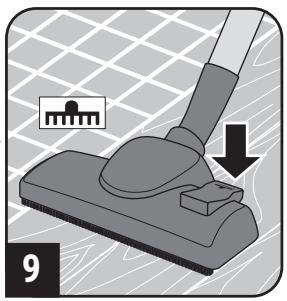
natural_image
Mechanical diagram showing a lever pressing a component on a base, with no visible text or symbols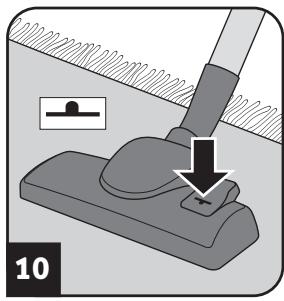
natural_image
Mechanical diagram showing a lever pressing a button with a downward arrow, no text or symbols present! WARNING:
natural_image
Illustration of a hand using a tool to adjust or install a device (no text or symbols visible)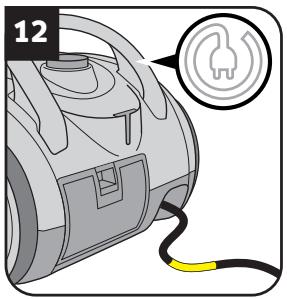
natural_image
Illustration of a robotic vacuum cleaner with a circular badge and handle (no text or symbols)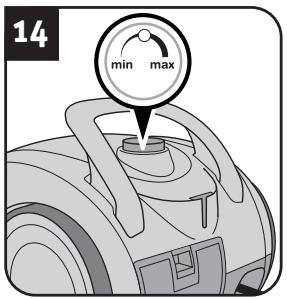
natural_image
Illustration of a person using a power tool to clean or walk (no text or symbols)WARNUNG:
natural_image
Illustration of a hand using a handheld device to adjust a tool, with arrows indicating movement (no text or symbols)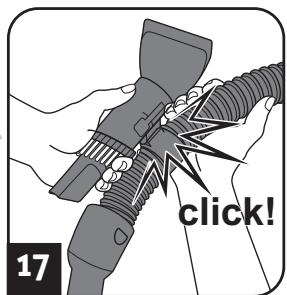
natural_image
Mechanical assembly diagram showing a valve inserted into a vehicle's seat and belt (no text or symbols)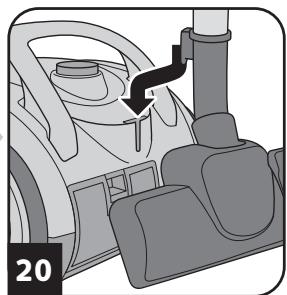
natural_image
Diagram of a car interior showing dashboard, steering wheel, and seatbelt mechanism (no text or symbols)! WARNING:
natural_image
Technical illustration of a mechanical component with a red circular feature and numbered label (21), no readable text or symbols present.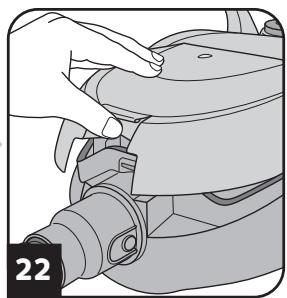
natural_image
Illustration of a hand adjusting a mechanical component with a numbered label '22' (no text or symbols on the diagram itself)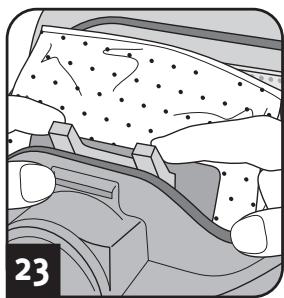
natural_image
Cross-sectional diagram of a mechanical or geological structure with no visible text or symbols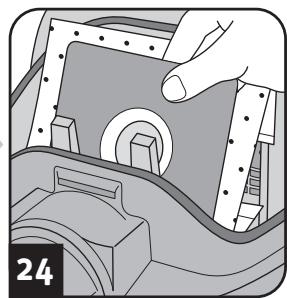
natural_image
Illustration of a hand inserting a component into a device housing (no text or symbols visible)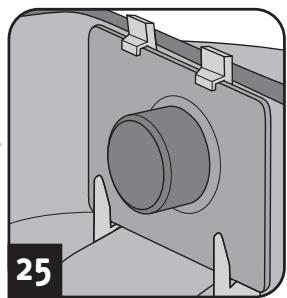
natural_image
Mechanical component diagram showing a cylindrical assembly with mounting brackets (no text or symbols)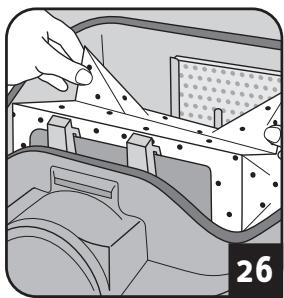
natural_image
Illustration of a hand holding a tool interacting with a mechanical component, no visible text or symbols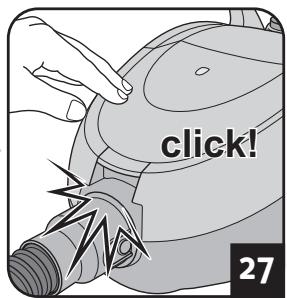
Kaufempfehlung
Swirl®
Y50®
natural_image
Illustration of a hand holding a device with a circular button, no visible text or symbols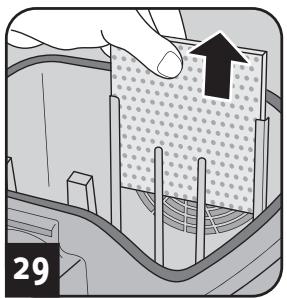
natural_image
Diagram showing a hand pressing down on a textured material surface with arrows indicating direction (no text or symbols)
natural_image
Diagram of a spray coating process with a container and pipe, no text or symbols present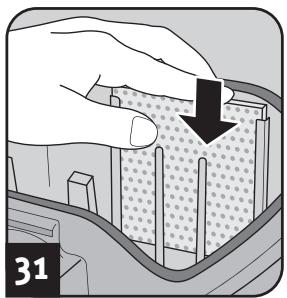
natural_image
Illustration of a hand pressing down on a textured surface with a black arrow indicating downward motion (no text or symbols)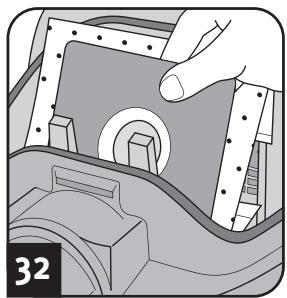
natural_image
Illustration of a hand operating a mechanical component with a circular feature, no text or symbols presentACHTUNG:
natural_image
Illustration of a hand inserting a component into a vehicle's air vent (no text or symbols visible)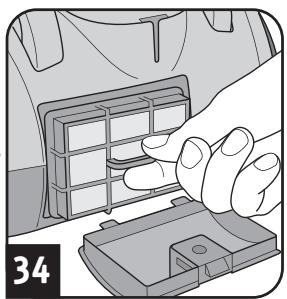
natural_image
Illustration of a hand inserting a component into a car air vent (no text or symbols)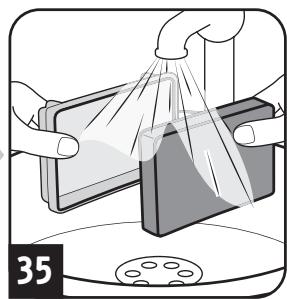
natural_image
Illustration of hands cleaning a rectangular object with a cloth, no text or symbols present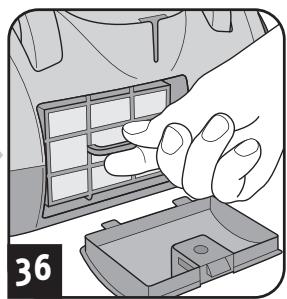
natural_image
Illustration of a hand placing a component into a car's air vent (no text or symbols visible)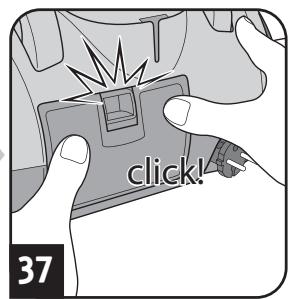
ACHTUNG:
1.1 About the operating manual
Read this operating manual completely before working with the appliance. Keep the operating manual in a safe place. Include the operating manual if you pass the appliance on to someone else. Failure to comply with these instructions can lead to serious injuries or damage to the appliance. We take no responsibility for damage due to failure to comply with these operating instructions.
Always comply with the notices marked as follows to avoid accidents and damage to the appliance.
WARNING:
Warns of health hazards and indicates possible risks of injury.
CAUTION:
Warns of possible dangers to the appliance or other objects.
NOTE:
Highlights tips and information for you.
1.2 Concerning certain groups of persons
These appliances can be used by children of 8 years and upwards and persons with impaired physical, sensory or mental abilities, or insufficient experience or knowledge, providing they are supervised or have been instructed in the proper use of the appliance and understand the risks involved.
Children are not permitted to play with the appliance.
Children must not carry out cleaning tasks or maintenance unless they are supervised.
Children under the age of eight should be kept away from the appliance and the connection cable whilst it is switched on or cooling down.
- Packing material must not be used to play with. There is danger of suffocation.
1.3 Concerning the power supply
The appliance is operated with electrical power which means there is always a risk of electric shock. Therefore, please comply with the following:
- Never immerse the appliance in water or other liquids; keep it away from rain and moisture.
■ Never touch the plug with wet hands. Do not operate the appliance outside or in rooms with a high level of humidity.
Take care that the power cord is not kinked, pinched, or rolled over and ensure it does not come into contact with heat sources. Also take care that it does not become a stumbling hazard.
Before connecting to the power supply, make sure that the voltage stated on the type plate matches the voltage of your plug socket.
■ Always check the power cord for possible damage before using the appliance. - Never carry the appliance by its power cord. It could be damaged.
Before you clean or maintain the appliance, switch off the appliance and pull the mains plug from the socket.
■ Always pull directly on the plug if you want to disconnect the appliance from the mains. Never pull on the power cord as this could damage it.
If possible, do not use extension cords. If you must use an extension cord, use only safety-certified, water-protected single extension cords (no multi-socket distributors) designed for the power consumption of the appliance.
1.4 Concerning intended use
The cylinder vacuum cleaner is intended for home use only.
It is not suitable for commercial use.
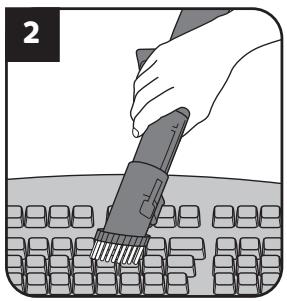
Use the cylinder vacuum cleaner only for cleaning dry, normally soiled floors. Once you have attached the 3-in-1 combi-nozzle, you will also be able to use the appliance to vacuum furniture and upholstery.
Any other use is considered non-intended use and is prohibited.
Particularly prohibited:
■ Use in the vicinity of explosive or highly-flammable substances. There is a risk of fire or explosion.
To use the appliance outdoors. There is danger of rain or dirt destroying the appliance.
■ Sticking objects into the appliance's openings. It could overheat.
■ To modify or repair the appliance yourself.
Vacuuming of:
- Persons, animals, plants, especially hair, fingers and other parts of the body as well as articles of clothing on the body. These might be drawn in. This could result in injuries.
- Water and other fluids, especially damp carpet cleaners. Moisture inside the appliance can cause a short-circuit.
- Toner (for laser printers, copying machines, etc.). There is danger of fire or explosion.
- Hot ash, burning cigarettes or matches. This could cause a fire.
- Pointed objects, such as glass shards, nails, etc. They can damage the appliance.
- Rubble, plaster, cement, fine drilling-dust, make-up, etc. These might damage the appliance.
1.5 If the appliance is defective
Never use a defective appliance or operate an appliance with a defective power cord. If the power cord of this appliance is damaged, it must be replaced by the manufacturers, their authorised service representative or a similarly qualified person to avoid danger.
Refer a defective appliance to an authorised dealer or the Royal Appliance Service ( Page 46, 'International Service') for repair.
2.1 Assemble appliance and adjust nozzles to surface
natural_image
Illustration of a hand using a handheld tool to clean or store digital displays (no text or symbols visible)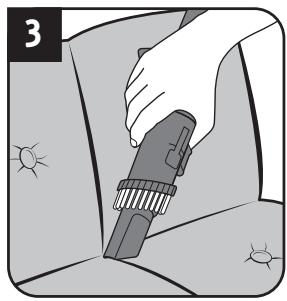
natural_image
Illustration of a hand using a power tool to clean or store items (no text or symbols visible)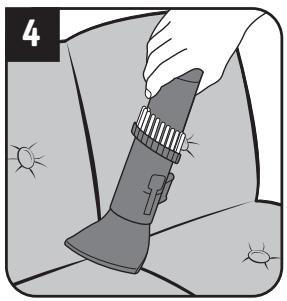
natural_image
Illustration of a hand holding a flashlight with sun-like patterns around it (no text or symbols)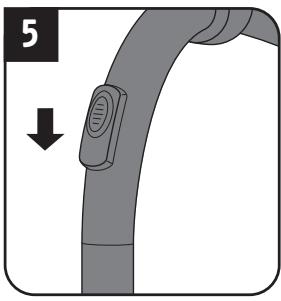
natural_image
Illustration of a hand holding a device with a downward arrow indicating motion (no text or symbols)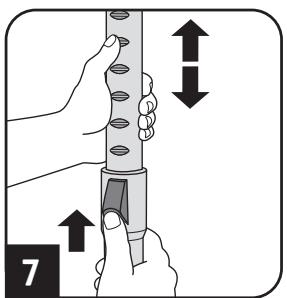
natural_image
Illustration of a hand using a tool to press or install a component on a device (no text or symbols visible)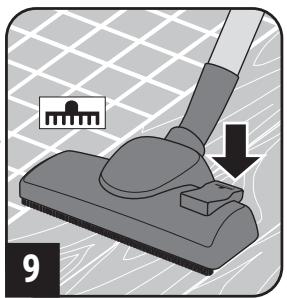
natural_image
Mechanical component diagram showing a lever pressing a button, with no visible text or symbols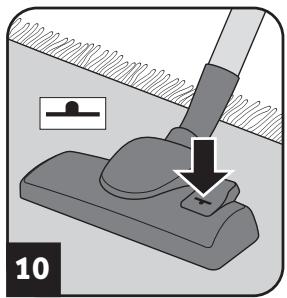
natural_image
Mechanical assembly diagram showing a lever pressing a workpiece with a downward arrow indicating motion (no text or symbols)! WARNING:
Danger of injury! Only attach the appliance parts when the appliance is not connected to the power supply. Otherwise the machine might start up and parts of your body, hair or pieces of clothing might be sucked in.
CAUTION:
Before assembling, make sure that the fitted nozzle suits the surface to be cleaned. Do not clean e.g. any floors or objects with a brush with rotating bristles that you would not clean without a second thought with a conventional brush. Also observe the flooring manufacturer's recommendations.
NOTE:
You might have to twist the parts when connecting them so they are securely in place. Ensure that installed parts are secure by trying to pull them apart.
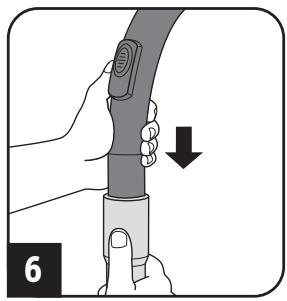
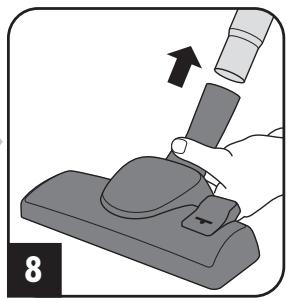
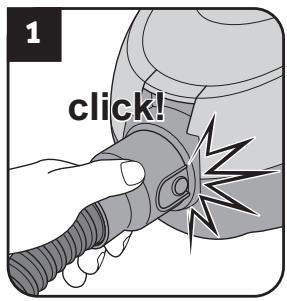
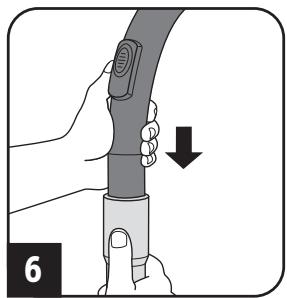
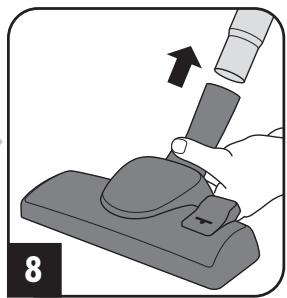
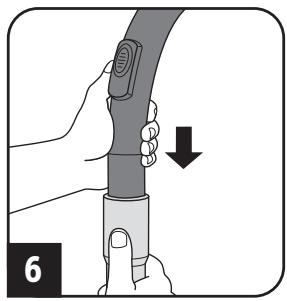
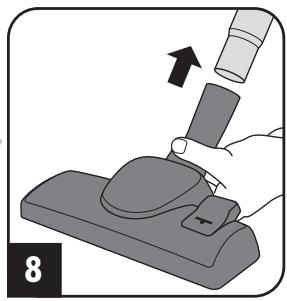
- Assemble the appliance and accessory parts depending on the surface you want to vacuum clean (Fig. 1 – 8).
- Ensure that the bypass vent is closed (Fig. 5).
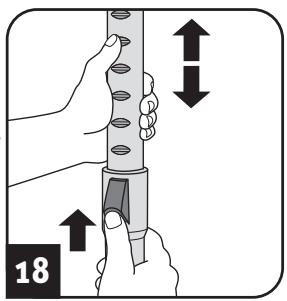
- If you use the telescopic tube (Fig. 6), set its length (Fig. 7).
- If you use the floor nozzle (Fig. 8), set it to the floor to be vacuumed (Fig. 9 hard floor, Fig. 10 carpet).
2.2 Vacuum cleaning
natural_image
Illustration of a hand using a handheld device to adjust or install a device (no text or symbols visible)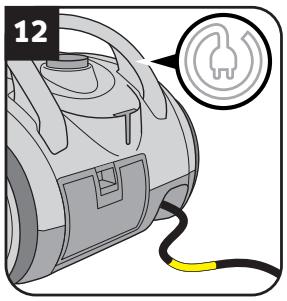
natural_image
Illustration of a robotic vacuum cleaner with a circular badge and handle (no text or symbols)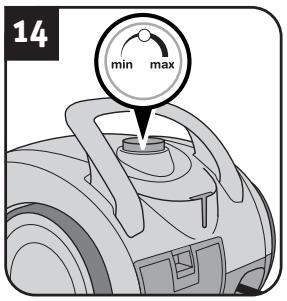

natural_image
Illustration of a person using a manual power tool (no text or symbols)WARNING:
Danger of injury! Check appliance and power cord before each use. A damaged appliance must never be used.
CAUTION:
Only use the appliance with all filters undamaged, in dry condition and correctly fitted. Make sure that no objects obstruct the telescopic tube, the suction hose or other openings.
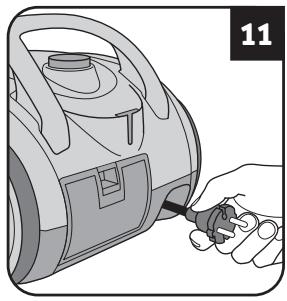
- Pull the cable out of the appliance (Fig. 11) and plug into a socket.
WARNING:
Danger of electric shock! If the red marking shows retract the cord by pressing the retraction button (☐) to pull in the cord up to the yellow mark (Fig. 12) again.
-
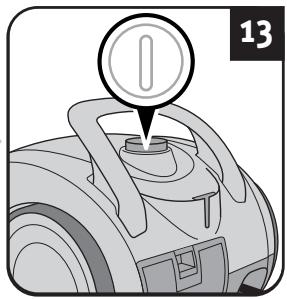
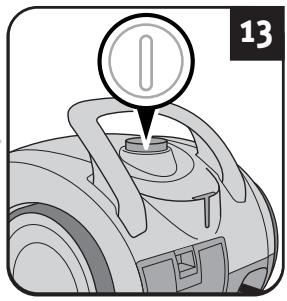
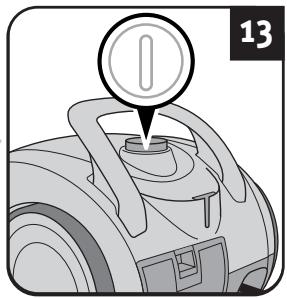
Switch on the appliance using the on/off switch (①) (Fig. 13).
-
Set the power to the setting that corresponds to the cleaning task. (Fig. 14).
NOTE:
The auxiliary air regulator (Fig. 5) must be completely closed for vacuum cleaning. With the auxiliary air regulator you can quickly reduce the suction power, to release objects (such as curtains) that have been sucked in.
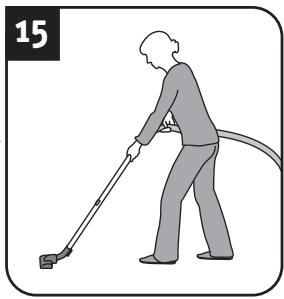
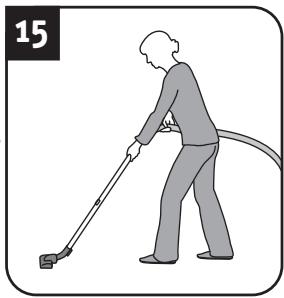
- Vacuum clean (Fig. 15).
WARNING:
Danger of injury! Especially when vacuum-cleaning stairs make sure that you always stand on a higher level than the appliance.
NOTE:
Your vacuum cleaner has an integrated protective function that triggers before the appliance can overheat (e.g. due to blocked suction paths or a full dust filter bag), ▷ Chapter 4.1, 'Before you send in the appliance'.
2.3 After use
natural_image
Illustration of hands using a tool to adjust a component, showing arrows indicating movement (no text or symbols)
natural_image
Mechanical assembly diagram showing a valve inserted into a car seat, with no visible text or symbols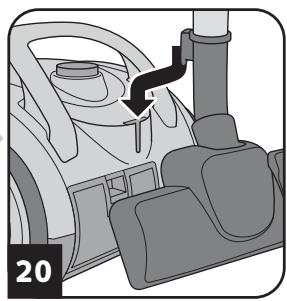
natural_image
Diagram of a car's steering wheel and dashboard with a black arrow indicating direction (no text or symbols)WARNING:
Danger of injury! After vacuuming, switch off the appliance (①) and wind up the power cord (◎). When winding up the cord keep the plug in your hand so that the cord does not thrash about, possibly injuring you.
WARNING:
Danger of injury! Therefore, always keep the appliance out of the reach of children.
CAUTION:
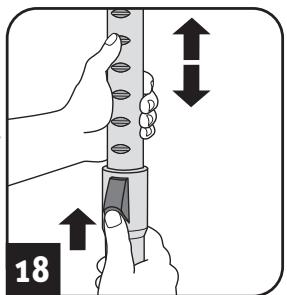
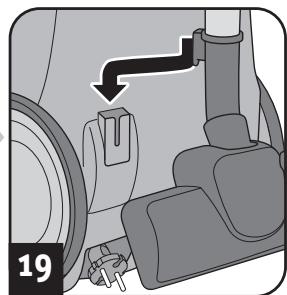
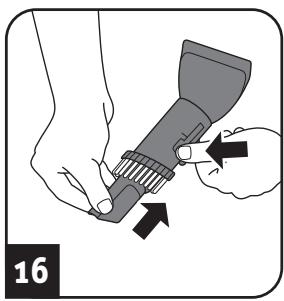
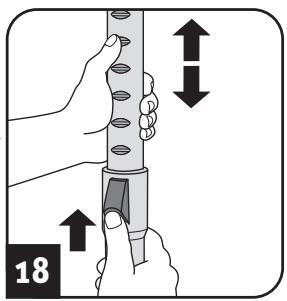
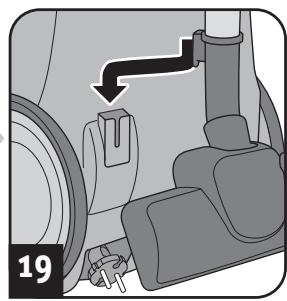
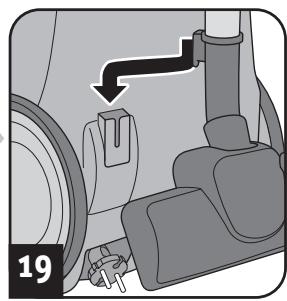
Never store the appliance next to heat sources (e.g. stoves or radiators). Avoid exposing it to direct sunlight. Keep the appliance and accessories cool and dry and so that it does not take up too much space (Fig. 16 – 20).
CAUTION:
If you intend to store the appliance for a long period, first replace the dust filter bag with a new one, Chapter 3.1, 'Changing the dust filter bag'.
3.1 Changing the dust filter bag
CAUTION:
Switch off the appliance before changing the dust filter bag. Otherwise, the appliance might be damaged.
NOTE:
Be careful when removing the dust filter bag so that no dust escapes.
natural_image
Technical illustration of a mechanical component with a red circular feature and numbered label (21), no readable text or symbols present.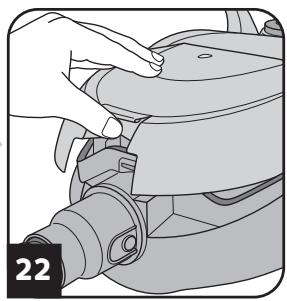
natural_image
Illustration of a hand adjusting a mechanical component (no text or symbols visible)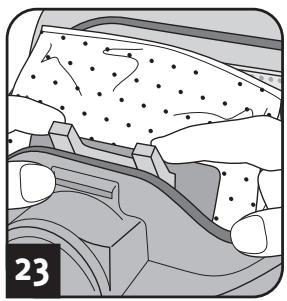
natural_image
Cross-sectional diagram of a mechanical or geological structure with no visible text or symbols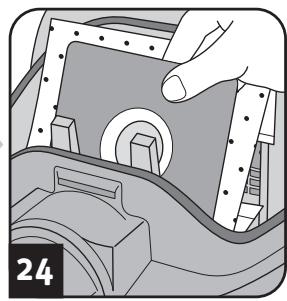
natural_image
Illustration of a hand inserting a component into a mechanical housing (no text or symbols visible)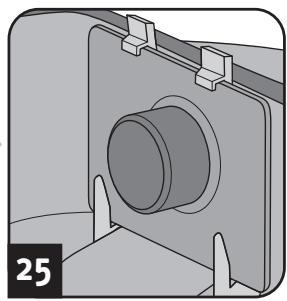
natural_image
Mechanical component diagram showing a cylindrical housing mounted on a bracket with mounting holes (no text or symbols)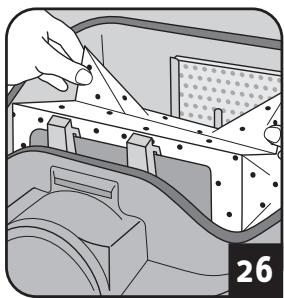
natural_image
Illustration of a hand holding a tool interacting with a mechanical component, no visible text or symbols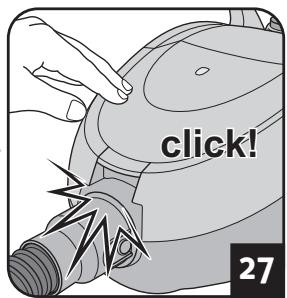
Recommendation
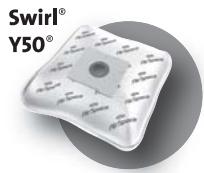
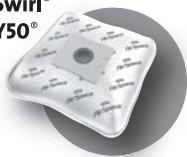
We recommend: Swirl ^® Y50 ^® MicroPor ^® Plus dust filter bags with AirSpace ^® Long Power Guarantee
Swirl ^® , AirSpace ^® MicroPor ^® and Y50 ^® are registered trade marks of a company of the Melitta group and used with their permission.
NOTE:
Insert the bag in the direction of the arrow on the bag. Unfold the bag after insertion (Fig. 26) so that it can erect itself during vacuuming and fill up optimally.
NOTE:
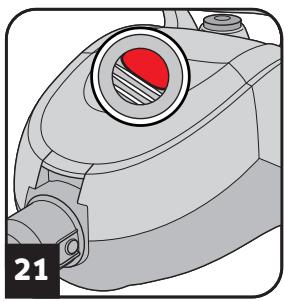
As soon as the dust filter bag change indicator appears in the window (Fig. 21), the dust filter bag has to be changed. In addition, change the dust filter bag at least every three months and before storing for a long period or sending the appliance.
- Switch off the appliance (①).
- Pull the plug out of the plug socket.
- Open the dust compartment cover (Fig. 22).
- Pull the full dust filter bag out carefully (Fig. 23 - 24).
CAUTION:
You can dispose of the contents of the dust filter bag with your normal domestic waste as long as it contains no substances not allowed in domestic waste.
- Insert a new dust filter bag (Fig. 25).
- Check whether the dust filter bag is flush with the edges.
CAUTION:
Never use the appliance without having inserted a dust filter bag. Otherwise, the appliance might be damaged.
- Unfold the bag after insertion (Fig. 26) so that it can erect itself during vacuuming and fill up optimally.
- Shut the dust compartment cover (Fig. 27).
3.2 Cleaning / changing the motor protection filter
natural_image
Illustration of a hand holding a device with a circular button, no visible text or symbols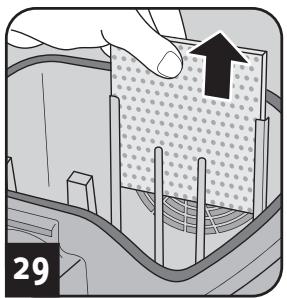
natural_image
Diagram showing a hand pressing down on a textured surface with a black arrow indicating direction (no text or symbols)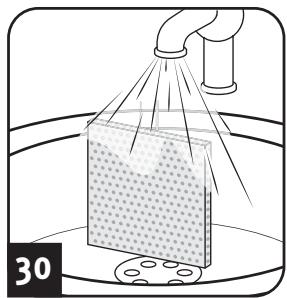
natural_image
Diagram showing a spray coating process with pipe and material, no text or symbols present
natural_image
Illustration of a hand pressing down on a textured surface with a black arrow indicating downward motion (no text or symbols)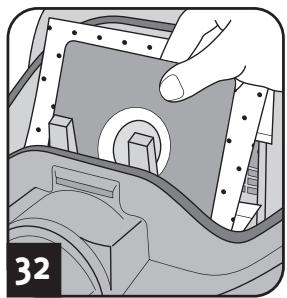
natural_image
Illustration of a hand operating a mechanical component with no visible text or symbolsCAUTION:
Clean the motor protection filter upon every filter bag change, and at least every 3 months. Change the motor protection filter every time you open a new dust filter bag packet, because there is a new motor protection filter in every dust filter bag packet. Change the motor protection filter at least every 6 months.
CAUTION:
The filter is washable, but it may not be cleaned in dishwashers or washing machines. Also, do not use cleaning agents or brushes with hard bristles. Leave the filter to dry after cleaning it with water (approx. 24 hours at room temperature). Only put it back in place when it is completely dry.
- Switch off the appliance (①).
- Pull the plug out of the plug socket.
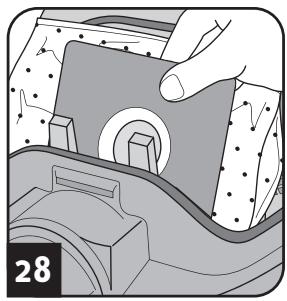
- Take the dust filter bag out of the appliance (Fig. 28), Chapter 3.1, 'Changing the dust filter bag'.
- Pull the filter up and out of the filter holder (Fig. 29).
- Rinse out the filter thoroughly with running cold or hand-warm water (Fig. 30).
- Leave the filter to dry (approx. 24 hours at room temperature).
- Insert the filter back into the filter holder (Fig. 31).
- Put the dust filter bag back in (Fig. 32), ▷Chapter 3.1, ‘Changing the dust filter bag’.
3.3 Cleaning / changing the exhaust filter
natural_image
Illustration of a hand inserting a component into a device (no text or symbols visible)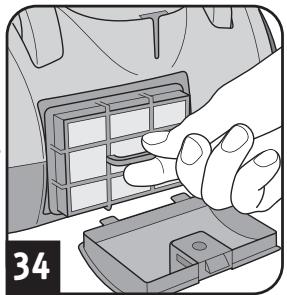
natural_image
Illustration of a hand inserting a component into a car air vent (no text or symbols)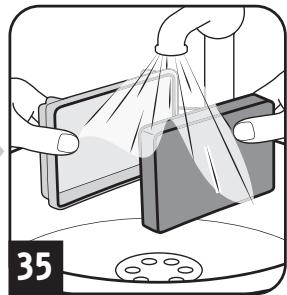
natural_image
Illustration of hands cleaning a rectangular object with a cloth, no text or symbols present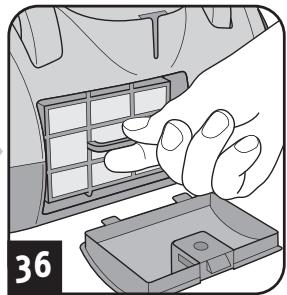
natural_image
Illustration of a hand inserting a component into a car's air vent (no text or symbols)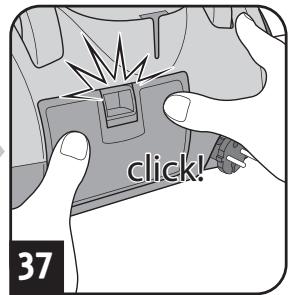
CAUTION:
Clean the exhaust filter each time you clean the motor protection filter. Change the exhaust filter as soon as it has deformed or is damaged at the latest.
CAUTION:
The filter is washable, but it may not be cleaned in dishwashers or washing machines. Also, do not use cleaning agents or brushes with hard bristles. Leave the filter to dry after cleaning it with water (approx. 24 hours at room temperature). Only put it back in place when it is completely dry.
- Switch off the appliance (①).
- Pull the plug out of the plug socket.
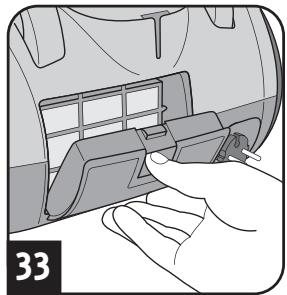
- Open the exhaust filter cover as shown (Fig. 33).
- Take the filter out of the appliance (Fig. 34).
- Rinse out the exhaust filter thoroughly under running water (Fig. 35).
- Then leave the exhaust filter to dry (approx. 24 hours at room temperature).
- Put the filter back into its holder (Fig. 36).
- Put the exhaust filter cover into its recesses.
- Push the cover until it locks into place (Fig. 37).
3.4 Spare parts and accessories
The following accessories and spare parts can be reordered:
| Item number | Description |
| 7700002 | 1 exhaust filter |
| 7700022 | 4 dust filter bags + 1 motor protection filter |
| M203-4 | 1 parquet brush |
| M208-8 | 1 turbo brush |
| M219 | 1 mini-turbo brush “Fellino” |
Accessory parts and spare parts can be reordered from:
▷Page 46, 'International Service'
CAUTION:
Only use original spare parts from the scope of delivery or those that you have purchased by reordering.
4.1 Before you send in the appliance

WARNING:
Danger of injury! Never use a defective appliance! Always switch off the appliance and disconnect it from the mains before starting troubleshooting.
Before contacting us or even sending the appliance to us, use the table to check whether you can correct the problem yourself.
| Problem | Possible cause / solution |
| The dust filter bag change indicator appears in the window (Fig. 21). | The dust filter bag is full.Change the dust filter bag ▷Chapter 3.1, ‘Changing the dust filter bag’. |
| The filters are dirty.Clean the respective filter, ▷Chapter 3.2, ‘Cleaning / changing the motor protection filter’ or ▷Chapter 3.3, ‘Cleaning / changing the exhaust filter’. | |
| Nozzle, telescopic tube or suction hose is blocked.Remove the obstacle. If necessary, use a long wooden stick (e. g. a broomstick) to do this. | |
| The vacuum cleaner stops suddenly. | The overheating protection has tripped (possibly due to blocked suction channels, filters, or similar).Switch the appliance off and pull the plug out of the socket.Remove the cause of overheating (e.g. by disassembling telescopic tube and suction hose and removing the obstacle and/or cleaning filters).Wait around 45 minutes until the appliance has cooled down.After the appliance has cooled off, you may switch it on again. |
4.2 Warranty
The statutory warranty regulations in accordance with the EU Directive 1999/44/EC apply.
4.3 Disposal


Dispose of the appliance in compliance with the environmental protection laws of your country. Electrical waste may not be disposed of together with domestic waste. Use local old-appliance collection points instead.
4.4 Technical data
| Type of appliance | : Bagged vacuum cleaner |
| Model name | : Rebel^70 |
| Model | : DD 7700 (-0/-1/.../-8/-9) |
| Voltage | : 220-240 V ~, 50/60 Hz |
| Power | : 1,600 W nom. - 1,800 W max. |
| max. available dust bag capacity | : approx. 2.0 litres |
| Power cord length | : approx. 6 m |
| Weight | : approx. 3.9 kg |



Technical and design specifications may be changed in the course of continuous product improvement. © Royal Appliance International GmbH
| Problem | Possible cause / solution |
| The cleaning results are unsatisfactory in spite of the appliance working correctly. | Bypass vent (Fig. 5) is open.Close the bypass vent (Fig. 5). |
| Position of the suction power control is not appropriate (Fig. 14).Adjust the position of the suction power control (Fig. 14). | |
| The attached nozzle is unsuitable.Change the nozzle, ▷Chapter 2.1, ‘Assemble appliance and adjust nozzles to surface’. | |
| Collar brush of the floor nozzle is in a position inappropriate to the floor (Fig. 9 – 10).Adjust the position of the collar brush to the floor via the switch on the floor nozzle (Fig. 9 – 10). | |
| The dust filter bag is full.Change the dust filter bag ▷Chapter 3.1, ‘Changing the dust filter bag’. | |
| The filters are dirty.Clean the respective filter, ▷Chapter 3.2, ‘Cleaning / changing the motor protection filter’ or ▷Chapter 3.3, ‘Cleaning / changing the exhaust filter’. | |
| Nozzle, telescopic tube or suction hose is blocked.Remove the obstacle. If necessary, use a long wooden stick (e. g. a broomstick) to do this. |
NOTE:
If you cannot solve the problem following these instructions, contact the Royal Appliance customer service (▷Page 46, 'International Service').
In non-EU countries the minimum requirements of the warranty in the respective country apply.
The filters and dust filter bags are made from environmentally-friendly materials. You can dispose of them — as opposed to the appliance itself — with your domestic waste, provided they do not contain anything that is forbidden from disposal in domestic waste.
natural_image
Line drawing of a vacuum cleaner device with no visible text or symbols1.1 Mode d'emploi
natural_image
Illustration of a hand using a handheld tool to clean or store digital displays (no text or symbols visible)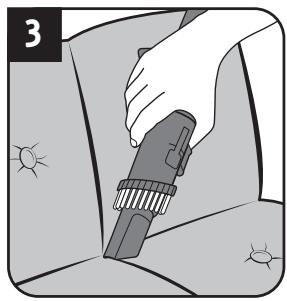
natural_image
Illustration of a hand using a power tool to clean or store items (no text or symbols visible)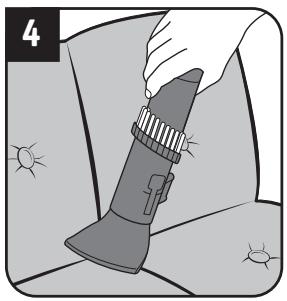
natural_image
Illustration of a hand holding a flashlight with sun icons nearby (no text or symbols)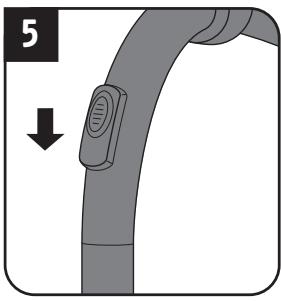
natural_image
Illustration of a hand holding a device with a downward arrow indicating motion (no text or symbols)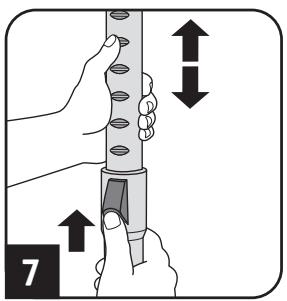
natural_image
Illustration of a hand using a pipette to press or install a component on a base, with an arrow indicating the process (no text or symbols present)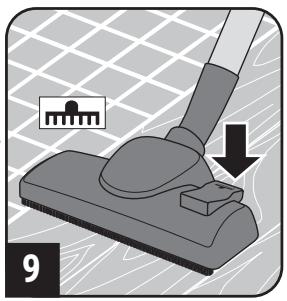
natural_image
Mechanical diagram showing a lever pressing a component with a small inset image (no text or symbols)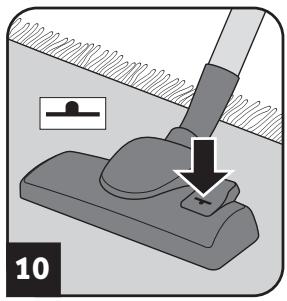
natural_image
Mechanical assembly diagram showing a lever pressing a workpiece with a downward arrow indicating motion (no text or symbols)! AVERTISSEMENT:
natural_image
Illustration of a hand using a tool to adjust or install a device (no text or symbols visible)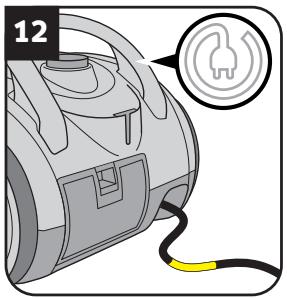
natural_image
Illustration of a vacuum cleaner's handle with a circular badge and number 13, no text or symbols present.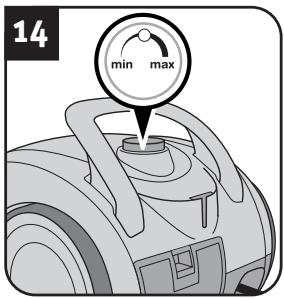
natural_image
Illustration of a person using a power tool to clean or walk (no text or symbols)AVERTISSEMENT:
natural_image
Illustration of hands using a tool to adjust a component, showing arrows indicating movement (no text or symbols)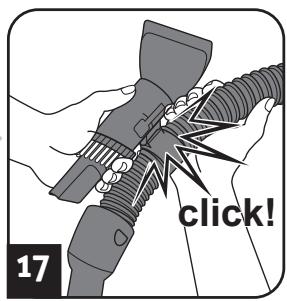
natural_image
Mechanical assembly diagram showing a valve inserted into a car seat, with no visible text or symbols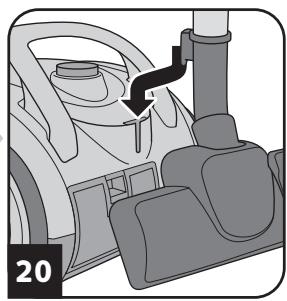
natural_image
Diagram of a car's steering wheel and dashboard with a black arrow indicating direction (no text or symbols)! AVERTISSEMENT:
natural_image
Technical illustration of a mechanical component with a red circular feature and labeled section number 21 (no text or symbols on the diagram itself)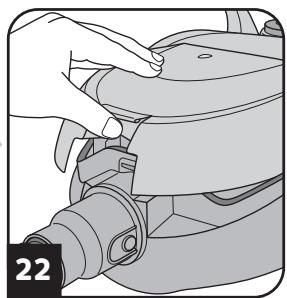
natural_image
Illustration of a hand adjusting a mechanical component (no text or symbols visible)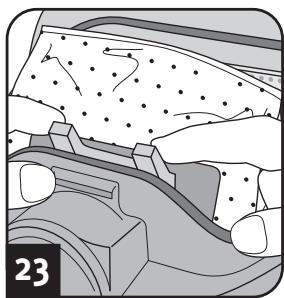
natural_image
Cross-sectional diagram of a mechanical or geological structure with no visible text or symbols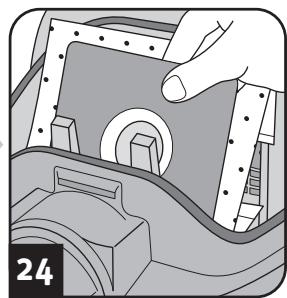
natural_image
Illustration of a hand inserting a component into a mechanical housing (no text or symbols visible)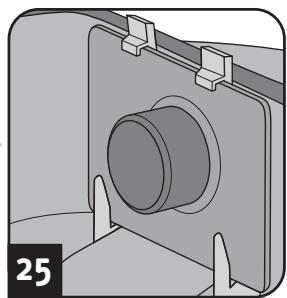
natural_image
Mechanical component diagram showing a cylindrical housing mounted on a bracket with mounting brackets (no text or symbols)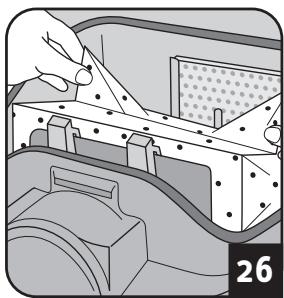
natural_image
Illustration of a mechanical assembly with a hand holding a sheet metal, showing internal components and alignment (no text or symbols)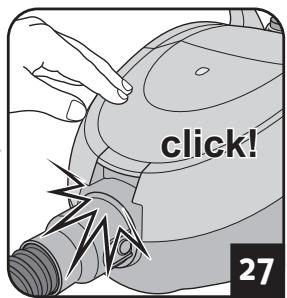
natural_image
Illustration of a hand holding a device with a circular button, no visible text or symbols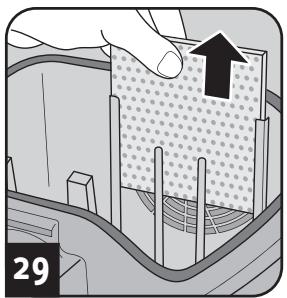
natural_image
Diagram showing a hand pressing down on a textured material surface with arrows indicating direction (no text or symbols)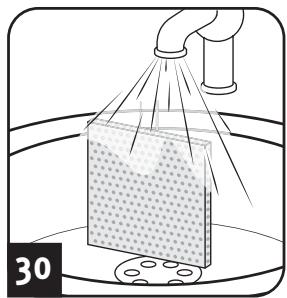
natural_image
Diagram showing a spray coating process with pipe and container (no text or symbols)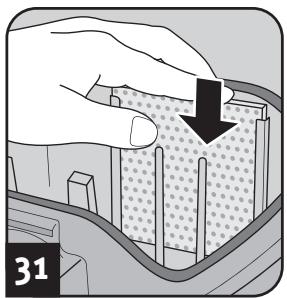
natural_image
Illustration of a hand pressing down on a textured surface with a black arrow indicating downward motion (no text or symbols)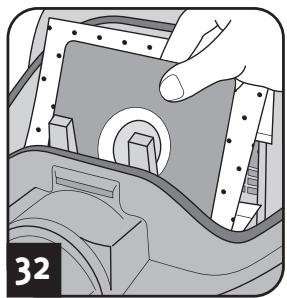
natural_image
Illustration of a hand operating a mechanical component with no visible text or symbolsATTENTION:
natural_image
Illustration of a hand inserting a component into a vehicle's air vent (no text or symbols visible)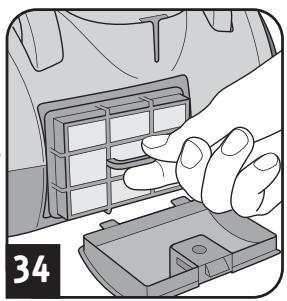
natural_image
Illustration of a hand inserting a component into a car air vent (no text or symbols visible)
natural_image
Illustration of hands cleaning a rectangular object with a cloth, no text or symbols present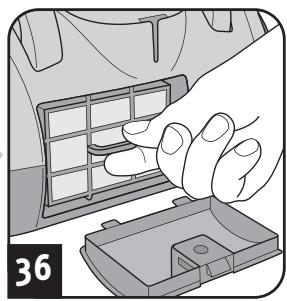
natural_image
Illustration of a hand placing a grid on a car's side panel into a battery pack (no text or symbols)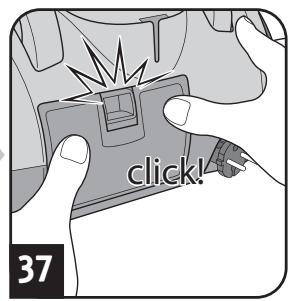
ATTENTION:
natural_image
Line drawing of a vacuum cleaner device (no text or symbols)DE
Kundenservice:
Royal Appliance International GmbH
Abt. Kundenservice
Jagenbergstraße 19
41468 Neuss
DEUTSCHLAND
Tel.: +49 (0) 180 - 501 50 50*
Fax: +49 (0) 2131 - 60 90 60 95
WhiteBrown A/S Service
c/o BSL Baltship Seatainers Logistics
Egeskowej 6
8700 Horsens
DANMARK
Tel.: +45 73326150
info@whitebrown.eu
ES
natural_image
Line drawing of a vacuum cleaner (no text or symbols on the device itself)Fehlerbeschreibung • Description of the malfunction • Description du problème • Omschrijving van de fout • Descripción del fallo • Descrizione del difetto • Hata tanımı:

Royal Appliance International GmbH
Jagenbergstraße 19
41468 Neuss
Germany
servicecenter@dirtdevil.de
www.dirtdevil.de
+49 (0) 1805 - 10 90 19*
+49 (0) 2131 - 60 90 60 95
DE
* € 0.14 per minute from German landlines, maximum German mobile phone tariff € 0.42 per minute.
The cost of calls from abroad—outside Germany—depend upon the current prices of the respective foreign telephone company.
FR
- ! WARNING:
- WARNUNG:
- Kaufempfehlung
- ACHTUNG:
- About the operating manual
- WARNING:
- CAUTION:
- NOTE:
- Concerning certain groups of persons
- Concerning the power supply
- Concerning intended use
- Particularly prohibited:
- If the appliance is defective
- Assemble appliance and adjust nozzles to surface
- Vacuum cleaning
- After use
- Changing the dust filter bag
- Recommendation
- Cleaning / changing the motor protection filter
- Cleaning / changing the exhaust filter
- Spare parts and accessories
- Before you send in the appliance
- Warranty
- Disposal
- Mode d'emploi
- ! AVERTISSEMENT:
- AVERTISSEMENT:
- ATTENTION:
- DE
- Kundenservice:
- ES
- FR
Brand : DIRT DEVIL
Model : DD7700, DD7710
Category : Vacuum Cleaners