PF851WN - Refrigerator Point - Free user manual and instructions
Find the device manual for free PF851WN Point in PDF.


Pick your language and provide your email: we'll send you a specifically translated version.
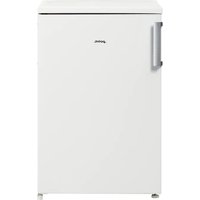
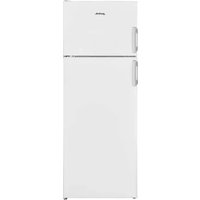
| Product Type | Freestanding Refrigerator with Freezer Compartment |
| Brand | Point |
| Model | PF851WN |
| Total Capacity | 150 liters (estimated) |
| Refrigerator Capacity | 120 liters |
| Freezer Capacity | 30 liters |
| Energy Efficiency Class | F (approximate) |
| Annual Energy Consumption | 200 kWh (estimated) |
| Noise Level | 42 dB (typical) |
| Dimensions (W x H x D) | 550 x 850 x 580 mm |
| Weight | 28 kg |
| Power Supply | 220-240 V ~ 50 Hz |
| Power Consumption | 100 W |
| Climate Class | N-ST |
| Defrost Type | Manual defrost for freezer section |
| Shelving | Adjustable glass shelves |
| Door Reversibility | Yes, reversible door |
| Thermostat | Adjustable mechanical thermostat |
| Interior Lighting | LED light |
| Refrigerant | R600a (isobutane) - environment friendly |
| Safety Features | Meets European safety standards |
| Cleaning | Use a soft damp cloth and mild detergent; avoid abrasive cleaners |
| Spare Parts | Available from authorized service centers; user replaceable door seals, thermostat, shelves |
| General Information | User manual in PDF available for download; support from Point customer service |
Frequently Asked Questions - PF851WN Point
How to install the refrigerator properly?
Place the refrigerator on a level surface away from heat sources and direct sunlight. Keep a gap of at least 5 cm around the sides and back for ventilation. After installation, wait 4 hours before turning it on to allow the refrigerant to settle.
What is the recommended temperature setting?
For optimal food preservation, set the thermostat to 4°C in the refrigerator section and -18°C in the freezer. Adjust gradually and allow 24 hours for the temperature to stabilize.
How to defrost the freezer?
Turn off the appliance and remove all food. Leave the door open. Use a plastic scraper to remove ice; never use sharp objects or heaters. Clean and dry the interior before restarting.
How to clean the refrigerator?
Unplug the appliance and remove shelves and drawers. Wash with warm water and mild detergent. Rinse and dry thoroughly. Clean the door seals with a soft brush. Avoid abrasive cleaners or solvents.
How to reverse the door?
Follow the instructions in the manual: remove the top hinge, lift the door off, remove the bottom hinge, and reinstall on the opposite side. Use a screwdriver and keep all screws. The door must be aligned properly to ensure a tight seal.
What to do if the refrigerator does not cool?
Check the power supply, thermostat setting, and whether the door closes completely. Clean the condenser coils at the back. If the issue persists, contact customer service as the compressor may be faulty.
How to save energy?
Place the refrigerator away from heat sources, do not set the thermostat colder than necessary, and avoid frequent door openings. Ensure the door seals are in good condition. This reduces energy consumption by up to 30%.
Is it safe to store hot food?
No, wait until hot food has cooled to room temperature before placing it inside. Hot food raises internal temperature, increases energy use, and can cause bacterial growth in other foods.
What are the dimensions and weight?
This model measures 550 x 850 x 580 mm (W x H x D) and weighs approximately 28 kg. Ensure your kitchen space matches these dimensions, including clearance for ventilation.
How to obtain spare parts?
Contact the Point authorized service center with your model number (PF851WN). Commonly available spare parts include door seals, thermostat, shelves, and light bulbs. Check the manual for part numbers and availability.
User questions about PF851WN Point
0 question about this device. Answer the ones you know or ask your own.
Ask a new question about this device
No questions yet. Be the first to ask one.
Download the instructions for your Refrigerator in PDF format for free! Find your manual PF851WN - Point and take your electronic device back in hand. On this page are published all the documents necessary for the use of your device. PF851WN by Point.
USER MANUAL PF851WN Point
Manual assistant
Powered by Anthropic
Waiting for your message
Product information
Brand : Point
Model : PF851WN
Category : Refrigerator