PORLMW1 - Robotic mower Point - Free user manual and instructions
Find the device manual for free PORLMW1 Point in PDF.
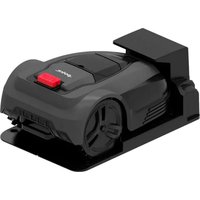


Pick your language and provide your email: we'll send you a specifically translated version.
| Product Type | Robotic mower |
| Brand | Point |
| Model | PORLMW1 |
| Cutting Width | 22 cm |
| Cutting Height Range | 20-60 mm (adjustable) |
| Recommended Max Area | 500 m² |
| Battery Type | Lithium-ion (18 V) |
| Charging Time | Approx. 90 min |
| Mowing Time | Up to 60 min |
| Automatic Charging | Yes, returns to base station |
| Rain Sensor | Yes, pauses mowing in rain |
| Lift Sensor | Yes, stops blades when lifted |
| Tilt Sensor | Yes, prevents operation on steep slopes |
| Security Lock | PIN code for anti-theft |
| Noise Level | Approx. 60 dB |
| Weight | 8 kg |
| Dimensions | 55 × 38 × 28 cm |
| Installation | Boundary wire included |
| Maintenance | Clean blades and underside weekly |
| Spare Parts | Blades, wheels, and battery available |
| Repairability | Modular design for easy DIY repair |
| Power Consumption | 18 V / 2.0 Ah battery pack |
Frequently Asked Questions - PORLMW1 Point
How do I install the boundary wire?
Lay the boundary wire around the mowing area, secure it with pegs, and connect it to the base station. Keep the wire at least 30 cm from obstacles such as flower beds and walls. Refer to the installation diagram for correct spacing.
How often should I replace the blades?
Typically, replace the blades every 2 to 3 weeks or sooner if they are dull or damaged. Always use original spare blades to ensure optimal cutting and safety.
Can the PORLMW1 handle slopes?
The mower can handle slopes up to 25%. If the slope exceeds this limit, the tilt sensor stops the blades and prevents operation to protect the motor.
What happens when it starts raining?
The integrated rain sensor detects moisture and automatically pauses mowing. The mower then returns to its charging station and resumes only when the weather clears.
How can I set a mowing schedule?
Use the control panel on the mower to set days and times for automatic mowing. You can adjust the schedule according to your lawn's growth and seasonal needs.
Is the mower safe for children and pets?
Yes, the mower is equipped with a blade stop system that halts the blades within 3 seconds if the mower is lifted. A PIN code prevents accidental starts by children or unauthorized users.
How do I clean and maintain the robotic mower?
Clean the underside with a brush and water after each mowing season. Avoid high-pressure washers. Wipe the wheels, sensors, and blade disc to maintain performance.
What should I do before winter storage?
Before winter, fully charge the battery, remove it, and store it at room temperature. Clean the mower thoroughly and keep it in a dry, frost-free location.
What should I do if the mower gets stuck?
If the mower becomes stuck, it will automatically reverse and retry. If it cannot free itself, turn off the power, remove any obstacles, and check the wheels and sensors for debris.
Where can I find spare parts and accessories?
Original spare parts such as blades, wheels, batteries, and filters can be purchased from authorized retailers or online. Use the model number PORLMW1 for compatibility, and consult the repair guide for DIY replacement.
User questions about PORLMW1 Point
0 question about this device. Answer the ones you know or ask your own.
Ask a new question about this device
No questions yet. Be the first to ask one.
Download the instructions for your Robotic mower in PDF format for free! Find your manual PORLMW1 - Point and take your electronic device back in hand. On this page are published all the documents necessary for the use of your device. PORLMW1 by Point.
USER MANUAL PORLMW1 Point


Manual assistant
Powered by Anthropic
Waiting for your message
Product information
Brand : Point
Model : PORLMW1
Category : Robotic mower