Renew POPS3000 - Scale Point - Free user manual and instructions
Find the device manual for free Renew POPS3000 Point in PDF.


Pick your language and provide your email: we'll send you a specifically translated version.
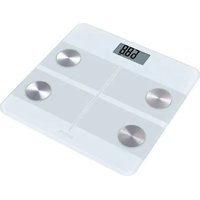
| Product Type | Digital Scale |
| Brand | Point |
| Model | Renew POPS3000 |
| Display | LCD screen with large digits |
| Maximum Weight Capacity | 180 kg / 396 lb / 28 st 8 lb |
| Graduation (Precision) | 0.1 kg / 0.2 lb |
| Units of Measurement | Kilograms (kg), pounds (lb), stones (st) |
| Power Supply | 2 x 1.5V AAA batteries (included) |
| Auto-Off Function | Yes, after 10 seconds of inactivity |
| Platform Material | Tempered glass with anti-slip texture |
| Weight Measurement Technology | High-precision strain gauge sensor |
| Additional Functions | Overload indication, low battery indicator, step-on activation |
| Dimensions (W x D x H) | 30 x 30 x 2.2 cm |
| Product Weight | 1.5 kg |
| Maintenance and Cleaning | Wipe with a damp cloth; do not use abrasive cleaners |
| Safety Instructions | Use on a hard, flat surface; avoid water immersion and extreme temperatures |
| Spare Parts and Repairability | Replaceable batteries; factory service for internal components |
| General Information | Bathroom scale for home use, suitable for daily weight monitoring |
Frequently Asked Questions - Renew POPS3000 Point
How do I switch the unit from kg to lb or st?
Look for the unit button on the back or bottom of the scale. Press it to cycle through kilograms (kg), pounds (lb), and stones (st).
Why does my scale show different readings each time I step on it?
Ensure the scale is placed on a hard, flat surface (not carpet). Wait for the scale to show 0.0 before stepping on. Stand still with your weight evenly distributed on the center of the platform.
How do I replace the batteries?
Open the battery compartment on the underside of the scale. Remove the old batteries and insert 2 x AAA batteries following the polarity signs (+ / -) inside the compartment.
What does 'Err' mean on the display?
The scale may be overloaded (weight exceeds 180 kg) or the reading is unstable. Step off, wait for the scale to turn off, then try again on a stable surface.
Can I use the scale on a carpet?
No, for accurate and consistent readings, place the scale on a hard, even floor such as tile or hardwood. Carpet can cause unstable measurements.
How do I clean my scale?
Use a soft damp cloth to wipe the glass platform and plastic parts. Avoid using harsh chemicals, abrasive sponges, or submerging the scale in water.
Does the scale shut off automatically?
Yes, the scale features an auto-off function that activates after about 10 seconds of inactivity to save battery life.
Why is the weight reading slightly different from my previous scale?
Different scales can have slight calibration variations. For the most consistent tracking, weigh yourself at the same time of day, on the same scale, and on the same surface.
How do I reset the scale if it behaves strangely?
Remove the batteries, wait 30 seconds, then reinsert them. This resets the electronics and clears any temporary errors.
Is this scale suitable for monitoring body fat or BMI?
This model is a basic weight scale and measures only body weight. For body composition metrics like BMI, consider using a body composition monitor or consulting a healthcare professional.
User questions about Renew POPS3000 Point
0 question about this device. Answer the ones you know or ask your own.
Ask a new question about this device
No questions yet. Be the first to ask one.
Download the instructions for your Scale in PDF format for free! Find your manual Renew POPS3000 - Point and take your electronic device back in hand. On this page are published all the documents necessary for the use of your device. Renew POPS3000 by Point.
USER MANUAL Renew POPS3000 Point

Manual assistant
Powered by Anthropic
Waiting for your message
Product information
Brand : Point
Model : Renew POPS3000
Category : Scale