POMW3020W - Oven Point - Free user manual and instructions
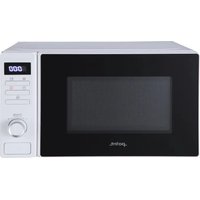
Find the device manual for free POMW3020W Point in PDF.


Pick your language and provide your email: we'll send you a specifically translated version.
| Product type | Built-in electric oven |
| Brand | Point |
| Model | POMW3020W |
| Installation | Built-in under counter or in a tall unit |
| Dimensions (H x W x D) | 595 mm x 594 mm x 545 mm |
| Oven capacity | 65 liters (gross) |
| Energy efficiency class | A |
| Power supply | 220-240 V, 50/60 Hz, 16 A |
| Maximum power | 2.5 kW |
| Number of functions | 8 cooking modes |
| Main cooking modes | Conventional heating, fan assisted, grill, fan grill, defrost, bottom heat, top heat, eco |
| Control type | Mechanical knobs with digital timer |
| Display | LED digital clock with timer |
| Oven door | Double glazed, cool touch |
| Cleaning | Enamel interior, easy-clean catalytic back panel |
| Safety features | Child lock, automatic shut-off, overheating protection |
| Accessories included | One wire shelf, one baking tray, one grill tray |
| Repairability index | High – spare parts available for 10 years |
| Warranty | 2 years standard manufacturer warranty |
| Manual languages | English, French, German, Italian, Spanish, and more |
Frequently Asked Questions - POMW3020W Point
How do I install the Point POMW3020W oven?
The oven is built-in. Ensure the power is off before installing. Place the oven into the cabinet opening, level it, and secure it with screws. Connect the power supply (220-240 V) and follow the detailed installation instructions in the manual.
What should I do before first use?
Remove all packaging and accessories. Clean the interior with warm soapy water. Run the oven at 250°C for 30 minutes to burn off any manufacturing residues. Let it cool and wipe again.
How do I set the clock on the oven?
After connecting the oven, the clock will flash. Use the timer control to set the current time. Confirm by pressing the timer button. If the clock is not set, the oven may not operate.
What are the main cooking modes and when to use them?
Use conventional heating for traditional baking. Fan assisted provides even heat for multi-level cooking. Grill for grilling meat and toasting. Fan grill combines fan and grill for roasting. Defrost uses low heat to thaw frozen food.
How do I clean the oven effectively?
After use, wipe the interior with a damp cloth and mild detergent. The catalytic back panel absorbs grease and burns it off during hot cycles. Avoid abrasive cleaners that can damage the enamel. Clean the door glass with vinegar and water.
Why is the oven not heating up?
Check if the oven is properly supplied with power and the timer is set to manual mode (not automatic). Verify that a cooking program is selected. If the problem persists, consult the troubleshooting section or contact a qualified technician.
Can I use aluminum foil in the oven?
Yes, but avoid placing foil on the bottom of the oven or covering heating elements. Use foil only on trays or to cover food. Improper use can block heat circulation and damage the interior.
How does the child lock work?
Activate the child lock to prevent accidental operation. Press the timer and minus buttons together for 3 seconds. A symbol will appear on the display. Repeat to unlock. This prevents changes to settings while the oven is unattended.
Are spare parts available for this model?
Yes, Point provides spare parts such as heating elements, thermostats, door hinges, and control knobs. They are available from authorized service centers or online parts stores. The model has a high repairability index for long-term service.
What is the recommended maintenance schedule?
Clean the oven after each use. Monthly, inspect the door seals for damage and clean them with mild soap. Check that the shelves and trays are in good condition. Have a professional check the electrical connections every two years.
User questions about POMW3020W Point
0 question about this device. Answer the ones you know or ask your own.
Ask a new question about this device
No questions yet. Be the first to ask one.
Download the instructions for your Oven in PDF format for free! Find your manual POMW3020W - Point and take your electronic device back in hand. On this page are published all the documents necessary for the use of your device. POMW3020W by Point.
USER MANUAL POMW3020W Point
Manual assistant
Powered by Anthropic
Waiting for your message
Product information
Brand : Point
Model : POMW3020W
Category : Oven