POPANW400 - Heating Point - Free user manual and instructions
Find the device manual for free POPANW400 Point in PDF.


Pick your language and provide your email: we'll send you a specifically translated version.
| Product Type | Electric space heater |
| Brand | Point |
| Model | POPANW400 |
| Power Source | 220-240 V ~ 50 Hz |
| Rated Power | 2000 W |
| Heating Element | PTC ceramic |
| Number of Power Levels | 2 |
| Thermostat | Adjustable |
| Dimensions (H x W x D) | 420 x 240 x 100 mm |
| Weight | 2.3 kg |
| Installation Type | Wall-mounted |
| Temperature Range | 5 °C - 35 °C |
| Safety Features | Overheat protection, tip-over switch |
| Enclosure Protection | IP24 (splash-proof) |
| Control Type | Manual dial |
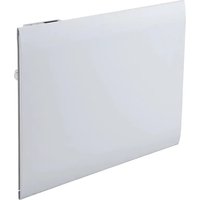
| Finish | White |
| Room Size Recommendation | Up to 25 m² |
| Cleaning Instructions | Wipe with soft damp cloth |
| Spare Parts Availability | Manufacturer approved parts |
| Warranty | 2 years |
| Certifications | CE compliant |
Frequently Asked Questions - POPANW400 Point
What is the recommended room size for the Point POPANW400?
The Point POPANW400 is designed for rooms up to 25 m² with a heating output of 2000 W. For larger spaces, consider multiple units or a higher-capacity heater.
Can I use the POPANW400 in a bathroom?
Yes, the device has an IP24 rating, meaning it is protected against splashing water. It can be installed in bathroom zones 2 and 3, but always keep it at least 60 cm away from water sources and follow local electrical regulations.
How do I clean the heater?
Before cleaning, turn off and unplug the heater. Use a soft, damp cloth to wipe the exterior. Avoid abrasive cleaners or submerging in water. Regularly remove dust from the air intake and outlet grilles using a vacuum cleaner to maintain efficiency.
Does the POPANW400 have a thermostat?
Yes, it features an adjustable thermostat that lets you set the desired room temperature from 5 °C to 35 °C. Once the set temperature is reached, the heating element switches off automatically to save energy.
What should I do if the heater does not turn on?
First, check that the power cord is securely plugged into an electrical outlet. Then, inspect the power switch and thermostat dial to ensure they are in the ON position. If the problem persists, the internal thermal safety fuse may have tripped; contact customer support or a qualified technician.
Is it safe to leave the heater unattended?
The heater is equipped with overheat protection and a tip-over switch, which automatically shuts off the device in case of abnormal temperatures or accidental tip-over. However, it is always advisable to turn off and unplug the heater when leaving the room for extended periods.
How do I mount the POPANW400 on the wall?
Use the supplied mounting bracket and screws. Mark the drill holes according to the template, drill and insert wall plugs, then fix the bracket securely. Finally, hook the heater onto the bracket and ensure it is stable. Keep a minimum distance of 30 cm from the floor and 15 cm from the ceiling.
What is the energy consumption of this heater?
At maximum power, the POPANW400 consumes 2000 watts per hour. Using the thermostat and lower power level can reduce average consumption. The PTC ceramic element heats quickly, helping to minimize runtime.
Can I use an extension cord with the heater?
It is not recommended to use an extension cord, as it may cause overheating. If unavoidable, use a heavy-duty cord rated for at least 13 amps and keep it fully unwound. For safety, always plug the heater directly into a wall outlet.
How do I reset the heater after overheating?
If the overheat protection is triggered, unplug the device and wait for it to cool down completely (approximately 15-30 minutes). Check that air inlets are not blocked. Then plug it back in and turn it on. The heater should operate normally again.
User questions about POPANW400 Point
0 question about this device. Answer the ones you know or ask your own.
Ask a new question about this device
No questions yet. Be the first to ask one.
Download the instructions for your Heating in PDF format for free! Find your manual POPANW400 - Point and take your electronic device back in hand. On this page are published all the documents necessary for the use of your device. POPANW400 by Point.
USER MANUAL POPANW400 Point


Manual assistant
Powered by Anthropic
Waiting for your message
Product information
Brand : Point
Model : POPANW400
Category : Heating