
MCM1150X - Hi-Fi System PHILIPS - Free user manual and instructions
Find the device manual for free MCM1150X PHILIPS in PDF.


Pick your language and provide your email: we'll send you a specifically translated version.
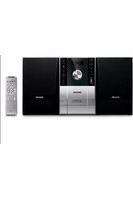
| Type of product | Micro Hi-Fi System |
| Brand | Philips |
| Model | MCM1150X |
| Playback media | CD, CD-R, CD-RW, Cassette |
| Radio tuner | FM/MW with 40 preset stations |
| Audio power output | 2 x 20 W RMS |
| Speaker system | 2-way bass reflex, 6 Ω |
| Frequency range | 63 Hz – 20 kHz |
| Total harmonic distortion | < 1 % |
| Signal-to-noise ratio | > 60 dB |
| Auxiliary input | Yes, 3.5 mm stereo |
| Headphone output | Yes, 3.5 mm stereo |
| Display | LCD with white backlight |
| Remote control | Included (battery type CR2025) |
| Clock / Sleep timer | Yes, 24-hour format |
| Alarm | Yes, dual alarm (radio or CD) |
| Power supply | AC 220-240 V, 50/60 Hz |
| Power consumption | 30 W (standby < 1 W) |
| Dimensions (W x H x D) | 200 x 250 x 250 mm (main unit) |
| Weight | 2.8 kg (main unit) |
| Maintenance | Clean with soft dry cloth; avoid solvents |
| Safety precautions | Disconnect power during storm; keep away from water |
| Spare parts | Available via Philips service centers; repair by qualified personnel |
| Included | Main unit, 2 speakers, remote control, FM antenna, user manual |
Frequently Asked Questions - MCM1150X PHILIPS
How do I set the clock on the Philips MCM1150X?
Press the CLOCK button on the remote or panel until the hour digits flash. Use the TUNING +/- buttons to set the hour, then press CLOCK again to set the minutes. Confirm by pressing CLOCK once more. The time is now stored and displayed when the system is in standby.
How do I store radio stations?
Tune to the desired station manually, then press and hold a preset number button (1-40) until you hear a beep. The station is now stored. You can also use AUTOSTORE to automatically find and assign all available FM/MW stations to presets.
How do I play an external device through the auxiliary input?
Connect your device (e.g., a smartphone) to the AUX IN 3.5 mm jack on the front panel using a stereo audio cable. Press AUX on the remote or select AUX from the source input. Playback of the external device will then be heard through the system speakers.
How do I clean the cassette heads?
Use a commercial cassette head cleaner (dry or wet type) and insert it into the cassette deck as if it were a normal tape. Press PLAY and let it run for about 5 seconds. Repeat if necessary. Do not use abrasive materials or solvents directly on the heads.
The system does not switch on. What should I check?
First, ensure the power cord is firmly plugged into a working wall outlet. Check the standby indicator on the unit; if it is off, the fuse may be blown, and the unit should be serviced by a qualified technician. Also, try pressing the POWER button on the main unit rather than the remote, as the remote batteries may be exhausted.
Can I play MP3 CDs?
Yes, the MCM1150X supports playback of MP3 files burned on CD-R/RW discs. Simply insert the disc, and the system will read and play the MP3 tracks. You can navigate folders using the FOLDER +/− buttons on the remote.
How do I adjust the bass and treble?
Press the SOUND button repeatedly to select bass or treble. Use the VOLUME +/- buttons to increase or decrease the level. The system also offers a Dynamic Bass Boost option that enhances low frequencies with a single press of the DBB button.
How do I use the sleep timer?
Press the SLEEP button on the remote. Each press cycles through the sleep time options: 60, 45, 30, 15 minutes, or OFF. The system will automatically switch to standby after the selected time, allowing you to fall asleep to music without leaving the unit on all night.
Is there a warranty for this product?
Yes, the Philips MCM1150X includes a one-year limited warranty against manufacturing defects under normal use. To claim warranty, keep your sales receipt as proof of purchase and contact the Philips consumer care center or your local authorized dealer.
How can I obtain spare parts?
Spare parts such as the remote control, speaker units, or cassette belts can be ordered through your nearest Philips service center. When ordering, provide the model number (MCM1150X) and the part description. For safety, replacement of internal components should only be carried out by qualified personnel.
User questions about MCM1150X PHILIPS
0 question about this device. Answer the ones you know or ask your own.
Ask a new question about this device
No questions yet. Be the first to ask one.
Download the instructions for your Hi-Fi System in PDF format for free! Find your manual MCM1150X - PHILIPS and take your electronic device back in hand. On this page are published all the documents necessary for the use of your device. MCM1150X by PHILIPS.
USER MANUAL MCM1150X PHILIPS
Manual assistant
Powered by Anthropic
Waiting for your message
Product information
Brand : PHILIPS
Model : MCM1150X
Category : Hi-Fi System