
FWM452X - Hi-Fi System PHILIPS - Free user manual and instructions
Find the device manual for free FWM452X PHILIPS in PDF.


Pick your language and provide your email: we'll send you a specifically translated version.
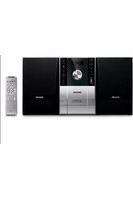
| Product Type | Hi-Fi System |
| Brand | Philips |
| Model | FWM452X |
| Color | Black |
| Main Unit Dimensions (W x H x D) | 180 x 250 x 300 mm |
| Speaker Dimensions (W x H x D) | 200 x 300 x 250 mm |
| Total Weight | 8.5 kg |
| Power Supply | AC 220-240V, 50 Hz |
| Power Consumption | 60 W (typical) |
| Output Power | 2 x 50 W RMS, 2 x 200 W PMPO |
| Audio System | Stereo |
| CD Player | CD, CD-R, CD-RW, MP3-CD compatible |
| Cassette Deck | Yes, stereo with auto stop |
| Tuner Bands | FM, MW, LW |
| Radio Presets | 40 presets |
| USB Playback | Yes, supports MP3 and WMA |
| Audio Input | 3.5 mm AUX front input |
| Remote Control | Full-function remote included |
| Display | LCD with amber backlight |
| Bass Reflex Speakers | Yes |
| Maintenance | Clean with a soft, dry cloth |
| Repairability | Spare parts available for at least 7 years |
Frequently Asked Questions - FWM452X PHILIPS
How do I set the clock on my Philips FWM452X?
Press and hold the CLOCK button on the front panel. While it blinks, press TUNE +/- to adjust the hour, then press CLOCK again. Repeat for the minutes and press CLOCK to confirm.
How can I program my favorite radio stations?
First, tune to the desired station by pressing TUNE +/- or using the SCAN function. Press PROG to start programming, select a preset number using the number buttons or TUNE +/-, and press PROG again to store the station. Repeat for other stations.
How do I connect my smartphone to the FWM452X?
Use a 3.5 mm audio cable to connect your smartphone's headphone jack to the AUX IN port on the front panel. Press AUX on the remote or the source button to select the AUX mode. Your phone's audio will then play through the system speakers.
What should I do if there is no sound from the speakers?
Check the volume level and make sure the system is not muted. Verify that the speakers are properly connected to the corresponding terminals with the correct polarity. Also ensure that the correct source is selected and that the component you are playing is not paused or stopped.
How can I clean the CD player lens?
Use a commercial CD lens cleaner disc. Insert the cleaning disc into the CD compartment and press PLAY. The brush on the disc will gently clean the lens. Avoid opening the unit or using any liquid sprays, as this may damage the optical assembly.
Why is my remote control not working?
First, check that the batteries are inserted correctly and have enough charge. Replace them if necessary. Ensure there are no obstacles between the remote and the system, and that you are pointing the remote directly at the IR sensor on the front panel. Also, move the system away from direct sunlight or fluorescent lights that might interfere with the IR signal.
How do I play MP3 files from a USB drive?
Insert the USB drive into the USB port on the front panel. Press USB on the remote or select USB as the source. The system will read the drive automatically. Use the PLAY/PAUSE and FOLDER +/- buttons to navigate and play your MP3 or WMA files.
Can I record radio broadcasts to a cassette tape?
Yes, insert a blank cassette into the cassette deck. Tune to the desired radio station. Press RECORD on the deck to start recording. To protect a recording, break off the cassette's write-protect tabs. Note that recording quality depends on the type of tape used and the clarity of the radio signal.
What is the meaning of the power specifications on the label?
The system operates on AC 220-240V, 50 Hz and consumes approximately 60 W during normal use. If you need to operate it in a country with a different mains voltage, do not connect it directly to the outlet. Use a suitable step-up/down transformer with adequate wattage.
How do I restore the system to factory settings?
To reset the system, unplug the power cord from the wall outlet and wait for about 10 seconds, then plug it back in. This will clear the clock, preset stations, and other user settings. Some models also have a small RESET button on the back panel; if present, press it with a pointed object while the system is turned on.
User questions about FWM452X PHILIPS
0 question about this device. Answer the ones you know or ask your own.
Ask a new question about this device
No questions yet. Be the first to ask one.
Download the instructions for your Hi-Fi System in PDF format for free! Find your manual FWM452X - PHILIPS and take your electronic device back in hand. On this page are published all the documents necessary for the use of your device. FWM452X by PHILIPS.
USER MANUAL FWM452X PHILIPS
Manual assistant
Powered by Anthropic
Waiting for your message
Product information
Brand : PHILIPS
Model : FWM452X
Category : Hi-Fi System