RT81P - Turntable Fluance - Free user manual and instructions
Find the device manual for free RT81P Fluance in PDF.


Pick your language and provide your email: we'll send you a specifically translated version.
| Product Type | Belt Drive Turntable |
| Brand | Fluance |
| Model | RT81P |
| Speeds | 33 1/3 and 45 RPM |
| Drive Method | Belt drive with high-precision motor |
| Cartridge | Audio-Technica AT95E (replaceable) |
| Phono Preamp | Built-in switchable phono preamp |
| Tonearm | S-shaped tonearm with hydraulic lift |
| Counterweight | Adjustable counterweight for precise tracking force |
| Anti-Skate | Adjustable anti-skate control |
| Output | RCA line-level output with ground terminal |
| Power Supply | AC adapter (12V DC) |
| Dimensions (W x D x H) | 17.3 x 14.4 x 5.6 in (43.9 x 36.6 x 14.2 cm) |
| Weight | 16 lbs (7.3 kg) |
| Platter | Aluminum platter with rubber mat |
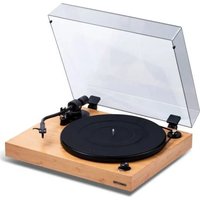
| Plinth | Walnut finish MDF plinth |
| Maintenance | Clean stylus with brush; replace belt every few years |
| Safety | Do not expose to moisture or heat; unplug when not in use |
| Spare Parts & Repairability | Replaceable cartridge, belt, and stylus; accessible internals |
| Warranty | 2-year limited manufacturer warranty |
Frequently Asked Questions - RT81P Fluance
How do I set up the Fluance RT81P turntable?
Place the turntable on a stable, level surface. Attach the turntable platter, remove the stylus guard, and balance the tonearm using the counterweight. Connect the RCA cables and if your receiver has no phono input, switch the built-in preamp to Line. Finally, plug in the AC adapter and you are ready to play.
Does the RT81P have a built-in phono preamp?
Yes, the RT81P has a built-in phono preamplifier that can be switched between Phono and Line levels, so you can connect directly to an AUX input or a receiver without a dedicated phono stage.
How do I switch between 33 and 45 RPM?
To switch speeds, simply adjust the speed selector on the left front of the turntable plinth. Rotate between 33 1/3 and 45 RPM as needed for your vinyl records.
How do I replace the cartridge on the RT81P?
The cartridge is mounted on a standard half-inch headshell. Remove the headshell by unscrewing it from the tonearm, or separate the cartridge from the headshell, unscrew the two mounting screws, disconnect the wires, and attach the new cartridge. Realign it using a protractor and adjust tracking force.
How do I adjust the tracking force and anti-skate?
First balance the tonearm so it floats level, then rotate the counterweight to set the desired tracking force (typically 2.0g for the AT95E). Adjust the anti-skate dial to the same value to reduce distortion and wear.
What is the recommended tracking force for the included cartridge?
For the supplied Audio-Technica AT95E cartridge, the recommended tracking force is 2.0 grams. Use a stylus pressure gauge to verify the exact value after setting the counterweight.
How do I connect the RT81P to my speakers or amplifier?
The RT81P provides RCA output cables and a ground wire. If your amplifier has an AUX or Line input, set the rear switch to Line. If it has a dedicated phono input, set the switch to Phono and connect the ground wire to prevent humming.
How do I clean and maintain the Fluance RT81P?
Clean the stylus with a soft brush from back to front. Dust the platter and plinth with an anti-static cloth. Replace the drive belt when needed and check the stylus for wear. Avoid touching the stylus tip and keep the turntable covered when not in use.
Why is my RT81P turntable skipping?
Check that the turntable is level. Ensure the tonearm tracking force and anti-skate are correctly set. Also inspect the stylus for debris or damage. A warped record or a worn stylus can also cause skipping; replace the stylus if necessary.
What should I do if the turntable does not spin?
First verify the power adapter is plugged in and the platter is correctly placed. Make sure the drive belt is intact and not slipped off the motor pulley. If the motor runs but the platter does not, replace the belt. If the motor is silent, check the on/off switch and the AC adapter.
User questions about RT81P Fluance
0 question about this device. Answer the ones you know or ask your own.
Ask a new question about this device
No questions yet. Be the first to ask one.
Download the instructions for your Turntable in PDF format for free! Find your manual RT81P - Fluance and take your electronic device back in hand. On this page are published all the documents necessary for the use of your device. RT81P by Fluance.
USER MANUAL RT81P Fluance
Manual assistant
Powered by Anthropic
Waiting for your message
Product information
Brand : Fluance
Model : RT81P
Category : Turntable