
MPG Ai1300TS PCIE5 - Uncategorized MSI - Free user manual and instructions
Find the device manual for free MPG Ai1300TS PCIE5 MSI in PDF.


| Product Type | Power Supply Unit (PSU) for desktop PCs |
| Brand | MSI |
| Model | MPG Ai1300TS PCIE5 |
| Form Factor | ATX |
| Total Power Output | 1300 W |
| Efficiency Rating | 80 PLUS Platinum (up to 94% efficiency) |
| Modular Type | Fully modular cabling system |
| Cooling Fan | 135 mm silent fan with zero RPM mode |
| Input Voltage | 100-240 V AC |
| Input Frequency | 50-60 Hz |
| PCIe 5.0 Support | Native 12VHPWR connector for latest GPUs |
| Protections | OVP, OCP, OPP, OTP, SCP |
| Dimensions (W x H x D) | 150 mm x 86 mm x 160 mm |
| Net Weight | 2.9 kg |
| Connectors | 1x ATX 24-pin, 2x EPS 4+4-pin, 6x PCIe 6+2-pin, 2x 12VHPWR, 12x SATA, 6x Molex |
| Noise Level | Low noise operation with smart fan curve |
| Maintenance | Clean the fan and vents with compressed air or a dry cloth. |
| Safety Features | Short circuit protection, over-voltage protection, etc. |
| Spare Parts | Cables are removable and replaceable; main unit is sealed. |
| Warranty | 10 years manufacturer warranty |
| General | Designed for high-end gaming and professional workstations |
Frequently Asked Questions - MPG Ai1300TS PCIE5 MSI
User questions about MPG Ai1300TS PCIE5 MSI
0 question about this device. Answer the ones you know or ask your own.
Ask a new question about this device
Download the instructions for your Uncategorized in PDF format for free! Find your manual MPG Ai1300TS PCIE5 - MSI and take your electronic device back in hand. On this page are published all the documents necessary for the use of your device. MPG Ai1300TS PCIE5 by MSI.
USER MANUAL MPG Ai1300TS PCIE5 MSI
Number of Power Connectors....5
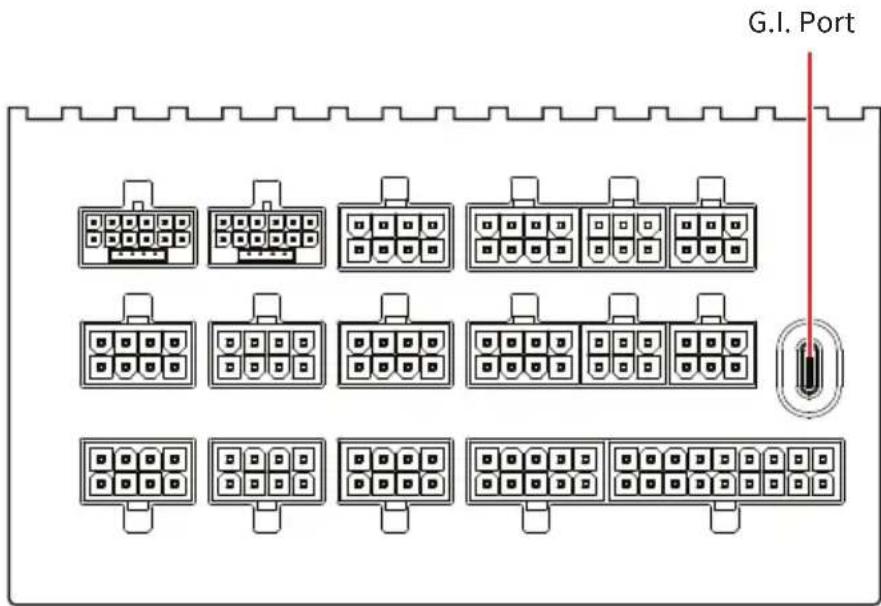
Detachable Connectors....6
Connectivity and Cable Lengths 7
Protection Features 9
Fan Safeguard 9
GPU Safeguard+....9
12V-2x6 Cable Installation....10
Zero Fan Mode....11
G.I. Port 12
G.I. Port Connection.... 12
Software Control and Monitoring 13
Regulatory Notices....14
Specifications
MPG Ai1600TS PCIE5
| AC Input 100-240V~, 15-10A, 50-60Hz | ||||
| DC Output | +5V +3.3V +12V +5Vsb | |||
| 22.0A 22.0A 133.33A 3.0A | ||||
| Total Power | 120W 1599.96W 15W | |||
| 1600W: 100-240V~ / 1200W: 100-115V~ | ||||
MPG Ai1300TS PCIE5
| AC Input 100-240V~, 15-10A, 50-60Hz | ||||
| DC Output | +5V +3.3V +12V +5Vsb | |||
| 22.0A 22.0A 108.33A 3.0A | ||||
| Total Power | 120W 1299.96W 15W | |||
| 1300W: 100-240V~ | ||||
Dimensions
150mm
190mm 86mm


Number of Power Connectors
| Power Connectors MPG Ai1600TS PCIE5 MPG Ai1300TS PCIE5 | ||
| ATX 24-pin (20+4) 1 1 | ||
| EPS12V CPU 8-pin 1 1 | ||
| EPS12V CPU 8-pin (4+4) 1 1 | ||
| 12V-2x6 (12+4) 2 2 | ||
| PCIe 8-pin (6+2) 7 7 | ||
| SATA 15-pin 8 8 | ||
| Peripheral/Molex-type 4-pin 4 4 | ||
Detachable Connectors
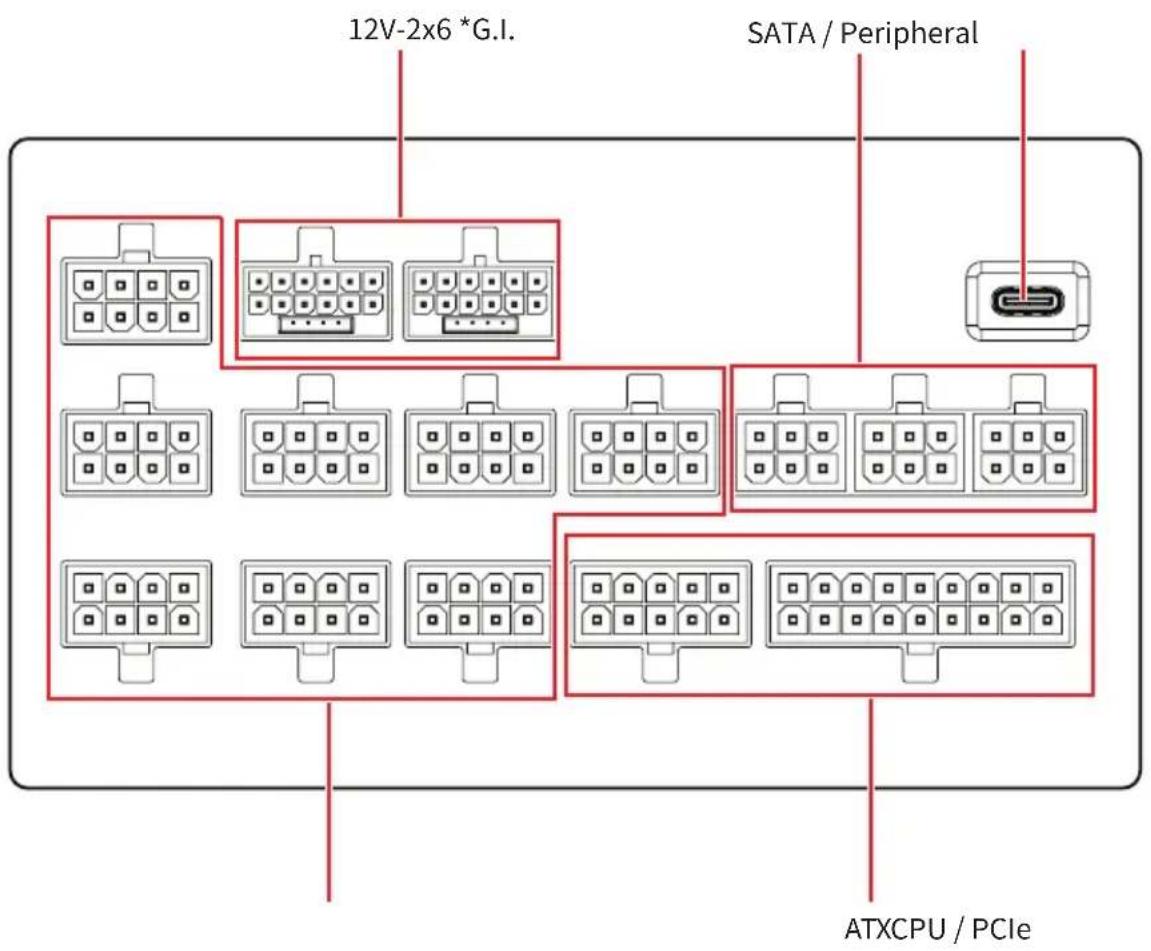
*G.I.: Please refer to "G.I. Port" section for more information.
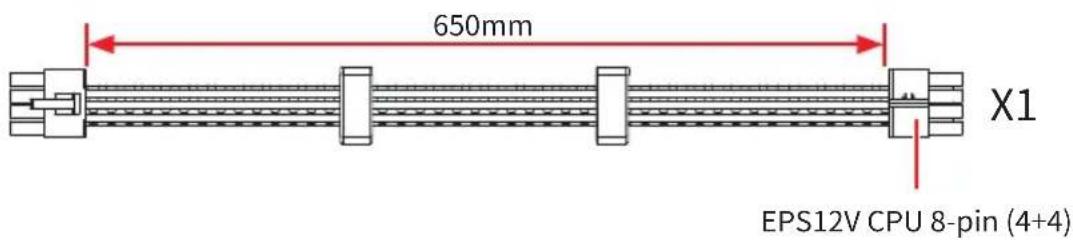
Connectivity and Cable Lengths




Protection Features
This section details the advanced hardware protection mechanisms built into this PSU to ensure system safety and prevent hardware damage.

For more information, please visit the MSI official website.
Fan Safeguard
To prevent the power supply from overheating due to cooling failure, the system features intelligent fan monitoring.
- Trigger Condition: Activated if the fan fails to spin when operation is required.
- Warning Signal: The buzzer will emit a continuous long beep.
- System Action: After 10 seconds of the warning alert, the PSU will automatically shut down to protect internal components.

- If this protection is triggered, please visually inspect the fan through the ventilation grille to check for any foreign objects obstructing it. Remove the obstruction and restart the system.
- Do not open the PSU casing to check the fan. Opening the casing will void the warranty.
GPU Safeguard+
This PSU is equipped with advanced current monitoring technology specifically for the 12V-2x6 connector to ensure safe power delivery to high-end graphics cards.
- Trigger Condition: Activated if the current on the 12V-2x6 connector exceeds the safety threshold (potential indication of poor contact or abnormal resistance).
- Warning Signal: The buzzer will emit a warning alert for 180 seconds.

Please check the 12V-2x6 connection now and save your important data immediately.
- System Action: Following the alert, the system will cut the display signal (resulting in a black screen) to prevent connector overheating or damaging.

If the GPU Safeguard alert is triggered:
- Immediately turn off the PSU power switch and unplug the power cord.
- Inspect the 12V-2x6 cable connection at both the GPU and PSU ends.
- Ensure the connector is fully seated and the cable is not severely bent.
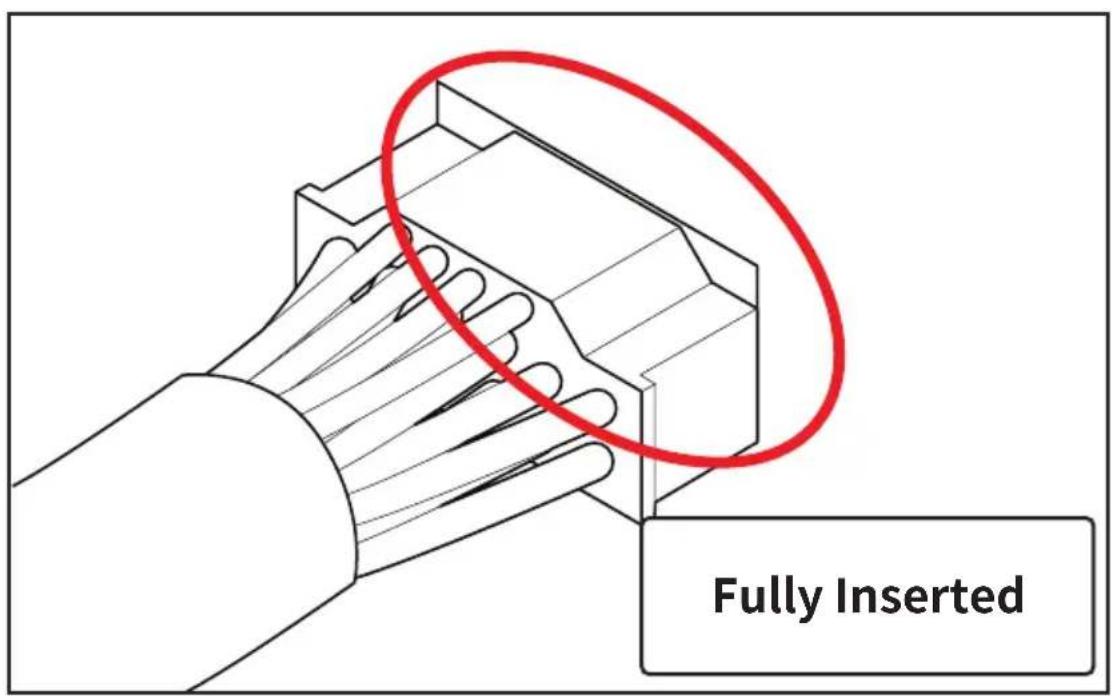
12V-2x6 Cable Installation

ATION
Please fully insert the cable before use.

Zero Fan Mode
This PSU supports the Zero Fan Mode, which stops the PSU fan when the power load falls below the designated level. You can turn the Zero Fan Mode off for the fan to run constantly through MSI Center. You must install the Cooling Wizard feature within MSI Center to toggle the Zero Fan Mode.
| Zero Fan Mode Description | |
| ON(Default) | The PSU fan stops when the system load falls below the designated level. |
| OFF | The PSU fan runs constantly. |
G.I. Port
The G.I. port allows you to connect your system with USB-C to 9-Pin Cable. Once connected properly, you can monitor PSU performance through MSI center.
G.I. Port Connection
![graph LR A["USB-C to 9-Pin CableG.I. Port"] --> B["9-Pin JUSB connector on motherboard"]](/content/2026/08/1629485/images/32dc0025645fef94f6ff194bdcd364ef00312c0668fb442a1e01475843e9aaa4.jpg)
Software Control and Monitoring
Once connected properly, you can monitor power supply unit's performance and control it through the MSI Center.
If you would like to know more information about MSI Center, please refer to MSI Center User Guide: http://download.msi.com/manual/mb/MSICENTER.pdf or scan the QR code to access.


The screen, options and settings will vary depending on the products you have.
Regulatory Notices
Model Number
Model No.: MS-7ZPUA、MS-7ZPUB
Brand : MSI
Model : MPG Ai1300TS PCIE5
Category : Uncategorized