Coquina - Loudspeaker Exibel - Free user manual and instructions
Find the device manual for free Coquina Exibel in PDF.


Pick your language and provide your email: we'll send you a specifically translated version.
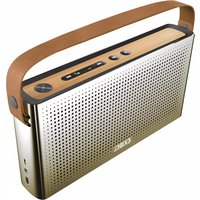
| Product type | Speaker |
| Brand | Exibel |
| Model | Coquina |
| Bluetooth version | 5.0 |
| Bluetooth range | 10 m |
| Output power | 5 W |
| Frequency range | 100 Hz - 20 kHz |
| Battery type | Lithium-ion battery |
| Battery capacity | 1800 mAh |
| Music playback time | up to 10 hours |
| Charging time | approx. 3 hours |
| Charging port | USB-C |
| Water resistance | IPX5 (splash-proof) |
| Music source | Bluetooth, AUX |
| Hands-free function | Yes |
| Controls | Buttons on the device |
| Color | Black |
| Weight | 300 g |
| Dimensions | 180 x 60 x 60 mm |
| Package contents | Speaker, USB cable, user manual |
Frequently Asked Questions - Coquina Exibel
How do I connect my Exibel Coquina to my smartphone?
Turn on the speaker and enable Bluetooth on your smartphone. Select Exibel Coquina from the list of available devices. Pairing will happen automatically. A signal tone sounds when the connection is successful.
How do I charge the battery of the Exibel Coquina?
Connect the included USB cable to the USB-C port of the speaker and a USB power source (e.g., power adapter or computer). The LED indicator lights up during charging. The battery is fully charged after approx. 3 hours.
Is the speaker waterproof?
Yes, the Exibel Coquina is splash-proof according to IPX5. It withstands rain and splashes, but should not be fully submerged in water.
How long does the speaker's battery last?
The built-in lithium-ion battery allows a music playback time of up to 10 hours at medium volume. The actual battery life depends on the volume and the music content.
Can I use the speaker as a hands-free device?
Yes, the Exibel Coquina has a built-in microphone. When you receive a call on your phone, playback will be paused. You can accept and end calls via the hands-free button on the speaker.
How do I clean the speaker?
Wipe the speaker with a soft, slightly damp cloth. Do not use aggressive cleaning agents or sharp objects to avoid damaging the surface. Disconnect the speaker from the mains before cleaning.
What does the LED indicator on the speaker mean?
The LED indicator provides information about the operating status. A blue flashing indicates that the speaker is in pairing mode. A continuous light signals an active Bluetooth connection. Red light indicates charging and goes out when the battery is full.
How can I adjust the volume?
You can adjust the volume on the speaker using the + and - buttons. Alternatively, you can also adjust the volume using the buttons on your smartphone or tablet.
What can I do if a Bluetooth connection is not possible?
Make sure the speaker is in pairing mode and near the device. Remove the device from the Bluetooth list and perform the pairing again. Reset the speaker by turning it off and on again for 5 seconds.
Can I connect two Exibel Coquina speakers together?
Yes, many models support the True Wireless Stereo (TWS) function. Turn on both speakers and press the Bluetooth button twice on both devices. A signal tone confirms the pairing. You can then use two speakers for stereo sound.
User questions about Coquina Exibel
0 question about this device. Answer the ones you know or ask your own.
Ask a new question about this device
No questions yet. Be the first to ask one.
Download the instructions for your Loudspeaker in PDF format for free! Find your manual Coquina - Exibel and take your electronic device back in hand. On this page are published all the documents necessary for the use of your device. Coquina by Exibel.
USER MANUAL Coquina Exibel


Manual assistant
Powered by Anthropic
Waiting for your message
Product information
Brand : Exibel
Model : Coquina
Category : Loudspeaker