SG BLINDER4L - Lamp SDJ - Free user manual and instructions
Find the device manual for free SG BLINDER4L SDJ in PDF.


Pick your language and provide your email: we'll send you a specifically translated version.
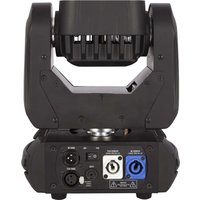
| Product Type | LED Blinder Light |
| Brand | SDJ |
| Model | SG BLINDER4L |
| Power Supply | AC 100-240V, 50/60Hz |
| Power Consumption | 400W |
| Light Source | 4 x 100W COB LED |
| Color Temperature | 3200K - 5600K (adjustable) |
| Beam Angle | 45° |
| Control Modes | DMX512, Master/Slave, Sound Active, Auto |
| DMX Channels | 2, 4, or 8 channels |
| Strobe Rate | 0 - 20 Hz |
| Dimming | 0 - 100% linear |
| Housing Material | Metal, black powder coated |
| Cooling System | Fan cooled |
| Protection Rating | IP20 (indoor use only) |
| Mounting | Floor standing or hanging with brackets |
| Dimensions (L x W x H) | 420 x 420 x 300 mm |
| Net Weight | 8.5 kg |
| Maintenance | Clean lens with soft cloth |
| Safety | Keep away from flammable materials |
| Spare Parts | LED modules and power supply available |
| Repairability | Modular design, easy to repair |
Frequently Asked Questions - SG BLINDER4L SDJ
How do I connect the SG BLINDER4L to power?
Use a standard IEC power cable to connect to AC 100-240V, 50/60Hz. Always ensure the fixture is grounded and switched off before connecting.
How do I set the DMX address?
Use the control panel buttons to enter DMX mode and set the starting address. The SG BLINDER4L supports 2, 4, or 8-channel operation. Assign a unique address for each fixture.
Can I use the SG BLINDER4L outdoors?
No, the fixture has an IP20 rating and is designed for indoor use only. Protect it from rain and moisture.
How do I clean the lenses?
Disconnect the power first. Use a soft dry cloth or a slightly damp cloth with mild cleaner to gently wipe the lenses. Never use abrasive materials.
What are the control modes available?
The fixture supports DMX512, Master/Slave, Sound Active, and Auto mode. You can choose the desired mode via the menu.
How many DMX channels does the SG BLINDER4L use?
It can operate in 2, 4, or 8-channel modes, depending on the features you want to control. Check the manual for channel assignments.
Does the fixture have a strobe function?
Yes, the SG BLINDER4L includes a strobe effect with adjustable frequency from 0 to 20 Hz.
How can I mount the light?
The fixture can be placed on the floor or mounted on a truss using the integrated brackets and clamps. Ensure proper safety cables are used for overhead installations.
What should I do if one LED stops working?
Replace the LED module. The SG BLINDER4L has a modular design, making the LED modules easy to swap. Always disconnect from power before servicing.
How do I reset the fixture to factory settings?
Access the menu and select the Reset option. This will restore the default DMX settings and control modes.
User questions about SG BLINDER4L SDJ
0 question about this device. Answer the ones you know or ask your own.
Ask a new question about this device
No questions yet. Be the first to ask one.
Download the instructions for your Lamp in PDF format for free! Find your manual SG BLINDER4L - SDJ and take your electronic device back in hand. On this page are published all the documents necessary for the use of your device. SG BLINDER4L by SDJ.
USER MANUAL SG BLINDER4L SDJ
Manual assistant
Powered by Anthropic
Waiting for your message
Product information
Brand : SDJ
Model : SG BLINDER4L
Category : Lamp