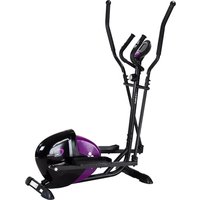
DD200 - Uncategorized HMS Premium - Free user manual and instructions
Find the device manual for free DD200 HMS Premium in PDF.


Pick your language and provide your email: we'll send you a specifically translated version.
| Product Type | Treadmill |
| Brand | HMS Premium |
| Model | DD200 |
| Product Dimensions | 150 x 70 x 130 cm (folded: 80 x 70 x 140 cm) |
| Product Weight | 45 kg |
| Maximum User Weight | 120 kg |
| Motor Power | 2.5 HP continuous |
| Speed Range | 0.5 – 12 km/h |
| Incline Range | 0 – 10% (motorized) |
| Running Surface | 42 x 120 cm |
| Display | LCD with time, speed, distance, calories, pulse |
| Programs | 12 preset programs + manual mode |
| Heart Rate Monitoring | Hand grip pulse sensors |
| Safety Features | Emergency stop key, child lock, stable frame |
| Folding Mechanism | Foldable with hydraulic assist |
| Transport Wheels | Yes, two wheels for easy movement |
| Power Supply | 220–240 V AC, 50/60 Hz |
| Maintenance | Lubricate belt every 3 months; clean surface weekly |
| Parts and Repairability | Spare parts available; repairs by qualified technicians |
| Included Accessories | Safety key, user manual, tools for assembly |
| Warranty | 2 years |
| Certifications | CE, RoHS |
Frequently Asked Questions - DD200 HMS Premium
How do I assemble the treadmill?
Place the treadmill in a clear area. Attach the upright posts to the base frame and secure with the provided bolts. Connect the handrail wire connectors. Attach the console. Use the supplied hex key to tighten all screws. Once fully assembled, check the belt alignment before first use.
How do I fold and unfold the treadmill?
To fold, first unplug the treadmill. Lift the deck toward the vertical position until it clicks into place with the latch. To unfold, push the latch release and guide the deck down slowly. Ensure you have enough clearance.
How do I adjust the speed and incline?
Use the console buttons to increase or decrease speed. Adjust incline via the incline keys. The changes take effect gradually for safety.
How do I use the heart rate monitor?
Place both palms on the sensors located on the handlebars. Hold for about 10 seconds. The console will display your current heart rate. For accurate reading, avoid moving your hands.
What maintenance does the treadmill require?
Clean the deck and console with a soft cloth after each use. Check belt tension every month. Lubricate the running deck every 3 months or after 100 km. Keep the area around the treadmill free of dust.
How do I troubleshoot common error codes?
Common errors include E1 (communication issue), E2 (motor overload), E3 (sensor problem). Turn off and unplug for 10 minutes, then reboot. If error persists, contact HMS Premium support.
Can I use the treadmill on carpet?
Yes, but ensure the carpet is even. Place a mat underneath to protect the carpet and maintain stability. Avoid thick pile carpets that may interfere with leveling.
What is the maximum user weight?
The maximum user weight is 120 kg (265 lbs). Exceeding this may cause damage and void the warranty.
How do I lubricate the running belt?
First unplug the treadmill. Loosen the belt adjustment rollers slightly. Apply silicone lubricant (not petroleum-based) under the center of the belt. Run the belt at 1 km/h for 5 minutes to spread. Re-tighten the rollers.
How do I reset the treadmill to factory settings?
Unplug the treadmill for 2 minutes. Plug it back in and turn on. Press the reset button (usually a pinhole) on the console if available. Consult the manual for exact procedure.
User questions about DD200 HMS Premium
0 question about this device. Answer the ones you know or ask your own.
Ask a new question about this device
No questions yet. Be the first to ask one.
Download the instructions for your Uncategorized in PDF format for free! Find your manual DD200 - HMS Premium and take your electronic device back in hand. On this page are published all the documents necessary for the use of your device. DD200 by HMS Premium.
USER MANUAL DD200 HMS Premium
Manual assistant
Powered by Anthropic
Waiting for your message
Product information
Brand : HMS Premium
Model : DD200
Category : Uncategorized