BonePro - Earphones Evolveo - Free user manual and instructions
Find the device manual for free BonePro Evolveo in PDF.


Pick your language and provide your email: we'll send you a specifically translated version.
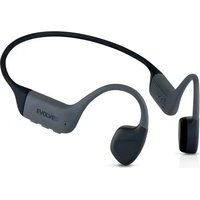
| Product type | Bone conduction earphones |
| Brand | Evolveo |
| Model | BonePro |
| Connectivity | Bluetooth 5.0 |
| Wireless range | Up to 10 meters |
| Power source | Built-in rechargeable lithium battery |
| Music playback time | Up to 8 hours |
| Standby time | Up to 200 hours |
| Charging time | Approximately 2 hours |
| Charging interface | USB-C |
| Water resistance | IPX5 (splash-proof) |
| Frequency response | 20 Hz - 20 kHz |
| Microphone | Yes, built-in |
| Controls | Multi-function buttons on earpiece |
| Compatibility | Smartphones and tablets with Bluetooth |
| Weight | Approx. 30 g |
| Dimensions | Approx. 120 x 100 x 35 mm |
| Driver technology | Bone conduction transducer |
| Maintenance | Clean with a soft dry cloth after use |
| Safety | Do not disassemble; keep away from children |
Frequently Asked Questions - BonePro Evolveo
How do I pair the BonePro with my phone?
Turn on the earphones and activate Bluetooth on your phone. Select Evolveo BonePro from the available devices to complete pairing.
How do I charge the earphones?
Connect the included USB-C cable to the charging port on the earphones and plug it into a power source. The indicator light shows charging status; a full charge takes about 2 hours.
What is the battery life of the BonePro?
The earphones offer up to 8 hours of music playback on a single charge, with a standby time of up to 200 hours.
Are the BonePro earphones waterproof?
They are splash-proof with an IPX5 rating, meaning they can withstand light moisture, rain, and sweat, but should not be submerged in water.
How do I control music playback and calls?
Use the multi-function buttons on the earpiece to play/pause, skip tracks, adjust volume, and answer or end calls. Refer to the manual for specific button combinations.
Can I use the BonePro for phone calls?
Yes, the earphones have a built-in microphone that allows you to make and receive calls while connected via Bluetooth.
How should I clean and maintain my bone conduction earphones?
After use, wipe the earphones with a soft, dry cloth to remove sweat and dust. Do not use abrasive cleaners or submerge them in water.
What should I do if the Bluetooth connection keeps dropping?
Ensure the earphones are within 10 meters of your device and there are no obstacles. Reset the earphones by turning them off and on again, and try re-pairing with your phone.
Can I wear the BonePro while exercising?
Absolutely. They are designed for sports and outdoor activities, featuring a secure fit and IPX5 sweat resistance, making them ideal for running and workouts.
How do I reset the BonePro to factory settings?
To reset, press and hold the multi-function button for about 10 seconds until the LED flashes red and blue simultaneously, then release. This clears the pairing list and restores default settings.
User questions about BonePro Evolveo
0 question about this device. Answer the ones you know or ask your own.
Ask a new question about this device
No questions yet. Be the first to ask one.
Download the instructions for your Earphones in PDF format for free! Find your manual BonePro - Evolveo and take your electronic device back in hand. On this page are published all the documents necessary for the use of your device. BonePro by Evolveo.
USER MANUAL BonePro Evolveo


Manual assistant
Powered by Anthropic
Waiting for your message
Product information
Brand : Evolveo
Model : BonePro
Category : Earphones