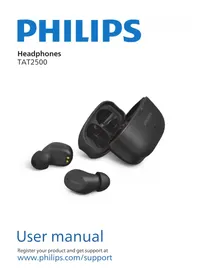
TAT2500 - Uncategorized PHILIPS - Free user manual and instructions
Find the device manual for free TAT2500 PHILIPS in PDF.


Pick your language and provide your email: we'll send you a specifically translated version.
| Type of product | True Wireless Earbuds |
| Brand | Philips |
| Model | TAT2500 |
| Colour | Black |
| Dimensions (earbuds) | Approx. 2.5 x 1.8 x 2.0 cm each |
| Dimensions (charging case) | Approx. 5.8 x 4.5 x 2.6 cm |
| Weight (total) | Approx. 45 g (case + earbuds) |
| Weight (each earbud) | Approx. 4.5 g |
| Battery capacity (earbuds) | 40 mAh each |
| Battery capacity (case) | 300 mAh |
| Battery life | Up to 6 hours per charge, up to 16 hours with case |
| Charging method | USB-C cable |
| Bluetooth version | 5.3 |
| Driver size | 6 mm dynamic |
| Water resistance | IPX5 (sweat and water splash resistant) |
| Touch controls | Yes, on each earbud |
| Microphone | Yes, built-in for calls with ENC |
| Compatibility | Works with most Bluetooth-enabled devices |
| Material | Plastic (ABS) |
| Main functions | Music playback, calls, voice assistant access |
| Maintenance | Wipe clean with a dry cloth, keep away from moisture and extreme heat |
| Safety | Do not disassemble, expose to high temperature, or use near water |
| Spare parts and repairability | Not user-replaceable; contact Philips authorized service for repairs |
| General information | Manufactured by Philips, registered trademark |
Frequently Asked Questions - TAT2500 PHILIPS
How do I pair the Philips TAT2500 earbuds with my phone?
To pair your earbuds, first remove them from the charging case. They will enter pairing mode automatically. Enable Bluetooth on your phone and search for 'Philips TAT2500' in the list. Tap to connect. If prompted, enter '0000' as the PIN.
How do I reset the Philips TAT2500 earbuds?
To reset your earbuds, delete the pairing from your device. Place both earbuds in the case, close the lid, and wait 10 seconds. Then remove them again and re-pair as if new. For a factory reset, press and hold the touch area on both earbuds for 10 seconds until the LED flashes red and white.
How long does the battery last on the Philips TAT2500?
The earbuds offer up to 6 hours of playback on a single charge. With the charging case, you can get a total of 16 hours before needing to recharge the case itself.
How do I charge the Philips TAT2500 charging case?
Use the included USB-C cable to connect the case to a USB charger. The LED indicator on the case will show the charging status. It takes approximately 2 hours to fully charge the case.
Are the Philips TAT2500 earbuds water resistant?
Yes, they have an IPX5 rating, meaning they are protected against sweat and light water splashes. However, do not submerge them in water or use them while swimming.
How do I control music playback with the Philips TAT2500?
Use the touch controls on the earbuds: tap once to play/pause, tap twice on the right to skip forward, tap twice on the left to go back, and tap three times to activate the voice assistant. Ensure your earbuds are connected to your device.
How do I answer or end a call with the Philips TAT2500?
When a call comes in, tap once on either earbud to answer. Tap twice to end the call. To reject an incoming call, press and hold the touch area for 2 seconds.
What should I do if only the left earbud is working?
First, ensure both earbuds are charged. If the issue persists, try resetting the earbuds by following the reset procedure. If the problem remains, check if the earbud is properly placed in the case and the charging contacts are clean. Restart your Bluetooth connection as well.
How should I clean and maintain the Philips TAT2500?
Use a soft, dry, lint-free cloth to wipe the earbuds and case. Avoid using abrasive cleaners or liquids. Keep the earbuds away from extreme temperatures and remove them from your ears after use to prevent earwax buildup. Clean the mesh tips gently with a dry cotton swab if necessary.
Can I replace the ear tips or get spare parts for the Philips TAT2500?
Ear tips are replaceable and may be available from Philips accessories. For other spare parts, contact Philips authorized service. The earbuds and case are not user-serviceable, so any internal repairs should be done by qualified professionals.
User questions about TAT2500 PHILIPS
0 question about this device. Answer the ones you know or ask your own.
Ask a new question about this device
No questions yet. Be the first to ask one.
Download the instructions for your Uncategorized in PDF format for free! Find your manual TAT2500 - PHILIPS and take your electronic device back in hand. On this page are published all the documents necessary for the use of your device. TAT2500 by PHILIPS.
USER MANUAL TAT2500 PHILIPS

Manual assistant
Powered by Anthropic
Waiting for your message
Product information
Brand : PHILIPS
Model : TAT2500
Category : Uncategorized