WT 5020 - Clock Techno Line - Free user manual and instructions
Find the device manual for free WT 5020 Techno Line in PDF.


Pick your language and provide your email: we'll send you a specifically translated version.
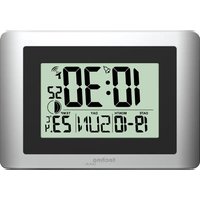
| Product Type | Digital Alarm Clock |
| Display Type | LCD |
| Functions | Time, Date, Alarm, Snooze, Backlight, Indoor Temperature |
| Power Source | 1 x AA 1.5V Battery |
| Dimensions (approx.) | 110 x 70 x 30 mm |
| Weight (approx.) | 120 g |
| Material | ABS Plastic |
| Color | Black / Grey |
| Mounting Options | Table Stand, Wall Mountable |
| Temperature Display | Indoor Temperature in Celsius / Fahrenheit |
| Radio-Controlled Time | DCF-77 Signal (Germany) with Automatic Sync |
| Alarm Features | Single Alarm, Snooze Function |
| Backlight | Blue LED Display Illumination |
| Battery Life | Approximately 12 Months |
| Operating Temperature Range | 0°C to 50°C |
| Cleaning Method | Wipe with a Soft, Dry Cloth |
| Safety Warnings | Keep Away from Water and Direct Sunlight |
| Spare Parts | Battery Replacement Only (User Accessible) |
| Repairability | Not User Serviceable, Contact Manufacturer for Repairs |
| Certifications | CE, RoHS Compliant |
Frequently Asked Questions - WT 5020 Techno Line
How do I set the time manually?
Press the SET button on the back of the clock for 2 seconds. The hour digits will flash. Use the +/− buttons to adjust the hour, then press SET to confirm and move to minutes. Repeat for minutes, year, month, and day.
What type of battery does the WT 5020 use?
The clock uses 1 x AA (LR6) 1.5V battery. Always insert the battery with the correct polarity as indicated in the compartment. Typical battery life is about 12 months.
How does the radio-controlled time setting work?
The clock receives the DCF-77 time signal from Germany when placed within the reception range (up to 1500 km from Frankfurt). It automatically synchronizes the time every night. To initiate a manual search, press and hold the RCC button until the antenna icon starts blinking.
How do I set the alarm?
Press the ALARM button once to view the alarm time. Press and hold the ALARM button for 3 seconds until the alarm time flashes. Use +/− to adjust hours and minutes, then press ALARM to confirm. The clock automatically switches to alarm setting mode.
How do I turn off the alarm?
When the alarm sounds, press the SNOOZE button on the top of the clock to activate the 5-minute snooze. To completely turn off the alarm, press the ALARM button once; the alarm icon will disappear from the display.
Does the clock have a snooze function?
Yes, the WT 5020 includes a snooze function. Press the SNOOZE button while the alarm is ringing to delay it for 5 minutes. The snooze can be set to repeat by pressing the button each time.
How can I change the temperature unit from Celsius to Fahrenheit?
Press and hold the °C/°F button (or use the settings menu) for 3 seconds. The display will switch between Celsius (°C) and Fahrenheit (°F). The chosen unit is stored in memory.
Where should I place the clock for best radio signal reception?
Place the clock near a window, away from metal objects, electronic devices, and walls. Avoid basements and rooms with reinforced concrete. The optimal distance from a TV or computer is at least 1.5 meters. For best DCF-77 reception, place it in a north-south orientation.
How do I clean and maintain the clock?
Use a soft, lint-free cloth slightly dampened with water or a mild detergent. Do not use abrasive cleaners or solvents. Regularly check and replace the battery to prevent corrosion. Keep the clock dry and avoid exposure to extreme temperatures.
Can the clock be mounted on a wall?
Yes, the WT 5020 has a keyhole slot on the back for wall mounting. Use a screw and anchor suitable for the wall type. Ensure the clock is level and securely attached to prevent falling.
User questions about WT 5020 Techno Line
0 question about this device. Answer the ones you know or ask your own.
Ask a new question about this device
No questions yet. Be the first to ask one.
Download the instructions for your Clock in PDF format for free! Find your manual WT 5020 - Techno Line and take your electronic device back in hand. On this page are published all the documents necessary for the use of your device. WT 5020 by Techno Line.
USER MANUAL WT 5020 Techno Line

Manual assistant
Powered by Anthropic
Waiting for your message
Product information
Brand : Techno Line
Model : WT 5020
Category : Clock