
VR-BF27952H1S - Refrigerator VESTFROST - Free user manual and instructions
Find the device manual for free VR-BF27952H1S VESTFROST in PDF.
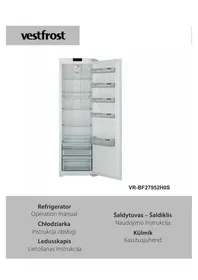


| Product type | Refrigerator |
| Freezer type | Bottom, chest |
| Color | White |
| Height (mm) | 845 |
| Width (mm) | 595 |
| Depth (mm) | 580 |
| Total capacity (l) | 280 |
| Fridge capacity (l) | 200 |
| Freezer capacity (l) | 80 |
| Energy class | F |
| Supply voltage | 230 V |
| Frequency | 50 Hz |
| Freezing power | 4 kg/24h |
| Storage time without power | 10 h |
| Noise level | 40 dB |
| Refrigerant | R600a |
| Automatic defrosting | Yes |
| Quick cooling function | Yes |
| Electronic control | Yes |
| Interior lighting | LED |
| Net weight | 52 kg |
| Warranty | 24 months |
Frequently Asked Questions - VR-BF27952H1S VESTFROST
User questions about VR-BF27952H1S VESTFROST
0 question about this device. Answer the ones you know or ask your own.
Ask a new question about this device
Download the instructions for your Refrigerator in PDF format for free! Find your manual VR-BF27952H1S - VESTFROST and take your electronic device back in hand. On this page are published all the documents necessary for the use of your device. VR-BF27952H1S by VESTFROST.
USER MANUAL VR-BF27952H1S VESTFROST
VR-BF27952H0S
Refrigerator
Operation manual
Chłodziarka
Instrukcja obsługi
Ledusskapis
Lietošanas instrukcija

PRZED ROZPOCZĘCIEM KORZYSTANIA Z URZĄDZENIA


PRZED ROZPOCZĘCIEM KORZYSTANIA Z URZĄDZENIA


PRZED WEZWANIEM SERWISU


Installing and operating your fridge.... 29
Before using your fridge.... 29
THE PARTS OF THE APPLIANCE AND THE COMPARTMENTS .... 30
USAGE INFORMATION......31
Display and Control Panel 31
Operating Your Fridge.... 31
Super Cool Mode 31
Economy Mode 32
Screen Saver Mode 32
Door Open Alarm Function 33
Temperature Settings.... 33
Cooler Temperature Settings 33
Warnings About Temperature Adjustments 34
Accessories 35
Fresh dial 35
ARRANGING FOOD IN THE APPLIANCE......36
CLEANING AND MAINTENANCE....37
Defrosting the Refrigerator Compartment.... 38
Replacing the LED strip.... 38
SHIPMENT AND REPOSITIONING....39
BEFORE CALLING YOUR AFTER SALES SERVICE...40
Tips for saving energy 42
BEFORE USING THE APPLIANCE
General warnings
WARNING: Keep ventilation openings, in the appliance enclosure or in the built-in structure, clear of obstruction.
WARNING: Do not use mechanical devices or other means to accelerate the defrosting process, other than those recommended by the manufacturer.
WARNING: Do not use electrical appliances inside the food storage compartments of the appliance, unless they are of the type recommended by the manufacturer.
WARNING: Do not damage the refrigerant circuit.
WARNING: In order to avoid any hazards resulting from the instability of the appliance, it must be fixed in accordance with the following instructions:
WARNING: When positioning the appliance, ensure the supply cord is not trapped or damaged.
WARNING: Do not locate multiple portable socket-outlets or portable power supplies at the rear of the appliance.
- If your appliance uses R600a as a refrigerant (this information will be provided on the label of the cooler) you should take care during transportation and installation to prevent the cooler elements from being damaged. R600a is an environmentally friendly and natural gas, but it is explosive. In the event of a leak due to damage of the cooler elements, move your freezer away from open flames or heat sources and ventilate the room where the appliance is located for a few minutes.
- While carrying and positioning the freezer, do not damage the cooler gas circuit.
- Do not store explosive substances such as aerosol cans with a flammable propellant in this appliance.
- This appliance is intended to be used in household and domestic applications such as:
-staff kitchen areas in shops, offices and other working environments.
-farm houses and by clients in hotels, motels and other residential type environments.
-bed and breakfast type environments;
-catering and similar non-retail applications.
- If the socket does not match the freezer plug, it must be replaced by the manufacturer, a service agent or similarly qualified persons in order to avoid a hazard.
- A specially grounded plug has been connected to the power cable of your freezer. This plug should be used with a specially grounded socket of 16 amperes. If there is no such socket in your house, please have one installed by an authorised electrician.
- Do not use plug adapter
- This appliance can be used by children aged from 8 years and above and persons with reduced physical, sensory or mental capabilities or lack of experience and knowledge if they have been given supervision or instruction concerning use of the appliance in a safe way and understand the hazards involved. Children shall not play with the appliance. Cleaning and user maintenance shall not be made by children without supervision.
- If the supply cord is damaged, it must be replaced by the manufacturer, an authorised service agent or similar qualified persons, in order to avoid a hazard.
- This appliance is not intended for use at altitudes exceeding 2000 m.
BEFORE USING THE APPLIANCE


Old and out-of-order fridges or freezers
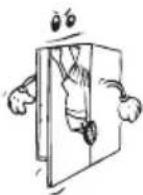
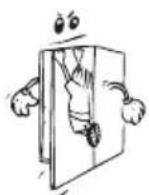
- If your old fridge has a lock, break or remove the lock before discarding it, because children may get trapped inside it and may cause an accident.
- Old fridges and freezers may contain isolation material and refrigerant with CFC or HFC. Therefore, take care not to harm environment when you are discarding your old fridges.
Please ask your municipal authority about the disposal of the WEEE reuse, recycle and recovery purposes.
Warning; Risk of fire / flammable materials (Symbol ISO 7010 W021)
Notes:
- Please read the instruction manual carefully before installing and using your appliance. We are not responsible for the damage occurred due to misuse.
- Follow all instructions on your appliance and instruction manual, and keep this manual in a safe place to resolve the problems that may occur in the future.
- This appliance is produced to be used in homes and it can only be used in domestic environments and for the specified purposes. It is not suitable for commercial or common use. Such use will cause the guarantee of the appliance to be cancelled and our company will not be responsible for losses incurred.
- This appliance is produced to be used in houses and it is only suitable for cooling / storing food. It is not suitable for commercial or common use and/or for storing substances except for food. Our company is not responsible for losses to be incurred in the contrary case.
Safety warnings
- Do not use multiple receptacles or extension cord.
- Do not plug in damaged, torn or old plugs.
- Do not pull, bend or damage the cord.


- This appliance is designed for use by adults, do not allow children to play with the appliance or let them to hang over the door.
BEFORE USING THE APPLIANCE
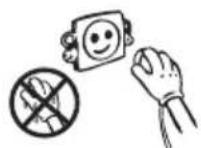
- Do not plug-in or out the plug from the receptacle with wet hands to prevent electrocution!
- Do not place explosive or flammable material in your fridge for your safety. Place drinks with higher alcohol amount vertically and by closing their necks tightly in the fridge.
- Do not cover the body or top of fridge with lace. This affects the performance of your fridge.
- Fix the accessories in the fridge during transportation to prevent damage to accessories.
Installing and operating your fridge
Before starting to use your fridge, you should pay attention to the following points:
- Operating voltage for your fridge is 220-240 V at 50Hz.
- We do not take the responsibility of the damages that occur due to ungrounded usage.
- Place your fridge in a place that it would not be exposed to direct sunlight.
- Your appliance should be at least 50 cm away from stoves, Gas ovens and heater cores, and should be at least 5 cm away from electrical ovens.
- Your fridge should never be used outdoors or left under the rain.
- When your fridge is placed next to a deep freezer, there should be at least 2 cm between them to prevent humidity on the outer surface.
- Do not place heavy items on the appliance.
- Do not place anything on your fridge, and install your fridge in a suitable place so that at least 15 cm is available on the upper side.
- The adjustable front legs should stabilize in an appropriate height to allow your fridge operate in a stable and proper way. You can adjust the legs by turning them clockwise (or in the opposite direction). This should be done before placing food in the fridge.
- Before using your fridge, wipe all parts with warm water added with a tea spoonful of sodium bicarbonate, and then rinse with clean water and dry. Place all parts after cleaning.
Before using your fridge
- When it is operated for the first time or after transportation, keep your fridge in the upright position for 3 hours and plug it on to allow efficient operation. Otherwise, you may damage the compressor.
- Your fridge may have a smell when it is operated for the first time; the smell will fade away when your fridge starts to cool.


THE PARTS OF THE APPLIANCE AND THE COMPARTMENTS

This presentation is only for information about the parts of the appliance. Parts may vary according to the appliance model.
- Control panel
- Turbo fan
- Wine rack
- Fridge shelves
- Upper crisper cover
- Upper crisper
-
Bottom crisper cover
-
Bottom crisper
- Bottle shelf
- Door shelf (Adjustable door shelf *)
- Door shelf
- Egg holder
- Upper side LED strip *
- Left / Right side LED strip *
USAGE INFORMATION
Display and Control Panel

Using the Control Panel
- Alarm indicator
- Cooler set value screen.
- Super Cool mode indicator
- It enables the setting value of cooler to be modified and super cool mode to be activated if desired. Cooler maybe set to 8, 6, 5, 4, 2 °C, super cool.
- It enable the economy mode to be activated if desired.
- Eco mode indicator
Operating Your Fridge
Super Cool Mode
How Would It Be Used?
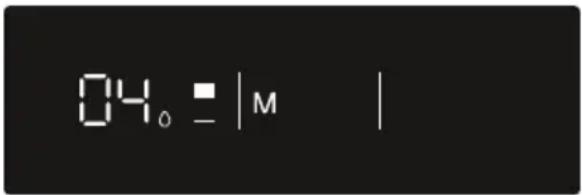
Press cooler set button (#4 on control panel diagram) until Super cool symbol (#3) will be seen on the screen. Buzzer will sound beep beep. Mode will be set.
During This Mode:
• Economy mode can not be selected.
- Super cool mode can be cancelled by the same operation of selecting.
Economy Mode
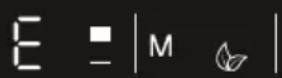
How Would It Be Used?
- Push "MODE" button (#5 on control panel diagram) until eco symbol appears.
- If no button is pressed for 1 second. Mode will be set. Eco symbol (#6) will blink 3 times. When mode is set, buzzer will sound beep beep.
- Cooler temperature segments (#2) will show "E".
- Economy symbol and E will light till mode finishes.
During This Mode:
- Cooler may be adjusted. When economy mode will be cancelled, the selected setting values will proceed.
- Super cool mode can be selected. Economy mode is automatically cancelled and the selected mode is activated.
- To cancel, you will just need to press on mode button.
Screen Saver Mode
Purpose
This mode saves energy by switching off all control panel lighting when the panel is left inactive.
How to Use
- Screen saver mode will be activated automatically after 30 seconds.
- If you press any key while the lighting of the control panel is off, the current machine settings will reappear on the display to let you make any change you wish.
- If you do not cancel the screen saving mode or press any key for 30 seconds, control panel will remain off.
To deactivate the screen saving mode,
- To cancel the screen saving mode, first of all, you need to press any key to activate the keys and then press and hold the Mode button "M" (#5) for 3 seconds.
- To reactivate screen saving mode, press and hold the mode button M" (#5) for 3 seconds.
Door Open Alarm Function
If cooler door is opened more than 2 minutes, appliance sounds ‘beep beep’.
Temperature Settings
Cooler Temperature Settings
- Initial temperature value for the cooler setting indicator is +4 °C.

- Press the cooler button once (#4 on control panel diagram).
- When you first push this button, the last value will appear on the cooler setting indicator (#2).
- Whenever you press this button (#4), a lower temperature will be set. (+8°C, +6°C, +5°C, +4°C, +2°C, super cool)
- When you push the cooler set button until the super cool symbol (#3) appears, and if you do not push any button within 1 second, super cool will flash.
- If you continue to press the button(#4), it will restart from +8°C.
- The temperature value selected before super cool mode or economy mode is activated and will remain the same when the mode is over or cancelled. The appliance continues to operate with this temperature value.
Recommended Temperature Values for Cooler
| When to adjust Inner Temperature ( °C) | |
| For cooling the fridge at minimum capacity 8 | |
| In normal usage 4, 5, 6 | |
| For cooling the fridge at maximum capacity 2 | |
Warnings About Temperature Adjustments
- Do not pass to another adjustment before completing an adjustment.
- Temperature adjustments should be made according to the frequency of door openings, the quantity of food kept inside the fridge and ambient temperature of the place of your fridge.
- Your fridge should be operated up to 24 hours according to the ambient temperature without interruption after being plugged in to be completely cooled.
- Do not open doors of your fridge frequently and do not place much food inside it in this period.
- A 5 minute delaying function is applied to prevent damage to the compressor of your fridge, when you take the plug off and then plug it on again to operate it or when an energy breakdown occurs. Your fridge will start to operate normally after 5 minutes.
- Your fridge is designed to operate in the ambient temperature intervals stated in the standards, according to the climate class stated in the information label. We do not recommend operating your fridge out of stated temperatures value limits in terms of cooling effectiveness.
- This appliance is designed for use at an ambient temperature within the 10°C - 38°C range.
| Climate class | Abbient temperature ( °C) |
| T Between 16 and 43 ( °C) | |
| ST Between 16 and 38 ( °C) | |
| N Between 16 and 32 ( °C) | |
| SN Between 10 and 32 ( °C) | |
Accessories
Fresh dial
When the humidity controller in the closed position, it allows fresh fruit and vegetables to be stored longer.
In case of the crisper is totally full, the fresh dial is located in front of crisper, should be opened. By means of this the air in the crisper and humidity rate will be controlled and endurance life will be increased.
If you see any condensation on glass shelf, humidity control should be taken into the open positions.

Visual and text descriptions on the accessories section may vary according to the model of your appliance.
ARRANGING FOOD IN THE APPLIANCE
- To reduce humidity and consequent increase of frost never place liquids in unsealed containers in the refrigerator. Frost tends to concentrate in the coldest parts of the evaporator and in time will require more frequent defrosting.
- Never place warm food in the refrigerator. Warm food should be allowed to cool at room temperature and should be arranged to ensure adequate air circulation in the refrigerator.
- Nothing should touch on the back wall as it will cause frost and the packages can stick on the back wall. Do not open the refrigerator door too frequently.
- Arrange the meat and cleaned fish (wrapped in packages or sheets of plastic) which you will use in 1-2 days, in the bottom section of the refrigerator (that is above the crisper) as this is the coldest section and will ensure the best storing conditions.
- You can put the fruits and vegetables into crisper without packing.
CLEANING AND MAINTENANCE
- Disconnect the unit from the power supply before cleaning.
- Do not clean the appliance by pouring water.
- Make sure that no water enters the lamp housing and other electrical components.
- The refrigerator should be cleaned periodically using a solution of bicarbonate of soda and lukewarm water.
- Clean the accessories separately with soap and water Do not clean them in the dishwasher.
- Do not use abrasive products, detergents or soaps. After washing, rinse with clean water and dry carefully. When you have finished cleaning, reconnect the plugto the mains supply with dry hands.
- Clean the condenser with a broom at least twice a year. This will help you to save on energy costs and increase productivity.
THE POWER SUPPLY MUST BE DISCONNECTED.
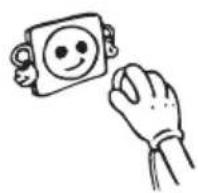


CLEANING AND MAINTENANCE
Defrosting the Refrigerator Compartment

- Defrosting occurs automatically in the refrigerator compartment during operation; the water is collected by the evaporation tray and evaporates automatically.
- The evaporation tray and the water drain hole should be cleaned periodically with the defrost drain plug to prevent the water from collecting at the bottom of the refrigerator instead of flowing out.
- You can also clean the drain hole by pouring 1/2 glass of water down it.
Replacing the LED strip
1 or 2 led strips in fridge is used to illuminate your appliance. Please call the service man.
Note: Numbers and location of led strips may be changed according to the model.
!!! Some versions may be without illumination.

SHIPMENT AND REPOSITIONING
Transportation and Changing of Installation Position
- The original packages and foamed polystyrene (PS) can be retained if required.
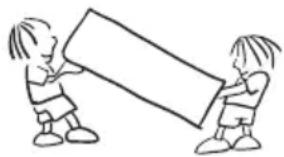
- During transportation, the appliance should be secured with a wide string or a strong rope. The instructions written on the corrugated box must be followed while transporting.
- Before transporting or changing the installation position, all the moving objects (ie,shelves,crisper...) should be taken out or fixed with bands in order to prevent them from getting damaged.
Carry your fridge in the upright position.
BEFORE CALLING YOUR AFTER SALES SERVICE
If your fridge is not working properly, it may be a minor problem, therefore check the following, before calling an electrician to save time and money.
| ERROR TYPE MEANING WHY WHAT TO DO | |||
| E01 | Sensor warning | Call Service for assistance as soon as possible. | |
| E02 | Sensor warning | Call Service for assistance as soon as possible. | |
| E03 | Sensor warning | Call Service for assistance as soon as possible. | |
| E06 | Sensor warning | Call Service for assistance as soon as possible. | |
| E07 | Sensor warning | Call Service for assistance as soon as possible. | |
| E08 | "Low voltage Warning" | When the power supply gets lower than 170 V the appliance gets to steady position. | This is not a failure. This prevents any damages on the compressor. This warning will off after the voltage gets required level.If the warning continues, please contact with authorized technical service. |
| E10 | "Refrigerator comp. Not Cold enough" | Ideal temperature for Ref. Compartment is +4 °C. If you see this warning your foods have risk of spoiling.This warning becomes visible if electricity is off for a long time (most probably) or the refrigerator is activated for the first time or hot food is loaded to the appliance. | Set the refrigerator temperature to colder values or set the super cooling mode until the compartment gets to normal temperature.Do not open the door much until this failure is off.Please empty the location at the front area of air duct channel holes.Please be careful while loading the appliance in order not to avoid the ventilation at the areas which are very close to the sensor.Please don't open the refrigerator doors frequently until the warning disappears.If the warning continues, please contact with authorized technical service. |
| ERROR TYPE M | MEANING WHY WHAT TO DO | ||
| E11 | Refrigerator comp. too Cold | The foods starts to freeze because of the too much cold temperature.This warning means that the temperature of the cooler compartment is very low. Therefore, this ambient condition may lead to the freezing of foods in the compartment. | 1. Check if the “Super cooling mode” is on.2. Decrease the refrigerator temperature values.3. If the warning continues, please contact with authorized technical service. |
What to do if your appliance does not operate;
Check that;
- There is no power,
- The general switch in your home is disconnected,
- The socket is not sufficient. To check this, plug in another appliance that you know which is working into the same socket.
What to do if your appliance performs poorly;
Check that;
- You have not overloaded the appliance,
- The fridge temperature set to 2.
• The door is closed perfectly,
• There is no dust on the condenser, - There is enough place at the rear and side walls.
If your fridge is operating too loudly;
Normal Noises
Cracking (Ice cracking) Noise:
• During automatic defrosting.
- When the appliance is cooled or warmed (due to expansion of appliance material).
Short cracking: Heard when the thermostat switches the compressor on/off.
Compressor noise: Normal motor noise. This noise means that the compressor operates normally Compressor may cause more noise for a short time when it is activated.
Bubbling noise and splash: This noise is caused by the flow of the refrigerant in the tubes of the system.
BEFORE CALLING YOUR AFTER SALES SERVICE
Water flow noise: Normal flow noise of water flowing to the evaporation container during defrosting. This noise can be heard during defrosting.
Air Blow Noise: Normal fan noise. This noise can be heard in fridges during normal operation of the system due to the circulation of air.
If the edges of fridge cabinet that the door joint contact are warm;
Especially in summer (hot weather), the surfaces that the joint contact may get warmer during the operation of the compressor, this is normal.
If humidity builds up inside the fridge;
- Are all food packed properly? Are the containers dried before placing them in the fridge?
- Is the fridge's door opened frequently? Humidity of the room gets in the fridge when the door is opened. Humidity build up will be faster when you open the door more frequently, especially if the humidity of the room is high.
If the door is not opened and closed properly;
- Do the food packages prevent closing of the door?
- Are the door compartments, shelves and drawers placed properly?
- Are door joints broken or torn?
• Is your fridge on a level surface?
Recommendations
- To stop the appliance completely, unplug from main socket (for cleaning and when the door is left open)
Tips for saving energy
- Install the appliance in a cool, well ventilated room, but not in direct sunlight and not near a heat source (radiator, cooker.. etc). Otherwise use an insulating plate.
- Allow warm food and drinks to cool down outside the appliance.
- Cover drinks or other liquids when placing them in the appliance Otherwise humidity increases in the appliance. Therefore, the working time gets longer. Also covering drinks and other liquids helps to preserve smell and taste.
- Try to avoid keeping the doors open for long periods or opening the doors too frequently as warm air will enter the cabinet and cause the compressor to switch on unnecessarily often.
- Keep the covers of the different temperature compartments (crisper, chiller ...etc) closed
- Door gasket must be clean and pliable. Replace gaskets if worn.
Saturs
PIRMS IERICES IZMANTOŠANAS 44
Veci un nedarbojošies ledusskapji

IERİCES DALAS UN NODALIJUMI
NORĀDES PAR PĀRTIKAS UZGLABĀŠANU

PIRMS SAZINĀŠANĀS AR PĒCPĀRDOŠANAS SERVISA CENTRU


PRIEŠ NAUDOJANT ŠALDYTUVA

PRIEŠ NAUDOJANT ŠALDYTUVA
PRIETAISO DALYS IR SKYRIAI


MAISTO PRODUKTŲ LAIKYMAS

Replacing the LED strip 95
LED-riba asendamine 95
TRANSPORT JA PAIGALDUSKOHA VAHETAMINE .... 96
ENNE TEENINDUSSE HELISTAMIST.... 97
NÕUANDED ENERGIA SÄÄSTMISEKS......100
Ohutusalased hoiatused
ENNE SEADME KASUTAMIST

TOIDU HOIUSTAMISE JUHIS
CLEANING AND MAINTENANCE
Sulatamine


Replacing the LED strip
LED-riba asendamine
| ERROR TYPE MEANING WHY WHAT TO DO | |||
| E01 Sensor warning | Call Service for assistance as soon as possible. | ||
| E02 Sensor warning | Call Service for assistance as soon as possible. | ||
| E03 Sensor warning | Call Service for assistance as soon as possible. | ||
| E06 Sensor warning | Call Service for assistance as soon as possible. | ||
| E07 Sensor warning | Call Service for assistance as soon as possible. | ||
| E08 | "Low voltage Warning" | When the power supply gets lower than 170 V the appliance gets to steady position. | This is not a failure. This prevents any damages on the compressor. This warning will off after the voltage gets required level.If the warning continues, please contact with authorized technical service. |
| E10 | "Refrigerator comp. Not Cold enough" | Ideal temperature for Ref. Compartment is +4 °C. If you see this warning your foods have risk of spoiling.This warning becomes visible if electricity is off for a long time (most probably) or the refrigerator is activated for the first time or hot food is loaded to the appliance. | Set the refrigerator temperature to colder values or set the super cooling mode until the compartment gets to normal temperature.Do not open the door much until this failure is off.Please empty the location at the front area of air duct channel holes.Please be careful while loading the appliance in order not to avoid the ventilation at the areas which are very close to the sensor.Please don't open the refrigerator doors frequently until the warning disappears.If the warning continues, please contact with authorized technical service. |
| E11 | Refrigerator comp. too Cold | The foods starts to freeze because of the too much cold temperature.This warning means that the temperature of the cooler compartment is very low. Therefore, this ambient condition may lead to the freezing of foods in the compartment. | Check if the "Super cooling mode" is on.Decrease the refrigerator temperature values.If the warning continues, please contact with authorized technical service. |
ENNE TEENINDUSSE HELISTAMIST
- REFRIGERATOR
- CHŁODZIARKA
- LEDUSSKAPIS
- PRZED ROZPOCZĘCIEM KORZYSTANIA Z URZĄDZENIA
- PRZED WEZWANIEM SERWISU
- THE PARTS OF THE APPLIANCE AND THE COMPARTMENTS
- USAGE INFORMATION
- ARRANGING FOOD IN THE APPLIANCE
- CLEANING AND MAINTENANCE
- SHIPMENT AND REPOSITIONING
- BEFORE CALLING YOUR AFTER SALES SERVICE
- BEFORE USING THE APPLIANCE
- GENERAL WARNINGS
- OLD AND OUT-OF-ORDER FRIDGES OR FREEZERS
- NOTES
- SAFETY WARNINGS
- INSTALLING AND OPERATING YOUR FRIDGE
- BEFORE USING YOUR FRIDGE
- DISPLAY AND CONTROL PANEL
- USING THE CONTROL PANEL
- OPERATING YOUR FRIDGE
- SUPER COOL MODE
- HOW WOULD IT BE USED
- DURING THIS MODE
- ECONOMY MODE
- SCREEN SAVER MODE
- PURPOSE
- HOW TO USE
- TO DEACTIVATE THE SCREEN SAVING MODE
- DOOR OPEN ALARM FUNCTION
- TEMPERATURE SETTINGS
- COOLER TEMPERATURE SETTINGS
- WARNINGS ABOUT TEMPERATURE ADJUSTMENTS
- ACCESSORIES
- FRESH DIAL
- DEFROSTING THE REFRIGERATOR COMPARTMENT
- REPLACING THE LED STRIP
- TRANSPORTATION AND CHANGING OF INSTALLATION POSITION
- CHECK THAT
- WHAT TO DO IF YOUR APPLIANCE PERFORMS POORLY
- IF YOUR FRIDGE IS OPERATING TOO LOUDLY
- NORMAL NOISES
- CRACKING (ICE CRACKING) NOISE
- IF THE EDGES OF FRIDGE CABINET THAT THE DOOR JOINT CONTACT ARE WARM
- IF HUMIDITY BUILDS UP INSIDE THE FRIDGE
- IF THE DOOR IS NOT OPENED AND CLOSED PROPERLY
- RECOMMENDATIONS
- TIPS FOR SAVING ENERGY
- SATURS
- PIRMS IERICES IZMANTOŠANAS
- VECI UN NEDARBOJOŠIES LEDUSSKAPJI
- IERİCES DALAS UN NODALIJUMI
- NORĀDES PAR PĀRTIKAS UZGLABĀŠANU
- PIRMS SAZINĀŠANĀS AR PĒCPĀRDOŠANAS SERVISA CENTRU
- PRIEŠ NAUDOJANT ŠALDYTUVA
- PRIETAISO DALYS IR SKYRIAI
- MAISTO PRODUKTŲ LAIKYMAS
- TRANSPORT JA PAIGALDUSKOHA VAHETAMINE
- ENNE TEENINDUSSE HELISTAMIST
- NÕUANDED ENERGIA SÄÄSTMISEKS
- OHUTUSALASED HOIATUSED
- ENNE SEADME KASUTAMIST
- TOIDU HOIUSTAMISE JUHIS
- LED-RIBA ASENDAMINE
Brand : VESTFROST
Model : VR-BF27952H1S
Category : Refrigerator