Conga Rockstar 5500 Hurricane Twice - Vacuum Cleaner CECOTEC - Free user manual and instructions
Find the device manual for free Conga Rockstar 5500 Hurricane Twice CECOTEC in PDF.


| Product type | Robotic vacuum cleaner |
| Brand | Cecotec |
| Model | Conga Rockstar 5500 Hurricane Twice |
| Dimensions (D x H) | 34 x 9 cm |
| Weight | 3.5 kg |
| Power source | Lithium-ion battery 5500 mAh |
| Voltage | 14.4 V |
| Suction power | 2700 Pa |
| Maximum runtime | 120 minutes |
| Charging time | 3 hours |
| Dustbin capacity | 600 ml |
| Filtration | HEPA H13 filter |
| Noise level | 60 dB |
| Control | Wi-Fi, mobile app and voice assistants |
| Cleaning modes | Auto, spiral, edge, spot |
| Main brush | Anti-tangle silicone brush |
| Side brushes | 2 side brushes |
| Sensors | Drop, obstacle and carpet detection |
| Return to base | Automatic, with cleaning resume |
| Scheduling | Weekly timer via app |
| Included accessories | Charging base, adapter, 2 side brushes, replacement filter |
| Safety | Drop detection, automatic shut-off in case of overheating |
Frequently Asked Questions - Conga Rockstar 5500 Hurricane Twice CECOTEC
User questions about Conga Rockstar 5500 Hurricane Twice CECOTEC
0 question about this device. Answer the ones you know or ask your own.
Ask a new question about this device
Download the instructions for your Vacuum Cleaner in PDF format for free! Find your manual Conga Rockstar 5500 Hurricane Twice - CECOTEC and take your electronic device back in hand. On this page are published all the documents necessary for the use of your device. Conga Rockstar 5500 Hurricane Twice by CECOTEC.
USER MANUAL Conga Rockstar 5500 Hurricane Twice CECOTEC
Aspirador vertical / Upright vacuum cleaner

Safety instructions 9
- Parts and components 47
- Before use 47
- Product assembly 48
- Operation 48
- Cleaning and maintenance 49
- Troubleshooting 50
- Technical specifications 51
- Disposal of old electrical and electronic appliances 51
- Technical support and warranty 52
- Copyright 52
SOMMAIRE
Before using the appliance, read the following instructions carefully. Keep this instruction manual for future reference or new users.
- This appliance can be used by children aged 8 years and above and persons with reduced physical, sensory, or mental capabilities or lack of experience and knowledge if they have been given supervision or instruction concerning use of the appliance in a safe way and understand the hazards involved. Children must not play with the appliance. Cleaning and user maintenance should not be carried out by unsupervised children.
- This appliance is designed for domestic use only and is not intended for bars, restaurants, farmhouses, hotels, motels, and offices.
- Inspect the power cable regularly for visible damage, especially the cable, plug, and charger casing. Should the cable be damaged or the product not work properly, it must be repaired by the official Cecotec Technical Support Service to avoid any type of danger.
- The appliance must be powered at a low safety voltage as stated on the marking.
- Do not try to repair the appliance by yourself. Contact the official Cecotec Technical Support Service for advice.
- WARNING: The appliance has rotating parts which may pose a risk of entrapment. Exercise extreme caution.
- Ensure that the mains voltage matches the voltage specified on the appliance marking and that the mains plug is earthed.
- Do not use the appliance if it has been dropped or if there are any visible signs of damage.
-
Do not use any accessory that has not been recommended by Cecotec, as they might cause injuries or damage.
-
Do not place the appliance close to heat sources, flammable substances, or wet surfaces where it could fall, nor allow it to come into contact with water or other liquids. Do not use outdoors.
- Do not use the appliance to vacuum liquids, lighted matches, cigarette ends, hot ash, or on wet surfaces.
- Do not use on concrete, tarmac, or other rough surfaces.
- Stop using the appliance if you notice an abnormal sound or sense a temperature higher than usual.
- Keep the air outlet unblocked to avoid losing suction power.
- Check the suction tube from time to time to make sure it is not blocked.
- Take special care when using the appliance near stairs.
- Do not block the appliance openings or airflow. Keep openings free of any objects, and do not block them with clothes or your fingers.
- Do not pull on the cable to disconnect the appliance. Pull from the plug.
- Do not immerse the cable, plug, or any other part of the appliance in water or any other liquid or expose electrical connections to water. Make sure your hands are dry before handling the plug or switching on the appliance.
Battery instructions
- WARNING: to recharge the battery, use only the power supply included with the appliance, with reference CZH015350050EUWH o GQ18-350050-AG
- Do not allow children to replace batteries without adult supervision.
- Do not disassemble, open, or break secondary batteries.
-
Keep the batteries out of the reach of children. Pay particular attention to small batteries. In case of battery ingestion, please seek medical attention immediately.
-
Do not expose batteries to heat or fire. Avoid storage in direct sunlight.
- Do not short-circuit the battery. Do not store batteries in an untidy manner, in a box, or drawer where they can short-circuit each other or be short-circuited by other metal objects.
- Do not subject batteries to mechanical shock.
- Both batteries and cells can leak under extreme conditions. In the event of a battery leak, keep your skin and eyes away from the liquid. If the liquid gets into contact with skin, wash immediately with soap and water. If the liquid gets into the eyes, wash them immediately with clean water for a minimum of 10 minutes and seek medical attention. Wear gloves to handle the battery and dispose of it immediately in accordance with local regulations.
- Do not use any charger other than the one supplied specifically for this appliance.
- Observe the positive (+) and negative (-) markings on the battery and equipment and make sure the former is inserted accordingly.
- Do not use any battery that is not designed for this appliance.
- Do not use the appliance if powered with batteries that differ in capacity, size, or type.
- Children must be supervised if they handle the battery.
- In case of battery ingestion, please seek medical attention immediately.
- Always use the battery recommended for this appliance.
- Keep batteries and cells clean and dry.
- Wipe the battery terminals with a clean, dry cloth if they become dirty.
-
Secondary batteries must be charged before use. Always use the specified charger and refer to these instructions.
-
Do not leave the battery on prolonged charge when not in use.
- After long periods of storage, it may be necessary to charge and discharge the batteries several times to obtain maximum performance.
- Keep this instruction manual for future reference.
- Use the battery only for its intended purpose, i.e., for use with this appliance.
- Remove the battery from the appliance when not in use whenever possible.
- Dispose of the battery properly.
- Non-rechargeable batteries should not be recharged.
INSTRUCTIONS DE SÉCURITÉ
- Battery
- Dust tank
- Dirt-tank opening button
- Suction-tube release button
- Suction tube
- Suction base release button
- Dualbrush suction base
- Display
- Speed knob
- Power button
- Charging port
- Wall bracket
- Accessory for corners
- 2-in-1 accessory for furniture
- Adapter
NOTE:
The graphics in this manual are schematic representations and may not exactly match the appliance.
2. BEFORE USE
- This upright vacuum cleaner includes a package designed to protect it during transport. Take the appliance out of the box and remove all packaging materials. Keep the original box and other elements in a safe place, as this will help you prevent product damage when transporting it in the future. In case the original packaging is disposed of, make sure all packaging materials are recycled accordingly.
- Make sure all parts and components are included and in good conditions. If there is any piece missing or in bad conditions, contact the official Cecotec Technical Support Service immediately.
- Fully charge the appliance before first use. When the battery is fully charged, unplug it.
Box content
- Conga Rockstar 5500 Hurricane Twice upright vacuum cleaner
- Suction tube
- Dualbrush suction base
- Wall bracket
ENGLISH
- Jalisco brush
- 2-in-1 accessory for furniture
- Accessory for corners
- Instruction manual
3. PRODUCT ASSEMBLY
Battery assembly
Fig. 2
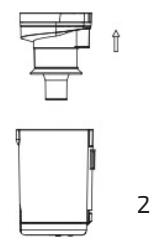
- Insert the battery in the corresponding slot on the main body. Once inserted, it will click into place. Make sure it's secured in position.
- To remove the battery, press the release button and remove the it.
Attaching the suction tube to the main body
Fig. 3
- To install the suction tube on the main body, align the two parts so that they match, and insert the tube into the main body until it snaps into place.
- To disassemble, press the release button and pull the suction tube while holding the main body firmly.
Accessories assembly
Fig. 4
To complete the installation of the Upright Vacuum Cleaner, once the suction tube is connected to the main body, hold the tube in an upright position and insert the desired accessory into it.
Installing the wall bracket
Fig. 5-6
- Attach the adapter to the wall bracket as shown in Figure 5.
- Place the wall bracket on the wall and mark the points where the holes for fixing the bracket are to be drilled. It is important that the suction base rests on the floor so that the wall bracket does not support the full weight of the hoover.
- Drill the holes and fix the wall bracket with the expansion screws, then place the vacuum cleaner and the attached accessory on the wall bracket as shown in Figure 6.
4. OPERATION
You can use this vacuum cleaner in two different manners:
- Handheld vacuum cleaner, attaching the accessories directly to the main body. Fig. 7
- Upright vacuum cleaner, using the suction tube with the accessories assembled. Fig. 4
Using the handheld vacuum cleaner
This vacuum cleaner features the following modes:
- Low: low speed, activated by pressing the Power button once.
- Med: medium speed, activated by pressing the speed selector once.
- Turbo: high speed, activated by pressing the speed selector twice. Press the speed selector once more to return to the low speed setting.
- Automatic: speed adjusts automatically based on the amount of dirt.
To switch the vacuum cleaner off, press the Power button twice.
Charge and display
- If the last indicator light on the LED display flashes green, it means that battery is low and must be recharged. Connect the charger to the power supply and the charging port. While charging, all four indicator lights will flash green.
- Once the battery is fully charged, all four indicator lights will light up green.
5. CLEANING AND MAINTENANCE
- Turn the appliance off, unplug it from the power socket, and allow it to cool down before cleaning it.
- Use a soft, slightly dampened cloth to clean the surface of the appliance.
- Never immerse the appliance in water or other liquids. Do not allow liquids to enter the appliance.
- Do not use abrasive cleaners or scouring pads to clean the appliance.
- Do not leave the vacuum cleaner in a place with direct sunlight.
- Do not leave the vacuum cleaner in a wet place after cleaning it.
- After the brush has been used for a long time, bristles might start to tangle with hair and other particles. Clean it in order for it to operate correctly again.
Tank cleaning.Fig. 8
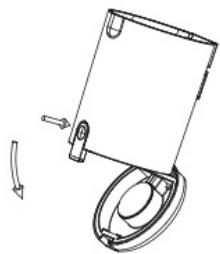
- Press the dirt container release button and remove the dirt container.
- Empty the tank.
Cleaning the filters. Fig. 9
- To prevent the appliance from overheating and losing suction power, it is suggested to clean the filters frequently. To make the most of the suction power, it is suggested to clean the filter after every use.
- The filters shelf life will depend on the accumulated use and the type of particles which are frequently vacuumed. It is recommended to replace the filters every 6 months.
- Press the dirt tank opening button and remove the dirt container.
ENGLISH
- Remove the filtering system from inside the dirt tank.
- Separate the filters from the filtering system as shown in Figure 9.
- Vacuum and shake the filter to remove every particle and dust remain that may block them and difficult the correct air circulation. Remember not to use the vacuum cleaner without the filter properly assembled. Filters cannot be washed inside a washing machine nor dried with a hair dryer. Do not brush the high-efficiency filter.
- Put the filters back into the filtering system.
- Put the filtering system back into the dirt tank.
- Replace the dust tank on the appliance.
Cleaning the brush attachment
- Slide the brush release button with your finger and remove the side cover.
- Remove the brush.
- It is important to remove any debris that may have been deposited in the brush inlet.
- If you decide to wash the brush, you must air dry all the pieces. Assemble the pieces back in order to use the brush again.
How to remove the battery
Press the battery release button and remove the battery. Store the battery in a dry place.
Vacuum claner storage
If the robot is not going to be used for a long time, remove the battery from the product and store it in a dry and safe place.
6. TROUBLESHOOTING
| Problem | Possible cause | Possible solution |
| The vacuum cleaner does not work. | Battery is discharged. | Charge the vacuum cleaner. |
| The suction tube, brush, battery, or the appliance itself are not correctly positioned. | Make sure all parts of the vacuum cleaner are correctly assembled. | |
| The suction power decreased and the vacuum cleaner makes a lot of noise. | The dirt tank is full. | Empty the dirt tank and clean the filter system. |
| The filter has too much dust, the brush inlet is clogged or the brush is blocked. | Empty the dirt tank, clean the filter system, brush inlet and brush. | |
| Insufficient operating time after charging the vacuum cleaner. (The battery life may vary according to the room temperature). | Insufficient charge time. | Charge the battery to 100% according to the instructions in this manual. |
| Battery life has been exceeded. | Batteries are easily recycled. Go to your nearest recycling point and buy new batteries. |
Note:
If none of these situations match your problem, do not attempt to disassemble or repair the hoover yourself. Repairs carried out by unqualified persons may result in injury or serious malfunctions. Contact the official Cecotec Technical Support Service. The repair must be carried out by an authorised technician and you must use only original spare parts.
*Possible error codes can be found at the end of the manual.
7. TECHNICAL SPECIFICATIONS
Conga Rockstar 5500 Hurricane Twice
Product reference: 08431
Motor rated power: 600 W
Brush rated power: 30 W
Charger output: 35 V = 0.5 A
Battery data:
29.6 V, 3000 mAh, 88.80 Wh
Input: 35 V, 0.5 A
Type: 8INR19/66
Technical specifications may change without prior notification to improve product quality. Made in China | Designed in Spain
8. DISPOSAL OF OLD ELECTRICAL AND ELECTRONIC APPLIANCES


This symbol indicates that, according to the applicable regulations, the product and/or battery must be disposed of separately from household waste. When this product reaches the end of its shelf life, you should dispose of the cells/batteries/accumulators and take them to a collection point designated by the local authorities.
Consumers must contact their local authorities or retailer for information concerning the correct disposal of old machines and/or their batteries.
Compliance with the above guidelines will help protecting the environment.
ENGLISH
9. TECHNICAL SUPPORT AND WARRANTY
Cecotec shall be liable to the end user or consumer for any lack of conformity that exists at the time of delivery of the product under the terms, conditions, and deadlines established by the applicable regulations.
It is recommended that repairs be carried out by qualified personnel.
If at any moment you detect any problem with your product or have any doubt, do not hesitate to contact the official Cecotec Technical Support Service at +34 963 210 728.
10. COPYRIGHT
The intellectual property rights over the texts in this manual belong to CECOTEC INNOVACIONES, S.L. All rights reserved. The contents of this publication may not, in whole or in part, be reproduced, stored in a retrieval system, transmitted, or distributed by any means (electronic, mechanical, photocopying, recording or similar) without the prior authorization of CECOTEC INNOVACIONES, S.L.
1. PIÈCES ET COMPOSANTS
Img. 1
Installation du support mural
Img. 5-6
6. PROBLEEMOPLOSSING
Fig./Img./Abb./Afb./Rys. 2

Fig./Img./Abb./Afb./Rys. 3
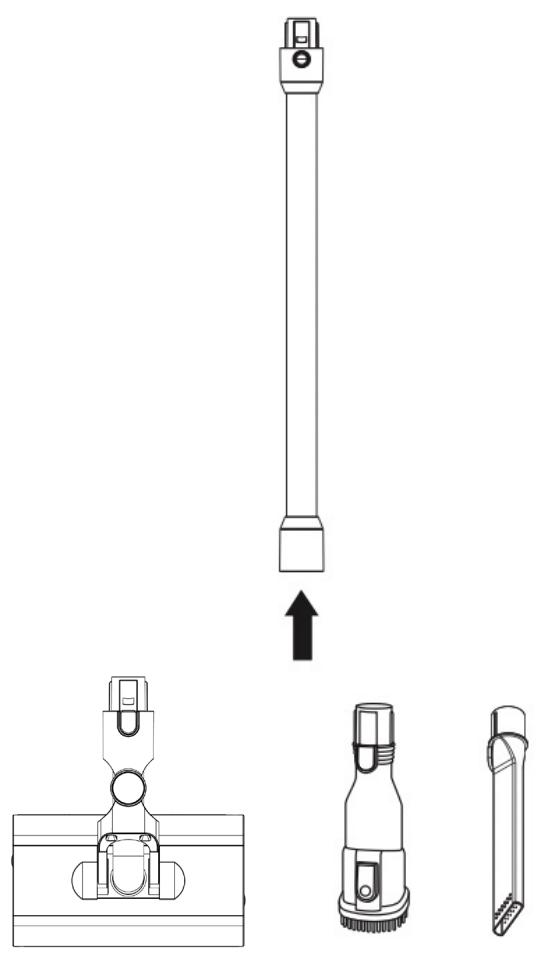
Fig./Img./Abb./Afb./Rys. 4

Fig./Img./Abb./Afb./Rys. 5

Fig./Img./Abb./Afb./Rys. 6

Fig./Img./Abb./Afb./Rys. 7

1
2
Fig./Img./Abb./Afb./Rys. 8



4
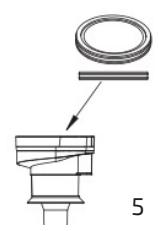


Fig./Img./Abb./Afb./ Rys. 9
ES
| Error code | Problem | Solution |
| E1 | Charger voltage is not suitable. | Use the charger supplied by Cecotec. |
| E2 | The base brush is blocked. | Check that no foreign object (dirt, hair, lint, etc.) is preventing the brush from rotating normally. |
| E3 | Overheated motor. | Check that the filters are clean, and let the appliance cool down for 5 minutes. |
| E4 | Overheated battery. | Let the appliance cool down for 5 minutes. |
| E5 | Overheated brush motor. | Let the appliance cool down for 5 minutes. |
| E9 | Overcharged battery. | The battery charging time has been exceeded.Unplug the appliance from the power supply. |
| CF | Filter cleaning reminder. | Clean the filter after every use. |
FR


- SOMMAIRE
- BATTERY INSTRUCTIONS
- INSTRUCTIONS DE SÉCURITÉ
- NOTE
- BEFORE USE
- BOX CONTENT
- ENGLISH
- PRODUCT ASSEMBLY
- BATTERY ASSEMBLY
- FIG. 2
- ATTACHING THE SUCTION TUBE TO THE MAIN BODY
- FIG. 3
- ACCESSORIES ASSEMBLY
- FIG. 4
- INSTALLING THE WALL BRACKET
- FIG. 5-6
- OPERATION
- USING THE HANDHELD VACUUM CLEANER
- CHARGE AND DISPLAY
- CLEANING AND MAINTENANCE
- TANK CLEANING.FIG. 8
- CLEANING THE FILTERS. FIG. 9
- CLEANING THE BRUSH ATTACHMENT
- HOW TO REMOVE THE BATTERY
- VACUUM CLANER STORAGE
- TROUBLESHOOTING
- TECHNICAL SPECIFICATIONS
- CONGA ROCKSTAR 5500 HURRICANE TWICE
- BATTERY DATA
- DISPOSAL OF OLD ELECTRICAL AND ELECTRONIC APPLIANCES
- TECHNICAL SUPPORT AND WARRANTY
- COPYRIGHT
- PIÈCES ET COMPOSANTS
- IMG. 1
- INSTALLATION DU SUPPORT MURAL
- PROBLEEMOPLOSSING
Brand : CECOTEC
Model : Conga Rockstar 5500 Hurricane Twice
Category : Vacuum Cleaner