VP51 - Uncategorized AVMATRIX - Free user manual and instructions
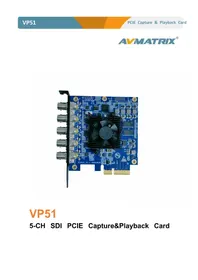
Find the device manual for free VP51 AVMATRIX in PDF.


Pick your language and provide your email: we'll send you a specifically translated version.
| Product Type | Video Converter / Scaler |
| Brand | AVMATRIX |
| Model | VP51 |
| Video Inputs | 1 x HDMI, 1 x 3G-SDI |
| Video Outputs | 1 x HDMI, 1 x 3G-SDI |
| Maximum Resolution | 4K UHD 3840x2160 @ 60Hz |
| Supported SDI Formats | SD-SDI, HD-SDI, 3G-SDI |
| Scaling Engine | Up/down scaling with independent horizontal and vertical control |
| Frame Rate Conversion | Auto frame rate synchronization between input and output |
| Color Space Support | RGB444, YUV444, YUV422 |
| Control Method | Front panel buttons and RS-232 |
| Power Supply | DC 12V / 1A |
| Power Consumption | < 10W |
| Dimensions (W x D x H) | 120 x 80 x 25 mm |
| Weight | 300 g |
| Housing | Metal chassis with ventilation slots |
| Operating Temperature | 0 °C to 40 °C |
| Cleaning Instructions | Wipe with a soft dry cloth; do not use liquids |
| Safety Approvals | CE, FCC, RoHS |
| Spare Parts Available | Power adapter, remote control (optional), mounting brackets |
| Repairability | Modular design; serviceable by qualified technicians |
| Package Contents | VP51 unit, power adapter, user manual |
Frequently Asked Questions - VP51 AVMATRIX
What is the AVMATRIX VP51 used for?
The AVMATRIX VP51 is a video converter and scaler that converts and formats HDMI and SDI signals for professional video production.
Which video formats are supported?
It supports SD-SDI, HD-SDI, 3G-SDI, and HDMI signals up to 4K UHD 60Hz.
Can I connect the VP51 to a computer monitor?
Yes, the HDMI output can connect to a computer monitor; the VP51 will scale the input to the monitor's native resolution.
How do I switch between inputs?
Use the front panel buttons to select HDMI or SDI input; the selected input is shown on the LED display.
Does the VP51 support HDCP?
Yes, the HDMI inputs and outputs support HDCP 1.4 and 2.2 for encrypted content.
What is the maximum cable length for SDI?
The 3G-SDI output can reliably transmit up to 100 meters using RG6 cable, depending on signal quality.
How do I update the firmware?
Connect the VP51 to your computer via the RS-232 port and use the AVMATRIX firmware tool to install updates.
Is the VP51 compatible with Mac or Linux?
The VP51 is OS-independent; it works with any computer that has an HDMI or SDI output.
Can I use the VP51 without a power outlet?
The device requires a 12V DC power supply; you can use a portable battery with a 12V adapter for field use.
How do I clean the device?
Use a soft, dry cloth to wipe the exterior; do not use chemicals or wet cloths.
User questions about VP51 AVMATRIX
0 question about this device. Answer the ones you know or ask your own.
Ask a new question about this device
No questions yet. Be the first to ask one.
Download the instructions for your Uncategorized in PDF format for free! Find your manual VP51 - AVMATRIX and take your electronic device back in hand. On this page are published all the documents necessary for the use of your device. VP51 by AVMATRIX.
USER MANUAL VP51 AVMATRIX

Manual assistant
Powered by Anthropic
Waiting for your message
Product information
Brand : AVMATRIX
Model : VP51
Category : Uncategorized