
X-4700AM - Air purifier XPower - Free user manual and instructions
Find the device manual for free X-4700AM XPower in PDF.
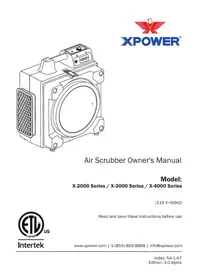


| Product Type | Air Purifier |
| Brand | XPower |
| Model | X-4700AM |
| Suitable Room Size | Up to 40 m² |
| Clean Air Delivery Rate (CADR) | 200 m³/h Dust, Pollen, Smoke |
| Filtration System | Washable Pre-filter, True HEPA, Activated Carbon |
| Fan Speeds | 3 Speeds (Low, Medium, High) |
| Noise Level | 25 - 50 dB |
| Power Consumption | 45 W |
| Voltage | 220 - 240 V, 50 Hz |
| Dimensions (W x D x H) | 25.6 x 25.6 x 55.9 cm |
| Weight | 5.4 kg |
| Control Type | Touch Panel with Remote Control |
| Display | LED Air Quality Indicator |
| Timer | 1 - 8 Hours Adjustable |
| Air Quality Sensor | Real-time PM2.5 Monitoring |
| Filter Replacement Indicator | Visual Alert for Filter Change |
| Sleep Mode | Ultra-quiet Operation with Display Off |
| Auto Mode | Automatic Fan Speed Adjustment |
| Maintenance | Clean Pre-filter Every 2 Weeks, Replace HEPA Every 6-12 Months |
| Safety Features | Automatic Shut-off When Cover Removed, Overheat Protection |
| Spare Parts and Reparability | Replacement Filters Available, Tool-free Filter Replacement |
| Warranty | 1 Year Limited Warranty |
Frequently Asked Questions - X-4700AM XPower
User questions about X-4700AM XPower
0 question about this device. Answer the ones you know or ask your own.
Ask a new question about this device
Download the instructions for your Air purifier in PDF format for free! Find your manual X-4700AM - XPower and take your electronic device back in hand. On this page are published all the documents necessary for the use of your device. X-4700AM by XPower.
USER MANUAL X-4700AM XPower
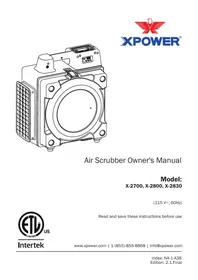
Air Scrubber Owner's Manual
Model:
X-2000 Series / X-3000 Series / X-4000 Series
(115 V\~60HZ)

Intertek
Read and save these instructions before use
www.xpower.com | 1-(855)-855-8868 | info@xpower.com

WARNING - READ AND SAVE THIS INSTRUCTIONS BEFORE USING THIS PRODUCT.
The user of electrical products may create hazards that include, but are not limited to injury, fire, electrical shock. Failure to follow these instructions may damage and/or impair its operation and void the warranty.
- Before operating, remove all packaging material and check for any damage that may have occurred during shipping or any missing items.
- Check household power supply to ensure it matches the appliance's specification.
- DO NOT operate any fan with a damaged cord or plug. Discard fan or return it to an authorized service facility for examination and/or repair.
- Use only on GFCI protected receptacles. Please contact a qualified electrician for verification and / or installation of a GFCI receptacle if necessary.
- DO NOT run cord under carpeting. DO NOT cover cord with throw rugs, runners, or similar coverings. DO NOT route cord under furniture or appliances. Arrange cord away from traffic area and where it will not be tripped over.
- (For model X-2380, X-2580, X-2480A, X-3300, X-3500, X-3780) To reduce the risk of fire or electric shock, DO NOT use this appliance with any solid-state speed control device. (For model X-3400A, X-4700A, X-4700AM) Suitable for use with solid state speed control.
- DO NOT touch this appliance or the plug with wet hands or while standing in water.
- DO NOT operate the appliance in any pooled water.
- DO NOT use the product in areas where gasoline, paint or other flammable goods and objects are used or stored.
- DO NOT insert or allow objects to enter any ventilation or exhaust opening as this may damage the appliance and void the warranty.
- DO NOT cover the air inlet or outlet on the appliance.
- DO NOT direct the air flow at human faces or bodies.
- DO NOT allow children to play around or with this appliance.
- AUTOMATICALLY OPERATED DEVICE – To reduce the risk of injury, disconnect from power supply before servicing.
- Remove the power cord from the electrical receptacle by grasping and pulling on the power cord plug-end only, DO NOT pull the cord directly.
- DO NOT attempt to repair or adjust any electrical or mechanical functions of this appliance, as this may cause danger and void the warranty.
- If the appliance is damaged or it malfunctions, DO NOT continue to use it. Unplug the product from the electrical outlet. Refer to troubleshooting guide or contact XPOWER.
- Store in a dry area, away from exposure to sunlight, extreme temperature and humidity, or other extreme environments, when not in use.
- DO NOT stack more than five units of this appliance.
- An electronic instruction manual can be obtained through manufacturer's website www.xpower.com.
Items Included


- Owner's Manual x 1 • Air Si
Parts Description
Machine

(1) Rubber Feet
(2) Latch Kit
(3) Cover
(4) Foam Cover*
(5) Additional Electrical Receptacle**
(6) Switch Plate
(7) Front Housing
(8) Motor Assembly
(9) Air Outlet Grille
(10) Motor Holder
(11) Pressure Switch
(12) Rear Housing
(13) Capacitor
(14) Power Cord
Machine (Continued)
* For model X-2480A/X-3400A/X-4700A/X-4700AM only.
** Additional electrical receptacle function does not apply to all models mentioned in this manual (See Page 16: Technical Specifications).
Filters
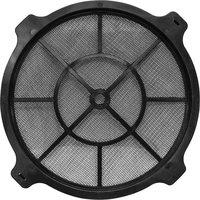
Outer Nylon Mesh Filter

NFR9/NFR12
Nylon Mesh
Filter

NFS13/NFS16
Pleated Media Filter

PF13/PF16
Carbon Filter
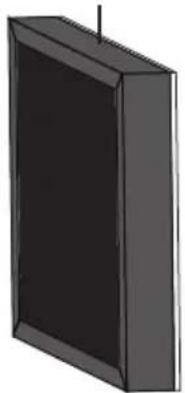
CF15/CF35
HEPA Filter
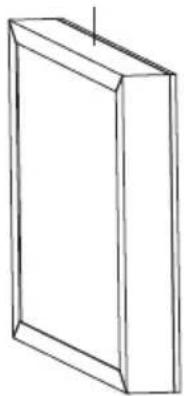
HEPA35/ HEPA35-33/HEPA50
Washable Filter

WF35/WF35+EVA/WF50
| MODEL NUMBER | X-2380 X-2580 X-2480A X-3380 X-3580 X-3780 | X-3400A, X-4700A, X-4700AM | |||||
| First Stage Filter | NFR9 NFS13 | NFR12 NFS16 | |||||
| Second Stage Filter | NFS13 PF13 | NFS16 PF16 | |||||
| Third Stage Filter | WF50 CF15 | HEPA 35-33 | WF35 CF35 | HEPA 50 | |||
| Fourth Stage Filter | - | HEPA 35-33 | - | WF35 +EVA | HEPA 35 | HEPA 50 | - |
The graph only presents the appearance of the filters. The actual sizes of filters with different part number could be slightly different. (See Page 16: Technical Specifications)
If your product(s) is not listed above, please visit www.xpower.com for more information.
Air Scrubber Introduction
- XPOWER's unique and highly innovative Air Scrubbers create a fresh and clean environment for various purposes.
- With a special designed powerful motor, XPOWER Air Scrubbers are able to provide suction in even difficult areas.
- The included filtration system can capture a wide range of compounds and prevents organism migration from location to location.

Installation and Operation Guide
Selecting a Location (Important)
- Enclosed Area: For optimal efficiency and longer filter lifespan, the Air Scrubber should be operated in an enclosed area. Keep all doors, windows and other outside entrances to the room closed.
- Air Circulation: It's suggested to have a constant efficient air circulation inside your working area. You may achieve this with XPOWER Air Mover combinations.
- Environment Humidity: For optimal efficiency and higher filter lifespan, the Air Scrubber should not be operated in an environment with a high relative humidity level. High humidity level could cause blockage and damage to filters.
- Power Cord: The power cord has a length of 13 feet (4.0 meters). Select a location where the power cord can reach the power source. (See Also Page 9: Additional Electrical Receptacle)
- Inlet and Outlet Orientation: Also pay attention to the orientation of the air inlet and air outlet. Make sure the airflow won't influence any object nearby the Air Scrubber.
- IMPORTANT: The effectiveness of the Air Scrubber can be influenced by different factors. You may also find that installing multiple Air Scrubbers may be required for larger enclosed areas. (See Also Page 9: Additional Electrical Receptacle)

Outer Nylon Mesh Filter

Foam Cover

Intake Ducting
- Turn off the machine and remove the outer nylon mesh filter* and foam cover**.
- Attach the ducting hose to the intake.
* For model X-2380/X-2580/X-3380/X-3580 only.
** For model X-2480A/X-3400A/X-4700A/X-4700AM only.


Exhaust Ducting
- Turn off the machine.
- Attach the ducting hose to the exhaust.

Filter change light


Variable Speed ControlFilter Change Light Five Speed Contr

Time Meter
Filter Change Light
This indicates that the filters have exceeded the maximum capacity of particles, and the filtration efficiency has diminished. You should clean or replace the filters. (See Page 13: Filter Maintenance)
Variable Speed Control (For Model X-3400A/X-4700A/X-4700AM only)
- Turn to "OFF" position to switch the Air Scrubber OFF. Turn to any speed position to switch the Air Scrubber ON.
- Turn clockwise to set the desired speed. "MAX" means the highest speed and "LOW" means the lowest speed.
Five Speed Control (For Model X-2380/X-2480A/X-2580/X-3380/X-3580/X-3780)
- Turn to "OFF" position to switch the Air Scrubber OFF. Turn to any speed position to switch the Air Scrubber ON.
- Turn clockwise to set the desired speed. There are 5 speeds from: 5, 4, 3, 2, 1. “5” is the highest speed and “1” is the lowest speed.
Control Panel (Continued)
Time Meter (For Model X-4700AM Only)
- The time meter shows the total running time from the first usage to the current moment.
- When the machine turns on, the activity indicator will blink. The running time starts to count. When the machine is off, the activity indicator will stay illuminated.
- The value can't be reset. When the value exceeds 9999.9 hours, it will start over from 0 again.
Foam Cover*

- Before use, please take off the foam cover. Otherwise it will cause abnormal motor operation and failure.
• After use, please put back the foam cover.
* For model X-2480A/X-3400A/X-4700A/X-4700AM only.
* The additional electrical receptacle function does not apply to all models mentioned in this manual. (See Page 16: Technical Specifications)
Regular Additional Electrical Receptacle (For model X-2480A)

GFCI Protected Additional Electrical Receptacle (For model X-3400A, X-4700A, X-4700AM)

- Other appliances can be plugged in the additional electrical receptacles and will operate whether the Air Scrubber is on or off. However, the total amperage must be lower than the amperage instructed. Different models may have varying instructions.
- If the Air Scrubber or the plugged in appliance stops working, press the Circuit Reset Button to reset the circuit.
For GFCI (Ground Fault Circuit Interrupter) protected additional electrical receptacle:
- Once a ground fault occurs, the GFCI will immediately interrupt the power connection to the additional electrical receptacle. Consult the Troubleshooting Guide.
- A ground fault is an inadvertent contact between an energized conductor (for example, a human being) and ground or equipment frame.

WARNING: Risk of electric shock. You should test the GFCI before each use.
- Press the Test Button and then press GFCI Reset Button, the Test Button should be reset to unpressed position.
- If the Test Button does not react as stated above, consult the Troubleshooting Guide.
Transportation

Carry with Handle
Lift the Air Scrubber with the handle on the top of the housing.

Stack in Carrier
You can stack up to 5 Air Scrubbers and transport.
User Maintenance Instructions
Frequent maintenance is recommended on this appliance. Failure to follow the maintenance instructions may cause failure of the appliance and void the warranty.
Before performing any maintenance or cleaning, always disconnect the Air Scrubber from its power source.
Machine Maintenance
- When not in use, unplug, remove all the extension and cover the intake with the foam cover* (See Also Page 8: Foam Cover). Store the appliance in a dry and cool indoor place. Make sure it's out of reach of children.
- Use a damp cloth to wipe the surface of the housing. Do not clean the unit with water directly.
- Check if the grille covers are clean. Remove dirt or any other objects that could block the air inlet and air outlet.
- Do not stack more than five units of this appliance.
* For model X-2480A/X-3400A/X-4700A/X-4700AM only.


Organize the Cord
- Wrap the power cord around the intake for storage after use.*
- Use convenient clip at end of cord to secure in place.
* Wrap-around design does not apply to all models mentioned in this manual.
Filter Maintenance
To ensure the best filtration efficiency and to prevent secondary pollution of used filters, you should replace or clean the filters frequently or when the filter change light illuminates. Please follow the instructions below.
Unload the filters (See Also Page 3: Parts Description)

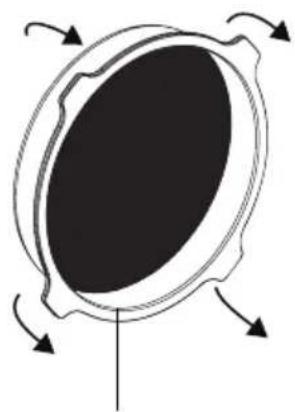
Outer Nylon Mesh Filter
Outter Nylon Mesh Filter
- Outer nylon mesh filter* is on the intake of the Air Scrubber.
• Take out this filter by pulling the four corners of it.
* For model X-2480A and X-3400A only.

Other Filters
Open the filter cover by releasing the latch kit on top. Unload other filters inside.
Clean the filters (See Also Page 4: Filters)
- Nylon Mesh Filters/Washable Filters: These filters are washable with water. Use a vacuum or clean cloth to remove loose debris. And then further clean the filter with water. Use a cloth to remove the water on the filter and dry it naturally in the air.
- Pleated Media Filters: This filter is not washable. Use a vacuum to remove loose debris. If filter change light still illuminates, you might need to replace the filter.
- Carbon Filters: This filter is not washable. Use a vacuum to remove loose debris. Lay it flat on a clean and dry surface under the sun for 3 hours. Sunshine will help remove various substance absorbed in the carbon with an appropriate temperature. If filter change light still illuminates or a decline of effectiveness is noted, you might need to replace the filter.
- HEPA Filters: This filter is not washable or reusable. Highly concentrated particles are captured by the HEPA filter and cleaning this filter can be hazardous to human health and contaminate the nearby environment. You must replace the filter if all the other filters are clean and however the filter change light still illuminates.
Filter storage
- When not in use for a long time, you should store the filter separately from the machine.
• Always clean the filters before storage. Place the filters in a sealed plastic bag and store it in a dry and cool indoor place.

WARNING: DISPOSAL OF FILTERS NO LONGER IN USE
The particles captured by a used filter can cause adverse human health effects and contaminate the nearby environment once the filter is exposed to the open air. Adequate personal protection equipment (PPE) is required during the whole process, for example, industry approved masks, eye protectors, gloves and coveralls. You should place the used filters in a sealed plastic bag before disposing. Follow local disposal regulations.
Reload the filters
To ensure the best efficiency and lifespan, each filter must be reloaded in a correct position, sequence and orientation.

Outer Nylon Mesh Filter
- The Outer Nylon Mesh Filter (if applicable) must be placed on the intake.

Other Filters
- Other filters must be loaded inside the Air Scrubber.
• See Page 4: Filters to check the installation sequence.

Last Stage Filter:
- On one of the side of the last stage filter, there is an EVA sealing pad around the frame.
- The last stage filter must be loaded with EVA side facing the machine housing.
- The EVA sealing pad ensures that all the air is filtered.

Tips:
- On one of the side of each filter, there is a label with an arrow showing the airflow direction.
- When placing the filter, the side with label should face up. The arrow on the label should point to the blue housing.
PROBLEM POSSIBLE CAUSE SOLUTION
| Air Scrubber does not start | No electricity. Check for power supply. | |
| The power cord is not properly plugged in. | Remove and reconnect the power cord. | |
| The circuit breaker on the additional electrical receptacle (Daisy chain)* trips. | Remove all appliances on the additional electrical receptacle and press circuit reset button. | |
| Unit runs but no or very low air movement | Air outlet is blocked. Remove blockage. | |
| Filters are fully loaded. The filter change light illuminates. | Clean or replace the loaded filters. (See Page 11: Filter Maintenance) | |
| The additional electrical receptacle has no power* | The circuit breaker on the additional electrical receptacle (Daisy chain)* trips. | Remove all appliances on the additional electrical receptacle and press circuit reset button. |
| A ground fault causes power interrupt by GFCI**. | Turn off and unplug the Air Scrubber. Remove all appliances on the additional electrical receptacle and press GFCI reset button. | |
| The Test Button doesn’t react to GFCI test based on the maual | ||
*/** The additional electrical receptacle / GFCI function does not apply to all models mentioned in this manual (See Page 16: Technical Specifications).
If troubleshooting does not resolve your problem, please contact XPOWER or other parties authorized by XPOWER for further instructions.
If your product(s) is not listed above, please visit www.xpower.com for more information.
| MODEL NUMBER X-2380 X-2580 X-2480A X-3380 X-3580 X-3780 X-3400A X-4700A X-4700AM | 115 V~60 HZ | |||||||
| Voltage/ Frequency | 115 V~60 Hz | |||||||
| Motor Power 1/2 HP - | ||||||||
| Rated Airflow 550 CFM 600 CFM | 750 CFM | |||||||
| Speed Control | 5 Speeds | Variable Speed | ||||||
| Additional Electrical Receptionle | N/A | 2 Normal Outlets | N/A | 2 GFCI Outlets | ||||
| Time Meter | N/A | Yes | ||||||
| Cord Length | 13 ft. / 4 m | |||||||
| Unit Dimension (L) x (W) x (H) | 16.6 x 10.4 x 18.9 in / 42.2 x 26.4 x 48 cm | 19.6 x 12.3 x 21.6 in / 47.0 x 31.2 x 54.9 cm | 19.6 x 12.3 x 21.6 in / 49.8 x 31.2 x 54.9 cm | |||||
| Unit Weight | 23.0 Ibs./ 10.4 kg | 23.6 Ibs./ 10.7 kg | 30.5 Ibs./ 13.8 kg | 32.8 Ibs./ 14.9 kg | 32.2 Ibs./ 14.6 kg | 28.8 Ibs./ 13.1 kg | 33.1 Ibs./ 15.0 kg | |
| Safety Certification | ETL | |||||||
Filter Specification
| FILTER MODEL NUMBER | Type of Filter Size | Thickness Function | |
| NFR9 | 9 x 9 in. - | ||
| NFR12 12 x 12 in. -Nylon Mesh Filter | Primary filtration for visible and coarse particles. | ||
| NFS13 13 x 13 in. - | |||
| NFS16 16 x 16 in. - | |||
| PF13 | Pleated Meida Filter | 13 x 13 in. 0.6 in. | Medium filtration for fine dust. |
| PF16 16 x 16 in. 0.8 in. | |||
| CF15 | Carbon Filter | 13 x 13 in. 0.6 in. | Filtration for gases. |
| CF35 16 x 16 in. 1.4 in. | |||
| WF35 | 13 x 13 in. 1.3 in. | Medium filtration for fine dust and particles. | |
| WF35+EVA 16 x 16ash after Filter | |||
| WF50 13 x 13 in. 2.0 in. | |||
| HEPA35-33 | HEPA (High Efficiency Particulate Air) Filter | 13 x 13 in. 1.4 in. | Final filtration for micro particles. |
| HEPA35 | 16 x 16 in. 1.5 in. | ||
| HEPA50 | 16 x 16 in. 2.0 in. |
See Also Page 4: Filters
1 YEAR LIMITED WARRANTY
XPOWER-branded products purchased in the U.S. from authorized distributors include a 1-year limited warranty. Contact XPOWER to confirm warranty information about your product(s).
This limited warranty covers defects in materials and workmanship in your XPOWER-branded products, purchased in the U.S. ONLY. Local warranty policy (if any) in your country will cover products purchased outside the U.S.

IMPORTANT:
(1) Please finish the online warranty registration before usage. Visit www.xpower.com/service-support/warranty-registration.
(2) This Limited Warranty applies with its own timeliness. Contact XPOWER or visit www.xpower.com for more information.
Items mentioned but not limited to below are not covered by warranty:
(1) Power cord, filters or any other components considered as a “consumable parts” by XPOWER.
(2) Normal wear and tear.
(3) Problems that result, directly or indirectly, at XPOWER's sole discretion, from:
(3.1) External causes such as accident, abuse, misuse or problems with electrical power supply.
(3.2) Disassembling, servicing or modification not authorized by XPOWER.
(3.3) Usage that is not accordant with product instructions stated in Owner's Manual.
(3.4) Failure to follow the product instructions or lack of necessary maintenance stated in Owner's Manual.
Before contacting XPOWER, please try one or more of the following:
(1) Consult this Owner's Manual and follow the instructions of troubleshooting guide.
(2) Access www.xpower.com for more advice and information that could be helpful to address your problems.
If you need additional assistance from XPOWER, please:
(1) Email info@xpower.com.
(2) Call XPOWER U.S. Customer Service Department at 855-855-8868 or other numbers provided on www.xpower.com.
(3) Visit XPOWER U.S. Head Office at 668 S. 6th Ave., City of Industry, CA 91746 or the most current address provided on www.xpower.com.
Please also have your original proof of purchase and the serial number(s) of your product(s) ready when you contact XPOWER.
If you are instructed to return the unit for service or replacement, please:
(1) Request a RMA (Return-Merchandise-Authorization) number.
(2) Use the original or an equivalent packaging, prepay shipping charges at your own expense to the address provided by XPOWER, with the RMA number on the shipping label or the packaging.
(3) Include all the original parts and components.
XPOWER will inspect, assess and advise the repairs needed and applicable cost, if any. For products under warranty, we will pay to ship the repaired or replaced product(s) to you if you use an address within the Contiguous United States. Otherwise, we will ship the product(s) to you at your own expense.

XPOWER®
XPOWER Manufacture, INC.
668 S. 6th Avenue,
City of Industry, CA 91746 USA
www.xpower.com | 1-(855)-855-8868 | info@xpower.com
Read and save these instructions before use


- AIR SCRUBBER OWNER'S MANUAL
- MODEL
- X-2000 SERIES / X-3000 SERIES / X-4000 SERIES
- WARNING - READ AND SAVE THIS INSTRUCTIONS BEFORE USING THIS PRODUCT
- ITEMS INCLUDED
- PARTS DESCRIPTION
- MACHINE
- MACHINE (CONTINUED)
- FILTERS
- AIR SCRUBBER INTRODUCTION
- INSTALLATION AND OPERATION GUIDE
- SELECTING A LOCATION (IMPORTANT)
- INTAKE DUCTING
- EXHAUST DUCTING
- FILTER CHANGE LIGHT
- VARIABLE SPEED CONTROL (FOR MODEL X-3400A/X-4700A/X-4700AM ONLY)
- FIVE SPEED CONTROL (FOR MODEL X-2380/X-2480A/X-2580/X-3380/X-3580/X-3780)
- CONTROL PANEL (CONTINUED)
- TIME METER (FOR MODEL X-4700AM ONLY)
- FOAM COVER
- FOR GFCI (GROUND FAULT CIRCUIT INTERRUPTER) PROTECTED ADDITIONAL ELECTRICAL RECEPTACLE
- WARNING: RISK OF ELECTRIC SHOCK. YOU SHOULD TEST THE GFCI BEFORE EACH USE
- TRANSPORTATION
- USER MAINTENANCE INSTRUCTIONS
- MACHINE MAINTENANCE
- ORGANIZE THE CORD
- FILTER MAINTENANCE
- UNLOAD THE FILTERS (SEE ALSO PAGE 3: PARTS DESCRIPTION)
- OUTTER NYLON MESH FILTER
- CLEAN THE FILTERS (SEE ALSO PAGE 4: FILTERS)
- FILTER STORAGE
- WARNING: DISPOSAL OF FILTERS NO LONGER IN USE
- RELOAD THE FILTERS
- OUTER NYLON MESH FILTER
- OTHER FILTERS
- LAST STAGE FILTER
- TIPS
- YEAR LIMITED WARRANTY
- IMPORTANT
- ITEMS MENTIONED BUT NOT LIMITED TO BELOW ARE NOT COVERED BY WARRANTY
- BEFORE CONTACTING XPOWER, PLEASE TRY ONE OR MORE OF THE FOLLOWING
- IF YOU NEED ADDITIONAL ASSISTANCE FROM XPOWER, PLEASE
- IF YOU ARE INSTRUCTED TO RETURN THE UNIT FOR SERVICE OR REPLACEMENT, PLEASE
- XPOWER®
Brand : XPower
Model : X-4700AM
Category : Air purifier