SM15 Aurora - Smartwatch Tracer - Free user manual and instructions
Find the device manual for free SM15 Aurora Tracer in PDF.


Pick your language and provide your email: we'll send you a specifically translated version.
| Type of product | Smartwatch |
| Brand | Tracer |
| Model | SM15 Aurora |
| Display | 1.3-inch AMOLED touchscreen |
| Display resolution | 240 x 240 pixels |
| Dimensions (case only) | 42 x 36 x 10 mm |
| Weight (including strap) | 50 g |
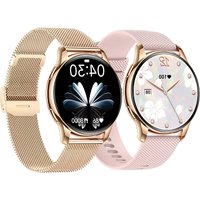
| Strap material | Soft silicone |
| Strap size | 22 mm, replaceable |
| Battery capacity | 290 mAh |
| Charging method | Magnetic charging cable |
| Battery life | Up to 7 days (depending on usage) |
| Water resistance | IP68 (protected against shallow immersion) |
| Connectivity | Bluetooth 5.0, GPS |
| Sensors | Heart rate, SpO2, accelerometer, gyroscope |
| Compatibility | Android 5.0+ and iOS 10+ with Tracer Fit app |
| Notifications | Call, SMS, email, and app notifications |
| Health tracking | Step counter, calorie tracker, sleep monitoring |
| Sports modes | Running, cycling, swimming, and more |
| Controls | Touchscreen and side button |
| Maintenance | Clean with a dry, soft cloth; avoid water pressure |
| Safety | Not a medical device; avoid contact with soap and solvents |
| Repairability | Strap replaceable; battery is sealed |
| Package contents | Smartwatch, charging cable, user manual, warranty card |
Frequently Asked Questions - SM15 Aurora Tracer
How do I charge my Tracer SM15 Aurora smartwatch?
To charge the Tracer SM15 Aurora, connect the magnetic charging cable to the contacts on the back of the watch, then plug it into a USB port. A full charge takes around 2 hours and provides up to 7 days of typical use.
Is the SM15 Aurora waterproof?
The watch has an IP68 rating, meaning it is protected against dust and can withstand immersion in water up to 1.5 meters for 30 minutes. It is suitable for swimming in shallow water, but not for diving or hot water.
How do I pair the watch with my smartphone?
Download the Tracer Fit app from the App Store or Google Play. Turn on Bluetooth on your phone, open the app, and follow the prompts to scan for the device. After pairing, you can synchronize notifications and health data.
Can I make and receive calls with this smartwatch?
Yes, the SM15 Aurora supports Bluetooth calling. You can answer or reject incoming calls using the watch's speaker and microphone. It also shows call notifications for SMS and social apps.
How do I change the watch strap?
The strap is attached with quick-release pins. Use a flat object or your fingernail to push the pin, then slide it out. The watch uses a standard 22mm strap, so you can replace it with any compatible band.
What health tracking features does it have?
The watch offers continuous heart rate monitoring, blood oxygen (SpO2) measurement, sleep tracking, and step counting. It also estimates calorie burn and includes a stress monitor.
How do I reset the watch if it freezes?
To restart, press and hold the side button for about 10 seconds until the logo appears. For a factory reset, go to Settings > Reset on the watch or use the app. This erases all personal data.
Does the watch have built-in GPS?
Yes, it has built-in GPS for accurate tracking of outdoor activities like running or cycling. You can view your route in the Tracer Fit app after recording a workout.
How do I clean and maintain the watch?
Wipe the case and strap with a soft, lint-free cloth slightly dampened with water. Do not use alcohol, soap, or abrasives. After swimming, rinse the watch with fresh water and dry it thoroughly.
Is the battery user-replaceable?
The battery is sealed inside and not intended to be replaced by the user. If the battery performance degrades, contact Tracer support for servicing. The strap is removable, but the battery is not.
User questions about SM15 Aurora Tracer
0 question about this device. Answer the ones you know or ask your own.
Ask a new question about this device
No questions yet. Be the first to ask one.
Download the instructions for your Smartwatch in PDF format for free! Find your manual SM15 Aurora - Tracer and take your electronic device back in hand. On this page are published all the documents necessary for the use of your device. SM15 Aurora by Tracer.
USER MANUAL SM15 Aurora Tracer
Manual assistant
Powered by Anthropic
Waiting for your message
Product information
Brand : Tracer
Model : SM15 Aurora
Category : Smartwatch