HX-1079BT - Alarm Clock HANNLOMAX - Free user manual and instructions
Find the device manual for free HX-1079BT HANNLOMAX in PDF.


Pick your language and provide your email: we'll send you a specifically translated version.
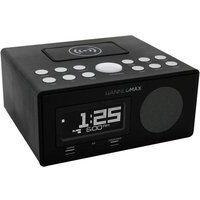
| Product Type | Alarm Clock Radio with Bluetooth |
| Brand | HANNLOMAX |
| Model | HX-1079BT |
| Color | Black |
| Display | LED with adjustable brightness |
| Alarm | Dual alarm with weekday/weekend option |
| Snooze | Yes, with adjustable snooze time |
| Radio | FM tuner with 10 station presets |
| Bluetooth | Yes, version 4.2 for wireless audio streaming |
| Speaker | Built-in 3W driver |
| USB Charging Port | 5V/1A for charging mobile devices |
| Aux Input | 3.5mm audio jack |
| Power Supply | AC adapter (100-240V) |
| Backup Battery | CR2032 for time and alarm settings |
| Dimensions | 180 x 120 x 80 mm |
| Weight | 350 g |
| Spare Parts and Repairability | Designed for easy repair; replacement speakers and batteries available |
| Maintenance and Cleaning | Wipe with a soft, dry cloth; avoid liquids |
| Safety | Place on a stable surface; ensure proper ventilation |
| Usage | Indoor use only |
Frequently Asked Questions - HX-1079BT HANNLOMAX
How do I set the alarm time?
Press the ALARM button to enter alarm setting mode, then use the + and - buttons to adjust hours and minutes. Confirm by pressing ALARM again. The alarm icon will appear on the display.
How do I pair my smartphone via Bluetooth?
Turn on the clock and press the MODE button to select Bluetooth mode. Enable Bluetooth on your phone and search for HX-1079BT, then connect. You can stream music and take calls.
Can I charge my phone through the USB port?
Yes, the built-in USB port provides 5V/1A charging, compatible with most smartphones and tablets.
How do I set the FM radio stations?
Press MODE to switch to FM radio, then press and hold SCAN to automatically search and save available stations. You can also manually tune with + and -.
What should I do if the display is too bright at night?
Use the DIMMER button to adjust the brightness level. There are typically three brightness levels to choose from.
Does the clock have a battery backup?
Yes, the clock includes a CR2032 backup battery slot, ensuring time and alarm settings are saved during a power outage.
How do I reset the clock to factory settings?
Use a pin to press the reset button on the back of the device. This will clear all settings and return to default.
Why is my alarm not working?
Check that the alarm time is set correctly, the alarm icon is displayed, and the volume is not set to zero. Also ensure that the clock is not in a silent mode.
Can I adjust the snooze time?
Yes, press and hold the SNOOZE button for a few seconds to enter snooze time setting, then use + and - to adjust (range 1-30 minutes).
How do I clean the alarm clock?
Unplug the device, then gently wipe the surface with a soft, dry cloth. Do not use water or chemical cleaners.
User questions about HX-1079BT HANNLOMAX
0 question about this device. Answer the ones you know or ask your own.
Ask a new question about this device
No questions yet. Be the first to ask one.
Download the instructions for your Alarm Clock in PDF format for free! Find your manual HX-1079BT - HANNLOMAX and take your electronic device back in hand. On this page are published all the documents necessary for the use of your device. HX-1079BT by HANNLOMAX.
USER MANUAL HX-1079BT HANNLOMAX


Manual assistant
Powered by Anthropic
Waiting for your message
Product information
Brand : HANNLOMAX
Model : HX-1079BT
Category : Alarm Clock